Stats
Actions
Available In
Tags

AI agent that fully tests React Native features on simulator/emulator — navigates the app, verifies UI, walks user flows, and confirms internal state.
Test a React Native feature on the running simulator/emulator. Verifies UI, user flows, and internal state. Generates a persistent Maestro test file.
Diagnose why the current screen is broken, showing unexpected content, or crashing. Gathers parallel evidence from all layers and applies a targeted fix.
Check that the React Native development environment is ready for testing -- Metro running, app loaded, CDP connected, no active errors.
Build the Expo/React Native app (local or EAS), install on simulator/emulator, start Metro, then test the specified feature end-to-end.
Guided feature development for React Native — explore codebase, design architecture, implement, verify live on device, and review quality.
Tests React Native features on simulator/emulator. Verifies UI renders correctly, user flows work, and internal state matches expectations. Use when a feature has been implemented and needs verification. PARENT-SESSION-ONLY: requires MCP tools (cdp_*, device_*) — do NOT spawn via Task tool, run protocol inline in parent session (GH #31). Triggers: "test this feature", "verify it works", "check the implementation", "test on simulator", "run on device", "does it work" <example> Context: User just finished implementing a feature user: "test this feature on the simulator" assistant: "I'll use the rn-tester agent to verify the feature works on the running simulator." <commentary> Feature implementation is complete and needs live verification on device. </commentary> </example> <example> Context: User wants to verify a specific user flow user: "verify the login flow works — enter credentials, tap sign in, see the home screen" assistant: "I'll launch the rn-tester agent to walk through the login flow and verify each step." <commentary> User described a multi-step flow that needs end-to-end verification on a real device. </commentary> </example> <example> Context: User asks if something works after a code change user: "does the cart badge update when I add items?" assistant: "Let me use the rn-tester agent to test the add-to-cart flow and check the badge." <commentary> User is asking whether a feature works correctly, which requires live device testing. </commentary> </example>
Diagnoses broken or unexpected behavior in a React Native app running on simulator/emulator. Gathers parallel evidence (component tree, logs, network, store), narrows root cause, applies a fix, and verifies recovery. PARENT-SESSION-ONLY: requires MCP tools (cdp_*, device_*, collect_logs) — do NOT spawn via Task tool, run protocol inline in parent session (GH #31). Triggers: "something is broken", "debug this", "why isn't this working", "the screen is blank", "I see an error", "fix the crash" <example> Context: User sees an error on the simulator screen user: "I see a RedBox error on the simulator" assistant: "I'll launch the rn-debugger agent to diagnose the error and apply a fix." <commentary> Visible error on simulator requires structured diagnostic evidence gathering. </commentary> </example> <example> Context: App is showing unexpected behavior user: "the screen is blank after navigating to the profile tab" assistant: "Let me use the rn-debugger agent to gather evidence and find the root cause." <commentary> Blank screen with no obvious error needs parallel evidence gathering from CDP, logs, and native layers. </commentary> </example> <example> Context: App is frozen or unresponsive user: "the app froze and nothing responds to taps" assistant: "I'll launch the rn-debugger agent to check if the JS thread is blocked or paused." <commentary> Frozen app could be paused debugger, blocked JS thread, or native crash — needs structured diagnosis. </commentary> </example>
Analyzes React Native codebases to map feature implementations across screens, components, state management, navigation, and API layers. Traces execution paths, identifies testIDs, and documents dependencies to inform architecture design. Triggers: "explore the codebase", "how does this feature work", "map the screens", "trace the data flow", "find all testIDs", "what components exist" <example> Context: User wants to understand how a feature is implemented user: "how does the notification system work in this app?" assistant: "I'll launch the rn-code-explorer agent to trace the notification implementation across screens, store, and API layers." <commentary> Understanding an existing feature requires tracing through multiple code layers — screens, components, state, navigation. </commentary> </example> <example> Context: User needs to find all testIDs and routes before writing tests user: "map out all the screens and testIDs in the app" assistant: "I'll use the rn-code-explorer agent to scan the codebase for screens, routes, and testID coverage." <commentary> Mapping testIDs and routes across an entire app requires systematic codebase analysis. </commentary> </example>
Designs implementation blueprints for React Native features by analyzing existing codebase patterns, then providing specific files to create/modify, component designs, testID placement, store slice design, and build sequences. Triggers: "design the architecture", "plan the implementation", "create a blueprint", "what files do I need", "design the store slice", "plan the component structure" <example> Context: User wants to plan a new feature before implementing user: "design the architecture for a shopping cart feature" assistant: "I'll launch the rn-code-architect agent to analyze existing patterns and create a comprehensive implementation blueprint." <commentary> New feature needs an architecture blueprint with file list, component design, store slices, and build sequence. </commentary> </example> <example> Context: User needs a blueprint for modifying existing functionality user: "plan how to add real-time sync to the tasks screen" assistant: "I'll use the rn-code-architect agent to design the sync architecture based on existing codebase patterns." <commentary> Extending existing functionality requires understanding current patterns before designing the addition. </commentary> </example>
Reviews React Native implementation for bugs, logic errors, RN-specific convention violations, and testability issues. Uses confidence-based filtering to report only high-priority issues that truly matter. Triggers: "review this code", "check for bugs", "review the implementation", "are there any issues", "check conventions", "review before merging" <example> Context: User finished implementing a feature and wants quality review user: "review the code I just wrote for the profile edit screen" assistant: "I'll launch the rn-code-reviewer agent to check for bugs, convention violations, and testability issues." <commentary> Implementation complete — needs quality review with confidence-based filtering for real issues. </commentary> </example> <example> Context: User wants to check code before merging user: "check these files for any React Native specific issues before I merge" assistant: "I'll use the rn-code-reviewer agent to review for RN-specific conventions, null safety, and testID coverage." <commentary> Pre-merge review specifically for React Native conventions and common pitfalls. </commentary> </example>
This skill should be used when the user asks to "capture proof", "record a demo of this feature", "make a video showing it works", "record the flow for the PR", "generate a PR body", "capture screenshots for the PR", "proof-capture", or when a verified feature needs PR-ready proof artifacts (video + numbered screenshots + PROOF.md + PR-BODY.md). Also loaded by /rn-dev-agent:proof-capture and by rn-feature-dev Phase 8.
This skill should be used when the user asks to "create an action", "save this flow as an action", "make this replayable", "record a reusable action", "author a Maestro flow as an action", "add a login/setup action", or when a verified UI walk should be persisted under .rn-agent/actions/ so future sessions can replay it with maestro. Also load it when a SAVED action misbehaves — "my action keeps failing", "the replay broke", "repair this flow", "why was the repair refused" — it owns the replay/repair troubleshooting protocol (Step 7).
This skill should be used when writing or reviewing React Native / Expo code — before writing list rendering, animations, data fetching, component APIs, navigation, or image/media UI — and when asked to "review best practices", "check performance", "optimize renders", "review list rendering", "check animation patterns", "review state management", "audit UI", "review composition", "review for production readiness", "check React Native conventions", "performance audit".
This skill should be used when the user asks to "debug the app", "fix a crash", "diagnose a blank screen", "read error logs", "troubleshoot CDP connection", "check Metro status", "find native crashes", "inspect network failures", "the app crashed", "I see a blank screen", "the screen is white", "something broke", "app won't load", "RedBox error", "network requests failing", or needs guidance on CDP vs bash debugging, error type identification, connection troubleshooting, or post-reload readiness for React Native apps.
This skill should be used when the user asks to "control the simulator", "take a screenshot", "boot the emulator", "install the app", "read UI hierarchy", "manage device state", "open a deep link", "grant permissions", "stream native logs", "disable animations", "change device locale", or needs guidance on xcrun simctl, adb commands, screenshot capture, Expo/EAS builds, or device lifecycle management for React Native testing.
Admin access level
Server config contains admin-level keywords
Modifies files
Own this plugin?
Verify ownership to unlock analytics, metadata editing, and a verified badge. GitHub access is read-only (username + org membership).
Sign in to claimOwn this plugin?
Verify ownership to unlock analytics, metadata editing, and a verified badge. GitHub access is read-only (username + org membership).
Sign in to claimnpx claudepluginhub lykhoyda/rn-dev-agent --plugin rn-dev-agentBased on adoption, maintenance, documentation, and repository signals. Not a security audit or endorsement.
Hook triggers on file write and edit operations
Hook triggers on file write and edit operations
Uses power tools
Uses Bash, Write, or Edit tools
Uses power tools
Uses Bash, Write, or Edit tools



A coding-agent plugin for Claude Code and Codex that turns an AI agent into a React Native development partner. It explores your codebase, designs architecture, implements features — then proves everything works live on the simulator by reading the component tree, store state, and navigation stack through the Chrome DevTools Protocol, driving the app like a user, and recording the evidence.
78 MCP tools · 5 agents · 15 commands · 8 skills · 118 best-practice rules · 2,976 unit tests · Full documentation
Coding agents are good at writing React Native code and bad at knowing whether it actually works. This plugin closes that loop:
.rn-agent/actions/. A 3-step wizard that took ~14 minutes as an interactive walk replays in ~4 seconds (~210× faster). Actions self-repair when testIDs drift./rn-dev-agent:observe serves a local web UI with a live tool-call timeline, device mirror, and route/store/component-tree panels — plus Actions and E2E tabs to replay saved flows straight from the browser.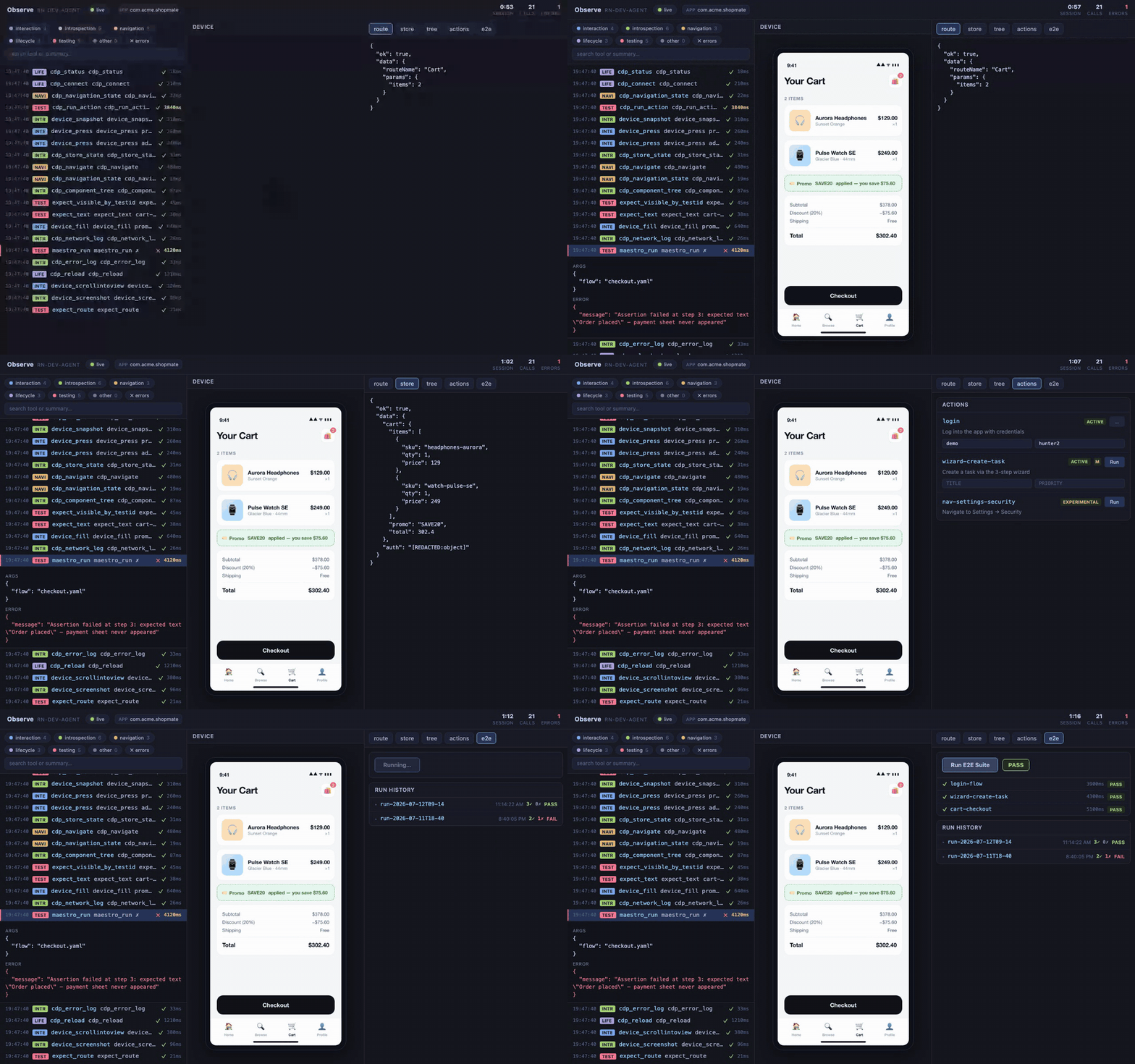
Jump to your host: Claude Code · Codex
Published marketplace:
/plugin marketplace add Lykhoyda/rn-dev-agent
/plugin install rn-dev-agent@rn-dev-agent
/reload-plugins
Local checkout: claude --plugin-dir /path/to/rn-dev-agent (the root .claude-plugin/marketplace.json resolves the plugin package from packages/claude-plugin/).
Published marketplace:
codex plugin marketplace add Lykhoyda/rn-dev-agent
codex plugin add rn-dev-agent@rn-dev-agent
Local checkout: register the package directory /path/to/rn-dev-agent/packages/codex-plugin — not the repository root. The Codex package is self-contained (bundled MCP runtime, native runner sources, runner manifest) and loads the same cdp MCP server from its .mcp.json. Codex does not load Claude Code hooks — No plugin hooks in the Codex plugin detail screen is expected.
cd /path/to/your-rn-app
/rn-dev-agent:setup
Setup checks the full toolchain and fixes what it can automatically:
| Check | Required | Auto-install |
|---|---|---|
| Node.js ≥ 22.18 LTS | Yes | No |
| CDP bridge deps | Yes | Yes |
| rn-fast-runner (iOS) | iOS targets only | Prebuilt artifact on releases; one-time xcodebuild build-for-testing fallback |
| rn-android-runner (Android) | Android targets only | Prebuilt artifact on releases; Gradle build fallback on first use |
| maestro-runner | Yes | Yes (pinned engine, checksum-verified) |
| iOS Simulator / Android Emulator | One platform | No |
| Metro dev server | Yes | No |
| CDP connection | Yes | Auto via cdp_status |
| ffmpeg | Optional (proof videos) | Yes |
| idb + idb-companion | Optional (smooth observe-UI mirroring) | Yes |
If auto-install fails, setup gives step-by-step manual instructions. Full setup guide
AI-to-AI collaboration — review code, brainstorm ideas, and debate plans across Codex, Antigravity, Ollama, and Gemini
 Lykhoyda
React Native & Expo development workflow: skills library for Claude Code with TDD, debugging, collaboration patterns, and proven techniques
 bidah
bidahComplete AI coding agent harness for React Native and Expo — 13 agents, 22 commands, 7 skills, 10 MCP integrations, autonomous worker mode, visual debugging, smart routing
 JubaKitiashvili
React Native (Expo) アプリの総合デバッグスキル。 再レンダリング調査、白い画面、ネイティブモジュールエラー、Firebase接続問題、 API通信エラーなどのトラブルシューティングを体系的に行う。 Use when: 「白い画面」「画面が表示されない」「エラーが出る」「動かない」 「接続できない」「400エラー」「タイムアウト」「再レンダリング」「重い」 「カクつく」などの不具合報告やデバッグ依頼があったとき。 Also use when: 「デバッグして」「原因調べて」「なぜ動かない」 「エミュレータで確認して」「デバッグログを仕込んで」などの依頼があったとき。 ├─ 1. Metro ログを確認(import エラー? ネイティブモジュール?) ├─ 2. 初期 loading 状態が解消されるか確認(Auth 等) ├─ 3. ネイティブモジュールの問題か確認(Expo Go vs dev-client) └─ 4. Provider のクラッシュを切り分け
 sean-sunagaku
Use this agent when you need expert assistance with React Native development tasks including code analysis, component creation, debugging, performance optimization, or architectural decisions. Examples: <example>Context: User is working on a React Native app and needs help with a navigation issue. user: 'My stack navigator isn't working properly when I try to navigate between screens' assistant: 'Let me use the react-native-dev agent to analyze your navigation setup and provide a solution' <commentary>Since this is a React Native specific issue, use the react-native-dev agent to provide expert guidance on navigation problems.</commentary></example> <example>Context: User wants to create a new component that follows the existing app structure. user: 'I need to create a custom button component that matches our app's design system' assistant: 'I'll use the react-native-dev agent to create a button component that aligns with your existing codebase structure and design patterns' <commentary>The user needs React Native component development that should follow existing patterns, so use the react-native-dev agent.</commentary></example>
 ananddtyagi
Use this agent when you need expert assistance with React Native development tasks including code analysis, component creation, debugging, performance optimization, or architectural decisions. Examples: <example>Context: User is working on a React Native app and needs help with a navigation issue. user: 'My stack navigator isn't working properly when I try to navigate between screens' assistant: 'Let me use the react-native-dev agent to analyze your navigation setup and provide a solution' <commentary>Since this is a React Native specific issue, use the react-native-dev agent to provide expert guidance on navigation problems.</commentary></example> <example>Context: User wants to create a new component that follows the existing app structure. user: 'I need to create a custom button component that matches our app's design system' assistant: 'I'll use the react-native-dev agent to create a button component that aligns with your existing codebase structure and design patterns' <commentary>The user needs React Native component development that should follow existing patterns, so use the react-native-dev agent.</commentary></example>
 devsforge
React Native mobile development toolkit for native module integration, performance optimization, and cross-platform patterns. Includes RN architect agent for strategic mobile architecture decisions.
 armanzeroeight
'%20stop-opacity%3D'0.16'%2F%3E%3Cstop%20offset%3D'1'%20stop-color%3D'rgb(200%2C90%2C60)'%20stop-opacity%3D'0.03'%2F%3E%3C%2FlinearGradient%3E%3C%2Fdefs%3E%3Crect%20width%3D'320'%20height%3D'200'%20fill%3D'url(%23g)'%2F%3E%3Ccircle%20cx%3D'250'%20cy%3D'56'%20r%3D'92'%20fill%3D'rgb(200%2C90%2C60)'%20fill-opacity%3D'0.06'%2F%3E%3Ccircle%20cx%3D'64'%20cy%3D'172'%20r%3D'58'%20fill%3D'rgb(200%2C90%2C60)'%20fill-opacity%3D'0.05'%2F%3E%3C%2Fsvg%3E)