Stats
Actions
Available In
Tags

Guides developers through creating, validating, and managing Claude Code plugins—covering hooks, MCP servers, commands, agents, and skills with structured scaffolding and best-practice reviews.
Use this agent when the user asks to "create an agent", "generate an agent", "build a new agent", "make me an agent that...", or describes agent functionality they need. Trigger when user wants to create autonomous agents for plugins. Examples: <example> Context: User wants to create a code review agent user: "Create an agent that reviews code for quality issues" assistant: "I'll use the agent-creator agent to generate the agent configuration." <commentary> User requesting new agent creation, trigger agent-creator to generate it. </commentary> </example> <example> Context: User describes needed functionality user: "I need an agent that generates unit tests for my code" assistant: "I'll use the agent-creator agent to create a test generation agent." <commentary> User describes agent need, trigger agent-creator to build it. </commentary> </example> <example> Context: User wants to add agent to plugin user: "Add an agent to my plugin that validates configurations" assistant: "I'll use the agent-creator agent to generate a configuration validator agent." <commentary> Plugin development with agent addition, trigger agent-creator. </commentary> </example>
Use this agent when the user asks to "validate my plugin", "check plugin structure", "verify plugin is correct", "validate plugin.json", "check plugin files", or mentions plugin validation. Also trigger proactively after user creates or modifies plugin components. Examples: <example> Context: User finished creating a new plugin user: "I've created my first plugin with commands and hooks" assistant: "Great! Let me validate the plugin structure." <commentary> Plugin created, proactively validate to catch issues early. </commentary> assistant: "I'll use the plugin-validator agent to check the plugin." </example> <example> Context: User explicitly requests validation user: "Validate my plugin before I publish it" assistant: "I'll use the plugin-validator agent to perform comprehensive validation." <commentary> Explicit validation request triggers the agent. </commentary> </example> <example> Context: User modified plugin.json user: "I've updated the plugin manifest" assistant: "Let me validate the changes." <commentary> Manifest modified, validate to ensure correctness. </commentary> assistant: "I'll use the plugin-validator agent to check the manifest." </example>
Use this agent when the user has created or modified a skill and needs quality review, asks to "review my skill", "check skill quality", "improve skill description", or wants to ensure skill follows best practices. Trigger proactively after skill creation. Examples: <example> Context: User just created a new skill user: "I've created a PDF processing skill" assistant: "Great! Let me review the skill quality." <commentary> Skill created, proactively trigger skill-reviewer to ensure it follows best practices. </commentary> assistant: "I'll use the skill-reviewer agent to review the skill." </example> <example> Context: User requests skill review user: "Review my skill and tell me how to improve it" assistant: "I'll use the skill-reviewer agent to analyze the skill quality." <commentary> Explicit skill review request triggers the agent. </commentary> </example> <example> Context: User modified skill description user: "I updated the skill description, does it look good?" assistant: "I'll use the skill-reviewer agent to review the changes." <commentary> Skill description modified, review for triggering effectiveness. </commentary> </example>
This skill should be used when the user asks to "create an agent", "add an agent", "write a subagent", "agent frontmatter", "when to use description", "agent examples", "agent tools", "agent colors", "autonomous agent", or needs guidance on agent structure, system prompts, triggering conditions, or agent development best practices for Claude Code plugins.
This skill should be used when the user asks to "create a slash command", "add a command", "write a custom command", "define command arguments", "use command frontmatter", "organize commands", "create command with file references", "interactive command", "use AskUserQuestion in command", or needs guidance on slash command structure, YAML frontmatter fields, dynamic arguments, bash execution in commands, user interaction patterns, or command development best practices for Claude Code.
This skill should be used when the user asks to "create a hook", "add a PreToolUse/PostToolUse/Stop hook", "validate tool use", "implement prompt-based hooks", "use ${CLAUDE_PLUGIN_ROOT}", "set up event-driven automation", "block dangerous commands", or mentions hook events (PreToolUse, PostToolUse, Stop, SubagentStop, SessionStart, SessionEnd, UserPromptSubmit, PreCompact, Notification). Provides comprehensive guidance for creating and implementing Claude Code plugin hooks with focus on advanced prompt-based hooks API.
This skill should be used when the user asks to "add MCP server", "integrate MCP", "configure MCP in plugin", "use .mcp.json", "set up Model Context Protocol", "connect external service", mentions "${CLAUDE_PLUGIN_ROOT} with MCP", or discusses MCP server types (SSE, stdio, HTTP, WebSocket). Provides comprehensive guidance for integrating Model Context Protocol servers into Claude Code plugins for external tool and service integration.
This skill should be used when the user asks about "plugin settings", "store plugin configuration", "user-configurable plugin", ".local.md files", "plugin state files", "read YAML frontmatter", "per-project plugin settings", or wants to make plugin behavior configurable. Documents the .claude/plugin-name.local.md pattern for storing plugin-specific configuration with YAML frontmatter and markdown content.
Uses power tools
Uses Bash, Write, or Edit tools
Own this plugin?
Verify ownership to unlock analytics, metadata editing, and a verified badge. GitHub access is read-only (username + org membership).
Sign in to claimOwn this plugin?
Verify ownership to unlock analytics, metadata editing, and a verified badge. GitHub access is read-only (username + org membership).
Sign in to claimnpx claudepluginhub ling71671/open-claudecode --plugin plugin-devBased on adoption, maintenance, documentation, and repository signals. Not a security audit or endorsement.
完整开源的 Claude Code 项目 - 基于 Anthropic 官方源码重建
本项目由衷感谢 Anthropic 公司的开源贡献!
Anthropic 通过 npm 包发布 Claude Code,使我们能够学习和研究这个优秀的 AI 编程助手架构。本项目的源码是从官方 npm 包的 source map 中恢复的,仅供学习和研究使用。
"您说的对,我不应该把map文件一并发布到npm中,这是一个非常严重的错误。"
我们理解 source map 文件本应用于开发调试,而非公开发布。Anthropic 对此问题的认识和处理方式值得我们学习。
Open-ClaudeCode 是一个完整的 Claude Code 开源版本,包含:
Open-ClaudeCode/
├── package/              # 可运行的 CLI
│   ├── cli.js            # 编译后的 CLI (12.5MB)
│   ├── cli.js.map        # Source Map (57MB)
│   ├── package.json      # 包配置
│   ├── bun.lock          # Bun 锁文件
│   ├── sdk-tools.d.ts    # SDK 类型定义 (117KB)
│   └── vendor/           # 原生二进制模块
│       ├── audio-capture/   # 音频捕获 (6 平台)
│       └── ripgrep/         # 代码搜索工具 (6 平台)
├── src/                  # 完整 TypeScript 源码 (1,902 文件)
│   ├── tools/            # 30+ 工具实现 (184 文件)
│   ├── commands/         # 50+ 命令实现 (207 文件)
│   ├── services/         # API、MCP、OAuth 服务 (130 文件)
│   ├── components/       # React UI 组件 (389 文件)
│   ├── ink/              # Ink UI 框架 (96 文件)
│   ├── utils/            # 工具函数 (564 文件)
│   ├── hooks/            # React Hooks (104 文件)
│   ├── bridge/           # 桥接模块 (31 文件)
│   ├── vendor/           # 原生模块源码 (4 文件)
│   └── ...               # 更多模块
├── plugins/              # 13 个官方插件
│   ├── agent-sdk-dev/
│   ├── claude-opus-4-5-migration/
│   ├── code-review/
│   ├── commit-commands/
│   ├── explanatory-output-style/
│   ├── feature-dev/
│   ├── frontend-design/
│   ├── hookify/
│   ├── learning-output-style/
│   ├── plugin-dev/
│   ├── pr-review-toolkit/
│   ├── ralph-wiggum/
│   └── security-guidance/
├── examples/             # 配置示例
│   └── settings/         # strict / lax / bash-sandbox
├── docs/                 # 文档
├── README.md             # 本文件
├── ACKNOWLEDGEMENTS.md   # 感谢声明
├── CHANGELOG.md          # 版本更新记录
├── LICENSE               # 许可证说明
├── .gitignore            # Git 忽略规则
└── .gitattributes        # Git 属性
⚠️ OpenAI 格式代理(如 MiniMax、OpenRouter 等)请使用 Universal-AI-Protocol-Bridge 进行协议转换
# 1. 克隆仓库
git clone https://github.com/LING71671/Open-ClaudeCode.git
cd Open-ClaudeCode

# 2. 验证环境
node --version          # 需要 >= 18.0.0
node package/cli.js --version  # 应显示 2.1.88

# 3. 启动!
node package/cli.js
首次运行需要认证,选择以下任一方式:
适合中国大陆用户,无需科学上网:
settings.json:{
"env": {
"ANTHROPIC_BASE_URL": "https://你的代理地址",
"ANTHROPIC_AUTH_TOKEN": "sk-你的密钥"
}
}
node package/cli.js --settings settings.jsonsk-ant-...)settings.json:{
"env": {
"ANTHROPIC_AUTH_TOKEN": "sk-ant-你的密钥"
}
}
node package/cli.js --settings settings.json需要 Claude 订阅 + 科学上网:
# 直接运行,会自动打开浏览器登录
node package/cli.js
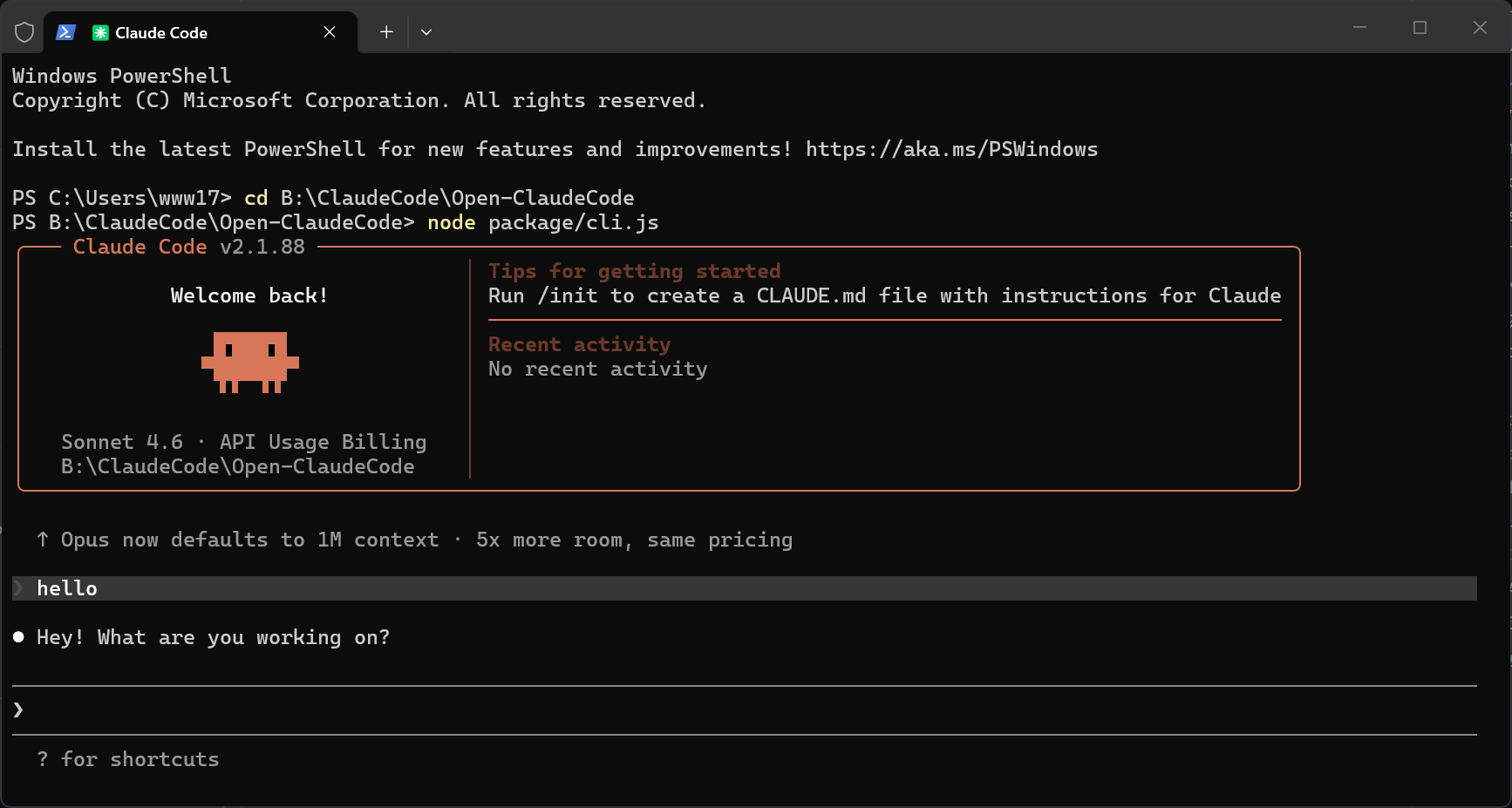
直接运行,像聊天一样对话:
node package/cli.js
进入后你会看到交互界面,可以直接输入问题或指令:
> 帮我创建一个 Python Flask 项目
> 解释一下这段代码
> 帮我修复这个 bug
常用操作:
Ctrl+C → 中断当前操作/help → 查看所有可用命令/clear → 清空对话/exit → 退出适合自动化、脚本调用:
# 简单问答
node package/cli.js -p "解释一下什么是闭包"

# 处理文件
node package/cli.js -p "帮我重构 src/main.ts 中的 getUser 函数"

# 指定模型
node package/cli.js -p "写一个排序算法" --model sonnet

# JSON 输出(适合程序处理)
node package/cli.js -p "列出当前目录的文件" --output-format json
# 继续当前目录的最近对话
node package/cli.js -c

# 恢复指定会话
node package/cli.js -r <session-id>
如果你使用第三方 API 代理服务或有自定义端点,可以这样配置:
// settings.json
{
  "env": {
    "ANTHROPIC_BASE_URL": "https://你的代理地址",
    "ANTHROPIC_AUTH_TOKEN": "sk-你的API密钥"
  }
}
node package/cli.js --settings settings.json
# PowerShell
$env:ANTHROPIC_BASE_URL = "https://你的代理地址"
$env:ANTHROPIC_AUTH_TOKEN = "sk-你的API密钥"
node package/cli.js
# CMD
set ANTHROPIC_BASE_URL=https://你的代理地址
set ANTHROPIC_AUTH_TOKEN=sk-你的API密钥
node package/cli.js
Claude Code 会自动读取 ~/.claude/settings.json:
Claude Agent SDK Development Plugin
 LING71671
Streamline your git workflow with simple commands for committing, pushing, and creating pull requests
LING71671Interactive learning mode that requests meaningful code contributions at decision points (mimics the unshipped Learning output style)
LING71671Adds educational insights about implementation choices and codebase patterns (mimics the deprecated Explanatory output style)
LING71671Security reminder hook that warns about potential security issues when editing files, including command injection, XSS, and unsafe code patterns
LING71671A Claude Code guide — skills for interactive onboarding and Q&A on setup, best practices, automation, and effective workflows
 OriNachum
oh-my-zsh for Claude Code — 11 agents, 34 commands, 26 skills, 15 hooks + 9 examples (21 events), 10 rules, 4 MCP (minimal: playwright, context7, jina-reader, [email protected]). One-line install: curl -fsSL https://raw.githubusercontent.com/sangrokjung/claude-forge/main/install.sh | bash
 sangrokjung
Commands for syncing CLAUDE.md, permissions allowlist, and refreshing context. Hooks for marketplace-to-plugin sync.
 fcakyon
Analyze codebases and recommend tailored Claude Code automations such as hooks, skills, MCP servers, and subagents.
 anthropics
Complete collection of battle-tested Claude Code configs from an Anthropic hackathon winner - agents, skills, hooks, and rules evolved over 10+ months of intensive daily use
 SiniyaYousuf
Access thousands of AI prompts and skills directly in your AI coding assistant. Search prompts, discover skills, save your own, and improve prompts with AI.
 f
f'%20stop-opacity%3D'0.16'%2F%3E%3Cstop%20offset%3D'1'%20stop-color%3D'rgb(200%2C90%2C60)'%20stop-opacity%3D'0.03'%2F%3E%3C%2FlinearGradient%3E%3C%2Fdefs%3E%3Crect%20width%3D'320'%20height%3D'200'%20fill%3D'url(%23g)'%2F%3E%3Ccircle%20cx%3D'250'%20cy%3D'56'%20r%3D'92'%20fill%3D'rgb(200%2C90%2C60)'%20fill-opacity%3D'0.06'%2F%3E%3Ccircle%20cx%3D'64'%20cy%3D'172'%20r%3D'58'%20fill%3D'rgb(200%2C90%2C60)'%20fill-opacity%3D'0.05'%2F%3E%3C%2Fsvg%3E)