Stats
Actions
Available In
Tags

Debug ML training failures (OOM, NaN, divergence), validate hyperparameters and configs against official docs before runs, and generate grounded implementation plans for fine-tuning, RAG, and inference pipelines using a knowledge base of 27k+ pages from Hugging Face, PyTorch, DeepSpeed, and vLLM.
Use when something is failing in ML/AI work — OOM, NaN, divergence, crashes, bad throughput, wrong outputs, dependency conflicts
Use when starting, logging, or reviewing ML experiments — maintains a persistent experiment journal with hypotheses, results, and learnings across sessions
Use when the user is stuck, needs ranked next steps, or wants alternatives after initial experiments — "I tried X and got Y, what next?"
Use when the user wants an implementation plan, architecture design, or multi-step ML pipeline — "build X", "implement X", "design X", "set up X"
Use when the user wants to understand an ML/AI topic, compare approaches, or survey framework capabilities — "how does X work?", "compare X vs Y"
External network access
Connects to servers outside your machine
Uses power tools
Uses Bash, Write, or Edit tools
Based on adoption, maintenance, documentation, and repository signals. Not a security audit or endorsement.
Give your AI coding agent ML engineering superpowers.




Watch how SuperML works in 90 seconds:
If SuperML helps you, give it a ⭐ it helps others find the project.
It adds two things your coding agent doesn't have:
ML Pipeline: Seven skills that encode the workflow you already follow. Plan against real framework docs. Catch config mistakes before they cost you GPU hours. Debug OOM, NaN, and divergence by root cause, not by guessing. Get ranked next steps when metrics plateau. An agentic experiment memory carries hypotheses, results, and lessons across sessions — your agent stops repeating failed experiments and starts compounding what works.
Memory: Backed by Leeroopedia, 27k+ pages across 1000+ ML/AI frameworks. Config references, debugging heuristics, implementation patterns, and battle-tested defaults from vLLM to DeepSpeed to LangChain. Built by the Leeroo continuous learning system, structured as a browsable wiki, and continuously updated by AI and human engineers. When your agent recommends a config, it points to the page it learned it from.
Works with Claude Code, Cursor, Codex, OpenCode, and Gemini CLI.
ml-expert) handles deeper tasks and remembers your hardware, experiments, and lessons across sessions.37 ML tasks scored head-to-head: Cursor / Claude Code with SuperML vs without. Each response rated by independent LLM judges across correctness, specificity, mistake prevention, actionability, and grounding.
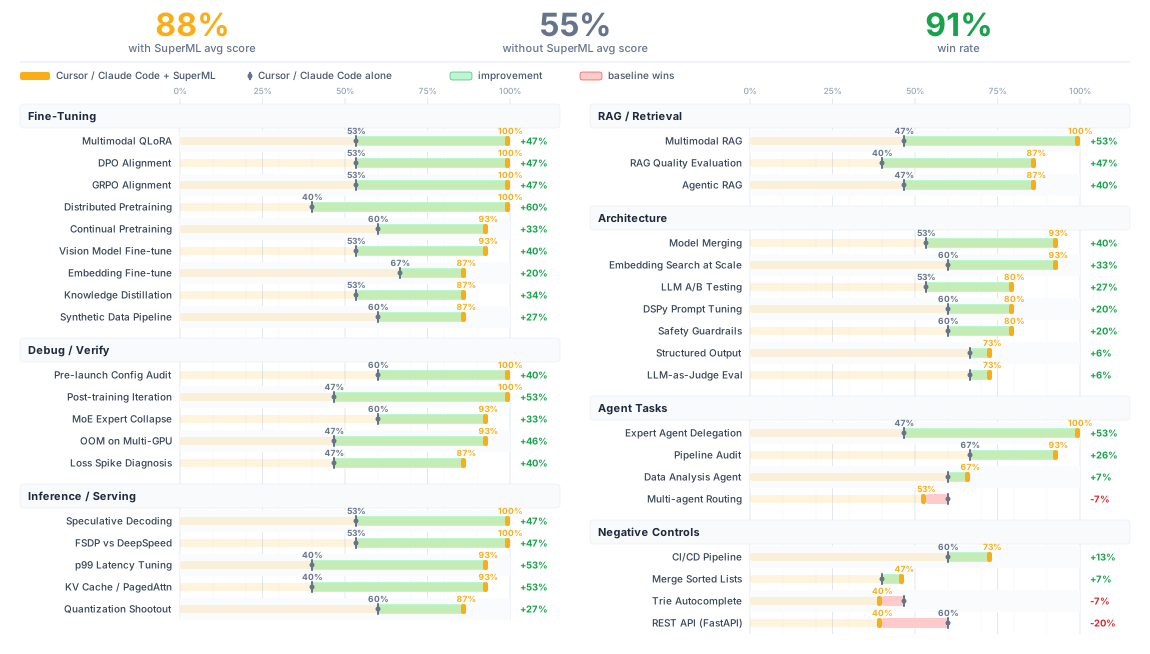
See TESTED_TASKS.md for detailed scores and methodology.
The plugin works without an API key — skills use web search to ground answers. With a key, your agent gets access to the Leeroopedia knowledge base (27k+ pages, faster and more precise lookups). The plugin will tell you if it's running without a key.
To get a key: app.leeroopedia.com — $20 free credit on signup, no credit card.
export LEEROOPEDIA_API_KEY=kpsk_your_key_here
Add to your shell profile (~/.bashrc, ~/.zshrc) so it persists.
Register the marketplace, then install the plugin:
/plugin marketplace add leeroo-ai/leeroo-marketplace
/plugin install superml@leeroo-marketplace
Or install directly from GitHub:
claude plugin add --from-github leeroo-ai/superml
In Cursor Agent chat (waiting for Cursor team approval):
/add-plugin superml
Or clone into your project — Cursor auto-detects .cursor-plugin/plugin.json:
git clone https://github.com/leeroo-ai/superml.git
See .codex/INSTALL.md.
See .opencode/INSTALL.md.
git clone https://github.com/leeroo-ai/superml.git
gemini extension add ./superml/gemini-extension.json
If you just want the knowledge base without the full plugin, see leeroopedia-mcp for setup instructions.
You get the MCP tools (memory) but not the workflow skills (process).
Start a conversation and try something like:
npx claudepluginhub leeroo-ai/superml --plugin supermlML/RecSys/LLM training workflow for AI agents: Validation Pyramid, experiment planning, process metrics, and proven ML development patterns
 qqhard
Eval-gated LLM fine-tuning lifecycle: LoRA/QLoRA SFT, preference optimization (DPO/ORPO/KTO), GRPO/RLVR, vision SFT, and quantized export — Unsloth-first with TRL fallback, no eval harness means no fine-tune
 wshobson
Professional AI/ML Engineering toolkit: Prompt engineering, LLM integration, RAG systems, AI safety with 12 expert plugins
 jeremylongshore
Core Hugging Face Hub operations through the hf CLI, including skill installation, repo management, jobs, datasets, models, Spaces, and discovery.
 huggingface
Train ML models with scikit-learn, PyTorch, TensorFlow. Use for classification/regression, neural networks, hyperparameter tuning, or encountering overfitting, underfitting, convergence issues.
 secondsky
ML research skills: topic, plan, judge, run, sweep, verify, fortify, retro
 Borda
Borda'%20stop-opacity%3D'0.16'%2F%3E%3Cstop%20offset%3D'1'%20stop-color%3D'rgb(200%2C90%2C60)'%20stop-opacity%3D'0.03'%2F%3E%3C%2FlinearGradient%3E%3C%2Fdefs%3E%3Crect%20width%3D'320'%20height%3D'200'%20fill%3D'url(%23g)'%2F%3E%3Ccircle%20cx%3D'250'%20cy%3D'56'%20r%3D'92'%20fill%3D'rgb(200%2C90%2C60)'%20fill-opacity%3D'0.06'%2F%3E%3Ccircle%20cx%3D'64'%20cy%3D'172'%20r%3D'58'%20fill%3D'rgb(200%2C90%2C60)'%20fill-opacity%3D'0.05'%2F%3E%3C%2Fsvg%3E)