Stats
Actions
Available In
Tags

Databricks development toolkit with skills for data engineering, ML, and AI agents plus MCP tools for direct Databricks operations
A brief one-sentence description of what this skill helps with.
Create and manage Databricks Agent Bricks: Knowledge Assistants (KA) for document Q&A, Genie Spaces for SQL exploration, and Supervisor Agents (MAS) for multi-agent orchestration. Use when building conversational AI applications on Databricks.
Use Databricks built-in AI Functions (ai_classify, ai_extract, ai_summarize, ai_mask, ai_translate, ai_fix_grammar, ai_gen, ai_analyze_sentiment, ai_similarity, ai_parse_document, ai_query, ai_forecast) to add AI capabilities directly to SQL and PySpark pipelines without managing model endpoints. Also covers document parsing and building custom RAG pipelines (parse → chunk → index → query).
Create Databricks AI/BI dashboards. CRITICAL: You MUST test ALL SQL queries via execute_sql BEFORE deploying. Follow guidelines strictly.
Builds Python-based Databricks applications using Dash, Streamlit, Gradio, Flask, FastAPI, or Reflex. Handles OAuth authorization (app and user auth), app resources, SQL warehouse and Lakebase connectivity, model serving integration, and deployment. Use when building Python web apps, dashboards, ML demos, or REST APIs for Databricks, or when the user mentions Streamlit, Dash, Gradio, Flask, FastAPI, Reflex, or Databricks app.
Admin access level
Server config contains admin-level keywords
Own this plugin?
Verify ownership to unlock analytics, metadata editing, and a verified badge. GitHub access is read-only (username + org membership).
Sign in to claimOwn this plugin?
Verify ownership to unlock analytics, metadata editing, and a verified badge. GitHub access is read-only (username + org membership).
Sign in to claimBased on adoption, maintenance, documentation, and repository signals. Not a security audit or endorsement.

AI-Driven Development (vibe coding) on Databricks just got a whole lot better. The AI Dev Kit gives your AI coding assistant (Claude Code, Cursor, Windsurf, etc.) the trusted sources it needs to build faster and smarter on Databricks.
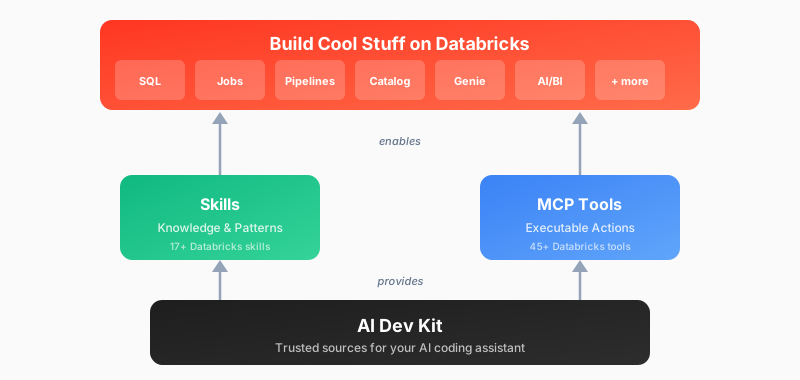
| Adventure | Best For | Start Here |
|---|---|---|
| :star: Install AI Dev Kit | Start here! Follow quick install instructions to add to your existing project folder | Quick Start (install) |
| Visual Builder App | Web-based UI for Databricks development | databricks-builder-app/ |
| Core Library | Building custom integrations (LangChain, OpenAI, etc.) | pip install |
| Skills Only | Provide Databricks patterns and best practices (without MCP functions) | Install skills |
| MCP Tools Only | Just executable actions (no guidance) | Register MCP server |
By default this will install at a project level rather than a user level. This is often a good fit, but requires you to run your client from the exact directory that was used for the install. Note: Project configuration files can be re-used in other projects. You find these configs under .claude, .cursor, or .gemini
Basic installation (uses DEFAULT profile, project scope)
bash <(curl -sL https://raw.githubusercontent.com/databricks-solutions/ai-dev-kit/main/install.sh)
Global installation with force reinstall
bash <(curl -sL https://raw.githubusercontent.com/databricks-solutions/ai-dev-kit/main/install.sh) --global --force
Specify profile and force reinstall
bash <(curl -sL https://raw.githubusercontent.com/databricks-solutions/ai-dev-kit/main/install.sh) --profile DEFAULT --force
Install for specific tools only
bash <(curl -sL https://raw.githubusercontent.com/databricks-solutions/ai-dev-kit/main/install.sh) --tools cursor,gemini
Next steps: Respond to interactive prompts and follow the on-screen instructions.
Basic installation (uses DEFAULT profile, project scope)
irm https://raw.githubusercontent.com/databricks-solutions/ai-dev-kit/main/install.ps1 | iex
Download script first
irm https://raw.githubusercontent.com/databricks-solutions/ai-dev-kit/main/install.ps1 -OutFile install.ps1
Global installation with force reinstall
.\install.ps1 -Global -Force
Specify profile and force reinstall
.\install.ps1 -Profile DEFAULT -Force
Install for specific tools only
.\install.ps1 -Tools cursor,gemini
Next steps: Respond to interactive prompts and follow the on-screen instructions.
Full-stack web application with chat UI for Databricks development:
cd ai-dev-kit/databricks-builder-app
./scripts/setup.sh
# Follow instructions to start the app
Use databricks-tools-core directly in your Python projects:
from databricks_tools_core.sql import execute_sql
npx claudepluginhub leary-poken/ai-dev-kit --plugin databricks-ai-dev-kitDatabricks development toolkit with skills for data engineering, ML, and AI agents plus MCP tools for direct Databricks operations
 databricks-solutions
5 live-detection Databricks skills — cost-leak-hunter, cluster-forensics, uc-migration-pilot, streaming-guardian, bundle-medic — backed by the databricks-workspace-mcp server.
 jeremylongshore
Databricks skills for CLI, Apps, Unity Catalog, Model Serving, Declarative Automation Bundles (DABs), and more.
 databricks
Editorial "Data Engineering" bundle for Claude Code from Antigravity Awesome Skills.
 sickn33
ETL pipeline construction, data warehouse design, batch processing workflows, and data-driven feature development
 wshobson
Data engineering plugin - warehouse exploration, pipeline authoring, Airflow integration
 astronomer
'%20stop-opacity%3D'0.16'%2F%3E%3Cstop%20offset%3D'1'%20stop-color%3D'rgb(200%2C90%2C60)'%20stop-opacity%3D'0.03'%2F%3E%3C%2FlinearGradient%3E%3C%2Fdefs%3E%3Crect%20width%3D'320'%20height%3D'200'%20fill%3D'url(%23g)'%2F%3E%3Ccircle%20cx%3D'250'%20cy%3D'56'%20r%3D'92'%20fill%3D'rgb(200%2C90%2C60)'%20fill-opacity%3D'0.06'%2F%3E%3Ccircle%20cx%3D'64'%20cy%3D'172'%20r%3D'58'%20fill%3D'rgb(200%2C90%2C60)'%20fill-opacity%3D'0.05'%2F%3E%3C%2Fsvg%3E)