By lawvable
Curated collection of agent skills for automating legal work, providing tools for contract review, research, and compliance tasks.
npx claudepluginhub joshuarweaver/cascade-business-ops --plugin lawvable-awesome-legal-skillsRédaction d'assignations en référé devant le tribunal de commerce ou des activités économiques pour le droit de communication d'un associé. Utiliser ce skill quand l'utilisateur demande de rédiger, préparer ou créer une assignation en référé fondée sur l'article L. 238-1 du code de commerce pour obtenir la communication forcée de documents sociaux (comptes annuels, rapports de gestion, PV d'assemblées, etc.) lorsqu'un dirigeant refuse ou fait obstruction à la communication de ces documents à un associé.
Rédaction d'assignations en référé devant le tribunal de commerce ou des activités économiques pour le recouvrement de créances commerciales. Utiliser ce skill quand l'utilisateur demande de rédiger, préparer ou créer une assignation en référé pour obtenir le paiement d'une créance impayée (factures, prestations de services, ventes de marchandises, etc.) lorsque le débiteur n'a pas honoré ses obligations de paiement et qu'il n'existe pas de contestation sérieuse.
Generate templated responses for common legal inquiries and identify when situations require individualized attention. Use when responding to routine legal questions — data subject requests, vendor inquiries, NDA requests, discovery holds — or when managing response templates.
Navigate privacy regulations (GDPR, CCPA), review DPAs, and handle data subject requests. Use when reviewing data processing agreements, responding to data subject access or deletion requests, assessing cross-border data transfer requirements, or evaluating privacy compliance.
Review contracts against your organization's negotiation playbook, flagging deviations and generating redline suggestions. Use when reviewing vendor contracts, customer agreements, or any commercial agreement where you need clause-by-clause analysis against standard positions.
Use this skill whenever the user wants to create, read, edit, or manipulate Word documents (.docx files). Triggers include: any mention of 'Word doc', 'word document', '.docx', or requests to produce professional documents with formatting like tables of contents, headings, page numbers, or letterheads. Also use when extracting or reorganizing content from .docx files, inserting or replacing images in documents, performing find-and-replace in Word files, working with tracked changes or comments, or converting content into a polished Word document. If the user asks for a 'report', 'memo', 'letter', 'template', or similar deliverable as a Word or .docx file, use this skill. Do NOT use for PDFs, spreadsheets, Google Docs, or general coding tasks unrelated to document generation.
Programmatically edit Word documents (.docx) with live preview and track changes via SuperDoc VS Code extension. Use when editing DOCX files, making tracked changes, redlining, marking up contracts, or when the user wants to modify Word documents with insertions/deletions visible. Triggers on docx, Word, track changes, redline, markup.
Toolkit for comprehensive document reading, editing, and creation with visual quality control. Use to work with Word documents (.docx files) for: (1) Reading or extracting content from existing DOCX files, (2) Creating new Word documents with professional formatting, (3) Editing documents requiring precise typography and layout, or any other DOCX reading or generation tasks.
Searches, replaces, and reads text in Word documents. Use when the user asks to edit, search, or extract text from .docx files.
GDPR Data Protection Impact Assessment (DPIA) guidance under Article 35 GDPR, EDPB Guidelines WP 248 rev.01, EDPB Opinion 28/2024 (AI), and national SA blacklists/whitelists. Triggers: "DPIA", "DSFA", "Datenschutz-Folgenabschätzung", "impact assessment", "Art. 35", "do I need a DPIA", descriptions of new high-risk processing (profiling, AI, biometrics, large-scale monitoring, special category data), Art. 36 prior consultation questions, national blacklist/whitelist queries.
Elite incident response and legal compliance guidance for data breaches under GDPR Articles 33 & 34. Use when: (1) User reports a data breach or security incident, (2) User asks about breach notification obligations or deadlines, (3) User mentions "72 hours", Art. 33, Art. 34, or notification requirements, (4) Discussion involves security incidents affecting personal data, (5) User needs breach risk assessment using ENISA methodology, (6) User mentions "Data Breach" or "Incident" or "Data Leakage" or "Ransomeware" or "Exfiltration", (7) User needs to determine Controller vs Processor obligations, (8) Cross-border breach scenarios requiring Lead SA determination, (9) User needs a mitigation playbook or immediate response recommendations, (10) User needs to generate audit-ready breach documentation (.docx).
Draft GDPR/DSGVO-compliant privacy notices as .docx for any EU/EEA jurisdiction and audience. Use when user asks to create a privacy policy/notice, mentions "Datenschutzerklärung", "politique de confidentialité", "privacy notice", needs Art. 13/14 disclosures, AI Act transparency, cookie policy, or notices for applicants ("Bewerber-Datenschutz"), employees ("Beschäftigten-Datenschutz"), B2B partners, or B2C customers. Covers DE (DSGVO+BDSG+TDDDG), FR (RGPD+LIL+LCEN), AT, IT, ES, NL, BE, IE, UK GDPR. Five notice types: Website/App, Applicant, Employee, Business Partner, B2C Customer.
Assess and classify legal risks using a severity-by-likelihood framework with escalation criteria. Use when evaluating contract risk, assessing deal exposure, classifying issues by severity, or determining whether a matter needs senior counsel or outside legal review.
Conduct legal research and risk analysis using GoodLegal MCP tools. Use this skill whenever the user asks a legal question, wants to research case law or legislation, needs a legal risk assessment, or asks about French or EU law. Trigger on any mention of jurisprudence, legal research, contract risk, regulatory analysis, legal memo, or references to GoodLegal tools — even if the user just says something like "can you look into whether this clause is enforceable" or "what does the case law say about X".
Framework for demonstrating AI capabilities in legal contexts. Provides detailed personas across tenant law, business contracts, startup disputes, employment claims, and consumer protection with progressive complexity scenarios. Use when: (1) Demonstrating AI-powered legal triage or intake systems, (2) Showcasing responsible AI-assisted client interactions, (3) Training staff on appropriate AI use in legal contexts, (4) Creating realistic scenarios for legal tech presentations, (5) Developing educational materials about AI in legal services, or (6) Testing AI-powered legal information systems in controlled environments.
Use this skill whenever a lawyer or mediator needs help analyzing a dispute for mediation purposes. This includes: reviewing case materials (pleadings, contracts, correspondence, evidence) to identify issues in dispute, summarizing each party's position and interests, conducting legal analysis of the key issues, proposing mediation strategies or settlement directions, and preparing for mediation sessions. Trigger this skill when the user mentions 'mediation', 'dispute analysis', 'settlement', 'dispute resolution', 'identify issues in dispute', 'party positions', 'mediation brief', 'case analysis for mediation', 'ADR', 'mediation preparation', 'caucus strategy', 'settlement options', or any request to analyze a conflict between two or more parties with the goal of finding resolution. Also trigger when the user uploads case files and asks for a structured breakdown of who wants what, what the core disagreements are, or how the case might settle. Even if the user doesn't explicitly say 'mediation', trigger when the context involves analyzing opposing positions in a dispute with a resolution-oriented (rather than litigation-oriented) goal.
Prepare structured briefings for meetings with legal relevance and track resulting action items. Use when preparing for contract negotiations, board meetings, compliance reviews, or any meeting where legal context, background research, or action tracking is needed.
Guide to review incoming one-way (unilateral) commercial NDAs in a jurisdiction-agnostic way, from either a Recipient or Discloser perspective (user-selected), producing a clause-by-clause issue log with preferred redlines, fallbacks, rationales, owners, and deadlines.
Screen incoming NDAs and classify them as GREEN (standard), YELLOW (needs review), or RED (significant issues). Use when a new NDA comes in from sales or business development, when assessing NDA risk level, or when deciding whether an NDA needs full counsel review.
NIL (Name, Image, and Likeness) contract analysis for NCAA student-athletes from the athlete's perspective. Use when user says 'review this NIL contract', 'analyze this NIL deal', 'check this athlete agreement', 'review my NIL agreement', or uploads a PDF NIL contract for review. Identifies red flags, missing protections, and compliance issues. Produces a structured review memorandum with negotiation positions. Do NOT use for general contract review, employment agreements, non-NIL endorsements, or brand-side deal analysis.
Guide pour la rédaction de notifications de licenciement conformes au droit du travail français. Utiliser ce skill quand l'utilisateur demande de rédiger, préparer, créer ou éditer une lettre de notification de licenciement, notamment pour faute grave, faute lourde ou motif personnel. Le skill guide la collecte d'informations précises et la rédaction d'une notification juridiquement solide avec tous les éléments obligatoires du droit français.
Read, search, and download emails and attachments from Microsoft Outlook via OAuth2. Use when the user asks to (1) check, read, or fetch emails or messages from Outlook, (2) search emails by keyword, sender, or subject, (3) download email attachments such as contracts, NDAs, or documents, (4) chain email content into other skills (e.g. "read the latest email from X and review the attached NDA"), or (5) any task involving Microsoft Outlook, Office 365, or Exchange email access.
Use this skill whenever the user wants to do anything with PDF files. This includes reading or extracting text/tables from PDFs, combining or merging multiple PDFs into one, splitting PDFs apart, rotating pages, adding watermarks, creating new PDFs, filling PDF forms, encrypting/decrypting PDFs, extracting images, and OCR on scanned PDFs to make them searchable. If the user mentions a .pdf file or asks to produce one, use this skill.
Toolkit for comprehensive PDF reading, reviwing, and creation with visual quality control. Use to work with PDFs (.pdf files) for: (1) Reading or extracting content from existing PDFs, (2) Creating new PDF documents with professional formatting, (3) Generating reports, documents, or layouts that require precise typography and design, or any other PDF reading or generation tasks.
Rédaction de requêtes devant le Conseil de prud'hommes pour contester un licenciement pour faute grave. Utiliser ce skill quand l'utilisateur demande de rédiger une requête CPH, contester un licenciement pour faute grave, préparer une saisine du CPH pour un litige lié à un licenciement, ou créer un document de contestation de licenciement en droit du travail français.
Guide for drafting privacy policies compliant with GDPR. Includes CNIL 2020 recommendations, a reference template, and best practices. Use when drafting or revising a privacy policy for a website or application.
Guide for drafting cookie policies compliant with GDPR and the ePrivacy Directive. Includes CNIL 2020 recommendations, a reference template, and best practices. Use when drafting or revising a cookie policy for a website or application.
Guide for (a) auditing an existing whistleblower system or (b) drafting a compliant reporting policy from a provided template. Covers EU Directive 2019/1937, the amended Sapin II law (Waserman 2022), Decree 2022-1284, CNIL guidelines, public sector requirements, and duty of vigilance.
Use this skill any time a .pptx file is involved in any way — as input, output, or both. This includes: creating slide decks, pitch decks, or presentations; reading, parsing, or extracting text from any .pptx file (even if the extracted content will be used elsewhere, like in an email or summary); editing, modifying, or updating existing presentations; combining or splitting slide files; working with templates, layouts, speaker notes, or comments. Trigger whenever the user mentions "deck," "slides," "presentation," or references a .pptx filename, regardless of what they plan to do with the content afterward. If a .pptx file needs to be opened, created, or touched, use this skill.
Adversarial verification for AI-generated legal content with systematic fact-checking, source validation, and quality control. Use when User requests verification of legal documents, fact-checking of regulatory content, red team review, or quality assurance before distribution to clients/stakeholders. Provides structured verification reports with severity-categorized errors, verified sources, and distribution readiness assessment.
Perform language and framework specific security best-practice reviews and suggest improvements. Trigger only when the user explicitly requests security best practices guidance, a security review/report, or secure-by-default coding help. Trigger only for supported languages (python, javascript/typescript, go). Do not trigger for general code review, debugging, or non-security tasks.
Guide for creating effective skills. This skill should be used when users want to create a new skill (or update an existing skill) that extends Claude's capabilities with specialized knowledge, workflows, or tool integrations.
Guide for creating effective skills. Use when users want to create a new skill (or update an existing skill) that extends the model's capabilities with specialized knowledge, workflows, or tool integrations.
Guide to analyze a current work session and propose improvements to skills. Use (1) automatically after working with a skill to capture learnings, (2) when the user suggests improvements, corrections, or additions during a skill-related session, or (3) when the user manually invokes `self-improve`.
---
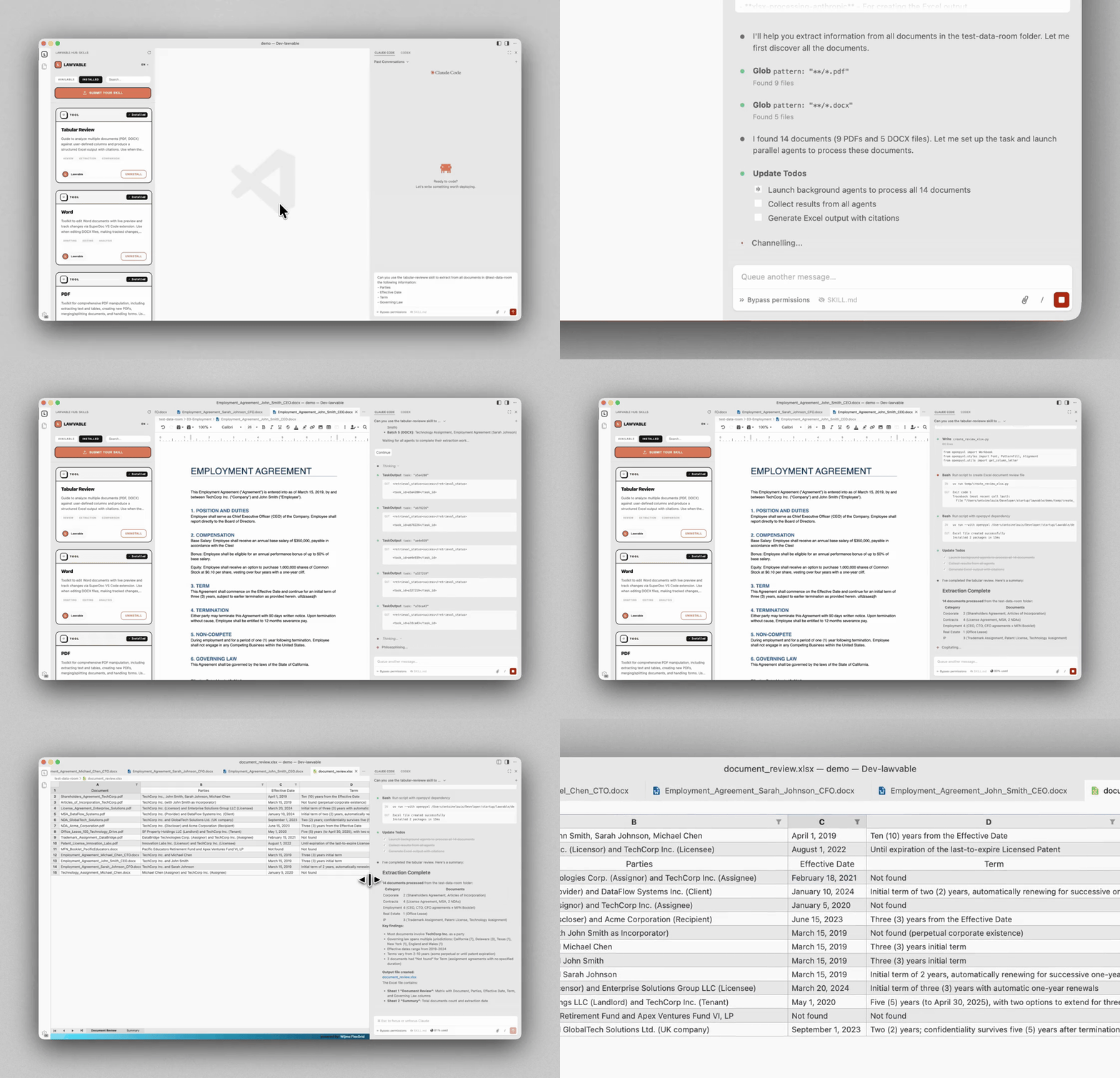
Guide to analyze multiple documents (PDF, DOCX) against user-defined columns and produce a structured Excel output with citations. Use when the user wants to: (1) Extract specific information from multiple documents into a table, (2) Compare clauses or provisions across contracts, (3) Create a document review matrix with source citations. Triggers on: 'tabular review', 'document matrix', 'extract from documents', 'compare across documents', 'review multiple contracts'.
Guide to negotiating technology services agreements, professional services contracts, and commercial B2B transactions. Provides three-position frameworks (provider-favorable, balanced, client-favorable), deal-size tactics, objection handling templates, and concession roadmaps. Use when: (1) Developing negotiation strategies for SaaS, cloud, or managed services agreements, (2) Preparing position papers and fallback positions, (3) Responding to counterparty objections and demands, (4) Creating concession roadmaps that protect critical interests, (5) Assessing tactics based on deal value and leverage, or (6) Structuring balanced outcomes for liability, IP, payment, SLA, or warranty provisions.
Framework for assessing IT service providers, technology vendors, and third-party partners. Creates structured risk assessments across financial, operational, compliance, security, and reputational dimensions with regulatory checklists (GDPR, DORA, NIS2, SOX). Use when: (1) Evaluating new vendors or technology providers, (2) Conducting third-party risk assessments for procurement, (3) Performing critical vendor due diligence for regulatory compliance, (4) Creating vendor onboarding documentation, (5) Establishing ongoing vendor monitoring processes, (6) Assessing vendor concentration risk, or (7) Generating executive-level vendor risk reports.
Build VS Code extensions from scratch or convert existing JS/React/Vue apps. Supports commands, webviews (React/Vue), custom editors, tree views, and AI agent integration via file-bridge IPC. Use when user wants to create a VS Code extension, convert a web app to an extension, add webviews or custom UIs to VS Code, implement tree views, build custom file editors, integrate with AI agents, or package/publish extensions (.vsix).
Use this skill any time a spreadsheet file is the primary input or output. This means any task where the user wants to: open, read, edit, or fix an existing .xlsx, .xlsm, .csv, or .tsv file (e.g., adding columns, computing formulas, formatting, charting, cleaning messy data); create a new spreadsheet from scratch or from other data sources; or convert between tabular file formats. Trigger especially when the user references a spreadsheet file by name or path — even casually (like "the xlsx in my downloads") — and wants something done to it or produced from it. Also trigger for cleaning or restructuring messy tabular data files (malformed rows, misplaced headers, junk data) into proper spreadsheets. The deliverable must be a spreadsheet file. Do NOT trigger when the primary deliverable is a Word document, HTML report, standalone Python script, database pipeline, or Google Sheets API integration, even if tabular data is involved.
Professional Excel spreadsheet creation with a focus on aesthetics and data analysis. Use when creating spreadsheets for organizing, analyzing, and presenting structured data in a clear and professional format.
Toolkit for comprehensive Spreadsheet reading, creation, editing, and analysis with visual quality control. Use to work with spreadsheets (.xlsx, .xlsm, .csv, .tsv) for: (1) Creating new spreadsheets with formulas and formatting, (2) Reading or analyzing tabular data, (3) Modifying existing spreadsheets while preserving formulas, (4) Building financial models with proper formatting, (5) Data visualization with in-sheet charts, or any other spreadsheet tasks.
Core skills library for Claude Code: TDD, debugging, collaboration patterns, and proven techniques
Team-oriented workflow plugin with role agents, 27 specialist agents, ECC-inspired commands, layered rules, and hooks skeleton.
Tools to maintain and improve CLAUDE.md files - audit quality, capture session learnings, and keep project memory current.
Reliable automation, in-depth debugging, and performance analysis in Chrome using Chrome DevTools and Puppeteer
Claude Code skills for Godot 4.x game development - GDScript patterns, interactive MCP workflows, scene design, and shaders
Plugin-safe Claude Code distribution of Antigravity Awesome Skills with 1,393 supported skills.