Stats
Actions
Available In
Tags

Deploy local or GitHub projects to Sealos Cloud with full lifecycle management: containerize apps, generate Kubernetes templates, provision databases and S3 storage, build Sealos Desktop apps, and visualize deployed resources.
Determine whether a repository contains a supported cloud workload, then assess eligible targets for cloud-native readiness with a 0-12 score. Use for containerization readiness, Docker/Kubernetes compatibility, deployment feasibility, workload eligibility, or pre-deployment assessment. Also triggers on "/cloud-native-readiness".
Convert Docker Compose files or installation docs into production-grade Sealos templates with role-specific personal low-load resource sizing. Use when user has a docker-compose.yml and wants a Sealos or Kubernetes template, wants to migrate from Docker Compose to Sealos, needs to convert container orchestration configs to Sealos format, or mentions compose-to-template conversion. Also triggers on "/docker-to-sealos".
Generate production-ready Dockerfile for any GitHub project. Supports monorepo, multi-stage builds, workspace detection, and iterative build-fix cycles. Use when user asks to create, generate, write, fix, or improve a Dockerfile, wants to containerize an application, mentions Docker build issues, needs a .dockerignore, or wants to package their app as a Docker image. Also triggers on "/dockerfile".
Build, adapt, and document apps that run inside Sealos Desktop using the Sealos app SDK. Use when creating a new Sealos app, integrating an existing web app into Sealos Desktop, wiring Sealos session data into business features, preparing local iframe-based debugging, or producing beginner-friendly Sealos app tutorials and starter implementations. Also triggers on "/sealos-app-builder".
Run a local read-only HTML topology UI for a project already deployed by Sealos Skills and return a localhost URL. Use when the user asks to view, inspect, visualize, render, open, or run a local canvas for deployed Sealos resources, mentions ".sealos", Sealos deployment state, Kubernetes resources, topology, resource graph, localhost UI, or invokes "/sealos-canvas".
Based on adoption, maintenance, documentation, and repository signals. Not a security audit or endorsement.
English | 简体中文 | 繁體中文 | 日本語 | 한국어 | Español | Français | Deutsch | Português (Brasil) | Русский | العربية | हिन्दी | Bahasa Indonesia
Deploy projects to Sealos Cloud from your AI agent.
Sealos Skills is a plugin-first skill pack centered on Sealos Cloud development and deployment. It helps an AI agent inspect a project, prepare missing deployment artifacts, connect Sealos Cloud databases and object storage for development, build or reuse a container image, ship the app to Sealos Cloud, and view deployed resources in a local read-only canvas.
The recommended Codex path is native Codex plugin installation. Cross-host plugin installs, skills.sh, and context-only extension hosts such as Gemini CLI and Qwen Code use the same root skills/** source.
Add this repository as a Codex marketplace, then install the Sealos plugin:
codex plugin marketplace add labring/sealos-skills
codex plugin add sealos@sealos
One Sealos plugin installs the deploy, database, S3, canvas, app-builder, and supporting cloud-native skills from root skills/**: sealos-deploy, sealos-database, sealos-s3, sealos-canvas, sealos-app-builder, cloud-native-readiness, dockerfile-skill, and docker-to-sealos.
For compatibility and local Codex testing, install the same plugin with:
npx plugins add https://github.com/labring/sealos-skills --target codex
After installation in Codex, use the plugin from Codex:
$sealos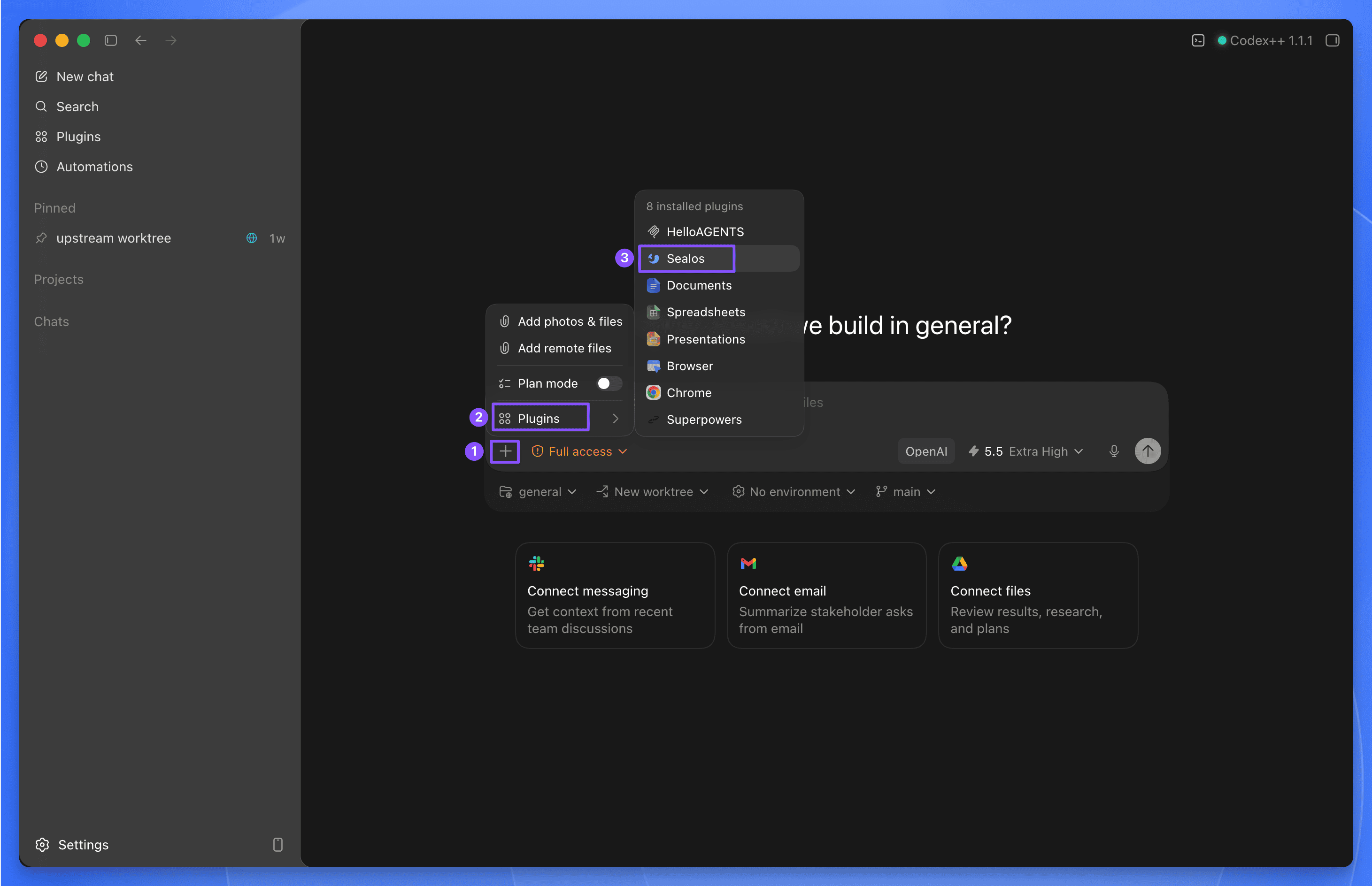
Codex examples:
$sealos deploy this repo to Sealos Cloud
$sealos deploy /path/to/project
$sealos deploy https://github.com/labring-sigs/kite
$sealos create a cloud Postgres database for this repo and wire DATABASE_URL
$sealos create private S3 object storage for uploads and wire env vars
Add this repository as a Claude Code marketplace, then install the Sealos plugin:
claude plugin marketplace add labring/sealos-skills
claude plugin install sealos@sealos
For compatibility with cross-host plugin installers, install the same plugin with:
npx plugins add https://github.com/labring/sealos-skills --target claude-code
If you only use one detected agent tool on the machine, you can let plugins choose the target:
npx plugins add https://github.com/labring/sealos-skills
After installation in Claude Code, use /sealos:
/sealos deploy this repo to Sealos Cloud
/sealos deploy /path/to/project
/sealos deploy https://github.com/labring-sigs/kite
/sealos create a cloud Postgres database for this repo and wire DATABASE_URL
/sealos create private S3 object storage for uploads and wire env vars
| Tool | Install | Usage |
|---|---|---|
| Codex CLI / Codex App | codex plugin marketplace add labring/sealos-skills then codex plugin add sealos@sealos | $sealos in Codex CLI, or + → Plugins → Sealos in Codex App |
| Claude Code | claude plugin marketplace add labring/sealos-skills then claude plugin install sealos@sealos | /sealos |
| Claude Code compatibility path | npx plugins add https://github.com/labring/sealos-skills --target claude-code | /sealos |
| OpenClaw / ClawHub | clawhub install labring/sealos-skills | Host command exposure depends on the ClawHub runtime |
| CodeBuddy | /plugin marketplace add labring/sealos-skills | Host command exposure depends on the CodeBuddy runtime |
| Gemini CLI | gemini extensions install https://github.com/labring/sealos-skills | Context-only extension; ask Gemini to use Sealos Skills |
| Qwen Code | qwen extensions install https://github.com/labring/sealos-skills | Context-only extension; ask Qwen to use Sealos Skills |
| Amp / Kimi / generic repo importers | Import https://github.com/labring/sealos-skills.git | Host-dependent |
Gemini CLI and Qwen Code manifests provide repository context through CLAUDE.md; they do not claim slash-command support.
skills.sh skill packIf your agent uses skills.sh directly, install the same skills pack with:
npx skills add labring/sealos-skills
Then run the deploy skill directly:
npx claudepluginhub labring/sealos-skills --plugin sealosDeployment automation with Dockerfile generation, CI/CD pipelines, and infrastructure as code
 rohitg00
Use this agent when setting up CI/CD pipelines, configuring Docker containers, deploying applications to cloud platforms, setting up Kubernetes clusters, implementing infrastructure as code, or automating deployment workflows. Examples: <example>Context: User is setting up a new project and needs deployment automation. user: "I've built a FastAPI application and need to deploy it to production with proper CI/CD" assistant: "I'll use the deployment-engineer agent to set up a complete deployment pipeline with Docker, GitHub Actions, and production-ready configurations."</example> <example>Context: User mentions containerization or deployment issues. user: "Our deployment process is manual and error-prone. We need to automate it." assistant: "Let me use the deployment-engineer agent to design an automated CI/CD pipeline that eliminates manual steps and ensures reliable deployments."</example>
 devsforge
Claude Code skill pack for Fly.io (18 skills)
 jeremylongshore
DigitalOcean cloud deployment plugin for App Platform, Droplets, Kubernetes, Functions, Managed Databases, Spaces storage, and infrastructure management with official MCP server integration
 vanman2024
Editorial "DevOps & Cloud" bundle for Claude Code from Antigravity Awesome Skills.
 sickn33
Container development and deployment - Docker, registry, Skaffold
 laurigates
'%20stop-opacity%3D'0.16'%2F%3E%3Cstop%20offset%3D'1'%20stop-color%3D'rgb(200%2C90%2C60)'%20stop-opacity%3D'0.03'%2F%3E%3C%2FlinearGradient%3E%3C%2Fdefs%3E%3Crect%20width%3D'320'%20height%3D'200'%20fill%3D'url(%23g)'%2F%3E%3Ccircle%20cx%3D'250'%20cy%3D'56'%20r%3D'92'%20fill%3D'rgb(200%2C90%2C60)'%20fill-opacity%3D'0.06'%2F%3E%3Ccircle%20cx%3D'64'%20cy%3D'172'%20r%3D'58'%20fill%3D'rgb(200%2C90%2C60)'%20fill-opacity%3D'0.05'%2F%3E%3C%2Fsvg%3E)