Interactive Architecture Diagrams
Agent Skill for Claude Code · Gemini CLI · GitHub Copilot CLI · OpenCode · Cursor
Build click-through, animated system architecture diagrams as a single HTML file.
No build step. No dependencies. One file you can email, host, or open locally.
Install ·
Try It ·
Examples ·
Skill Spec
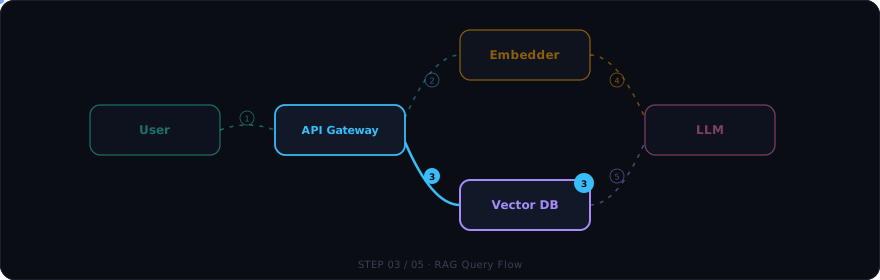
Build click-through, animated system architecture diagrams as a single HTML file. Drop it into a workshop, design review, or onboarding doc and let people watch the data flow instead of reading static boxes-and-arrows.
This is an Agent Skill — a folder of instructions any compatible AI coding agent loads on demand. When you ask for an architecture diagram, this skill takes over and produces a self-contained architecture.html plus a companion architecture.md description. Works with Claude Code, Gemini CLI, GitHub Copilot CLI, OpenCode, Cursor, and any tool supporting the SKILL.md standard.
What you get
Each generated diagram includes:
- Named flows — pick a scenario tab (
RAG Query, Login, Ingest, …) and watch it play out step by step
- Animated data packets glowing along quadratic-curve wires between services
- Side panel showing the current step's payload, description, and metadata chips (latency, auth headers, ports)
- Mode toggles — switch between
offline/online, dev/prod, or v1/v2 to swap node labels, ports, and payloads in place
- Drag-and-drop nodes — reposition any tile by dragging; snaps to grid, wires redraw live, layout saved to localStorage
- Player controls — play/pause/step, keyboard shortcuts, visual progress bar
- Dark/light theme toggle — switch with one click or press
T (preference saved in localStorage)
- Fullscreen mode — press
F to expand the canvas for presentations; Escape to exit
No build step. No dependencies. One HTML file you can email, host, or open locally.
Battle-tested on a public RAG workshop (Eskadra Bielik) and several internal design reviews.
When to use this skill
| Situation | Use this? |
|---|
| "Show me how the auth flow works" (interactive, for a workshop) | Yes |
| "Design the RAG pipeline before we build it" (planning a new service) | Yes |
| "Build an architecture mockup we can iterate on with the team" | Yes |
| "Visualize our microservices and how they communicate" | Yes |
| "Map out the CI/CD pipeline for onboarding docs" | Yes |
| "Show the data flow through our ETL pipeline" | Yes |
| "Draw a sequence diagram for this PR" (static, lives in markdown) | No — a Mermaid sequence diagram inline is simpler |
| "I just need a static boxes-and-arrows topology" (no flows/steps) | No — a Mermaid flowchart is enough |
The differentiator is interactivity + sequenced data flow. If the value is "click through it and watch what happens," this skill applies.
Use cases
- System architecture — map services, databases, queues, and external APIs; watch requests flow between them step by step
- Data pipelines & ETL — show how data moves from ingestion through transformation to storage, with payload previews at each stage
- Agentic / RAG flows — visualize LLM chains, tool calls, retrieval-augmented generation, and multi-agent orchestration
- Microservices communication — trace requests through API gateways, service mesh, event buses, and worker queues
- CI/CD pipelines — walk through build, test, deploy, and rollback stages with environment toggles (staging/prod)
- Auth & security flows — OAuth2, SAML, mTLS handshakes, token refresh cycles with the full redirect dance
- Onboarding diagrams — give new team members a clickable walkthrough of "how does X actually work here"
- Design reviews — present a proposed architecture before building it; iterate on the diagram with stakeholders
- Workshop materials — let attendees click through a system at their own pace instead of watching static slides
Install
Claude Code — Plugin Marketplace (recommended)
/plugin marketplace add konraddzbik/architecture-diagram-skill
/plugin install architecture-diagram
That's it. The skill activates automatically whenever you ask for an architecture diagram, system flow, RAG pipeline, etc.
Claude Code — manual clone
Personal install (available in all your projects):
git clone https://github.com/konraddzbik/architecture-diagram-skill \
  ~/.claude/skills/architecture-diagram

 edwingao28
 diegomarino
 ekusiadadus
 naorsabag
 konraddzbik
 wentong2022-arch
 markus41
'%20stop-opacity%3D'0.16'%2F%3E%3Cstop%20offset%3D'1'%20stop-color%3D'rgb(200%2C90%2C60)'%20stop-opacity%3D'0.03'%2F%3E%3C%2FlinearGradient%3E%3C%2Fdefs%3E%3Crect%20width%3D'320'%20height%3D'200'%20fill%3D'url(%23g)'%2F%3E%3Ccircle%20cx%3D'250'%20cy%3D'56'%20r%3D'92'%20fill%3D'rgb(200%2C90%2C60)'%20fill-opacity%3D'0.06'%2F%3E%3Ccircle%20cx%3D'64'%20cy%3D'172'%20r%3D'58'%20fill%3D'rgb(200%2C90%2C60)'%20fill-opacity%3D'0.05'%2F%3E%3C%2Fsvg%3E)