KMP Liquid Glass
A liquid glass effect library for Compose Multiplatform.

Based on AndroidLiquidGlass by Kyant.
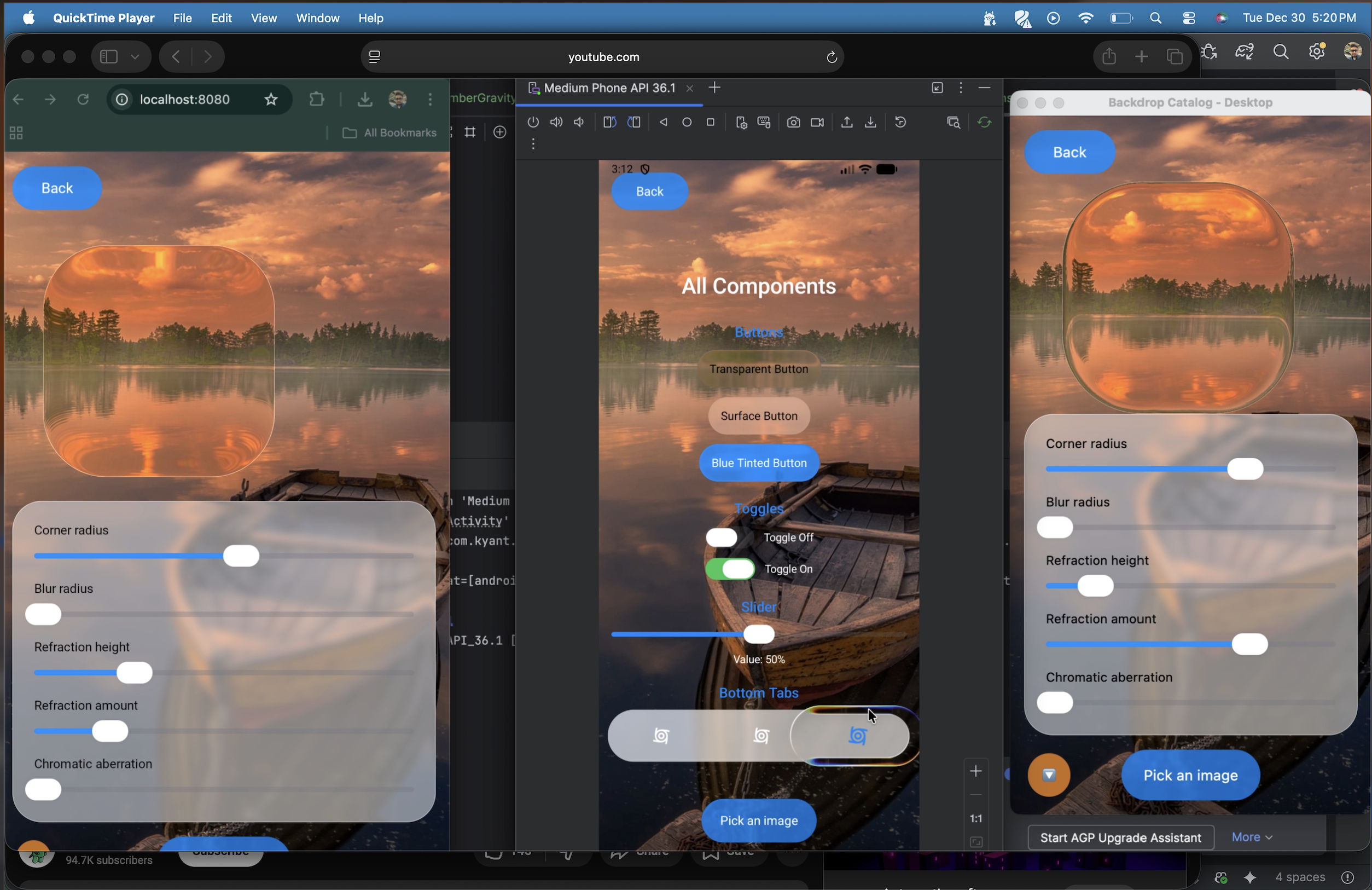
Overview
KMP Liquid Glass lets you create frosted glass UI effects in Compose Multiplatform. The library provides blur, refraction, highlights, and shadow effects that work across Android, iOS, Desktop, and Web.
Key capabilities:
- Blur effects — Gaussian blur with configurable radius and edge treatment
- Color adjustments — Brightness, contrast, saturation, and vibrancy controls
- Lens refraction — Glass-like distortion with optional chromatic aberration
- Dynamic highlights — Ambient and directional lighting that responds to angle
- Shadows — Drop shadows and inner shadows for depth
- Progressive blur — Gradient blur for scroll containers
Installation
commonMain.dependencies {
    implementation("io.github.kashif-mehmood-km:backdrop:0.0.1-alpha02")
}
For version catalog:
[libraries]
backdrop = { module = "io.github.kashif-mehmood-km:backdrop", version = "0.0.1-alpha02" }
Use with Claude Code
This repo is also a Claude Code plugin marketplace. Installing the kmp-liquid-glass skill teaches Claude (and any agent on Claude Code) the library's mental model, the full effect / component / shader API, and a curated set of recipes — so prompts like "add a frosted glass tab bar" or "make this card iOS-style translucent" produce correct, idiomatic code on the first try.
Install
In any Claude Code session, run:
/plugin marketplace add Kashif-E/KMPLiquidGlass
/plugin install kmp-liquid-glass@kmp-liquid-glass-marketplace
Then reload plugins (or restart the session):
/reload-plugins
Verify
Ask Claude something the skill should handle, for example:
Build a glass-style settings dialog using the backdrop library — title "Notifications", two toggle rows, Cancel/Save buttons. Heavy frosted look like an iOS alert.
Claude should invoke the kmp-liquid-glass skill (you'll see it announce "Using kmp-liquid-glass …") and produce code that uses real APIs from com.kashif_e.backdrop.* with the correct effect ordering, dim placement, and z-order.
Tip: the skill is much more reliable when you mention the library by name in your prompt — say "use the backdrop library" or "iOS liquid glass" rather than just "make it glassy". Claude Code currently under-triggers skills for purely visual descriptions.
What's included
The plugin ships a single skill — kmp-liquid-glass — with progressive references:
SKILL.md — mental model, decision tree, effect ordering rules, 12 pitfallsreferences/effects.md — every effect with parameter ranges and recipesreferences/components.md — full recipes for card, button, dialog, toggle, tab bar, search, FAB, sheet handle, sticky list header, scroll container with progressive blurreferences/advanced.md — SDF shaders, magnifier (combined backdrops), custom expect/actual shaders, performance tuningreferences/platform.md — exact API-level behavior matrix per effect, per platform
Using the skill from other agents
The skill files are plain Markdown, so any agent that reads filesystem skills (Claude Agent SDK, custom harnesses, IDE extensions) can load plugins/kmp-liquid-glass/skills/kmp-liquid-glass/SKILL.md directly without going through the Claude Code marketplace.
How it works
The library uses a two-layer approach:
- Backdrop layer — The content you want to show through the glass (usually an image or gradient)
- Glass layer — The element that samples and applies effects to the backdrop
The backdrop captures its content into a graphics layer. When you draw a glass element, it samples from this captured content and applies your chosen effects.
Basic usage
Step 1: Create a backdrop
Use rememberLayerBackdrop() to create a backdrop, then apply it to your background content with the layerBackdrop modifier:
val backdrop = rememberLayerBackdrop()

Image(
    painter = painterResource(Res.drawable.wallpaper),
    modifier = Modifier.layerBackdrop(backdrop).fillMaxSize()
)
Step 2: Draw glass elements
Use drawBackdrop to create glass elements that sample from the backdrop:
Box(
    modifier = Modifier
        .drawBackdrop(
            backdrop = backdrop,
            shape = { RoundedCornerShape(24.dp) },
            effects = {
                blur(16.dp.toPx())
            }
        )
        .size(200.dp)
)

 2dubu
2dubu aldefy
 hamen
hamen AvdLee
 heyman333
 blinkz-ai
'%20stop-opacity%3D'0.16'%2F%3E%3Cstop%20offset%3D'1'%20stop-color%3D'rgb(200%2C90%2C60)'%20stop-opacity%3D'0.03'%2F%3E%3C%2FlinearGradient%3E%3C%2Fdefs%3E%3Crect%20width%3D'320'%20height%3D'200'%20fill%3D'url(%23g)'%2F%3E%3Ccircle%20cx%3D'250'%20cy%3D'56'%20r%3D'92'%20fill%3D'rgb(200%2C90%2C60)'%20fill-opacity%3D'0.06'%2F%3E%3Ccircle%20cx%3D'64'%20cy%3D'172'%20r%3D'58'%20fill%3D'rgb(200%2C90%2C60)'%20fill-opacity%3D'0.05'%2F%3E%3C%2Fsvg%3E)