Stats
Actions
Available In
Tags
Databricks development toolkit with skills for data engineering, ML, and AI agents plus MCP tools for direct Databricks operations
Generate realistic synthetic data using Faker and Spark, with non-linear distributions, integrity constraints, and save to Databricks. Use when creating test data, demo datasets, or synthetic tables.
Unity Catalog system tables and volumes. Use when querying system tables (audit, lineage, billing) or working with volume file operations (upload, download, list files in /Volumes/).
Generate synthetic PDF documents for RAG and unstructured data use cases. Use when creating test PDFs, demo documents, or evaluation datasets for retrieval systems.
Patterns for Databricks Vector Search: create endpoints and indexes, query with filters, manage embeddings. Use when building RAG applications, semantic search, or similarity matching. Covers both storage-optimized and standard endpoints.
Build Zerobus Ingest clients for near real-time data ingestion into Databricks Delta tables via gRPC. Use when creating producers that write directly to Unity Catalog tables without a message bus, working with the Zerobus Ingest SDK in Python/Java/Go/TypeScript/Rust, generating Protobuf schemas from UC tables, or implementing stream-based ingestion with ACK handling and retry logic.
Admin access level
Server config contains admin-level keywords
Own this plugin?
Verify ownership to unlock analytics, metadata editing, and a verified badge. GitHub access is read-only (username + org membership).
Sign in to claimOwn this plugin?
Verify ownership to unlock analytics, metadata editing, and a verified badge. GitHub access is read-only (username + org membership).
Sign in to claimBased on adoption, maintenance, documentation, and repository signals. Not a security audit or endorsement.

AI-Driven Development (vibe coding) on Databricks just got a whole lot better. The AI Dev Kit gives your AI coding assistant (Claude Code, Cursor, Windsurf, etc.) the trusted sources it needs to build faster and smarter on Databricks.
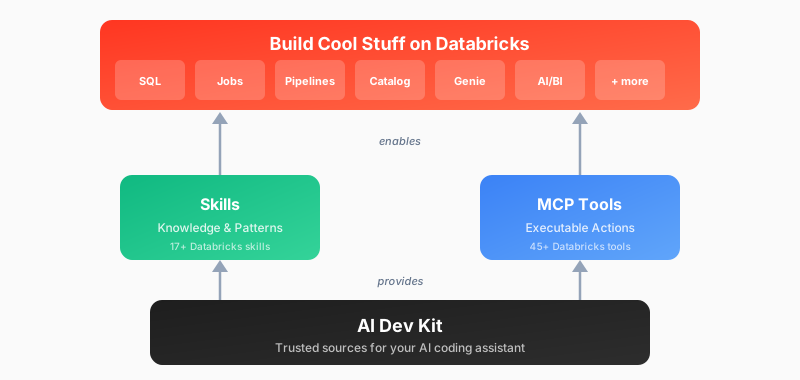
| Adventure | Best For | Start Here |
|---|---|---|
| :star: Install AI Dev Kit | Start here! Follow quick install instructions to add to your existing project folder | Quick Start (install) |
| Visual Builder App | Web-based UI for Databricks development | databricks-builder-app/ |
| Core Library | Building custom integrations (LangChain, OpenAI, etc.) | pip install |
| Skills Only | Provide Databricks patterns and best practices (without MCP functions) | Install skills |
| MCP Tools Only | Just executable actions (no guidance) | Register MCP server |
By default this will install at a project level rather than a user level. This is often a good fit, but requires you to run your client from the exact directory that was used for the install.
Note: Project configuration files can be re-used in other projects. You find these configs under .claude or .cursor
Basic installation (uses DEFAULT profile, project scope)
bash <(curl -sL https://raw.githubusercontent.com/databricks-solutions/ai-dev-kit/main/install.sh)
Global installation with force reinstall
bash <(curl -sL https://raw.githubusercontent.com/databricks-solutions/ai-dev-kit/main/install.sh) --global --force
Specify profile and force reinstall
bash <(curl -sL https://raw.githubusercontent.com/databricks-solutions/ai-dev-kit/main/install.sh) --profile DEFAULT --force
Install for specific tools only
bash <(curl -sL https://raw.githubusercontent.com/databricks-solutions/ai-dev-kit/main/install.sh) --tools cursor
Next steps: Respond to interactive prompts and follow the on-screen instructions.
Basic installation (uses DEFAULT profile, project scope)
irm https://raw.githubusercontent.com/databricks-solutions/ai-dev-kit/main/install.ps1 | iex
Download script first
irm https://raw.githubusercontent.com/databricks-solutions/ai-dev-kit/main/install.ps1 -OutFile install.ps1
Global installation with force reinstall
.\install.ps1 -Global -Force
Specify profile and force reinstall
.\install.ps1 -Profile DEFAULT -Force
Install for specific tools only
.\install.ps1 -Tools cursor
Next steps: Respond to interactive prompts and follow the on-screen instructions.
Full-stack web application with chat UI for Databricks development:
cd ai-dev-kit/databricks-builder-app
./scripts/setup.sh
# Follow instructions to start the app
Use databricks-tools-core directly in your Python projects:
from databricks_tools_core.sql import execute_sql

results = execute_sql("SELECT * FROM my_catalog.schema.table LIMIT 10")
npx claudepluginhub juanlamadrid20/ai-dev-kit --plugin databricks-ai-dev-kitReliable automation, in-depth debugging, and performance analysis in Chrome using Chrome DevTools and Puppeteer
 ChromeDevTools
Comprehensive skill pack with 66 specialized skills for full-stack developers: 12 language experts (Python, TypeScript, Go, Rust, C++, Swift, Kotlin, C#, PHP, Java, SQL, JavaScript), 10 backend frameworks, 6 frontend/mobile, plus infrastructure, DevOps, security, and testing. Features progressive disclosure architecture for 50% faster loading.
 Jeffallan
A growing collection of Claude-compatible academic workflow bundles. Covers scientific figures, manuscript writing and polishing, reviewer assessment, citation retrieval, data availability, paper reading, literature search, response letters, paper-to-PPTX conversion, and evidence-grounded Chinese invention patent drafting. Rules are organized as reusable skill folders with explicit workflows and quality checks.
 Yuan1z0825
Matt Pocock's agent skills for real engineering — grilling, spec/ticket flows, TDD, code review, domain modelling and more. Plug-and-play, not vibe coding.
 mattpocock
Core skills library for Claude Code: TDD, debugging, collaboration patterns, and proven techniques
 obra
obraHarness-native ECC plugin for engineering teams - 67 agents, 278 skills, 94 legacy command shims, reusable hooks, rules, MCP conventions, and operator workflows for Claude Code plus adjacent agent harnesses
 affaan-m
'%20stop-opacity%3D'0.16'%2F%3E%3Cstop%20offset%3D'1'%20stop-color%3D'rgb(200%2C90%2C60)'%20stop-opacity%3D'0.03'%2F%3E%3C%2FlinearGradient%3E%3C%2Fdefs%3E%3Crect%20width%3D'320'%20height%3D'200'%20fill%3D'url(%23g)'%2F%3E%3Ccircle%20cx%3D'250'%20cy%3D'56'%20r%3D'92'%20fill%3D'rgb(200%2C90%2C60)'%20fill-opacity%3D'0.06'%2F%3E%3Ccircle%20cx%3D'64'%20cy%3D'172'%20r%3D'58'%20fill%3D'rgb(200%2C90%2C60)'%20fill-opacity%3D'0.05'%2F%3E%3C%2Fsvg%3E)