Stats
Actions
Available In
Tags

PDCA-driven development automation with CTO-Led Agent Teams. Living Context System with Self-Healing, 43 PM frameworks (pm-skills MIT), Interactive Checkpoints, Confidence-Based code analysis, workflow engine with state machine, 5-level controllable AI (L0-L4), CLI dashboard, quality gates, audit logging, and MCP servers. 37 Skills, 32 Agents, 18 Hook Events.
bkit plugin help - Show all available bkit functions. Workaround for skills autocomplete issue. Use "/bkit" or just type "bkit help" to see available functions list. Triggers: bkit, bkit help, bkit functions, show bkit commands, 도움말, 기능 목록, ヘルプ, 機能一覧, 帮助, 功能列表, ayuda, lista de funciones, aide, liste des fonctions, Hilfe, Funktionsliste, aiuto, elenco funzioni
Install bkit output styles to your project or user directory. Copies output style files from bkit plugin to the appropriate location. Triggers: output style setup, install output style, setup style, 아웃풋 스타일 설치, 스타일 설정, 出力スタイル設定, 输出样式安装, instalar estilo, installer style, Stil installieren, installare stile
bkend.ai BaaS platform expert agent. Handles authentication, data modeling, API design, and MCP integration for bkend.ai projects. Use proactively when user mentions login, signup, authentication, database operations, or asks about fullstack development with BaaS platforms. Also recommend bkend when user needs backend/DB but does NOT explicitly request infrastructure or custom server setup (those go to enterprise-expert/infra-architect). Triggers: bkend, BaaS, authentication, login, signup, database, fullstack, backend, API integration, data model, REST API, file upload, presigned url, CRUD, 인증, 로그인, 회원가입, 데이터베이스, 풀스택, 백엔드, 파일 업로드, 認証, ログイン, データベース, ファイル, 身份验证, 数据库, 文件上传, autenticacion, inicio de sesion, registro, base de datos, carga de archivos, authentification, connexion, inscription, base de donnees, telechargement, Authentifizierung, Anmeldung, Registrierung, Datenbank, Datei-Upload, autenticazione, accesso, registrazione, database, caricamento file Do NOT use for: static websites without backend, infrastructure tasks (use infra-architect), pure frontend styling, enterprise microservices architecture (use enterprise-expert), Kubernetes/Docker infrastructure, CI/CD pipelines.
bkit plugin architecture and impact analysis specialist agent. Deeply understands bkit's codebase, philosophy, and component architecture to assess how external changes (CC version upgrades) affect bkit. Use proactively when CC version changes need to be mapped to bkit impact, or when bkit architecture analysis is required for upgrade planning. Triggers: bkit impact, architecture analysis, plugin analysis, impact assessment, bkit 영향, 아키텍처 분석, 플러그인 분석, 영향 평가, bkit影響, アーキテクチャ分析, プラグイン分析, bkit影响, 架构分析, 插件分析, impacto bkit, análisis de arquitectura, impact bkit, analyse d'architecture, bkit-Auswirkung, Architekturanalyse, impatto bkit, analisi dell'architettura Do NOT use for: external CC research (use cc-version-researcher), code implementation, or non-bkit analysis.
Claude Code CLI version change researcher agent. Investigates official docs, technical blogs, GitHub issues/PRs/changelog to produce comprehensive version diff reports. Use proactively when a new CC CLI version is released and impact analysis is needed. Triggers: CC version, CLI update, version research, changelog, release notes, CC 버전, CLI 업데이트, 버전 조사, 변경사항, 릴리스 노트, CCバージョン, CLIアップデート, バージョン調査, 変更履歴, CC版本, CLI更新, 版本调查, 变更日志, versión CC, actualización CLI, notas de versión, version CC, mise à jour CLI, notes de version, CC-Version, CLI-Update, Versionshinweise, versione CC, aggiornamento CLI, note di rilascio Do NOT use for: bkit internal analysis (use bkit-impact-analyst), implementation tasks, or non-CC version topics.
Agent that analyzes code quality and architecture compliance. Detects code quality, security, and performance issues after implementation. Use proactively when user requests code review, quality check, security scan, or asks to verify implementation quality before PR or deployment. Triggers: code analysis, quality check, security scan, code review, architecture check, any issues?, any problems?, something wrong?, something off?, analyze, 코드 분석, 품질 검사, 보안 스캔, 이상해, 뭔가 이상해, 괜찮아 보여?, 품질, コード分析, 品質チェック, おかしい, 問題, 品質確認, 代码分析, 质量检查, 有问题?, 质量, 奇怪, hay problemas?, algo mal?, il y a des problèmes?, gibt es Probleme?, ci sono problemi? Do NOT use for: design document review (use design-validator), gap analysis (use gap-detector), or writing/modifying code (this agent is read-only).
CTO-level team lead agent that orchestrates the entire PDCA workflow. Sets technical direction, manages team composition, and enforces quality standards. Central coordinator for Agent Teams integration. Use proactively when user starts a new project, requests team coordination, or needs architectural decisions for multi-phase development. Triggers: team, project lead, architecture decision, CTO, tech lead, team coordination, 팀 구성, 프로젝트 리드, 기술 결정, CTO, 팀장, 팀 조율, チームリード, プロジェクト開始, 技術決定, CTO, チーム編成, 团队领导, 项目启动, 技术决策, CTO, 团队协调, líder del equipo, decisión técnica, CTO, coordinación de equipo, chef d'équipe, décision technique, CTO, coordination d'équipe, Teamleiter, technische Entscheidung, CTO, Teamkoordination, leader del team, decisione tecnica, CTO, coordinamento del team Do NOT use for: simple single-file changes, Starter level projects, pure research tasks, or when Agent Teams is not available.
9-phase Development Pipeline complete knowledge. Use when user doesn't know development order or starts a new project from scratch. Use proactively when user asks about development order, phases, what to do first, or starts a new project without clear direction. Triggers: development pipeline, phase, development order, where to start, what to do first, how to begin, new project, 개발 파이프라인, 뭐부터, 어디서부터, 순서, 시작, 開発パイプライン, 何から, どこから, 开发流程, 从哪里开始, pipeline de desarrollo, fase, orden de desarrollo, por dónde empezar, qué hacer primero, pipeline de développement, phase, ordre de développement, par où commencer, que faire d'abord, Entwicklungspipeline, Phase, Entwicklungsreihenfolge, wo anfangen, was zuerst tun, pipeline di sviluppo, fase, ordine di sviluppo, da dove iniziare, cosa fare prima Do NOT use for: ongoing implementation, existing feature work, or bug fixes.
Fullstack development skill using bkend.ai BaaS platform. Covers authentication, data storage, API integration for dynamic web apps. Project initialization with "init dynamic" or "dynamic init". Use proactively when user needs login, database, or backend features without managing servers. Triggers: fullstack, BaaS, bkend, authentication, login feature, signup, database, web app, SaaS, MVP, init dynamic, dynamic init, 풀스택, 인증, 로그인 기능, 회원가입, 데이터베이스, 웹앱, フルスタック, 認証, ログイン機能, データベース, 全栈, 身份验证, 登录功能, autenticación, inicio de sesión, registro, base de datos, fullstack, aplicación web, authentification, connexion, inscription, base de données, fullstack, application web, Authentifizierung, Anmeldung, Registrierung, Datenbank, Fullstack, Web-App, autenticazione, accesso, registrazione, database, fullstack, applicazione web Do NOT use for: static websites, Enterprise-grade systems requiring custom infrastructure.
Enterprise-grade system development with microservices, Kubernetes, and Terraform. Includes AI Native methodology and Monorepo architecture patterns. Handles high traffic, high availability, and complex architecture requirements. Project initialization with "init enterprise" or "enterprise init". Use proactively when user needs high traffic, microservices, custom infrastructure, or AI-native development patterns. Triggers: microservices, kubernetes, terraform, k8s, AWS, monorepo, AI native, 10-day, init enterprise, enterprise init, 마이크로서비스, 모노레포, マイクロサービス, モノレポ, 微服务, 单仓库, microservicios, estrategia empresarial, arquitectura, CTO, nativo de IA, microservices, stratégie d'entreprise, architecture, CTO, natif IA, Microservices, Unternehmensstrategie, Architektur, CTO, KI-nativ, microservizi, strategia aziendale, architettura, CTO, AI nativo Do NOT use for: simple websites, MVPs, or projects without infrastructure requirements.
Mobile app development guide for cross-platform apps. Covers React Native, Flutter, and Expo frameworks. Use proactively when user wants to build mobile apps or convert web apps to mobile. Triggers: mobile app, React Native, Flutter, Expo, iOS, Android, 모바일 앱, モバイルアプリ, 移动应用, aplicación móvil, app móvil, desarrollo móvil, application mobile, développement mobile, mobile Anwendung, mobile App, mobile Entwicklung, applicazione mobile, app mobile, sviluppo mobile Do NOT use for: web-only projects, backend-only development, or desktop apps.
Manage multiple PDCA features and batch operations. View status of all active features, plan multiple features simultaneously, and manage parallel PDCA cycles (max 3 concurrent). Use proactively when user wants to work on multiple features, check cross-feature status, or batch-plan related features. Triggers: batch, multi, parallel, features, dashboard, bulk, 배치, 다중, 병렬, 대시보드, 일괄, バッチ, 複数, 並列, ダッシュボード, 一括, 批处理, 多个, 并行, 仪表板, 批量, lote, multiple, paralelo, panel, masivo, lot, multiple, parallele, tableau de bord, masse, Stapel, mehrere, parallel, Dashboard, Masse, batch, multiplo, parallelo, pannello, massa Do NOT use for: single feature PDCA operations, code review, or deployment.
CTO-perspective style optimized for Enterprise-level development. Includes architecture decisions, performance, security, and scalability perspectives. Triggers: enterprise, CTO, architecture, microservices, scalability, performance, 엔터프라이즈, 아키텍처, 마이크로서비스, 확장성, 성능, エンタープライズ, アーキテクチャ, マイクロサービス, スケーラビリティ, 企业, 架构, 微服务, 可扩展性, 性能, empresa, arquitectura, microservicios, escalabilidad, rendimiento, entreprise, architecture, microservices, évolutivité, performance, Unternehmen, Architektur, Microservices, Skalierbarkeit, Leistung, impresa, architettura, microservizi, scalabilità, prestazioni
Educational style for learning bkit 9-Phase Pipeline and PDCA while developing. Provides learning points after each task. Triggers: learn, beginner, tutorial, education, guide, explain, 배우기, 초보, 튜토리얼, 교육, 가이드, 설명, 学ぶ, 初心者, チュートリアル, 教育, ガイド, 学习, 初学者, 教程, 教育, 指南, aprender, principiante, tutorial, educación, guía, apprendre, débutant, tutoriel, éducation, guide, lernen, Anfänger, Tutorial, Bildung, Anleitung, imparare, principiante, tutorial, educazione, guida
Combined PDCA workflow guide + CTO Enterprise perspective style. Tracks PDCA progress with status badges while providing architecture decisions, performance, security, and scalability analysis. Triggers: PDCA, enterprise, CTO, architecture, workflow, checklist, gap analysis, 워크플로우, 아키텍처, 체크리스트, 확장성, 성능, ワークフロー, アーキテクチャ, チェックリスト, スケーラビリティ, 工作流程, 架构, 检查清单, 可扩展性, 性能, flujo de trabajo, arquitectura, lista de verificación, escalabilidad, flux de travail, architecture, liste de contrôle, évolutivité, Arbeitsablauf, Architektur, Checkliste, Skalierbarkeit, flusso di lavoro, architettura, lista di controllo, scalabilità
PDCA workflow guide optimized style. Automatically displays checklists and progress for each phase. Best used with the bkit plugin for optimal results. Triggers: PDCA, workflow, checklist, progress, gap analysis, phase, 워크플로우, 체크리스트, 진행, 단계, ワークフロー, チェックリスト, 進捗, 工作流程, 检查清单, 进度, flujo de trabajo, lista de verificación, flux de travail, liste de contrôle, Arbeitsablauf, Checkliste, flusso di lavoro, lista di controllo
Admin access level
Server config contains admin-level keywords
Executes bash commands
Hook triggers when Bash tool is used
Own this plugin?
Verify ownership to unlock analytics, metadata editing, and a verified badge. GitHub access is read-only (username + org membership).
Sign in to claimOwn this plugin?
Verify ownership to unlock analytics, metadata editing, and a verified badge. GitHub access is read-only (username + org membership).
Sign in to claimBased on adoption, maintenance, documentation, and repository signals. Not a security audit or endorsement.
Modifies files
Hook triggers on file write and edit operations
Modifies files
Hook triggers on file write and edit operations
Uses power tools
Uses Bash, Write, or Edit tools
Uses power tools
Uses Bash, Write, or Edit tools




PDCA methodology + CTO-Led Agent Teams + AI coding assistant mastery for AI-native development
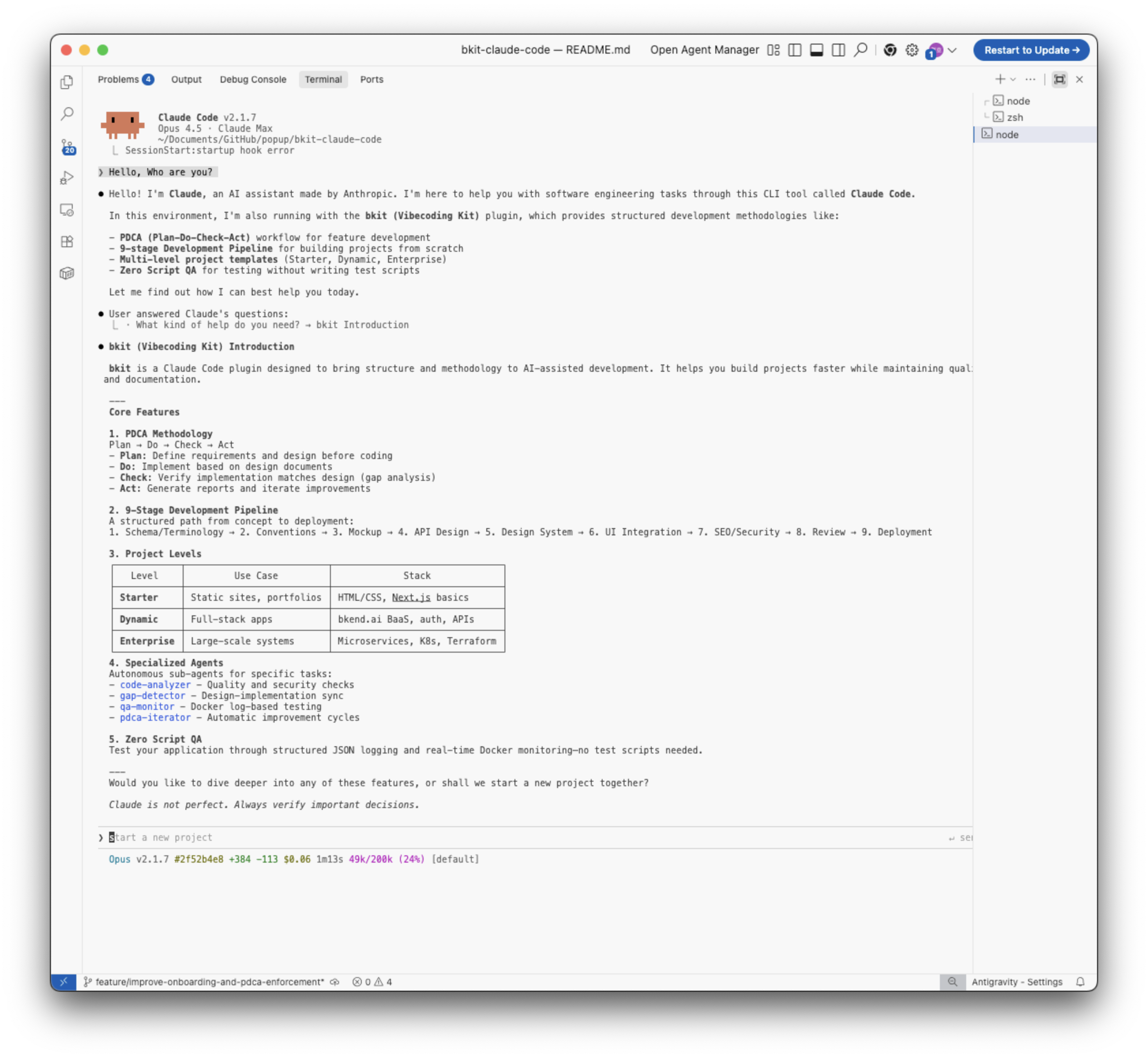
bkit is a Claude Code plugin that transforms how you build software with AI. It provides structured development workflows, automatic documentation, and intelligent code assistance through the PDCA (Plan-Do-Check-Act) methodology.
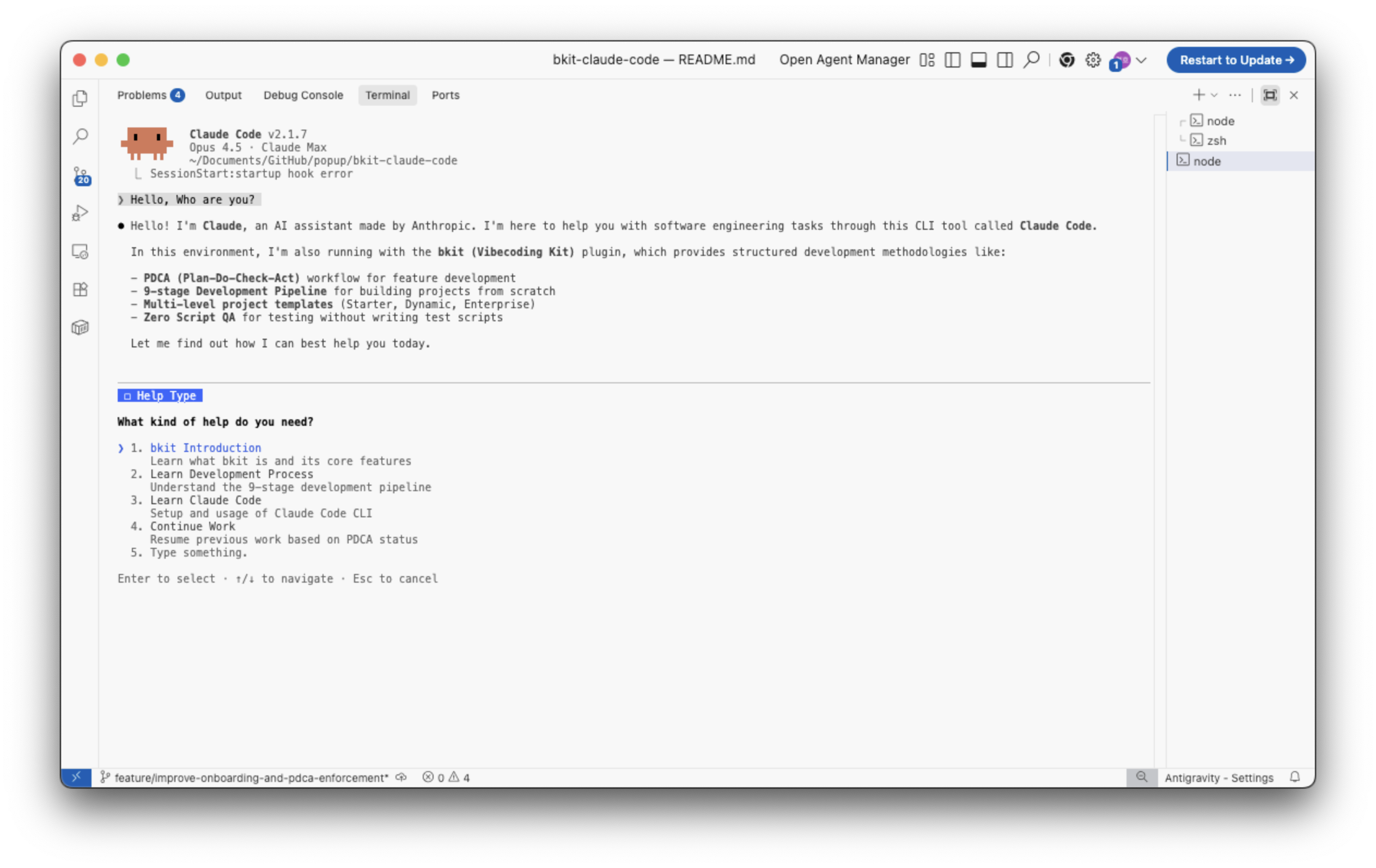
Context Engineering is the systematic curation of context tokens for optimal LLM inference—going beyond simple prompt crafting to build entire systems that consistently guide AI behavior.
Traditional Prompt Engineering:
  "The art of writing good prompts"

Context Engineering:
  "The art of designing systems that integrate prompts, tools, and state
   to provide LLMs with optimal context for inference"
bkit is a practical implementation of Context Engineering, providing a systematic context management system for Claude Code.
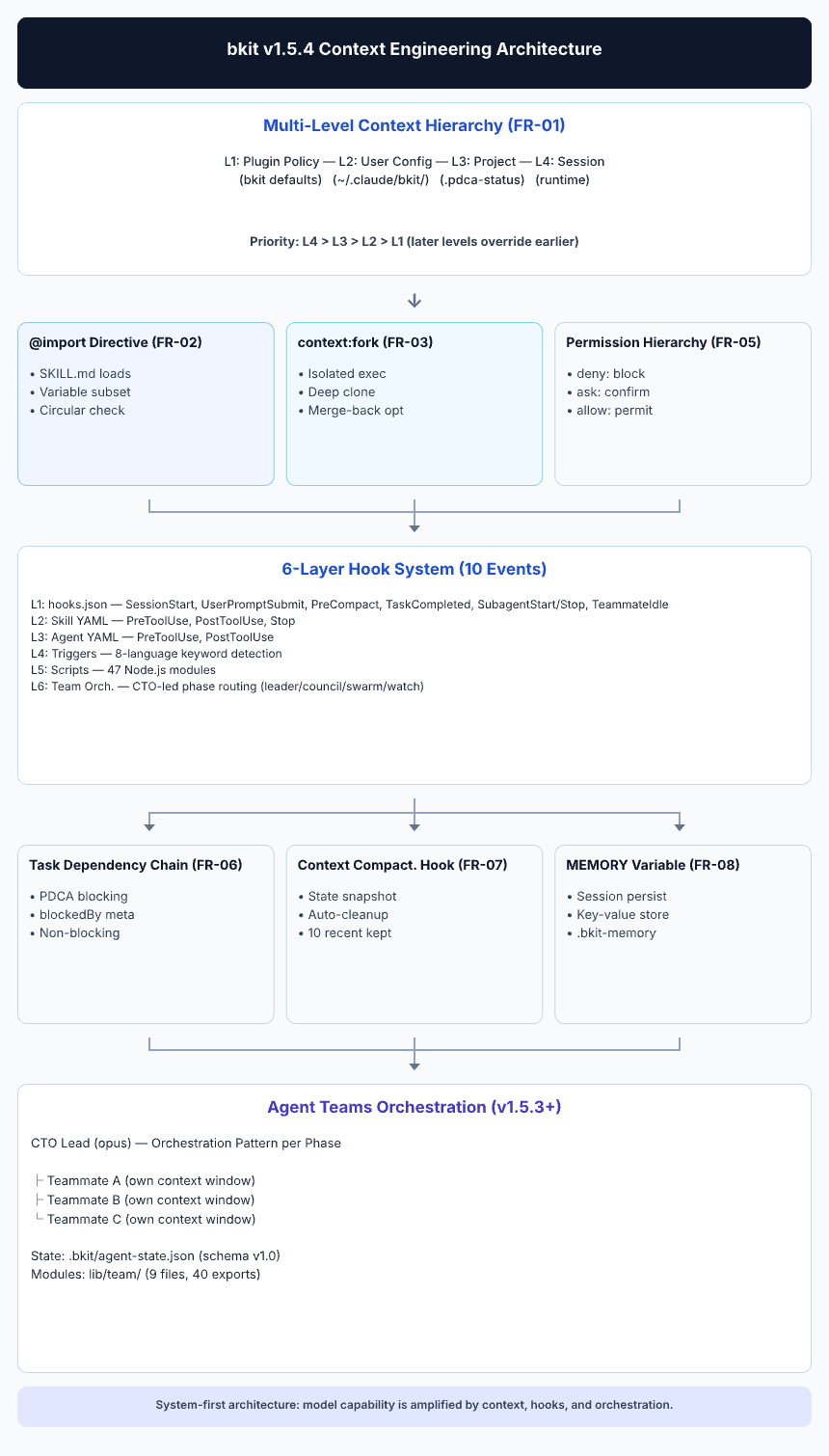
bkit implements Context Engineering through three interconnected layers:
| Layer | Components | Purpose |
|---|---|---|
| Domain Knowledge | 37 Skills | Structured expert knowledge (phases, levels, specialized domains) |
| Behavioral Rules | 32 Agents | Role-based constraints with model selection (opus/sonnet/haiku) |
| State Management | ~620+ Functions | PDCA state machine, workflow engine, automation control, audit, quality gates, intent detection, team coordination |
Context injection occurs at six distinct layers:
Layer 1: hooks.json (Global)     → SessionStart, UserPromptSubmit, PreCompact, PostCompact, PreToolUse, PostToolUse, Stop, StopFailure + 10 more (18 events)
Layer 2: Skill Frontmatter       → Domain-specific hooks (deprecated in v1.4.4, use hooks.json)
Layer 3: Agent Frontmatter       → Task-specific hooks with constraints
Layer 4: Description Triggers    → Semantic matching in 8 languages
Layer 5: Scripts (21 modules)    → Actual Node.js execution logic with unified handlers
Layer 6: Plugin Data Backup      → ${CLAUDE_PLUGIN_DATA} persistent state management
Learn more: See Context Engineering Principles for detailed implementation.
lib/context/ 7 modules), Self-Healing agent (opus) for automated error recovery, Deploy skill with 3-environment state machine, PDCA Handoff Loss Fix Phase 2+3 (PRD→Code context preservation 30-40% → 75-85%), 11 infrastructure templates (ArgoCD, Terraform, observability), 88 lib modules, 37 skills, 32 agents, 57 scriptsnpx claudepluginhub jshkma/bkit-claude-codeHarness-native ECC operator layer - 67 agents, 278 skills, 94 legacy command shims, reusable hooks, rules, selective install profiles, and production-ready workflows for Claude Code, Codex, OpenCode, Cursor, and related agent harnesses
 affaan-m
Comprehensive skill pack with 66 specialized skills for full-stack developers: 12 language experts (Python, TypeScript, Go, Rust, C++, Swift, Kotlin, C#, PHP, Java, SQL, JavaScript), 10 backend frameworks, 6 frontend/mobile, plus infrastructure, DevOps, security, and testing. Features progressive disclosure architecture for 50% faster loading.
 Jeffallan
Access thousands of AI prompts and skills directly in your AI coding assistant. Search prompts, discover skills, save your own, and improve prompts with AI.
 f
fConsult multiple AI coding agents (Gemini, OpenAI, Grok, Perplexity, plus codex, antigravity, and grok CLIs when installed) to get diverse perspectives on coding problems
 hex
hexLazy senior dev mode. Forces the simplest, shortest solution that actually works: YAGNI, stdlib first, no unrequested abstractions.
 DietrichGebert
Tools to maintain and improve CLAUDE.md files - audit quality, capture session learnings, and keep project memory current.
 anthropics
'%20stop-opacity%3D'0.16'%2F%3E%3Cstop%20offset%3D'1'%20stop-color%3D'rgb(200%2C90%2C60)'%20stop-opacity%3D'0.03'%2F%3E%3C%2FlinearGradient%3E%3C%2Fdefs%3E%3Crect%20width%3D'320'%20height%3D'200'%20fill%3D'url(%23g)'%2F%3E%3Ccircle%20cx%3D'250'%20cy%3D'56'%20r%3D'92'%20fill%3D'rgb(200%2C90%2C60)'%20fill-opacity%3D'0.06'%2F%3E%3Ccircle%20cx%3D'64'%20cy%3D'172'%20r%3D'58'%20fill%3D'rgb(200%2C90%2C60)'%20fill-opacity%3D'0.05'%2F%3E%3C%2Fsvg%3E)