Stats
Actions
Available In
Tags

ThroughLine — build a complete design system end to end. Author tokens, styles, icons, and components in Figma, then stand up a monorepo, sync tokens to framework-specific code via Style Dictionary, and generate Storybook stories with Chromatic. One unbroken line from design to code. Built for designers becoming developers; explanation scales to your comfort level.
Show a plain-language summary of the current design system state — what's set up, what's not, and sensible next steps — read from design-system.json.
Author, refresh, or reconcile the usage documentation for one existing component — draft its canonical doc record from four sources, project it to Figma, the doc card, and code, and resolve any drift via a reviewable per-item choice.
Build a single new component end to end — in Figma, then sync any new tokens, then build its code component and stories — with a confirmation between each stage.
Start building your design system — the deterministic entry point. Runs environment setup first, before anything else.
Re-run the Figma-to-code token sync — extract current Figma variables, rebuild code outputs via Style Dictionary, and open a PR with the changes for review.
Reviews a completed unit of work for spec compliance and quality before it is combined or landed. Two modes — code-diff review (a git diff) and Figma-visual review (screenshot then analyze). Dispatched on the balanced tier, scaled to the diff's risk. Reports a verdict; does not fix.
Plans a build stage on the deep tier and emits a transcription-grade spec addressed in stable identifiers (component/page/token/style names, never nodeIds). Reads existing Figma state read-only to plan against it; it does not write. Dispatched concurrency-1 because it touches the single Figma bridge.
Transcribes code or generated output from a complete, transcription-grade spec and verifies its own build. Dispatched on the fast tier for mechanical, parallel-safe code-gen (per-adapter token output, per-component stories, SVGR transforms). Not for planning or design decisions — those belong to the dispatcher or the architect.
Runs an architect's Figma spec — resolves stable names to nodeIds at run time, builds into a named working frame, read-back-verifies structure (asserts a real COMPONENT_SET, not frames), and finalizes by build-verify-then-replace. Defaults to the balanced tier for a real component build; fast only for trivial mechanical ops. Concurrency-1, bridge-locked. Not for design decisions — those belong to the architect.
Build a foundational set of Figma components — buttons, inputs, cards, badges, chips, modals, and more — as properly structured components with variant matrices (types, sizes, states) and icon/component/content slots, bound to the design system's tokens and styles. Use this when the user wants to create components, build a component library, make buttons/inputs/cards/etc. in Figma, or set up the foundational UI kit. Also trigger after tokens and icons exist, when the user is ready to build actual UI components. Make sure to use this whenever someone wants real, variant-rich components in their Figma design system, not just tokens.
Take a single new component from Figma to fully-built-and-storied code, end to end — build it in Figma, sync any new tokens it introduced, then build its code component and stories. This is an orchestrator that sequences the component-builder, token-sync-layer, and storybook-chromatic-builder skills with a human confirmation between each stage. Use this when the user wants to add a new component to an existing design system, ship a component end-to-end, or run the full new-component flow. Also trigger on "/new-component" or when someone says they want one component built all the way through to code. Make sure to use this when the design system foundations already exist and the user wants to add one more component through the whole pipeline.
Measure a pre-existing design system before retrofitting it onto tokens — size the code-side color surface and inventory the existing Figma file with verified per-class reads, then compute how semantic the system already is so the retrofit is right-sized. This is a PROCESS skill and the brownfield front door. Use this when retrofitting a design system onto a mature codebase and an already-populated Figma file, when the user wants to audit an existing system, size a retrofit, count existing tokens/variables/bindings, or figure out how much work a migration is. Also trigger when figma-environment-setup detects a brownfield situation (existing repo or populated Figma file), before any building. Make sure to use this whenever someone is converging two mature, drifted artifacts rather than building greenfield.
Set up the local working folder and connect Claude to Figma so the design-system skills can read and write variables, styles, and components. This is a SETUP/PROCESS skill — it must run BEFORE brainstorming, not after it, because there is nothing to brainstorm until the environment exists. Invoke this skill immediately when the user wants to start, set up, or begin building a design system — phrases like 'let's setup my design system', 'let's get started', 'connect Figma', or 'build my design system' should all trigger this skill first, ahead of brainstorming. Also trigger when the user wants to fix a broken Figma connection, or mentions the Figma Console MCP, the desktop bridge plugin, or a Figma access token. It is the required foundation everything else depends on — always run it before any other design-system skill.
Build an icon system in Figma — a dedicated "Icons" page populated with the user's chosen icon library (Lucide, Material, or custom SVGs) as well-named, scalable components — using the fastest, most-automated mechanism per library (for Lucide, batch-fetching the curated subset's official SVGs from the source repo and componentizing them hands-off; for Material, the official community file or importer plugin) rather than hand-generating icons or making the user copy components by hand. Use this when the user wants to set up icons, add an icon library, import Lucide or Material icons, create icon components, or build an icon set in Figma. Also trigger when the user mentions iconography, an icon page, or needs icons for their components. Make sure to use this whenever someone needs a managed set of icon components in their Figma design system.
Requires secrets
Needs API keys or credentials to function
Uses power tools
Uses Bash, Write, or Edit tools
Own this plugin?
Verify ownership to unlock analytics, metadata editing, and a verified badge. GitHub access is read-only (username + org membership).
Sign in to claimOwn this plugin?
Verify ownership to unlock analytics, metadata editing, and a verified badge. GitHub access is read-only (username + org membership).
Sign in to claimBased on adoption, maintenance, documentation, and repository signals. Not a security audit or endorsement.
Every skill you need to launch and manage a production-grade design system in hours — not months. Built for Claude Code, and installable into Cursor, Codex, or any AGENTS.md agent.





Whether you're starting from scratch or retrofitting an existing design system, ThroughLine puts you in the driver's seat — you make the high-level decisions while your agentic team powers through the production work. You stay in control of the what; it handles the how.
No code experience required.
/sync-figma-tokens — resync changes from Figma to code, landed as a reviewable PR./new-component — ship a new component in Figma, then sync and publish it to code.Most teams aren't starting from a blank file — they have a mature codebase with hundreds of hard-coded colors and a Figma file that's drifted from it over the years. ThroughLine treats that as a first-class path, not an afterthought, and it moves carefully: it never asserts what's in your files without reading them first, and it never deletes an old token until it's proven nothing still uses it.
design-system-audit sizes both sides of your system — it greps your codebase to measure the real color surface and inventories your Figma file with verified, per-class reads — then tells you how big the migration actually is and how semantic your system already is.token-crosswalk-builder maps every new token to its old Figma variable and old code value, then installs a tokens:validate gate that fails unless every resolved new value matches the old one (N/N). A zero-reference guard blocks removing an old token while any code still references it.retrofit-planner walks the safe seven-phase sequence — audit → refine variables in place → rebind → sync → capture a visual baseline → retrofit the code → adopt existing docs → remove the old tokens — pausing for your confirmation between every phase, with an optional decision journal recording each call.The payoff: your live product looks identical at every step, and you can prove it with a Chromatic baseline captured before the first change.
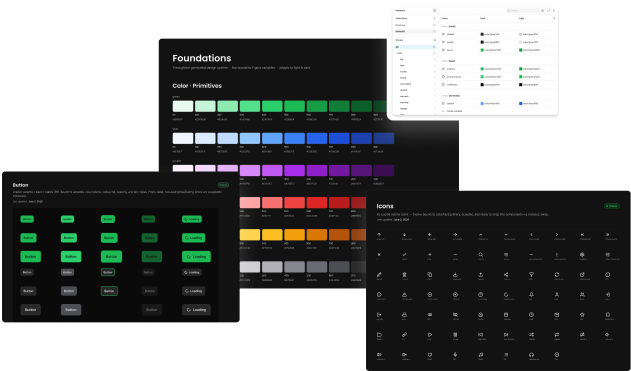
npx claudepluginhub jrpease/throughlineStaff-level design system auditing, governance, documentation, validation, and communication — 40 skills, 4 agents, and 12 knowledge notes for the full design system lifecycle
 murphytrueman
Compiler-driven design generation in Figma — 100% design system compliant. Compiles component specs into verified Figma output via MCP.
 noemuch
Automated design system construction from repository analysis to production-ready implementation.
 hakilee
Creates comprehensive design systems with typography, colors, components, and documentation for consistent UI development. Use when establishing design standards, building component libraries, or ensuring cross-team consistency.
 secondsky
Design System compliance harness for Claude + Figma. Enforces library-first components, token binding, and automated QA — so AI-generated designs stay on-spec.
 senlindesign
Token generators, component patterns, accessibility guidance, and framework integrations
 dylantarre
'%20stop-opacity%3D'0.16'%2F%3E%3Cstop%20offset%3D'1'%20stop-color%3D'rgb(200%2C90%2C60)'%20stop-opacity%3D'0.03'%2F%3E%3C%2FlinearGradient%3E%3C%2Fdefs%3E%3Crect%20width%3D'320'%20height%3D'200'%20fill%3D'url(%23g)'%2F%3E%3Ccircle%20cx%3D'250'%20cy%3D'56'%20r%3D'92'%20fill%3D'rgb(200%2C90%2C60)'%20fill-opacity%3D'0.06'%2F%3E%3Ccircle%20cx%3D'64'%20cy%3D'172'%20r%3D'58'%20fill%3D'rgb(200%2C90%2C60)'%20fill-opacity%3D'0.05'%2F%3E%3C%2Fsvg%3E)
