Stats
Actions
Available In
Tags
Vibecoding Kit - PDCA methodology + Claude Code mastery for AI-native development
bkend.ai BaaS platform expert agent. Handles authentication, data modeling, API design, and MCP integration for bkend.ai projects. Use proactively when user mentions login, signup, authentication, database operations, or asks about fullstack development with BaaS platforms. Triggers: bkend, BaaS, authentication, login, signup, database, fullstack, backend, API integration, data model, 인증, 로그인, 회원가입, 데이터베이스, 풀스택, 백엔드, 認証, ログイン, データベース, autenticación, 身份验证, 数据库, authentification, connexion, inscription, base de données, fullstack, backend, Authentifizierung, Anmeldung, Registrierung, Datenbank, Fullstack, Backend, autenticazione, accesso, registrazione, database, fullstack, backend Do NOT use for: static websites without backend, infrastructure tasks, pure frontend styling, or enterprise microservices architecture.
Agent that analyzes code quality and architecture compliance. Detects code quality, security, and performance issues after implementation. Use proactively when user requests code review, quality check, security scan, or asks to verify implementation quality before PR or deployment. Triggers: code analysis, quality check, security scan, code review, architecture check, any issues?, any problems?, something wrong?, something off?, analyze, 코드 분석, 품질 검사, 보안 스캔, 이상해, 뭔가 이상해, 괜찮아 보여?, 품질, コード分析, 品質チェック, おかしい, 問題, 品質確認, 代码分析, 质量检查, 有问题?, 质量, 奇怪, hay problemas?, algo mal?, il y a des problèmes?, gibt es Probleme?, ci sono problemi? Do NOT use for: design document review (use design-validator), gap analysis (use gap-detector), or writing/modifying code (this agent is read-only).
Agent that validates design document completeness and consistency. Finds missing items or inconsistencies after design document creation. Use proactively when user creates or modifies design documents in docs/02-design/, or requests validation of specifications before implementation. Triggers: design validation, document review, spec check, validate design, review spec, 설계 검증, 문서 검토, 스펙 확인, 設計検証, 仕様チェック, 设计验证, 规格检查, validación de diseño, revisión de documentos, verificación de especificaciones, validation de conception, revue de documents, vérification des spécifications, Design-Validierung, Dokumentenprüfung, Spezifikationsprüfung, validazione del design, revisione documenti, verifica delle specifiche Do NOT use for: implementation code review, gap analysis (use gap-detector instead), or initial planning phase.
CTO-level AI Native development expert agent. Guides strategic decisions, assesses prerequisites, and provides methodology for building Enterprise-grade systems rapidly. Use proactively when user discusses microservices, kubernetes, terraform, enterprise architecture, or asks about strategic technical decisions for large-scale systems. Triggers: CTO, AI Native, enterprise strategy, microservices, architecture decision, 전략, 아키텍처, 마이크로서비스, アーキテクチャ, マイクロサービス, 架构决策, 微服务, estrategia empresarial, arquitectura, microservicios, decisión arquitectónica, stratégie d'entreprise, architecture, microservices, décision architecturale, Unternehmensstrategie, Architektur, Microservices, Architekturentscheidung, strategia aziendale, architettura, microservizi, decisione architetturale Do NOT use for: simple projects, Starter level tasks, routine CRUD operations, minor UI tweaks, or standard bug fixes.
Agent that detects gaps between design documents and actual implementation. Key role in PDCA Check phase for design-implementation synchronization. Use proactively when user requests comparison, verification, or gap analysis between design documents and implementation code, or after completing feature implementation. Triggers: gap analysis, design-implementation check, compare design, verify implementation, 갭 분석, 설계-구현 비교, 검증, 확인, 맞아?, 이거 괜찮아?, 설계대로야?, 문제 없어?, is this right?, is this correct?, does this match?, any issues with this?, verify, ギャップ分析, 設計検証, 正しい?, 合ってる?, これで大丈夫?, 確認して, 差距分析, 对比设计, 对吗?, 对不对?, 正确吗?, 检验, está bien?, es correcto?, c'est correct?, ist das richtig?, è giusto?, va bene? Do NOT use for: documentation-only tasks, initial planning, or design creation.
Core rules for bkit plugin. PDCA methodology, level detection, agent auto-triggering, and code quality standards. These rules are automatically applied to ensure consistent AI-native development. Use proactively when user requests feature development, code changes, or implementation tasks. Triggers: bkit, PDCA, develop, implement, feature, bug, code, design, document, 개발, 기능, 버그, 코드, 설계, 문서, 開発, 機能, バグ, 开发, 功能, 代码, desarrollar, función, error, código, diseño, documento, développer, fonctionnalité, bogue, code, conception, document, entwickeln, Funktion, Fehler, Code, Design, Dokument, sviluppare, funzionalità, bug, codice, design, documento Do NOT use for: documentation-only tasks, research, or exploration without code changes.
PDCA document templates for consistent documentation. Plan, Design, Analysis, and Report templates with proper structure. Use proactively when generating PDCA documents to ensure consistent format. Triggers: template, plan document, design document, analysis document, report, 템플릿, 계획서, 설계서, 분석서, 보고서, テンプレート, 計画書, 設計書, 模板, 计划书, 设计书, plantilla, documento de plan, documento de diseño, documento de análisis, informe, modèle, document de plan, document de conception, document d'analyse, rapport, Vorlage, Plandokument, Designdokument, Analysedokument, Bericht, modello, documento di piano, documento di progettazione, documento di analisi, rapporto Do NOT use for: code implementation, deployment, or non-documentation tasks.
Mobile app development guide for cross-platform apps. Covers React Native, Flutter, and Expo frameworks. Use proactively when user wants to build mobile apps or convert web apps to mobile. Triggers: mobile app, React Native, Flutter, Expo, iOS, Android, 모바일 앱, モバイルアプリ, 移动应用, aplicación móvil, app móvil, desarrollo móvil, application mobile, développement mobile, mobile Anwendung, mobile App, mobile Entwicklung, applicazione mobile, app mobile, sviluppo mobile Do NOT use for: web-only projects, backend-only development, or desktop apps.
Claude Code learning and education skill. Teaches users how to configure and optimize Claude Code settings. Works across any project and any language. Start learning/setup with "learn" or "setup". Use proactively when user is new to Claude Code, asks about configuration, or wants to improve their Claude Code setup. Triggers: learn claude code, claude code setup, CLAUDE.md, hooks, commands, skills, how to configure, 클로드 코드 배우기, 설정 방법, Claude Code 학습, クロードコード学習, 设置方法, how do I use claude code, aprender claude code, configuración, cómo configurar, apprendre claude code, configuration, comment configurer, Claude Code lernen, Konfiguration, wie konfigurieren, imparare claude code, configurazione, come configurare Do NOT use for: actual coding tasks, debugging, or feature implementation.
Code review skill for analyzing code quality, detecting bugs, and ensuring best practices. Provides comprehensive code review with actionable feedback. Use proactively when user requests code review, quality check, or bug detection. Triggers: code review, review code, check code, analyze code, bug detection, 코드 리뷰, 코드 검토, 버그 검사, コードレビュー, バグ検出, 代码审查, 代码检查, revisión de código, revisar código, detección de errores, revue de code, réviser le code, détection de bugs, Code-Review, Code überprüfen, Fehlererkennung, revisione del codice, rivedere codice, rilevamento bug Do NOT use for: design document creation, deployment tasks, or gap analysis (use phase-8-review).
Executes bash commands
Hook triggers when Bash tool is used
Modifies files
Hook triggers on file write and edit operations
Uses power tools
Own this plugin?
Verify ownership to unlock analytics, metadata editing, and a verified badge. GitHub access is read-only (username + org membership).
Sign in to claimOwn this plugin?
Verify ownership to unlock analytics, metadata editing, and a verified badge. GitHub access is read-only (username + org membership).
Sign in to claimBased on adoption, maintenance, documentation, and repository signals. Not a security audit or endorsement.
Uses Bash, Write, or Edit tools
Uses Bash, Write, or Edit tools





PDCA methodology + AI coding assistant mastery for AI-native development Dual Platform Support: Claude Code & Gemini CLI
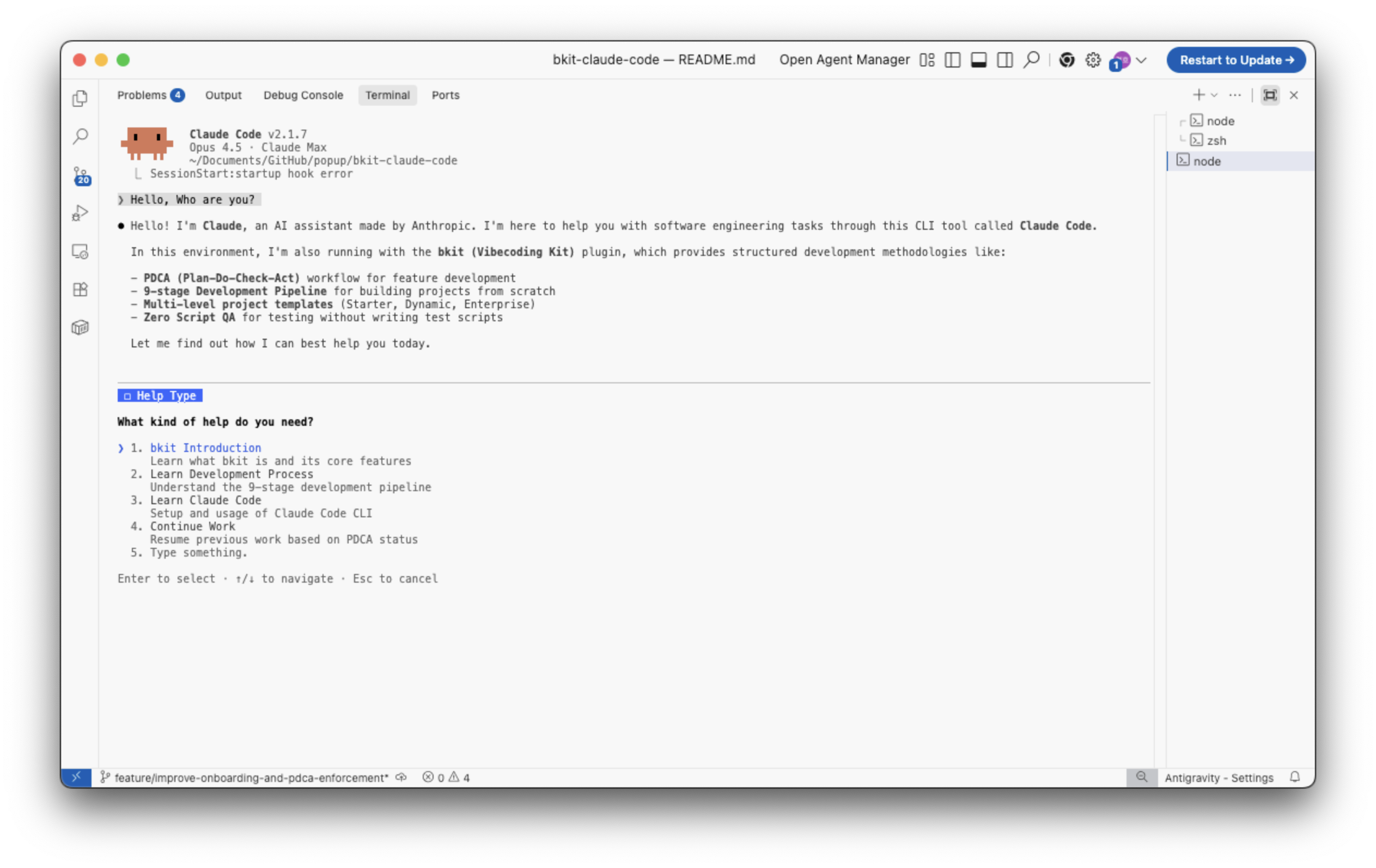
bkit is a plugin/extension that transforms how you build software with AI. It provides structured development workflows, automatic documentation, and intelligent code assistance through the PDCA (Plan-Do-Check-Act) methodology. Now supporting both Claude Code and Gemini CLI.
Context Engineering is the systematic curation of context tokens for optimal LLM inference—going beyond simple prompt crafting to build entire systems that consistently guide AI behavior.
Traditional Prompt Engineering:
  "The art of writing good prompts"

Context Engineering:
  "The art of designing systems that integrate prompts, tools, and state
   to provide LLMs with optimal context for inference"
bkit is a practical implementation of Context Engineering, providing a systematic context management system for Claude Code and Gemini CLI environments.
bkit implements Context Engineering through three interconnected layers:
| Layer | Components | Purpose |
|---|---|---|
| Domain Knowledge | 21 Skills | Structured expert knowledge (phases, levels, specialized domains) |
| Behavioral Rules | 11 Agents | Role-based constraints with model selection (opus/sonnet/haiku) |
| State Management | 86+ Functions | PDCA status, intent detection, ambiguity scoring, multi-feature context |
Context injection occurs at five distinct layers:
Layer 1: hooks.json (Global)     → SessionStart, UserPromptSubmit, PreCompact, PreToolUse, PostToolUse, Stop
Layer 2: Skill Frontmatter       → Domain-specific hooks (deprecated in v1.4.4, use hooks.json)
Layer 3: Agent Frontmatter       → Task-specific hooks with constraints
Layer 4: Description Triggers    → Semantic matching in 8 languages
Layer 5: Scripts (39 modules)    → Actual Node.js execution logic with unified handlers
Learn more: See Context Engineering Principles for detailed implementation.
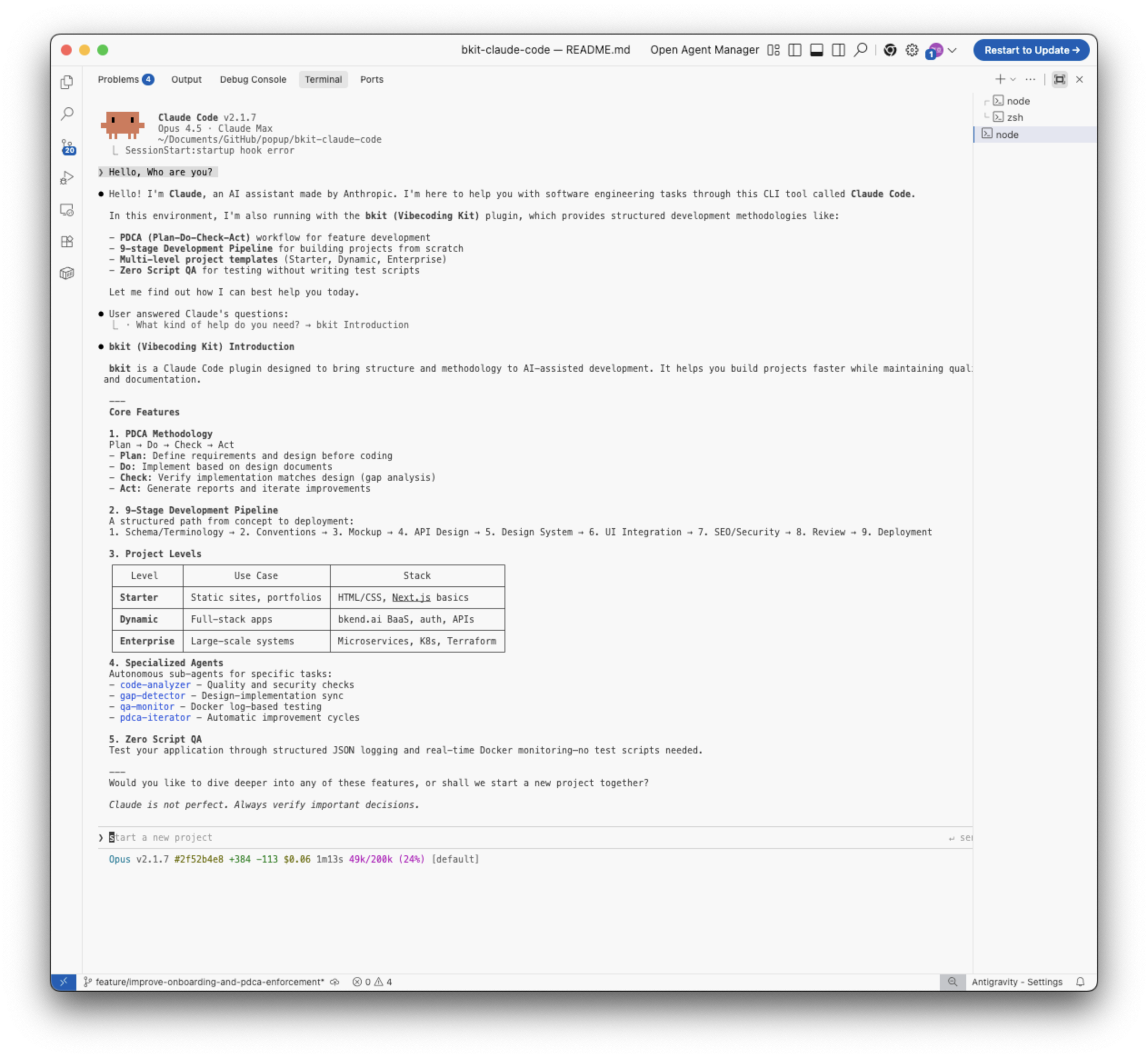
/pdca skill with 8 actions (plan, design, do, analyze, iterate, report, status, next)Claude Code가 처음이신가요?
bkit-starter로 시작하세요!
- 완전한 한글 가이드
- 프로그래밍 경험 없이도 시작 가능
- 첫 프로젝트 만들기 체험
/plugin enable bkit-starterbkit은 bkit-starter를 마스터한 후 사용하는 고급 확장 버전입니다.
The easiest way to install bkit is through the Claude Code marketplace.
# Step 1: Add bkit marketplace
/plugin marketplace add popup-studio-ai/bkit-claude-code

# Step 2: Install bkit plugin
/plugin install bkit
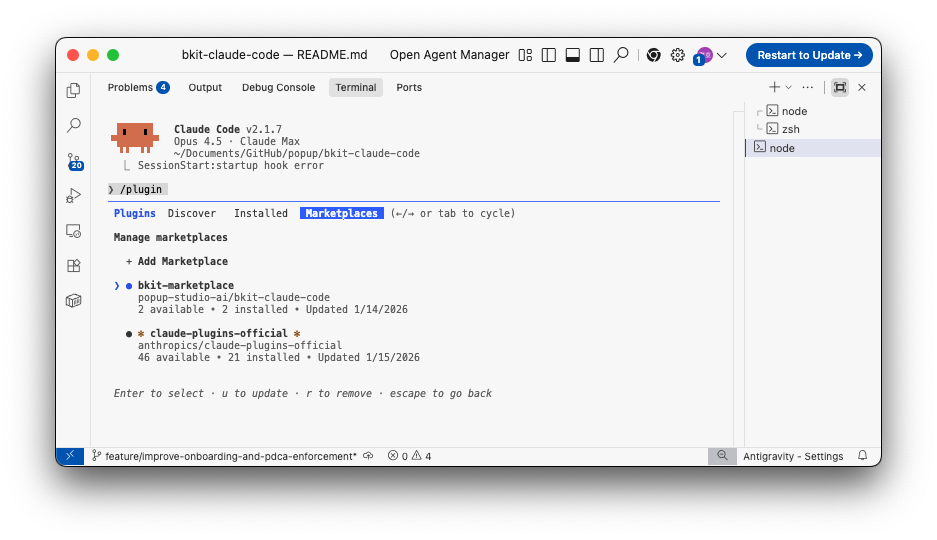
Use /plugin command and navigate to Marketplaces tab to manage your plugin sources:
npx claudepluginhub humanintheloo/bkit-claude-codeAccess personalized developer content feeds from daily.dev - the professional network for developers. Surface relevant articles, tutorials, and discussions based on user interests.
 humanintheloo
Developer experience essentials: GitHub Actions debugging, conversation cloning/half-cloning, context handoffs, and Reddit research via Gemini CLI
humaninthelooConsult multiple AI coding agents (Gemini, OpenAI, Grok, Perplexity, plus codex, antigravity, and grok CLIs when installed) to get diverse perspectives on coding problems
 hex
hexProduction-grade engineering skills for AI coding agents — covering the full software development lifecycle from spec to ship.
 addyosmani
Feature development with code-architect/explorer/reviewer agents, CLAUDE.md audit and session learnings, and Agent Skills creation with eval benchmarking from Anthropic.
 anthropics
Access thousands of AI prompts and skills directly in your AI coding assistant. Search prompts, discover skills, save your own, and improve prompts with AI.
 f
fComplete developer toolkit for Claude Code
 rohitg00
Intelligent draw.io diagramming plugin with AI-powered diagram generation, multi-platform embedding (GitHub, Confluence, Azure DevOps, Notion, Teams, Harness), conditional formatting, live data binding, and MCP server integration for programmatic diagram creation and management.
 markus41
'%20stop-opacity%3D'0.16'%2F%3E%3Cstop%20offset%3D'1'%20stop-color%3D'rgb(200%2C90%2C60)'%20stop-opacity%3D'0.03'%2F%3E%3C%2FlinearGradient%3E%3C%2Fdefs%3E%3Crect%20width%3D'320'%20height%3D'200'%20fill%3D'url(%23g)'%2F%3E%3Ccircle%20cx%3D'250'%20cy%3D'56'%20r%3D'92'%20fill%3D'rgb(200%2C90%2C60)'%20fill-opacity%3D'0.06'%2F%3E%3Ccircle%20cx%3D'64'%20cy%3D'172'%20r%3D'58'%20fill%3D'rgb(200%2C90%2C60)'%20fill-opacity%3D'0.05'%2F%3E%3C%2Fsvg%3E)