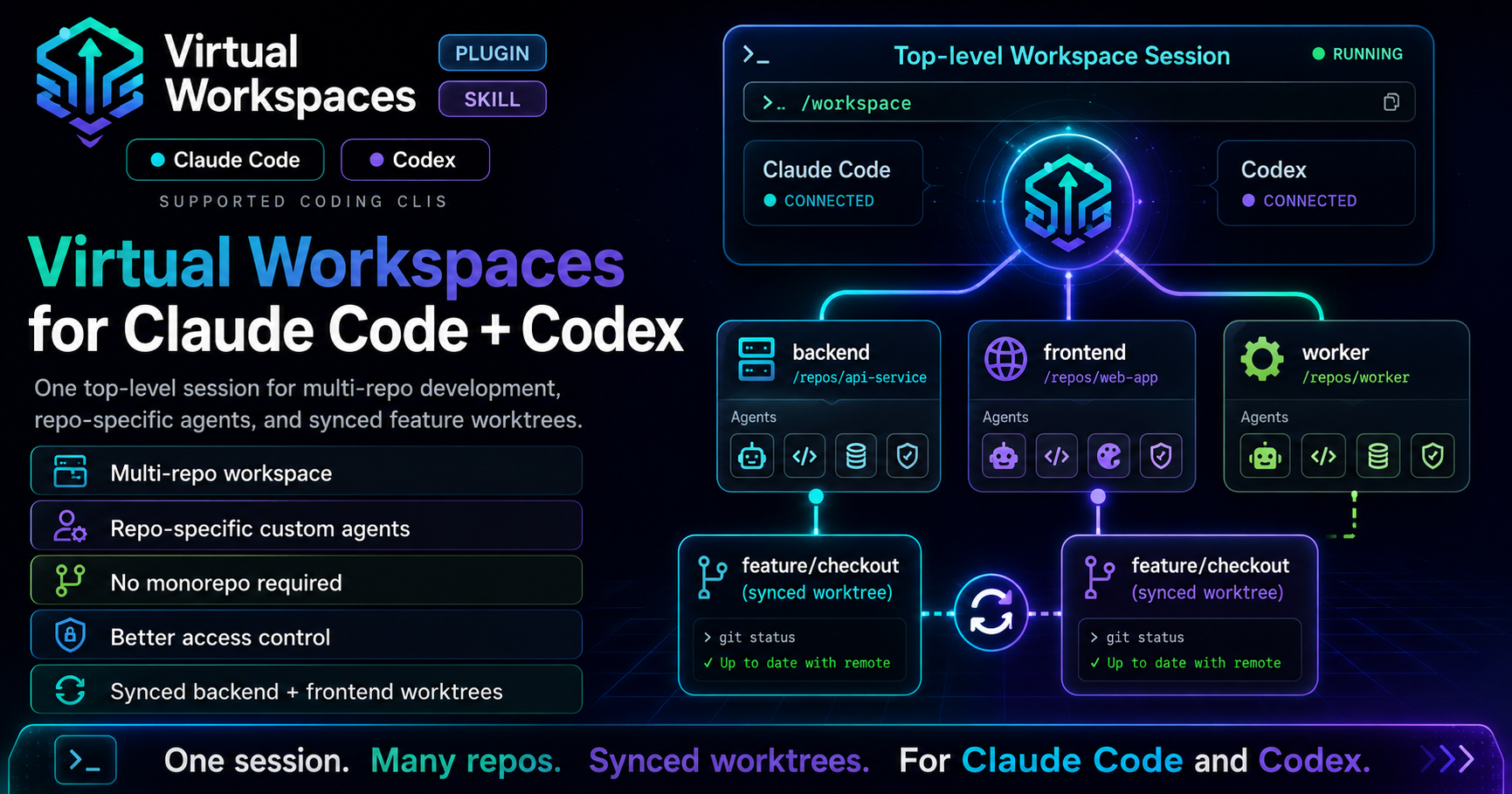
One top-level session for multi-repo development, repo-specific agents, and synced feature worktrees. Works with Claude Code and Codex.
Features
- Unified AI assistant session — agents, commands, skills, and hooks from all repos available in one session
- Works with Claude Code and Codex — symlinks both
.claude/ and .codex/ config directories
- Worktree-based feature branches — create synchronized feature branches across multiple repos with lightweight git worktrees
- Incremental worktree expansion — add repos to an existing feature branch mid-flight without disrupting work already in progress
- Status dashboard — see branch, dirty state, and ahead/behind tracking across all repos and worktrees at a glance
- Self-sufficient workspaces — generated workspaces run standalone; the plugin is only needed for initial creation
What you get
When invoked, the virtual-workspace skill walks you through naming the workspace, listing repo URLs, and picking a parent directory. It generates:
<Name>/
├── workspace.conf              # source of truth: list of sub-repos and worktrees
├── bootstrap.sh                # clones repos, creates worktrees, (re)builds symlinks
├── assistant-support.sh        # mirror repo-local config when adding Codex or Claude Code later
├── pull-all.sh                 # fast-forward pull every sub-repo and worktree
├── worktree-create.sh          # create worktrees for a feature branch across repos
├── worktree-remove.sh          # clean up worktrees when a feature is merged
├── worktree-status.sh          # show branch + dirty state for all repos and worktrees
├── CLAUDE.md                   # workspace conventions (Claude Code)
├── AGENTS.md                   # workspace conventions (Codex)
├── README.md                   # human-facing setup guide
├── .gitignore                  # excludes sub-repos, worktrees, and generated symlinks
└── <Name>.code-workspace       # multi-root file for VS Code / Cursor
It runs bootstrap.sh for you (cloning repos, creating symlinks), and optionally pushes the workspace shell to a new GitHub repo.
After setup, cd <Name> && claude (or codex) starts a session that sees every sub-repo's agents in one place.
If you add one assistant CLI after the workspace already exists, run ./assistant-support.sh codex, ./assistant-support.sh claude, or ./assistant-support.sh both. It mirrors repo-local config into the missing layout and reruns ./bootstrap.sh.
Install
Claude Code
/plugin marketplace add https://github.com/filipealva/virtual-workspace
/plugin install virtual-workspace@filipealva
Restart your session, then trigger the skill:
Create a virtual workspace with <repo-url-1> and <repo-url-2>
Or invoke it directly with /virtual-workspace.
Codex
codex plugin marketplace add filipealva/virtual-workspace
Then use the $virtual-workspace skill in a Codex session.
Manual install
git clone https://github.com/filipealva/virtual-workspace /tmp/vw

# Claude Code
mkdir -p ~/.claude/skills
cp -r /tmp/vw/skills/virtual-workspace ~/.claude/skills/

# Codex
mkdir -p ~/.codex/skills
cp -r /tmp/vw/skills/virtual-workspace ~/.codex/skills/
Multi-repo feature development with worktrees
The worktree system is the core workflow for cross-repo features. It uses git worktrees to create lightweight checked-out copies of each repo on a shared feature branch — no full re-clone needed.
Creating worktrees
Create worktrees for a feature branch across all repos, or a specific subset:
# All repos
./worktree-create.sh feature/payments

# Specific repos only
./worktree-create.sh feature/payments web-app api
This will:
- Fetch the latest from each repo's remote.
- Create the branch in each repo if it doesn't exist (from
origin/<branch> if available, otherwise from HEAD).
- Create worktree directories named
<repo>--<sanitized-branch>/ at the workspace root.
- Append worktree entries to
workspace.conf and .gitignore.
After creating worktrees, run ./bootstrap.sh to wire up .claude/ and .codex/ symlinks for the new directories.
Adding Claude Code or Codex after setup
Older workspaces, or workspaces that started with only one assistant's repo-local config, can be upgraded in place:
# Add Codex config from existing Claude Code config
./assistant-support.sh codex

# Add Claude Code config from existing Codex config
./assistant-support.sh claude

# Sync both directions
./assistant-support.sh both
The helper updates each checked-out repo declared in workspace.conf:

 openshift-eng
 rohitg00
 Marcel-Bich
 chardigio
 TheBushidoCollective
 pbakaus
'%20stop-opacity%3D'0.16'%2F%3E%3Cstop%20offset%3D'1'%20stop-color%3D'rgb(200%2C90%2C60)'%20stop-opacity%3D'0.03'%2F%3E%3C%2FlinearGradient%3E%3C%2Fdefs%3E%3Crect%20width%3D'320'%20height%3D'200'%20fill%3D'url(%23g)'%2F%3E%3Ccircle%20cx%3D'250'%20cy%3D'56'%20r%3D'92'%20fill%3D'rgb(200%2C90%2C60)'%20fill-opacity%3D'0.06'%2F%3E%3Ccircle%20cx%3D'64'%20cy%3D'172'%20r%3D'58'%20fill%3D'rgb(200%2C90%2C60)'%20fill-opacity%3D'0.05'%2F%3E%3C%2Fsvg%3E)