Full .NET development lifecycle — 27 commands, 120 skills, 16 rules, 13 agents, 12 architecture profiles. SDD workflow, code generation, AI detection for VSA, Clean Arch, DDD, CQRS Microservices.
npx claudepluginhub faysilalshareef/dotnet-ai-kit --plugin dotnet-ai-kitGenerates an event-sourced aggregate with events. Use when adding a new command-side domain entity.
Generates full CRUD stack for an entity. Use when adding complete create/read/update/delete operations.
Generates an API endpoint with request/response. Use when adding a new REST or Minimal API route.
Generates a query-side entity with handler. Use when adding a new read model for projections.
Generates a domain event type for an aggregate. Use when adding a new event to an existing aggregate.
Generates a Blazor page with data grid. Use when adding a new control panel UI page.
Generates test suite for existing code. Use when adding unit or integration tests to untested code.
Analyzes plan consistency before coding. Use when validating spec-plan-task alignment.
Saves a progress checkpoint for session handoff. Use when pausing work to resume in a later session.
Resolves ambiguities in a feature specification. Use when the spec has unclear or conflicting requirements.
Opens interactive configuration wizard. Use when changing company name, repos, permissions, command style, or any setting.
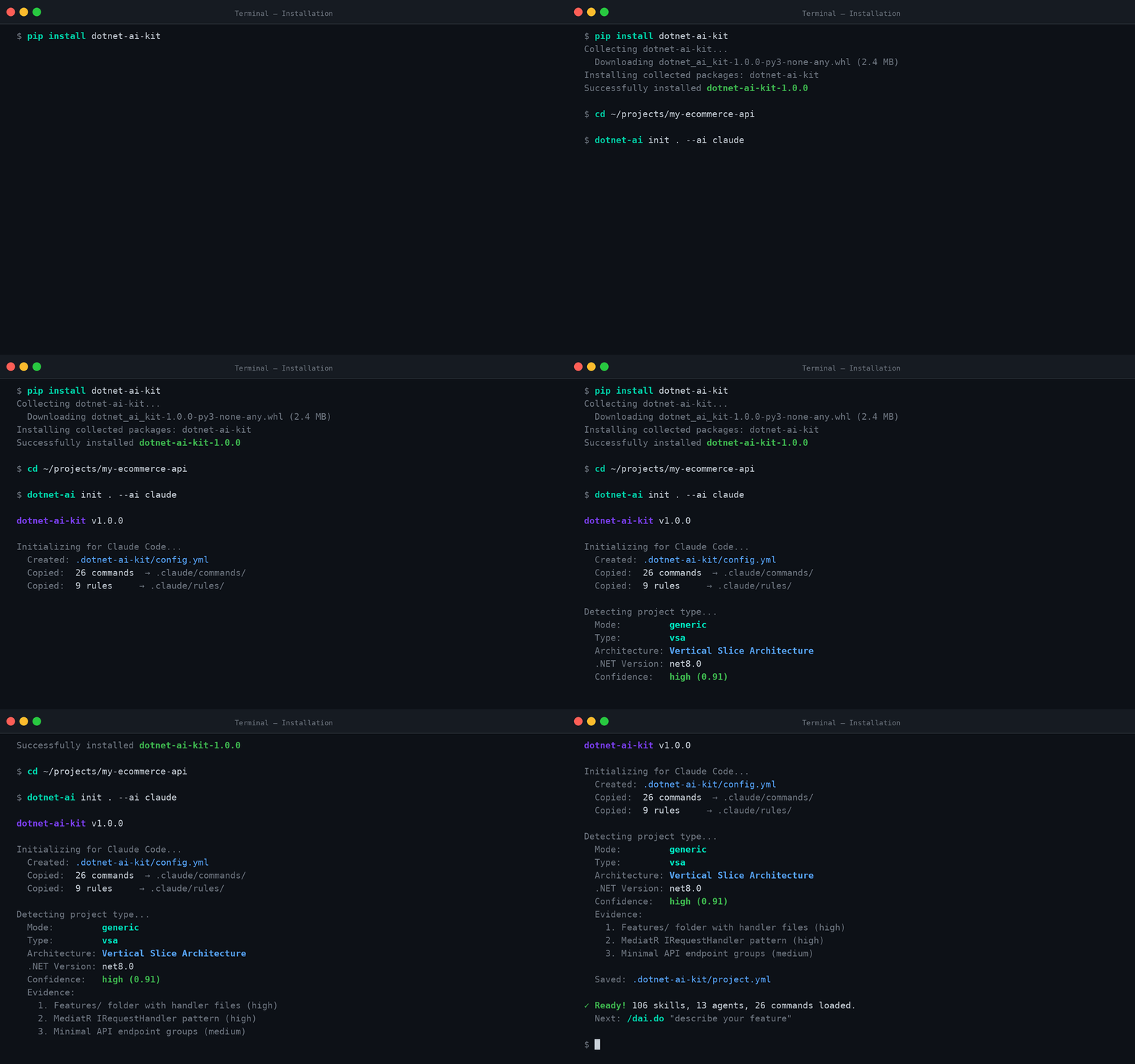
Detects project architecture, .NET version, and patterns. Use when initializing or learning project structure.
Runs the full SDD lifecycle from spec to PR. Use when building a complete feature end-to-end.
Generates project documentation. Use when creating README, API docs, ADRs, or deployment guides.
Explains code patterns with examples. Use when learning architecture patterns or understanding existing code.
Executes all planned implementation tasks. Use when ready to generate code from the task list.
Initializes dotnet-ai-kit in a .NET project. Use when setting up a new project for AI-assisted development.
Generates a project constitution from detected patterns. Use when persisting project knowledge across sessions.
Generates an implementation plan from the spec. Use when ready to design the technical approach.
Creates a pull request with linked changes. Use when implementation is verified and ready for team review.
Reviews code against standards and conventions. Use when implementation is complete and ready for quality check.
Creates a feature specification from a description. Use when starting a new feature or user story.
Shows current feature progress and phase. Use when checking where you are in the SDD lifecycle.
Breaks the plan into ordered executable tasks. Use when ready to start coding after planning.
Reverts the last AI-generated changes safely. Use when the last action produced incorrect results.
Verifies build, tests, and formatting pass. Use when validating implementation before creating a PR.
Ends session with summary and handoff notes. Use when finishing work for the day or handing off to a teammate.
Designs REST and gRPC API contracts and endpoint conventions
Architects CQRS command-side aggregates and event sourcing
Designs Blazor admin control panel UI and workflows
Designs Cosmos DB data models and query-side projections
Manages CI/CD pipelines, Docker, and infrastructure as code
Generates and maintains project documentation and ADRs
Leads overall .NET solution architecture and design patterns
Manages Entity Framework Core models, migrations, and queries
Designs API gateway routing, aggregation, and BFF patterns
Architects background processors and event handler services
Architects CQRS query-side read models and projections
Reviews code for quality, patterns, and architectural compliance
Designs and implements unit, integration, and E2E test suites
Caching patterns for .NET APIs — output caching, response caching, IDistributedCache, HybridCache, ETag conditional requests, and cache invalidation strategies. Trigger: cache, caching, output cache, distributed cache, Redis, ETag, HybridCache.
Content type negotiation, custom formatters, Accept headers, and response format configuration. Trigger: content negotiation, Accept header, formatter, content type, media type.
Controller-based API design, action results, model binding, routing, and MediatR integration patterns. Trigger: controller, ControllerBase, ApiController, action result, REST.
RESTful API controllers with MediatR integration, action results, model binding, authorization, and ProblemDetails error handling.
gRPC API design for .NET — proto file conventions, service naming, message design, gRPC-JSON transcoding, gRPC-Web for browsers, and backward compatibility. Trigger: gRPC, proto, protobuf, gRPC-Web, gRPC transcoding, service definition.
Minimal API endpoints, route groups, endpoint filters, TypedResults, and auto-discovery patterns. Trigger: minimal API, endpoints, MapGet, MapPost, route group, TypedResults.
OpenAPI spec generation with native .NET support, Scalar UI configuration, document transformers, and security scheme setup. Trigger: OpenAPI, Swagger, Scalar, API documentation, spec.
.NET 7+ built-in rate limiting — fixed window, sliding window, token bucket, concurrency limiter, per-endpoint policies, and custom partitioners. Trigger: rate limit, throttle, AddRateLimiter, 429, too many requests.
Scalar API documentation setup for .NET. OpenAPI doc generation, Scalar UI configuration, basic auth protection, theme customization.
SignalR real-time communication — hub design, typed clients, group management, authentication, Redis backplane scaling, and JavaScript/.NET client integration. Trigger: SignalR, real-time, WebSocket, hub, push notification, live update.
API versioning strategies using Asp.Versioning. URL segment, header, query string approaches, sunset policies, and OpenAPI integration. Trigger: API version, versioning, Asp.Versioning, v1, v2.
Architecture recommendation questionnaire. Evaluates project needs and recommends VSA, Clean Architecture, DDD, Modular Monolith, or Microservices.
4-layer Clean Architecture pattern with dependency rules. Domain, Application, Infrastructure, and Presentation layers with dependency inversion. Trigger: clean architecture, layers, dependency inversion, use cases.
Command/Query Responsibility Segregation basics. Separate read and write models, MediatR integration, and pipeline behaviors. Trigger: CQRS, command query separation, read model, write model.
Domain-Driven Design tactical patterns. Aggregates, value objects, domain events, strongly-typed IDs, bounded contexts, and rich domain models. Trigger: DDD, aggregate, value object, domain event, bounded context.
Modular monolith architecture. Module isolation, inter-module communication, shared kernel, and migration path to microservices. Trigger: modular monolith, modules, module isolation, module communication.
Multi-tenant architecture patterns — tenant isolation strategies, per-tenant database, schema separation, shared with discriminator, tenant resolution, and EF Core global query filters. Trigger: multi-tenant, tenant, tenancy, tenant isolation, shared database, tenant resolution.
Vertical Slice Architecture with feature folders, MediatR handlers per slice, minimal abstraction, and co-located code. Trigger: vertical slice, VSA, feature folders, feature-based.
Async/await best practices, CancellationToken propagation, Task patterns, ValueTask usage, and common async pitfalls. Trigger: async, await, Task, CancellationToken, concurrency.
Company-agnostic C# coding conventions. File-scoped namespaces, sealed classes, expression-bodied members, var usage, async naming, XML doc patterns.
IConfiguration, Options pattern, appsettings layering, user secrets, environment variables, and ValidateOnStart. Trigger: configuration, options, appsettings, secrets, IOptions, environment.
Modern C# idioms and language features. File-scoped namespaces, records, pattern matching, primary constructors, collection expressions. Trigger: C# style, modern syntax, idioms, language features.
DI registration patterns, service lifetimes, keyed services, Options pattern, decorator pattern, and factory delegates. Trigger: DI, dependency injection, services, registration, lifetime, singleton, scoped.
Modern C# design pattern catalog with decision guidance, when to use each pattern, when NOT to use, and which GoF patterns are replaced by language features. Trigger: design pattern, factory, builder, strategy, decorator, observer, mediator, singleton.
Domain exception hierarchy, ProblemDetails for REST, RpcException for gRPC, interceptor-based mapping, structured error codes, and error logging. Trigger: error handling, exceptions, problem details, RpcException, error codes.
Standalone FluentValidation patterns — validators, DI registration, manual and auto validation, custom validators, async validators, and integration with ProblemDetails. Trigger: FluentValidation, validator, validation, AbstractValidator, RuleFor.
Functional programming patterns in C# — Result types, railway-oriented programming, pure functions, immutability, pattern matching, and OOP vs FP decision guidance. Trigger: functional, Result, Option, immutable, pure function, pattern matching, railway.
Object mapping strategies — manual mapping (recommended), extension methods, LINQ projections, with AutoMapper and Mapster comparison for context. Manual-first approach. Trigger: mapping, map, AutoMapper, Mapster, DTO, projection, ToDto.
Modern C# 12/13/14 language features: primary constructors, records, collection expressions, field keyword, pattern matching, file-scoped namespaces, required members, raw string literals. Trigger: C# features, primary constructor, record, collection expression, pattern matching, field keyword.
SOLID principles with C# examples, decision guidance for when to apply each principle, anti-patterns for over-engineering, and practical trade-offs. Trigger: SOLID, single responsibility, open closed, liskov, interface segregation, dependency inversion.
CQRS command pattern: command record + handler + validator using MediatR and FluentValidation. Three-section file organization.
MediatR IRequest, IRequestHandler, and INotificationHandler patterns. Command and query handler creation, registration, and dispatch. Trigger: MediatR, IRequest, IRequestHandler, handler, Send.
Domain event dispatch using MediatR notifications. Multiple handlers per event, dispatch after persistence, and idempotent handling. Trigger: domain event, notification, INotification, event handler, publish.
MediatR pipeline behaviors for validation, logging, performance monitoring, and transaction management. Trigger: pipeline behavior, IPipelineBehavior, validation behavior, logging behavior.
CQRS query pattern: query record + handler + response DTO with pagination support. EF Core or Dapper read path.
CQRS request/response patterns, FluentValidation integration, Result types, and response DTO design. Trigger: request response, FluentValidation, validator, DTO, Result.
Audit trail with IAuditable interface and EF Core interceptor. Automatic CreatedAt/UpdatedAt/CreatedBy/UpdatedBy population.
Dapper for read-optimized queries alongside EF Core. Multi-mapping, pagination, dynamic filtering, CTEs, bulk operations.
Database transaction management, isolation levels, EF Core transactions, and cross-context coordination patterns. Trigger: transaction, isolation level, SaveChanges, commit, rollback.
Entity Framework Core fundamentals. DbContext configuration, entity configuration with IEntityTypeConfiguration, value converters, and connection resiliency. Trigger: EF Core, DbContext, entity configuration, database, ORM.
EF Core migration strategy, CI/CD migration application, data seeding, idempotent scripts, and migration best practices. Trigger: migration, database migration, seed data, schema change, EF migration.
EF Core query patterns. LINQ queries, raw SQL, compiled queries, projection with Select, split queries, and performance optimization. Trigger: EF query, LINQ, raw SQL, compiled query, projection, N+1.
Repository pattern with Unit of Work, specification pattern, generic and specialized repositories, and proper EF Core integration. Trigger: repository, unit of work, specification, IRepository, data access.
Specification pattern for composable query criteria. ISpecification interface, BaseSpecification with expression trees, repository integration.
AI-assisted project type detection for .NET projects (microservice and generic architectures)
.NET Aspire for local development orchestration and service defaults. Covers AppHost configuration, service discovery, and local resource provisioning. Trigger: Aspire, orchestration, service defaults, local development, AppHost.
Azure resource provisioning for microservices. Covers Service Bus topics/subscriptions, Cosmos DB accounts, SQL Server databases, and resource organization. Trigger: Azure Service Bus, Cosmos DB, SQL Server, Azure resources, provisioning.
Multi-stage Docker builds for .NET applications. Covers layer caching optimization, non-root user, health checks, and .NET-specific Dockerfile patterns. Trigger: Dockerfile, Docker, container, multi-stage build, container image.
GitHub Actions CI/CD workflows for .NET microservices. Covers build-test-deploy pipelines, Azure OIDC auth, ACR image push, and AKS deployment. Trigger: GitHub Actions, CI/CD, workflow, pipeline, deployment.
Kubernetes manifests for .NET microservices. Covers Deployment, Service, ConfigMap, Secret, health probes, and token placeholders for CI/CD pipelines. Trigger: Kubernetes, K8s, deployment, service, manifest, pod.
Architecture Decision Records using MADR format. Covers numbered sequence, status lifecycle, decision documentation, and cross-references. Trigger: ADR, architecture decision, MADR, decision record.
OpenAPI enrichment and Markdown API reference generation. Covers operation summaries, request/response examples, and gateway documentation patterns. Trigger: API documentation, OpenAPI, API reference, endpoint docs.
Architecture overview documentation with Mermaid diagrams. Covers service topology, event flows, data flows, and system architecture documentation. Trigger: architecture docs, Mermaid diagram, system overview, service map.
Changelog generation from git history using Keep a Changelog format. Covers conventional commits, semantic versioning, and release notes. Trigger: changelog, release notes, conventional commits, version, CHANGELOG.
Mermaid diagram generation patterns for architecture documentation. Covers service topology, event flows, sequence diagrams, and class diagrams. Trigger: Mermaid, diagram, flowchart, sequence diagram, class diagram.
Developer onboarding documentation generation. Covers setup guides, architecture overview, development workflow, and common tasks for new team members. Trigger: onboarding, developer guide, setup guide, getting started.
README generation from project analysis. Covers badges, setup instructions, architecture diagrams, and API summaries for per-repo and umbrella READMEs. Trigger: README, project documentation, badges, setup, getting started.
Deployment runbooks and troubleshooting guides. Covers prerequisites, deployment steps, verification, rollback procedures, and per-environment documentation. Trigger: runbook, deployment guide, troubleshooting, rollback, operations.
Background job patterns with Hangfire, hosted services, and recurring tasks. Covers job scheduling, persistent store, and fire-and-forget patterns. Trigger: background job, Hangfire, recurring task, scheduled job, cron.
Email service abstraction with template rendering. Covers IEmailService interface, SendGrid/SES integration, HTML templates, and queue-based sending. Trigger: email, notification, SendGrid, SES, template, SMTP.
Feature flag management with Microsoft.FeatureManagement — toggle patterns, percentage rollouts, time windows, custom filters, and Azure App Configuration integration. Trigger: feature flag, feature toggle, feature gate, FeatureManagement, feature rollout.
File storage abstraction with Azure Blob Storage and local file system support. Covers IFileStorage interface, blob operations, and SAS token generation. Trigger: file storage, blob storage, Azure Blob, file upload, download.
Event schema documentation per service, cross-service event registry, naming conventions, versioning strategy, and catalogue generation from code. Trigger: event catalogue, event registry, event schema, event documentation.
ASP.NET Core health check endpoints, custom health checks, Kubernetes probes, and health check UI. Trigger: health check, liveness, readiness, probe, /health.
OpenTelemetry integration for distributed tracing, custom metrics, and OTLP exporters. ASP.NET Core, EF Core, and HttpClient instrumentation. Trigger: OpenTelemetry, tracing, metrics, OTLP, distributed tracing, observability.
Serilog configuration with two-stage bootstrap, structured logging, enrichers, Seq sink, and request logging middleware. Trigger: Serilog, structured logging, logging, Seq, enricher, log.
Architecture tests with NetArchTest for enforcing dependency rules and project structure conventions. Covers layer dependency validation and naming rules. Trigger: architecture test, NetArchTest, dependency rule, fitness function.
Static code analysis with Roslyn analyzers, StyleCop, and EditorConfig. Covers analyzer configuration, rule customization, and CI enforcement. Trigger: code analysis, Roslyn, StyleCop, EditorConfig, analyzer, lint.
Standards review categories and severity ratings for code review. Covers architecture, security, performance, and testing review criteria. Trigger: review checklist, standards, code quality, review criteria.
Circuit breaker pattern for preventing cascading failures. Health degradation detection, half-open state, and recovery. Trigger: circuit breaker, cascading failure, half-open, break duration.
Polly v8 resilience pipelines with Microsoft.Extensions.Http.Resilience. Retry, timeout, fallback, hedging, and composable strategies. Trigger: Polly, resilience, resilience pipeline, HTTP resilience, fault tolerance.
Retry patterns with exponential backoff and jitter. Polly v8 retry strategies, transient fault handling, and idempotency considerations. Trigger: retry, exponential backoff, jitter, transient fault, retry policy.
JWT authentication setup, token generation with claims, refresh token flow, and token validation configuration. Trigger: JWT, authentication, token, Bearer, claims, refresh token.
Policy-based authorization with custom requirements, handlers, and permission-based access control. Trigger: authorization, policy, permission, HasPermission, requirement, handler.
CORS policy configuration for .NET APIs — named policies, origin/method/header control, credentials handling, per-endpoint CORS, preflight caching, and common mistakes. Trigger: CORS, cross-origin, AddCors, AllowOrigins, preflight, Access-Control.
ASP.NET Core Data Protection API for encryption at rest, key management, secure cookie protection, and sensitive data handling. Trigger: data protection, encryption, protect, unprotect, key management, DPAPI.
Input sanitization and XSS prevention — HTML sanitization, CSP headers, output encoding, security headers middleware, and file upload validation. Trigger: XSS, sanitize, sanitization, CSP, Content-Security-Policy, HtmlSanitizer, security headers.
Integration testing with WebApplicationFactory, TestContainers, and test fixtures. Covers in-memory database setup, fixture sharing, and end-to-end test patterns. Trigger: integration test, WebApplicationFactory, TestContainers, fixture.
Performance testing with BenchmarkDotNet, load testing, and Test.Live projects for Service Bus throughput validation. Covers hot path optimization and baselines. Trigger: benchmark, performance test, load test, throughput, Test.Live.
Test data generation with CustomConstructorFaker and Bogus. Covers faker patterns, assertion extensions, and test helper utilities for microservice testing. Trigger: test fixture, faker, Bogus, test data, assertion extension.
Unit testing patterns with xUnit, NSubstitute/Moq, and FluentAssertions. Covers Arrange-Act-Assert, test naming, mocking strategies, and test organization. Trigger: unit test, xUnit, NSubstitute, Moq, FluentAssertions, AAA.
Code review workflow with review checklist and CodeRabbit integration. Covers review categories, severity ratings, and automated review patterns. Trigger: code review, review checklist, CodeRabbit, PR review.
Feature directory structure and status progression for tracking development. Covers feature briefs, specs, status files, and multi-service coordination. Trigger: feature tracking, status, progress, feature directory.
Cross-repo coordination for microservice development. Covers dependency chains, deployment order, shared contracts, and parallel development strategies. Trigger: multi-repo, cross-repo, dependency chain, coordination.
Supporting artifact generation for complex features in /dotnet-ai.plan
Mode-specific plan templates for /dotnet-ai.plan
Specification-Driven Development lifecycle phases. Covers plan, spec, implement, review, and ship phases adapted for microservice and generic .NET projects. Trigger: SDD, specification driven, lifecycle, phases, plan, implement.
Session checkpoint, wrap-up, and handoff patterns for AI-assisted development. Covers session state persistence, context handoff, and resumption strategies. Trigger: session, checkpoint, handoff, wrap-up, resume, context.
Aggregate root pattern for event-sourced microservices. Covers Aggregate<T> base class, LoadFromHistory replay, ApplyChange for new events, factory methods, and domain invariants. Trigger: aggregate, event sourcing, domain model, CQRS command side.
Testing patterns for event-sourced aggregates. Covers CustomConstructorFaker with Bogus, event faker patterns, assertion extensions, and integration test patterns with WebApplicationFactory, DbContextHelper, and GrpcClientHelper. Trigger: aggregate test, faker, test data, assertion, command testing.
MediatR command handlers for event-sourced microservices. Covers IRequestHandler pattern, aggregate loading/creation via IUnitOfWork and ICommitEventService, command records with domain command interfaces, and gRPC service mapping. Trigger: command handler, MediatR, CQRS command, business logic.
Event hierarchy pattern for event-sourced microservices. Covers abstract Event base class, generic Event<TData>, IEventData interface, EventType enum, concrete event classes with primary constructors, and event data as records. Trigger: event sourcing, domain events, event data, event types.
EF Core event store with discriminator mapping for event-sourced command services. Covers ApplicationDbContext, GenericEventConfiguration with Newtonsoft.Json Data conversion, EventConfiguration discriminator pattern, OutboxMessageConfiguration with Event FK, and unique index on AggregateId+Sequence. Trigger: event store, command database, EF Core events, discriminator.
Event schema evolution for Event<TData> pattern. Covers backward-compatible changes, upcasting, versioned event data classes, migration strategies, and snapshot compatibility. Trigger: event versioning, event migration, schema evolution, upcaster, event version.
Outbox pattern for reliable event publishing. Covers OutboxMessage entity with Event FK, CommitEventService with IUnitOfWork, and ServiceBusPublisher with lock + Task.Run + batch processing. Trigger: outbox, event publishing, service bus, at-least-once delivery.
MudBlazor components for control panel pages. Covers MudDataGrid with server-side data, MudDialog for forms, loading states, and gateway integration. Trigger: Blazor, MudBlazor, MudDataGrid, data grid, dialog, form.
Gateway management class hierarchy for control panel API calls. Covers typed HttpClient wrappers, nested management classes, HTTP extension methods. Trigger: gateway facade, HttpClient, API client, management class.
MudBlazor theming, dialog patterns, snackbar integration, and common component usage for control panel applications. Trigger: MudBlazor, theme, dialog, snackbar, expansion panel, card.
URL-synchronized filter models for control panel data grids. Covers QueryStringBindable base class, two-way URL binding, and PropertyChanged notification. Trigger: query string, URL filter, bindable, filter model, URL sync.
ResponseResult<T> pattern with Switch for success/failure handling. Covers SuccessResult, FailedResult, ProblemDetails parsing, and UI integration. Trigger: ResponseResult, Switch pattern, error handling, result pattern.
Cosmos DB entity design with IContainerDocument, hierarchical partition keys, discriminator pattern, and ETag concurrency. Covers entity modeling for NoSQL documents. Trigger: cosmos entity, partition key, discriminator, IContainerDocument, NoSQL.
Cosmos DB repository pattern with LINQ queries, FeedIterator for pagination, point reads, and RU monitoring. Covers container-based data access patterns. Trigger: cosmos repository, LINQ query, FeedIterator, point read, RU.
Cosmos DB partition key strategy with composite/hierarchical keys, cross-partition query patterns, and hot partition avoidance. Covers design decisions for data distribution. Trigger: partition key, composite key, data distribution, cross-partition query.
Cosmos DB TransactionalBatch for atomic multi-document operations. Covers batch creation, ETag concurrency, chunked batches for large operations, and error handling. Trigger: transactional batch, atomic operations, cosmos batch, ETag.
Service registration for gateway gRPC clients. Covers ServicesURLsOptions with validated properties, AddGrpcClient with RegisterUrl helper, RegisterInterceptors, and AddServicesURLsOptions pattern. Trigger: gateway registration, gRPC client factory, service URL, ValidateOnStart.
REST controllers in gateway that delegate to gRPC backend services. Covers ControllerBaseV1 inheritance, gRPC client injection, inline request/response mapping, Paginated<T>, and authorization attributes. Trigger: gateway controller, REST endpoint, gRPC client call, API endpoint.
JWT authentication, policy-based authorization, and role-based access for gateway endpoints. Covers AddJwtAuthentication, AddPolicies with ApiScope, custom IAuthorizationHandler, Policy constants, and Roles constants. Trigger: JWT auth, authorization policy, gateway security, Authorize attribute.
Scalar API documentation for gateway endpoints. Covers AddOpenApiDocumentation, AddBaseScalarApiDocumentation, OpenApiDocEntry, BearerSecuritySchemeTransformer, ScalarBasicAuthMiddleware, and Pentagon rate limiting. Trigger: Scalar, API docs, OpenAPI, documentation UI, Pentagon.
gRPC server and client interceptors for cross-cutting concerns. Covers exception mapping, culture switching, access claims extraction, and registration order. Trigger: gRPC interceptor, exception handling, culture, access claims.
Proto file design and gRPC service implementation patterns. Covers proto service/message definitions, service class inheritance, MediatR integration, and mapping extensions. Trigger: proto file, gRPC service, protobuf, service definition, rpc.
FluentValidation for gRPC requests with Calzolari integration. Covers AbstractValidator for proto requests, resource-based messages, and pre-handler validation. Trigger: gRPC validation, FluentValidation, Calzolari, request validation.
Batch event processing with BackgroundService, SemaphoreSlim concurrency control, AcceptNextSessionAsync, ReceiveMessagesAsync batching, deduplication by SourceId, and batch MediatR request. Separate from IHostedService session processor pattern. Trigger: batch processing, semaphore, deduplication, BackgroundService, queue listener.
Subject-based event routing with inline switch statement, typed HandleAsync, MediatR dispatch, and Serilog LogContext enrichment. No separate EventRouter or EventDeserializer class -- routing is inline in each listener. Trigger: event routing, subject dispatch, MediatR send, HandleAsync, deserialize.
GrpcClientFactory registration with AddGrpcClient using (provider, client) callback, IOptions<ExternalServicesOptions> for URL resolution, and RetryCallerService wrapper for resilient gRPC calls with retry loop. Trigger: gRPC client, client factory, external service, cross-service call, retry.
IHostedService with ServiceBusSessionProcessor and paired DLQ processor pattern. Covers lifecycle management, exact session processor configuration, dead letter sub-processor, graceful shutdown, and error handling. Trigger: hosted service, processor, lifecycle, session processor, DLQ.
Query-side event handlers implementing IRequestHandler<Event<T>, bool>. Returns bool for message completion. Uses IUnitOfWork with named repository properties, strict sequence checking, and idempotent duplicate handling. Trigger: event handler, query projection, sequence check, idempotent.
Service Bus session-based listener as IHostedService. Uses ServiceBusSessionProcessor with specific config, paired dead-letter processor, subject-based routing via switch expression, typed HandleAsync<T> deserialization, and LogContext enrichment. Trigger: service bus listener, session processor, event routing, hosted service.
Query-side entity pattern with private setters, event-based constructors, behavior methods with (TData data, int sequence) signature, and sequence tracking for idempotency. Trigger: query entity, read model, projection, private setters, sequence.
MediatR query handlers using IUnitOfWork with named repository properties. Repositories encapsulate filtering, pagination, and sorting. Single-entity queries use FindAsync with DTO mapping. List queries delegate to repository methods returning output DTOs. Trigger: query handler, pagination, filtering, read operations.
Inline sequence validation for idempotent event handlers. Covers the exact guard pattern using Sequence != @event.Sequence - 1, returning true for already-processed duplicates, and false for out-of-order gaps. No helper class — logic is inlined in each handler. Trigger: sequence check, idempotent, event ordering, gap detection.
Battle-tested Claude Code plugin for engineering teams — 38 agents, 156 skills, 72 legacy command shims, production-ready hooks, and selective install workflows evolved through continuous real-world use
Core skills library for Claude Code: TDD, debugging, collaboration patterns, and proven techniques
Access thousands of AI prompts and skills directly in your AI coding assistant. Search prompts, discover skills, save your own, and improve prompts with AI.
Comprehensive skill pack with 66 specialized skills for full-stack developers: 12 language experts (Python, TypeScript, Go, Rust, C++, Swift, Kotlin, C#, PHP, Java, SQL, JavaScript), 10 backend frameworks, 6 frontend/mobile, plus infrastructure, DevOps, security, and testing. Features progressive disclosure architecture for 50% faster loading.
Reliable automation, in-depth debugging, and performance analysis in Chrome using Chrome DevTools and Puppeteer
AI-powered development tools for code review, research, design, and workflow automation.