project-brain
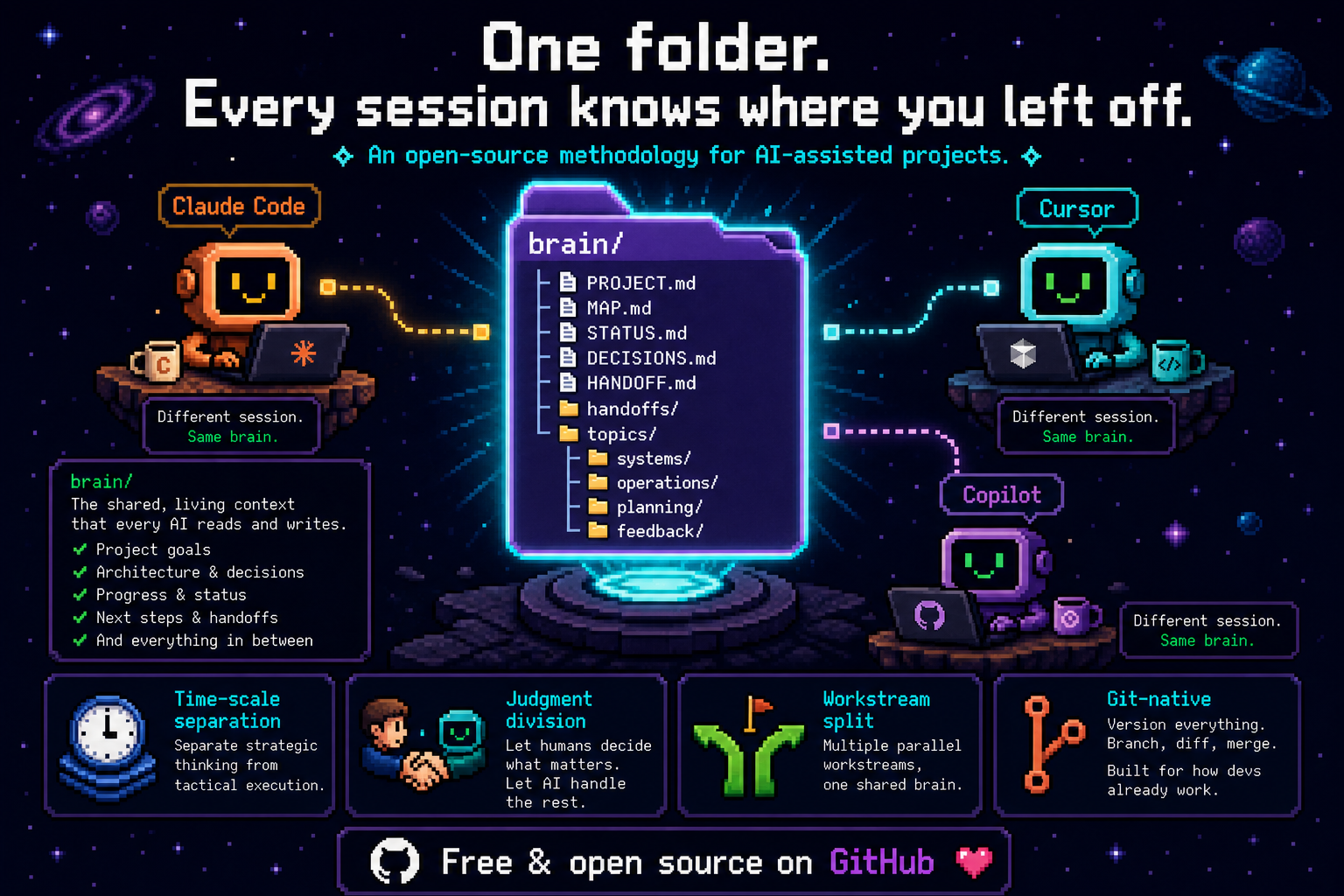
Different session. Same brain.
A folder structure + collaboration protocol that lets your AI assistant pick up a project after a context wipe — across new sessions, new windows, new collaborators.
中文版 →
Part of Sprout Labs — Local-first AI memory & agent safety, built independently by Ethan (Independent Product Designer & AI Builder, since 2016).
ethanflow.com · LinkedIn · @ethanflow_lab · GitHub

The problem
Long-running projects with AI coding assistants (Claude Code, Cursor, Copilot, etc.) hit a counter-intuitive wall:
Larger context windows don't solve the problem. Better information structure does.
A wider window doesn't mean it gets read. Read doesn't mean located. Located doesn't mean prioritized. Without structure, every new session starts with "wait, what's going on here?" — and the AI either reads too much (wasting tokens) or misses the critical pieces.
Symptoms you'll recognize:
- One README mixing project pitch + current status + decision history + how-to-run
- Sprawling docs where boundaries blur (one architecture file containing design + ops + history + bugs)
- Decisions buried in commit messages, chat logs, and footnotes — never traceable when you need them
- Cross-window handoff loses the "fresh stuff in your head" — the next session starts blind
- Projects running multiple parallel workstreams (e.g., dev + ops + outreach as three parallel streams) lose track of which session is on which line — switching between them re-orients from scratch every time
project-brain is a structural answer: a brain/ folder layout + a small set of protocols, designed so a fresh AI session can read 2-3 files and be productive.
Quick start
Option A — install as a Claude Code plugin (recommended for Claude Code users)
In Claude Code, run these two slash commands:
/plugin marketplace add Ethan-YS/project-brain
/plugin install project-brain@sprout-labs
If /plugin isn't exposed in your Claude Code environment (some embedded / SDK contexts strip it), the CLI form does the exact same thing — run from any terminal:
claude plugin marketplace add Ethan-YS/project-brain
claude plugin install project-brain@sprout-labs
That's it. From any project after that, just say:
- "set up project brain" — kick off a new brain
- "resume this project" — load
MAP.md + STATUS.md + (if exists) HANDOFF.md
- "I'm switching windows" / "context's getting full" — write a HANDOFF before context dies
- "update the project brain" — propose updates with reasons, you approve per item
The skill handles four workflows: new-project kick-off, startup resume, window-switch handoff, and updates. Auto-trigger requires an explicit user request — it intentionally does not activate just because a brain/ folder exists.
Already installed the old way? If you previously cloned to ~/.claude/skills/project-brain, remove it first: rm -rf ~/.claude/skills/project-brain. The plugin install is the supported path going forward.
Update later: /plugin marketplace update sprout-labs to fetch the latest version.
Option B — manual scaffold (works with any AI assistant)
If you don't use Claude Code, or you just want the scaffold script:
git clone https://github.com/Ethan-YS/project-brain.git

 pborenstein
 Advenire-Consulting
 blas0
blas0 ActiveMemory
 digital-stoic-org
 EricGrill
'%20stop-opacity%3D'0.16'%2F%3E%3Cstop%20offset%3D'1'%20stop-color%3D'rgb(200%2C90%2C60)'%20stop-opacity%3D'0.03'%2F%3E%3C%2FlinearGradient%3E%3C%2Fdefs%3E%3Crect%20width%3D'320'%20height%3D'200'%20fill%3D'url(%23g)'%2F%3E%3Ccircle%20cx%3D'250'%20cy%3D'56'%20r%3D'92'%20fill%3D'rgb(200%2C90%2C60)'%20fill-opacity%3D'0.06'%2F%3E%3Ccircle%20cx%3D'64'%20cy%3D'172'%20r%3D'58'%20fill%3D'rgb(200%2C90%2C60)'%20fill-opacity%3D'0.05'%2F%3E%3C%2Fsvg%3E)