Claude Code Privacy Guard

🛡️ Prevent secrets and PII from being accidentally shared with Claude Code.
A privacy-first plugin for Claude Code that scans prompts for sensitive data and blocks them before they reach the AI.
Features
- ✅ Blocks prompts containing sensitive data before they're sent to Claude
- ✅ Detects PII, secrets, API keys, tokens, and sensitive information
- ✅ Works locally - all scanning happens on your machine
- ✅ Zero configuration - works out of the box
- ✅ Detailed reporting - shows exactly what was detected
- ✅ Toggle rules and manage allowlists - by hand in
.privacy-guard.json, or via npx claude-code-privacy-guard rules for a local web UI
Installation
# Add the marketplace (if not already added)
/plugin marketplace add datumbrain/claude-code-privacy-guard

# Install the plugin
/plugin install claude-code-privacy-guard
⚠️ Important: Restart Required
After installing the plugin, you must restart your Claude Code session for it to take effect. This is because hooks are registered at session startup - Claude Code doesn't dynamically load new hooks mid-session.
Simply close and reopen Claude Code, or start a new session.
Once restarted, the plugin will automatically scan all prompts before they reach Claude.
What Gets Detected
✅ Secrets
- OpenAI API keys (
sk-..., sk-proj-...)
- Anthropic, OpenRouter, Google AI, Groq, and Perplexity API keys
- Hugging Face API tokens
- AWS credentials
- GCP service account keys
- Azure client secrets (Microsoft Entra ID)
- GitHub tokens (classic and fine-grained PATs)
- GitLab tokens (personal access, deploy, runner, pipeline trigger, service account, CI job)
- Slack tokens
- Stripe keys
- Twilio API key SIDs and account SIDs
- SendGrid API keys
- npm access tokens
- Database connection strings with inline credentials (postgres/mysql/mongodb/redis/amqp)
- JWT tokens
- Bearer tokens
- SSH and PEM private keys
- Generic API key/secret/token assignments in code
Plus a bundled external ruleset (data/regex_list_1.json, filterable via externalRulesMode) covering many more service-specific tokens - see Managing Rules to browse the full list.
✅ Personal Information (PII)
Phone numbers, Social Security Numbers, and credit card numbers are not
currently detected by the default configuration - see
#7 for
tracking status.
How It Works
- You type a prompt in Claude Code
- Privacy Guard intercepts it via a
UserPromptSubmit hook
- Scans for sensitive data using regex patterns
- Reacts according to the configured
mode (see Block, Redact, or Warn? below) - by default, blocks the prompt if sensitive data is found
- Shows you exactly what was detected
Blocking relies on the UserPromptSubmit hook JSON protocol: the hook prints {"decision": "block", "reason": "..."} to stdout and exits with code 0. (Exit code 0 is required for the JSON decision to be honored - a non-zero exit is treated as a non-blocking hook error, and the prompt would go through anyway.) A non-blocking warning uses {"systemMessage": "..."} instead, which surfaces the message without stopping the prompt.
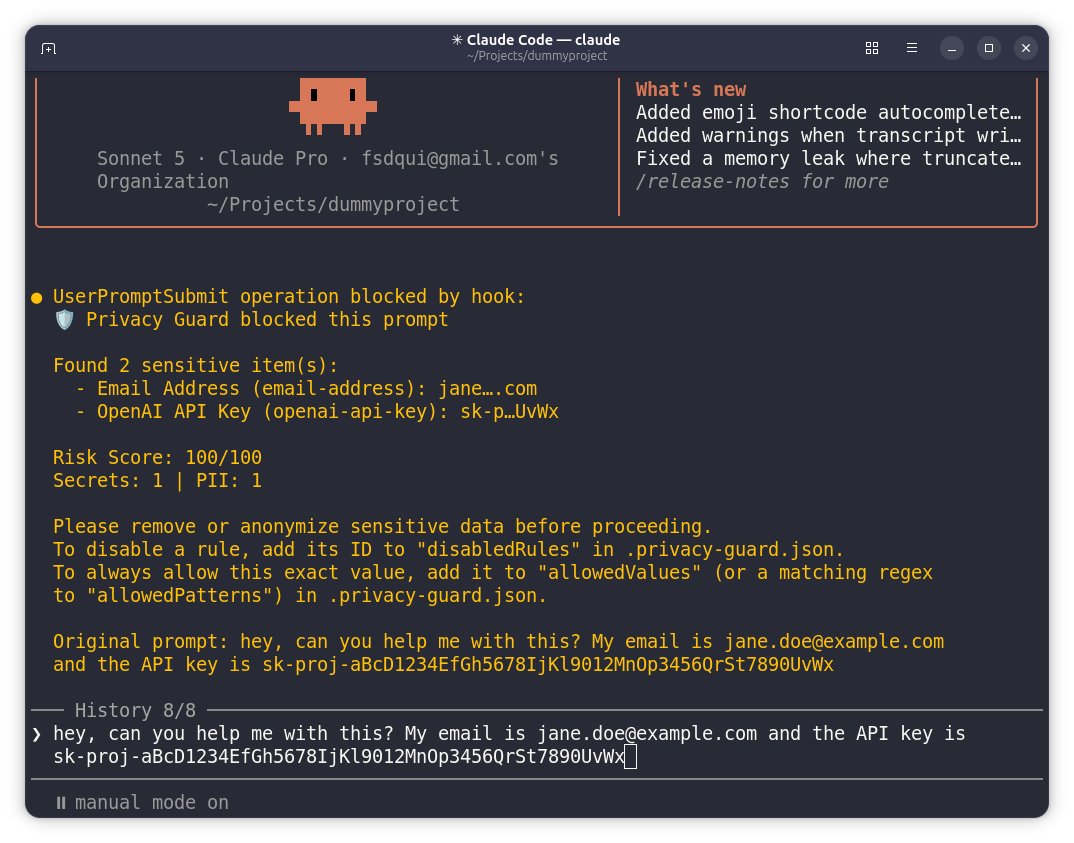
Example
Input:
My API key is sk-proj-abc123xyz and email is [email protected]
Result:
🛡️ Privacy Guard blocked this prompt

Found 2 sensitive item(s):
  - OpenAI API Key (openai-api-key): sk-p…3xyz
  - Email Address (email-address): john….com

Risk Score: 100/100
Secrets: 1 | PII: 1

Please remove or anonymize sensitive data before proceeding.
To disable a rule, add its ID to "disabledRules" in .privacy-guard.json.
Configuration
Create a .privacy-guard.json file (searched upward from your current
working directory, so a repo-root or home-directory config both work) to
override the defaults. See .privacy-guard.example.json for a starter
file.

 coo-quack
 JeongJaeSoon
 jeremylongshore
 mintmcp
 rohitg00
 railyard-dev
'%20stop-opacity%3D'0.16'%2F%3E%3Cstop%20offset%3D'1'%20stop-color%3D'rgb(200%2C90%2C60)'%20stop-opacity%3D'0.03'%2F%3E%3C%2FlinearGradient%3E%3C%2Fdefs%3E%3Crect%20width%3D'320'%20height%3D'200'%20fill%3D'url(%23g)'%2F%3E%3Ccircle%20cx%3D'250'%20cy%3D'56'%20r%3D'92'%20fill%3D'rgb(200%2C90%2C60)'%20fill-opacity%3D'0.06'%2F%3E%3Ccircle%20cx%3D'64'%20cy%3D'172'%20r%3D'58'%20fill%3D'rgb(200%2C90%2C60)'%20fill-opacity%3D'0.05'%2F%3E%3C%2Fsvg%3E)