English | 中文
CiteCheck — Cross-Agent Citation Verification Skill
A portable agent skill + standalone CLI for verifying academic paper citations.
Extract references from LaTeX or PDF, validate formatting, verify existence via Crossref / Semantic Scholar / OpenAlex / PubMed / arXiv / dblp / Google Scholar / WebSearch, and score thematic / semantic relevance using cited paper abstracts — all without requiring an external LLM API key when used as a skill.



✨ What is CiteCheck?
CiteCheck is primarily a cross-agent skill that helps AI coding assistants verify citations in academic papers. It is designed to work across Claude Code, Codex, OpenClaw, Hermes, Gemini CLI, Cursor, and more — following the agentskills.io open standard.
It is also available as a standalone Python CLI for users who prefer running it directly from the terminal.
Key Design Principle: When used as a skill, thematic and semantic matching are performed directly by the host agent's own reasoning. No OpenAI API key is required. The CLI handles structured tasks (parsing, format checks, API queries) while the agent handles interpretive tasks (relevance scoring, claim verification).
🚀 Two Ways to Use
Mode 1: Agent Skill (Recommended)
Install CiteCheck as a skill for your coding agent. The agent will automatically discover and invoke it when you ask to check citations.
Step 1 — Install the skill
🟢 Easiest way — just ask your agent:
Install this skill for me: https://github.com/color4-alt/CiteCheck
Your agent will clone the repo into the correct skill directory automatically.
If you prefer to install manually:
| Agent | Install Path |
|---|
| Claude Code | ~/.claude/skills/citecheck |
| Codex CLI | ~/.codex/skills/citecheck |
| OpenClaw | ~/.openclaw/skills/citecheck |
| Hermes | ~/.hermes/skills/citecheck |
| Gemini CLI | ~/.gemini/skills/citecheck |
| Cursor | .cursor/rules/citecheck.mdc (copy skills/citecheck/SKILL.md) |
| GitHub Copilot | Append AGENTS.md to .github/copilot-instructions.md |
Step 2 — Invoke
Use natural language or a slash command with a file reference:
/citation-verification @main.tex
/citation-verification @paper.pdf
/citation-verification @path/to/latex_project/
Or simply tell your agent:
Check the citations in this paper.
Verify the references in my LaTeX project.
Are these citations accurate and relevant?
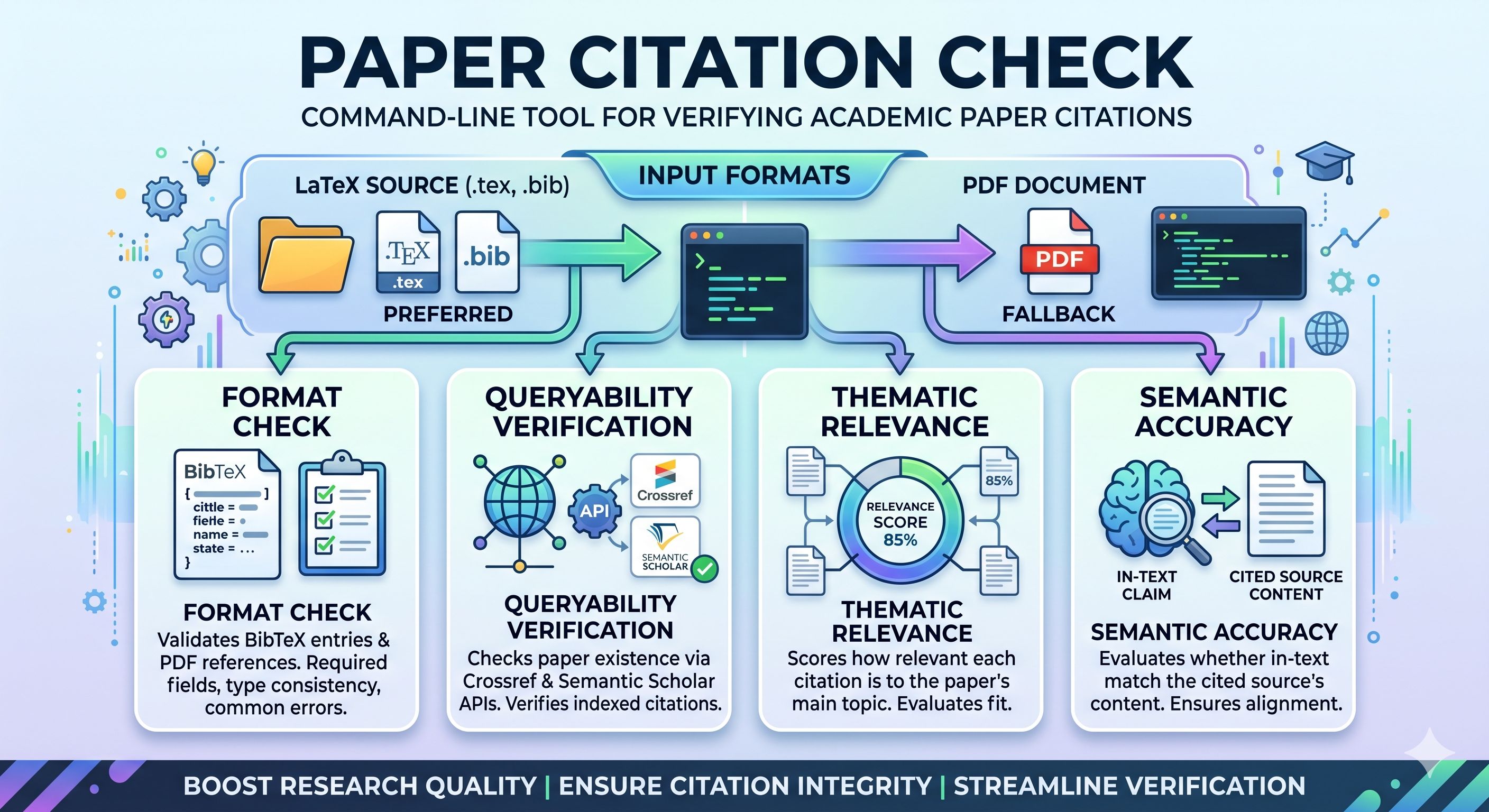
The agent will:
- Call
citecheck CLI to parse the paper and check formatting
- Query Crossref → Semantic Scholar → OpenAlex → PubMed → arXiv → dblp → Google Scholar → WebSearch to verify paper existence
- Use its own reasoning to evaluate thematic relevance and semantic accuracy
- Present a structured Markdown report
No API key needed. The agent handles steps 3–4 with its built-in LLM capabilities.
Mode 2: Standalone CLI
For users who prefer the command line or need to integrate into CI pipelines.
Step 1 — Install the Python package
pip install citecheck-cli
For PDF support:
pip install citecheck-cli[pdf]
Or install from source:
git clone https://github.com/color4-alt/CiteCheck.git
cd CiteCheck
pip install -e ".[pdf,dev]"
Step 2 — Run
# Check a LaTeX project (preferred)
citecheck path/to/latex_project/

# Check a single .tex file
citecheck main.tex

# Check a PDF (fallback)
citecheck paper.pdf -o report.md

# Skip online verification (offline mode)
citecheck main.tex --skip-verification

# Use external LLM for matching (requires --api-key)
citecheck main.tex --api-key $OPENAI_API_KEY
CLI Options
citecheck [-h] [-o OUTPUT] [--skip-verification] [--skip-semantic] [--api-key API_KEY] [-v] input

positional arguments:
  input                 Path to paper (PDF, .tex, or directory with .tex + .bib)

options:
  -o OUTPUT             Output report path (default: citation_check_report.md)
  --skip-verification   Skip all online verification (Crossref / Semantic Scholar / OpenAlex / PubMed / arXiv / dblp / Google Scholar / WebSearch)
  --skip-semantic       Skip semantic matching
  --api-key API_KEY     Optional OpenAI key for LLM matching (falls back to heuristics)
  -v, --verbose         Verbose output
📊 Workflow

 rpatrik96
 Imbad0202
 ZimoLiao
 agencyenterprise
 andrehuang
 andyed
'%20stop-opacity%3D'0.16'%2F%3E%3Cstop%20offset%3D'1'%20stop-color%3D'rgb(200%2C90%2C60)'%20stop-opacity%3D'0.03'%2F%3E%3C%2FlinearGradient%3E%3C%2Fdefs%3E%3Crect%20width%3D'320'%20height%3D'200'%20fill%3D'url(%23g)'%2F%3E%3Ccircle%20cx%3D'250'%20cy%3D'56'%20r%3D'92'%20fill%3D'rgb(200%2C90%2C60)'%20fill-opacity%3D'0.06'%2F%3E%3Ccircle%20cx%3D'64'%20cy%3D'172'%20r%3D'58'%20fill%3D'rgb(200%2C90%2C60)'%20fill-opacity%3D'0.05'%2F%3E%3C%2Fsvg%3E)