Stats
Actions
Available In
Tags

Explore and manage local SQL databases token-efficiently—connect to PostgreSQL, MySQL, SQLite, or SQL Server, browse schemas with progressive disclosure, and fix connection issues—all from within Claude Code.
This plugin requires configuration values that are prompted when the plugin is enabled. Sensitive values are stored in your system keychain.
dsnExamples: postgres://user:password@localhost:5432/dbname | mysql://user:password@localhost:3306/dbname | mariadb://user:password@localhost:3306/dbname | sqlserver://user:password@localhost:1433/dbname | sqlite:///path/to/database.db. Append ?sslmode=require for SSL. Use a least-privilege, read-only database account.
${user_config.dsn}Admin access level
Server config contains admin-level keywords
Own this plugin?
Verify ownership to unlock analytics, metadata editing, and a verified badge. GitHub access is read-only (username + org membership).
Sign in to claimOwn this plugin?
Verify ownership to unlock analytics, metadata editing, and a verified badge. GitHub access is read-only (username + org membership).
Sign in to claimnpx claudepluginhub bytebase/dbhub --plugin dbhubBased on adoption, maintenance, documentation, and repository signals. Not a security audit or endorsement.
[!NOTE]
Brought to you by Bytebase, open-source database DevSecOps platform.

            +------------------+    +--------------+    +------------------+
            |                  |    |              |    |                  |
            |                  |    |              |    |                  |
            |  Claude Desktop  +--->+              +--->+    PostgreSQL    |
            |                  |    |              |    |                  |
            |  Claude Code     +--->+              +--->+    SQL Server    |
            |                  |    |              |    |                  |
            |  Cursor          +--->+    DBHub     +--->+    SQLite        |
            |                  |    |              |    |                  |
            |  VS Code         +--->+              +--->+    MySQL         |
            |                  |    |              |    |                  |
            |  Copilot CLI     +--->+              +--->+    MariaDB       |
            |                  |    |              |    |                  |
            |                  |    |              |    |                  |
            +------------------+    +--------------+    +------------------+
                 MCP Clients           MCP Server             Databases
DBHub is a zero-dependency, token efficient MCP server implementing the Model Context Protocol (MCP) server interface. This lightweight gateway allows MCP-compatible clients to connect to and explore different databases:
PostgreSQL, MySQL, SQL Server, MariaDB, and SQLite.
DBHub implements MCP tools for database operations:
dbhub.toml configuration fileDBHub includes a built-in web interface for interacting with your database tools. It provides a visual way to execute queries, run custom tools, and view request traces without requiring an MCP client.
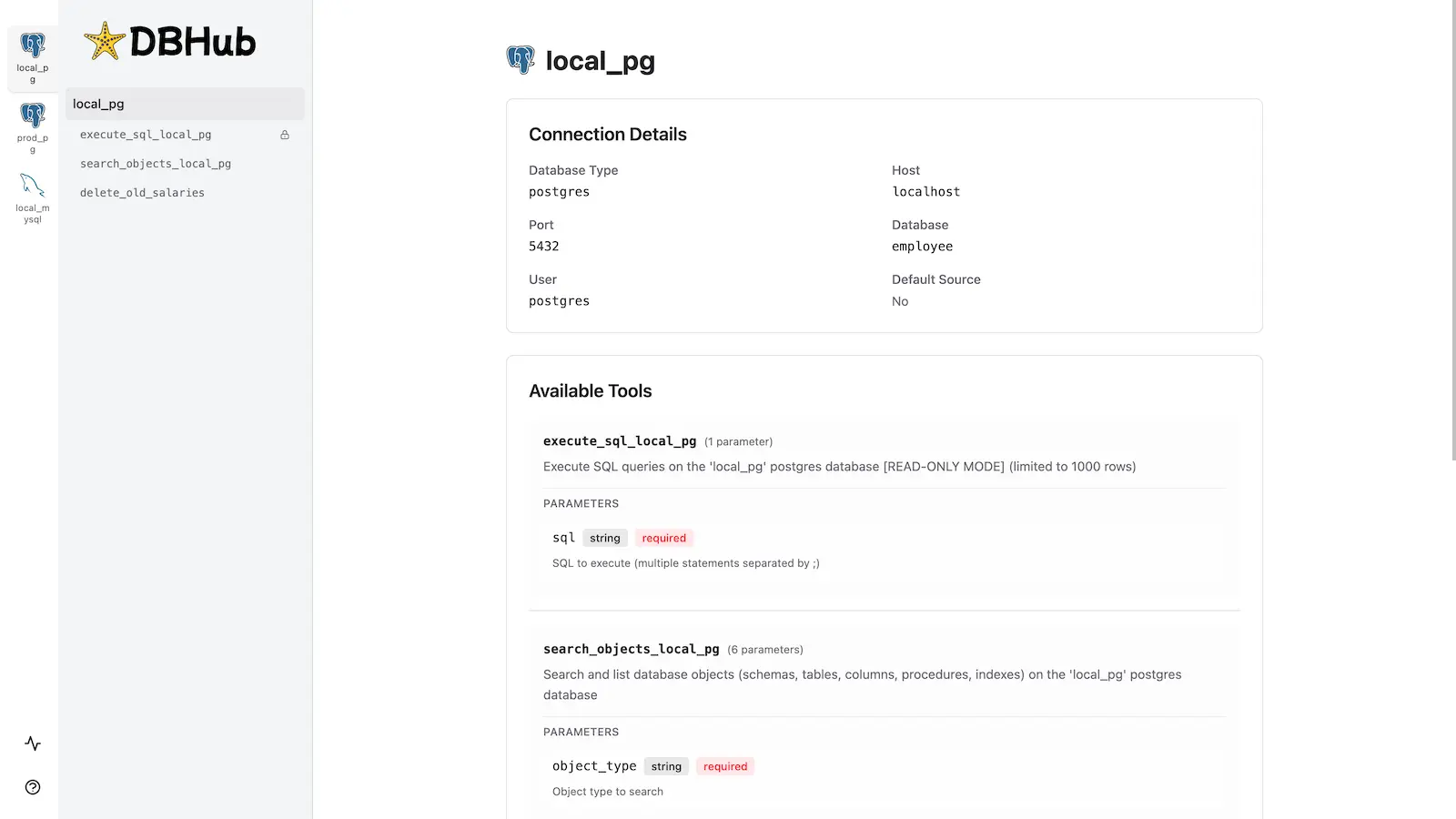
See the full Installation Guide for detailed instructions.
Docker:
docker run --rm --init \
   --name dbhub \
   --publish 8080:8080 \
   bytebase/dbhub \
   --transport http \
   --port 8080 \
   --dsn "[REDACTED:DB Connection String]
NPM: (requires Node.js >= 22.5.0)
npx @bytebase/dbhub@latest --transport http --port 8080 --dsn "[REDACTED:DB Connection String]
MCP Bundle (one-click install):
Download dbhub-<version>.mcpb from the latest release and install it in any MCPB-compatible client — Claude Desktop (double-click, or drag into Settings → Extensions), Claude Code, or MCP for Windows — then enter your database connection string. The bundle runs locally over stdio, is read-only by design (writes are rejected and the database session is set to read-only at the engine level), and needs no remote endpoint or OAuth setup — ideal for giving non-technical teammates curated, read-only database access. Pair it with a least-privilege, read-only database account. See the MCP Bundle guide for details and for packaging your own bundle.
Claude Code Plugin:
A fortune-cookie-style skill: the oracle 🔮 draws a random playful, encouraging answer of the day from a bilingual (Chinese / English) pool, independent of whatever you ask.
 bytebase
Create, connect, and interact with a Cloud SQL for PostgreSQL database and data.
 gemini-cli-extensions
Connect and interact with a Cloud SQL for MySQL database and data.
gemini-cli-extensionsGraphJin MCP server plugin for Claude Code
 dosco
doscoCreate, connect, and interact with an AlloyDB for PostgreSQL database and data.
gemini-cli-extensionsDatabase migration automation, observability, and cross-database migration strategies
 wshobson
Neon database development skills including authentication, Drizzle ORM, serverless drivers, and toolkit utilities
'%20stop-opacity%3D'0.16'%2F%3E%3Cstop%20offset%3D'1'%20stop-color%3D'rgb(200%2C90%2C60)'%20stop-opacity%3D'0.03'%2F%3E%3C%2FlinearGradient%3E%3C%2Fdefs%3E%3Crect%20width%3D'320'%20height%3D'200'%20fill%3D'url(%23g)'%2F%3E%3Ccircle%20cx%3D'250'%20cy%3D'56'%20r%3D'92'%20fill%3D'rgb(200%2C90%2C60)'%20fill-opacity%3D'0.06'%2F%3E%3Ccircle%20cx%3D'64'%20cy%3D'172'%20r%3D'58'%20fill%3D'rgb(200%2C90%2C60)'%20fill-opacity%3D'0.05'%2F%3E%3C%2Fsvg%3E)