Stats
Actions
Available In
Tags
By brimtown
Launch and play Dwarf Fortress-inspired ASCII simulations in tmux terminals, with Claude as your interactive fortress overseer. Generate dramatic fortress names to embark on new worlds or use an arrow-navigated picker to resume, delete, or manage saved games via CLI commands powered by a local stdio server.
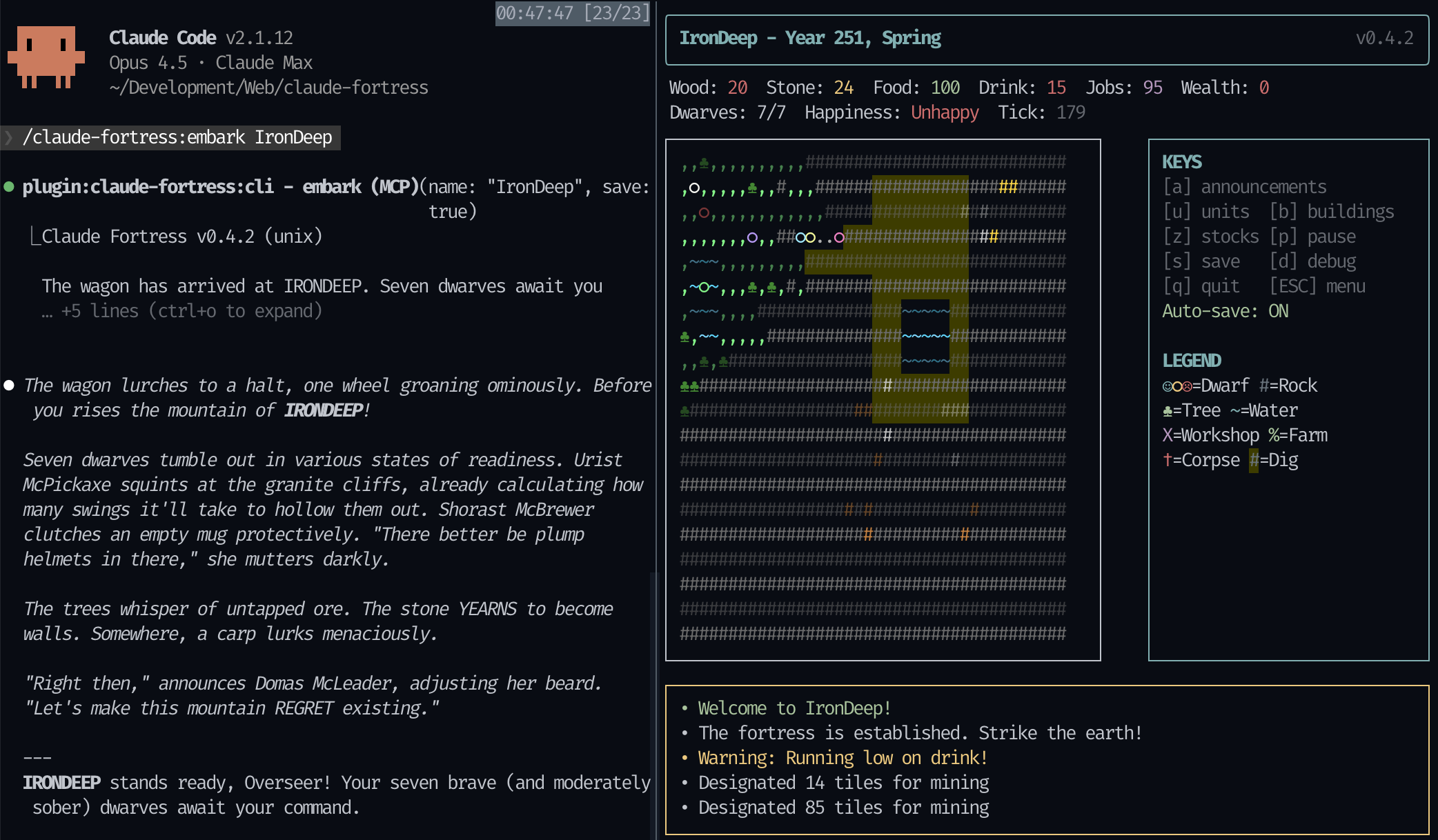
Strike the earth! Command dwarves through natural language. Claude Code acts as your fortress overseer in this Dwarf Fortress-inspired ASCII simulation. Glory or death awaits. ⛏️
 |
Easiest: Paste this URL into Claude Code and ask it to install the plugin:
https://github.com/brimtown/claude-fortress
Claude will handle dependencies and setup for your platform.
Manual install (if you prefer):
# macOS
brew install oven-sh/bun/bun tmux

# Linux
curl -fsSL https://bun.sh/install | bash && sudo apt install tmux
Option 1: Windows Terminal (Recommended)
Most Windows 11 users already have Windows Terminal. For Windows 10, install it from the Microsoft Store.
# Install Bun
irm bun.sh/install.ps1 | iex
Run Claude Code from PowerShell inside Windows Terminal. The fortress will open in a split pane.
Note: Each
/embarkcreates a new pane. Close old fortress panes manually.
Option 2: WSL
If you already have WSL set up, this gives the best experience with full tmux support:
# Inside WSL
curl -fsSL https://bun.sh/install | bash && sudo apt install tmux
Run Claude Code from inside WSL (wsl → claude).
Not supported: Git Bash does not support split-pane display.
In Claude Code:
/plugin marketplace add brimtown/claude-fortress
/plugin install claude-fortress
/plugin update claude-fortress@brimtown/claude-fortress
/plugin to open the plugin managerStart tmux (macOS/Linux/WSL) or use Windows Terminal, launch Claude Code, then:
/claude-fortress:embark
Or just say "Strike the earth!"
Claude spawns a fortress and you command it naturally:
| Command | Description |
|---|---|
/claude-fortress:embark | Embark on a new fortress |
/claude-fortress:embark Irondeep | Embark with a custom name |
/claude-fortress:resume | Resume a saved fortress |
Or trigger naturally with: "strike the earth", "fortress", "embark", "resume my fortress"
Use /claude-fortress:resume to open the save picker and return to a previous fortress. The picker shows all your saved fortresses sorted by most recent:
┌─────────────────────────────────────────┐
│ FORTRESS ARCHIVES - 5 saves found       │
├─────────────────────────────────────────┤
│ > Irondeep      Y252  7/7   Active      │
│   Doomgate      Y251  0/8   FALLEN      │
│   Copperhold    Y250  12/12 Active      │
└─────────────────────────────────────────┘
  [↑/↓] Navigate  [Enter] Resume  [D] Delete
~/.claude/fortress-saves/| Problem | Solution |
|---|---|
| "Raw mode not supported" | Run inside tmux (macOS/Linux/WSL) |
| "Windows Terminal required" | Install from https://aka.ms/terminal |
| Socket not created | Run cd canvas && bun install |
| Bun not found | Restart terminal after install |
| Git Bash: no split pane | Use Windows Terminal or WSL instead |
git clone https://github.com/brimtown/claude-fortress.git
cd claude-fortress && ./install.sh
See DEVELOPER_NOTES.md for architecture details and specs/ for game system documentation.
MIT — Inspired by Dwarf Fortress, built on claude-canvas
Admin access level
Server config contains admin-level keywords
Own this plugin?
Verify ownership to unlock analytics, metadata editing, and a verified badge. GitHub access is read-only (username + org membership).
Sign in to claimOwn this plugin?
Verify ownership to unlock analytics, metadata editing, and a verified badge. GitHub access is read-only (username + org membership).
Sign in to claimBased on adoption, maintenance, documentation, and repository signals. Not a security audit or endorsement.
npx claudepluginhub brimtown/claude-fortressStrike the earth! A Dwarf Fortress-inspired ASCII simulation where Claude acts as your fortress overseer.
 brimtown
Strike the earth! A Dwarf Fortress-inspired ASCII simulation where Claude acts as your fortress overseer.
brimtownBuild s&box games by talking to Claude. Bundles the Claude Bridge MCP server, a screenshot-driven game-dev workflow skill, and an optional sbox-game-dev specialist agent. The s&box editor addon must be installed separately (see README).
 LouSputthole
Terminal creature collection game — catch digital beings as you work
 amit221
IT startup office pixel art viewer - watch AI agents work in a Gather Town style office
 sebyul2
Learn Claude Code by building real things, one level at a time
 kylesnowschwartz
Permanent coding companion for Claude Code — survives any update. MCP-based terminal pet with ASCII art, stats, reactions, and personality.
 1270011
'%20stop-opacity%3D'0.16'%2F%3E%3Cstop%20offset%3D'1'%20stop-color%3D'rgb(200%2C90%2C60)'%20stop-opacity%3D'0.03'%2F%3E%3C%2FlinearGradient%3E%3C%2Fdefs%3E%3Crect%20width%3D'320'%20height%3D'200'%20fill%3D'url(%23g)'%2F%3E%3Ccircle%20cx%3D'250'%20cy%3D'56'%20r%3D'92'%20fill%3D'rgb(200%2C90%2C60)'%20fill-opacity%3D'0.06'%2F%3E%3Ccircle%20cx%3D'64'%20cy%3D'172'%20r%3D'58'%20fill%3D'rgb(200%2C90%2C60)'%20fill-opacity%3D'0.05'%2F%3E%3C%2Fsvg%3E)