Stats
Actions
Available In
Tags

Databricks development toolkit with skills for data engineering, ML, and AI agents plus MCP tools for direct Databricks operations
A brief one-sentence description of what this skill helps with.
Create and manage Databricks Agent Bricks: Knowledge Assistants (KA) for document Q&A, Genie Spaces for SQL exploration, and Supervisor Agents (MAS) for multi-agent orchestration. Use when building conversational AI applications on Databricks.
Use Databricks built-in AI Functions (ai_classify, ai_extract, ai_summarize, ai_mask, ai_translate, ai_fix_grammar, ai_gen, ai_analyze_sentiment, ai_similarity, ai_parse_document, ai_query, ai_forecast) to add AI capabilities directly to SQL and PySpark pipelines without managing model endpoints. Also covers document parsing and building custom RAG pipelines (parse → chunk → index → query).
Create Databricks AI/BI dashboards. Use when creating, updating, or deploying Lakeview dashboards. CRITICAL: You MUST test ALL SQL queries via execute_sql BEFORE deploying. Follow guidelines strictly.
Builds Python-based Databricks applications using Dash, Streamlit, Gradio, Flask, FastAPI, or Reflex. Handles OAuth authorization (app and user auth), app resources, SQL warehouse and Lakebase connectivity, model serving integration, foundation model APIs, LLM integration, and deployment. Use when building Python web apps, dashboards, ML demos, or REST APIs for Databricks, or when the user mentions Streamlit, Dash, Gradio, Flask, FastAPI, Reflex, or Databricks app.
Admin access level
Server config contains admin-level keywords
Own this plugin?
Verify ownership to unlock analytics, metadata editing, and a verified badge. GitHub access is read-only (username + org membership).
Sign in to claimOwn this plugin?
Verify ownership to unlock analytics, metadata editing, and a verified badge. GitHub access is read-only (username + org membership).
Sign in to claimBased on adoption, maintenance, documentation, and repository signals. Not a security audit or endorsement.

🔒 Proactive Dependency Security
As part of our commitment to supply chain integrity, we continually monitor our dependency tree against known vulnerabilities and industry advisories. In response to a recently disclosed supply chain incident affecting litellm versions 1.82.7–1.82.8, we have audited our packages and removed the litellm dependency for most usage. It is solely used in the test directory for skills evaluation and optimization, and has been pinned to a safe version.
For full third-party attribution, see NOTICE.txt.
AI-Driven Development (vibe coding) on Databricks just got a whole lot better. The AI Dev Kit gives your AI coding assistant (Claude Code, Cursor, Antigravity, Windsurf, etc.) the trusted sources it needs to build faster and smarter on Databricks.
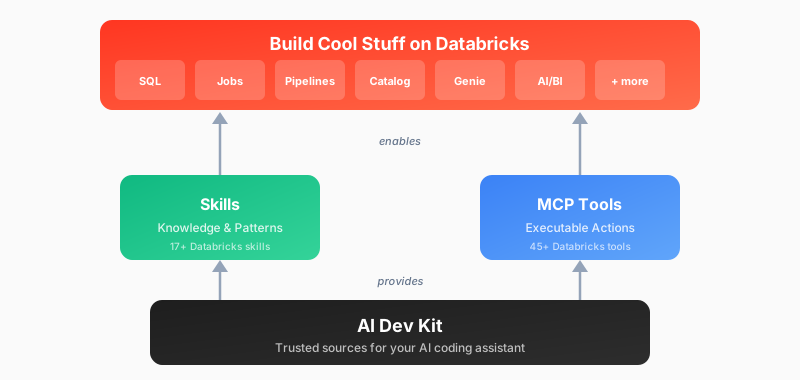
| Adventure | Best For | Start Here |
|---|---|---|
| :star: Install AI Dev Kit | Start here! Follow quick install instructions to add to your existing project folder | Quick Start (install) |
| Visual Builder App | Web-based UI for Databricks development | databricks-builder-app/ |
| Builder App + Genie Code MCP | Builder UI + MCP server for Genie Code in one deployment | deploy.sh --enable-mcp |
| Core Library | Building custom integrations (LangChain, OpenAI, etc.) | pip install |
| Skills Only | Provide Databricks patterns and best practices (without MCP functions) | Install skills |
| Genie Code Skills | Install skills into your workspace for Genie Code (--install-to-genie) | Genie Code skills (install) |
| MCP Tools Only | Just executable actions (no guidance) | Register MCP server |
By default this will install at a project level rather than a user level. This is often a good fit, but requires you to run your client from the exact directory that was used for the install. Note: Project configuration files can be re-used in other projects. You find these configs under .claude, .cursor, .gemini, .codex, .github, .agents, .windsurf, .codeium, .opencode, or opencode.json
Basic installation (uses DEFAULT profile, project scope)
bash <(curl -sL https://raw.githubusercontent.com/databricks-solutions/ai-dev-kit/main/install.sh)
Global installation with force reinstall
bash <(curl -sL https://raw.githubusercontent.com/databricks-solutions/ai-dev-kit/main/install.sh) --global --force
Specify profile and force reinstall
bash <(curl -sL https://raw.githubusercontent.com/databricks-solutions/ai-dev-kit/main/install.sh) --profile DEFAULT --force
Install for specific tools only
bash <(curl -sL https://raw.githubusercontent.com/databricks-solutions/ai-dev-kit/main/install.sh) --tools cursor,gemini,antigravity,windsurf,opencode
Next steps: Respond to interactive prompts and follow the on-screen instructions.
npx claudepluginhub auschoi96/ai-dev-kitReliable automation, in-depth debugging, and performance analysis in Chrome using Chrome DevTools and Puppeteer
 ChromeDevTools
Harness-native ECC operator layer - 67 agents, 278 skills, 94 legacy command shims, reusable hooks, rules, selective install profiles, and production-ready workflows for Claude Code, Codex, OpenCode, Cursor, and related agent harnesses
 affaan-m
Comprehensive skill pack with 66 specialized skills for full-stack developers: 12 language experts (Python, TypeScript, Go, Rust, C++, Swift, Kotlin, C#, PHP, Java, SQL, JavaScript), 10 backend frameworks, 6 frontend/mobile, plus infrastructure, DevOps, security, and testing. Features progressive disclosure architecture for 50% faster loading.
 Jeffallan
A growing collection of Claude-compatible academic workflow bundles. Covers scientific figures, manuscript writing and polishing, reviewer assessment, citation retrieval, data availability, paper reading, literature search, response letters, paper-to-PPTX conversion, and evidence-grounded Chinese invention patent drafting. Rules are organized as reusable skill folders with explicit workflows and quality checks.
 Yuan1z0825
Matt Pocock's agent skills for real engineering — grilling, spec/ticket flows, TDD, code review, domain modelling and more. Plug-and-play, not vibe coding.
 mattpocock
Core skills library for Claude Code: TDD, debugging, collaboration patterns, and proven techniques
 obra
obra'%20stop-opacity%3D'0.16'%2F%3E%3Cstop%20offset%3D'1'%20stop-color%3D'rgb(200%2C90%2C60)'%20stop-opacity%3D'0.03'%2F%3E%3C%2FlinearGradient%3E%3C%2Fdefs%3E%3Crect%20width%3D'320'%20height%3D'200'%20fill%3D'url(%23g)'%2F%3E%3Ccircle%20cx%3D'250'%20cy%3D'56'%20r%3D'92'%20fill%3D'rgb(200%2C90%2C60)'%20fill-opacity%3D'0.06'%2F%3E%3Ccircle%20cx%3D'64'%20cy%3D'172'%20r%3D'58'%20fill%3D'rgb(200%2C90%2C60)'%20fill-opacity%3D'0.05'%2F%3E%3C%2Fsvg%3E)