Stats
Actions
Available In
Tags

Workflow skills and agents: code-walk-thru, log-work, make-issue-spec skills; ui-tester agent for browser-based UI validation
Use this when user wants you to walk through (code or text) files in a EDITOR to either explain how some code works, or to show the user what changes you made, etc. You would typically use this repeatedly to show the user your changes or code files one by one, sometimes with specific line-numbers. This way the user is easily able to follow along in their favorite EDITOR as you point at various files possibly at specific line numbers within those files.
1. create the file WORKLOG/YYYYMMDD.md if it doesn't already exist.
There isn't a lot more to this than what the top level description says. The idea is
Own this plugin?
Verify ownership to unlock analytics, metadata editing, and a verified badge. GitHub access is read-only (username + org membership).
Sign in to claimOwn this plugin?
Verify ownership to unlock analytics, metadata editing, and a verified badge. GitHub access is read-only (username + org membership).
Sign in to claimBased on adoption, maintenance, documentation, and repository signals. Not a security audit or endorsement.
A collection of practical tools, hooks, and utilities for enhancing Claude Code and other CLI coding agents.
uv tool install claude-code-tools   # Python package
cargo install aichat-search         # Rust search TUI (requires Rust)
Prerequisites:
aichat action menus (resume, export, etc.)aichat search (install via cargo install)Without aichat-search, the search command won't be available, but other
aichat commands still work.
Four commands are installed:
| Command | Description |
|---|---|
aichat | Session management for Claude Code and Codex (find, resume, export, trim, query) |
tmux-cli | Terminal automation for AI agents ("Playwright for terminals") |
vault | Encrypted .env backup and sync |
env-safe | Safe .env inspection without exposing values |
All session tools are now under aichat. Use aichat search instead of
find-claude-session/find-codex-session, and similarly for other commands.
Note: While the description below focuses on Claude Code, tmux-cli works with any CLI coding agent.
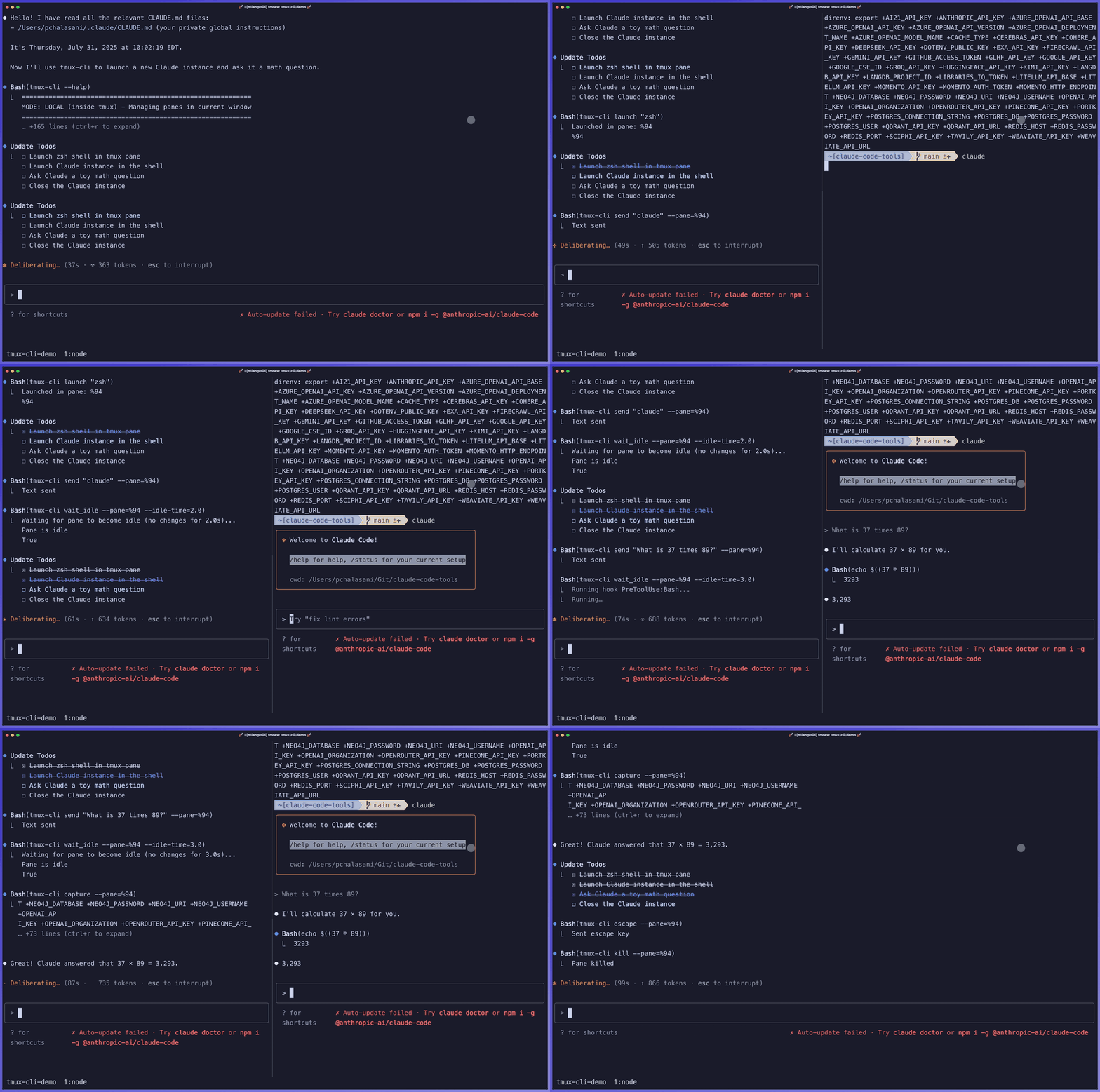
Think Playwright for terminals - Terminal automation for AI agents.
tmux-cli enables Claude Code to programmatically control terminal applications: test interactive scripts, debug with pdb, launch and interact with other CLI agents.
Important: You don't need to learn tmux-cli commands. Claude Code handles everything automatically—just describe what you want.
Works anywhere: Automatically handles both local tmux panes and remote sessions.
Test Interactive Scripts - CC can run and interact with scripts that require user input, answering prompts automatically based on your instructions.
UI Development & Testing - CC can launch web servers and coordinate with browser automation tools to test your applications.
Interactive Debugging - CC can use debuggers (pdb, node inspect, gdb) to step through code, examine variables, and help you understand program flow.
Claude-to-Claude Communication - CC can launch another Claude Code instance to get specialized help or code reviews.
Claude Code knows how to use tmux-cli through its built-in help. You just describe what you want, and CC handles the technical details.
For complete command reference, see docs/tmux-cli-instructions.md.
To enable CC to use tmux-cli, add this snippet to your global
~/.claude/CLAUDE.md file:
# tmux-cli Command to interact with CLI applications

`tmux-cli` is a bash command that enables Claude Code to control CLI applications
running in separate tmux panes - launch programs, send input, capture output,
and manage interactive sessions. Run `tmux-cli --help` for detailed usage
instructions.

Example uses:
- Interact with a script that waits for user input
- Launch another Claude Code instance to have it perform some analysis or review or
  debugging etc
- Run a Python script with the Pdb debugger to step thru its execution, for
  code-understanding and debugging
- Launch web apps and test them with browser automation MCP tools like Playwright or
Chrome Dev Tools.
More frequently, I use this method: I launch another CLI-agent (say Codex-CLI) in another tmux pane, and say something like this to the first agent:
There's another coding agent "Codex" running in tmux Pane 3. Feel free to use Codex to help you with your task or review your work. You can communicate with Codex using the tmux-cli command; you can do tmu-cli --help to see how to use it.
For detailed instructions, see docs/tmux-cli-instructions.md.
All of this assumes you're familiar and comfortable with tmux, and (like me) run all CLI coding sessions inside tmux sessions.
npx claudepluginhub apadoctor/claude-code-tools --plugin workflowProvides an agent, skill, hook, and slash command related to the `aichat` tool-set for searching and resuming CLI-agent sessions
 ApaDoctor
Safety hooks to block or require user approval for dangerous commands (rm, git operations, .env access, file size limits)
ApaDoctorProvides tmux-cli skill, to allow Claude-Code to interact with CLI scripts or other code-agents in tmux panes, using the `tmux-cli` command
ApaDoctorEvidence-gated AI coding workflow: scan → analyze → plan → TDD → execute → fix → verify → review, powered by Codebase Memory MCP >= 0.9.0 with optional Serena LSP intelligence. Includes blast-radius planning, test/cycle gates, independent review, and Windows Git Bash hook auto-resolution.
 datit309
Tools to maintain and improve CLAUDE.md files - audit quality, capture session learnings, and keep project memory current.
 anthropics
A growing collection of Claude-compatible academic workflow bundles. Covers scientific figures, manuscript writing and polishing, reviewer assessment, citation retrieval, data availability, paper reading, literature search, response letters, paper-to-PPTX conversion, and evidence-grounded Chinese invention patent drafting. Rules are organized as reusable skill folders with explicit workflows and quality checks.
 Yuan1z0825
Comprehensive feature development workflow with specialized agents for codebase exploration, architecture design, and quality review
anthropicsHarness-native ECC operator layer - 67 agents, 278 skills, 94 legacy command shims, reusable hooks, rules, selective install profiles, and production-ready workflows for Claude Code, Codex, OpenCode, Cursor, and related agent harnesses
 affaan-m
v9.54.0 — Reliability wave: tangle contextual review correction loop with hard round ceiling, progress-supervised review rounds (per-agent stall watch, descendant-tree kills), council diversity and agy pin fixes, marketplace generator source-of-truth fix, provider troubleshooting runbook and cost-expectations docs. Run /octo:setup.
 nyldn
nyldn'%20stop-opacity%3D'0.16'%2F%3E%3Cstop%20offset%3D'1'%20stop-color%3D'rgb(200%2C90%2C60)'%20stop-opacity%3D'0.03'%2F%3E%3C%2FlinearGradient%3E%3C%2Fdefs%3E%3Crect%20width%3D'320'%20height%3D'200'%20fill%3D'url(%23g)'%2F%3E%3Ccircle%20cx%3D'250'%20cy%3D'56'%20r%3D'92'%20fill%3D'rgb(200%2C90%2C60)'%20fill-opacity%3D'0.06'%2F%3E%3Ccircle%20cx%3D'64'%20cy%3D'172'%20r%3D'58'%20fill%3D'rgb(200%2C90%2C60)'%20fill-opacity%3D'0.05'%2F%3E%3C%2Fsvg%3E)