Stats
Actions
Available In
Tags

Orchestrate a multi-agent QA pipeline for code changes: analyze diffs, validate acceptance criteria, generate test scenarios, run browser validation, create bug reports, and produce automation code in Playwright, Cypress, or pytest.
Routes QA tickets to the right agents in the right order — including environment setup and live browser validation
Analyzes a multi-repo release diff to map cross-repo impact, AC compliance, and deployment risks
Maps code changes to existing tests — finds which tests to run, which may break, and where coverage gaps exist
Generates comprehensive test scenarios from acceptance criteria (happy path, negative, boundary, edge cases)
Converts test scenarios into executable Playwright, Cypress, or Gherkin test code
Uses power tools
Uses Bash, Write, or Edit tools
Own this plugin?
Verify ownership to unlock analytics, metadata editing, and a verified badge. GitHub access is read-only (username + org membership).
Sign in to claimOwn this plugin?
Verify ownership to unlock analytics, metadata editing, and a verified badge. GitHub access is read-only (username + org membership).
Sign in to claimBased on adoption, maintenance, documentation, and repository signals. Not a security audit or endorsement.
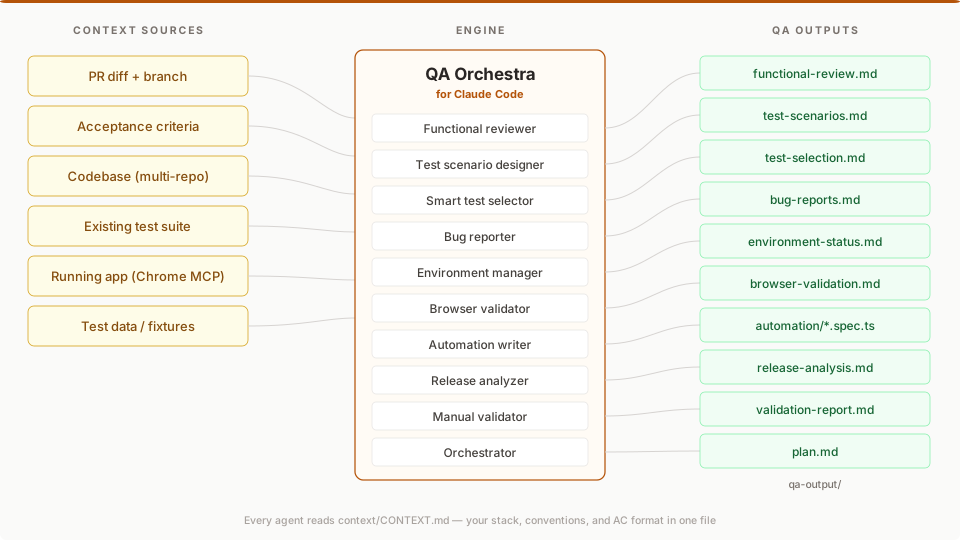
10 standalone QA agents for Claude Code. Each one answers a specific question about your PR — does this diff implement the AC?, what scenarios do I need?, which of my tests will break? — and writes a Markdown report you can paste into GitHub or Jira.
Two layers: the agents bring QA expertise (diff vs AC analysis, scenario design, test selection). MCP brings the data (GitHub, Chrome DevTools, Jira, GitLab). Your context/CONTEXT.md describes your stack in one file.
No SaaS. No API keys beyond Claude. Works with any stack.
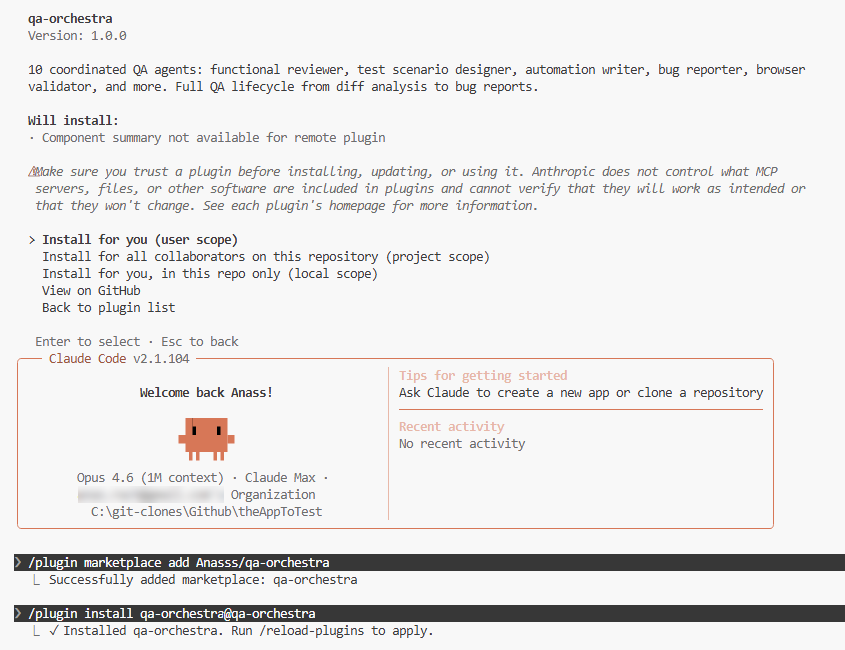
In any Claude Code chat, run:
/plugin marketplace add Anasss/qa-orchestra
/plugin install qa-orchestra@qa-orchestra
/reload-plugins
Or use the UI: Customize → Manage plugins → Marketplaces tab → paste Anasss/qa-orchestra → Add → Plugins tab → Install.
Once installed, all 10 agents are available. Type @functional-reviewer, @orchestrator, etc.
# Clone and copy agents to your global directory
git clone https://github.com/Anasss/qa-orchestra.git
cp qa-orchestra/.claude/agents/*.md ~/.claude/agents/
# 1. Clone alongside your project repos
git clone https://github.com/Anasss/qa-orchestra.git
cd qa-orchestra

# 2. Fill in your project context
cp examples/CONTEXT.example.md context/CONTEXT.md
# Edit context/CONTEXT.md with your stack, repos, URLs, and commands

# 3. Open Claude Code — agents auto-load from .claude/agents/
claude
Pick one agent for one question. @functional-reviewer is the most common entry point:
You: @functional-reviewer Compare PR #42 against these ACs:
     AC-1: users can add items to the cart from the product listing page
     AC-2: the cart count in the nav header updates immediately after adding

QA Orchestra writes qa-output/functional-review.md:
  - AC-1: COVERED at src/components/quick-add-button.tsx:43
  - AC-2: AT RISK — no router.refresh() after the server action
  - 2 regression risks in unchanged code paths touched by the diff
  - Verdict: GAPS — needs browser validation on AC-2
One agent. One question. One Markdown file you can paste into GitHub or Jira.
Other standalone entry points:
@test-scenario-designer — generate test scenarios from acceptance criteria (happy, negative, boundary, edge)@smart-test-selector — map a diff to your existing tests; find what to run, what may break, and where coverage is missing@bug-reporter — turn findings into developer-ready bug reportsEach runs independently. None requires the orchestrator or a prior agent. For the full pipeline (@orchestrator), see the recipe table below — most users never need it.
Every agent writes to qa-output/. The next agent reads from there. No copy-pasting between agents.
Not in scope: code quality review, linting, security scanning, performance profiling, or unit-test generation. QA Orchestra is scoped to functional correctness against acceptance criteria.
QA Orchestra ships 10 agents organized by how you'll actually use them. Most users live in Tier 1. You can stop reading after the first table if you want — everything below it is optional.
These four agents are the daily drivers. Each answers one question, runs independently, and produces a Markdown file you can paste into GitHub, Jira, or Linear.
| Agent | Model | Answers the question |
|---|---|---|
| functional-reviewer | Opus | Does this diff actually implement the acceptance criteria? Where are the gaps and risks? |
| test-scenario-designer | Sonnet | What test scenarios do I need to cover this AC? Happy path, negative, boundary, edge. |
| smart-test-selector | Sonnet | Which of my existing tests does this diff affect? What's likely to break? Where are my coverage gaps? |
| bug-reporter | Sonnet | Turn these findings into developer-ready bug reports. |
These two agents work together to test the feature in a real browser, not just read the diff. They're what separates QA Orchestra from static AI review tools.
npx claudepluginhub anasss/qa-orchestra --plugin qa-orchestraQA skills for test planning, E2E testing, API testing, regression checks, bug reporting, load testing, accessibility audits, and test data generation.
 heaptracetechnology
QA skills for functional-testing domain.
 sethdford
Quality assurance - E2E testing, PR review, browser automation
 WaterplanAI
Self-serve QA for your PR — browser-based verification of ticket requirements before you push.
 opslane
Tool-agnostic QA Automation library: Playwright, Selenium, API testing, accessibility (WCAG 2.1 AA), QA Planner, and ISTQB-aligned artifacts. Includes 7 specialized agents and 11 reusable skills.
 fugazi
Language-agnostic test plan generation and execution.
 existential-birds
'%20stop-opacity%3D'0.16'%2F%3E%3Cstop%20offset%3D'1'%20stop-color%3D'rgb(200%2C90%2C60)'%20stop-opacity%3D'0.03'%2F%3E%3C%2FlinearGradient%3E%3C%2Fdefs%3E%3Crect%20width%3D'320'%20height%3D'200'%20fill%3D'url(%23g)'%2F%3E%3Ccircle%20cx%3D'250'%20cy%3D'56'%20r%3D'92'%20fill%3D'rgb(200%2C90%2C60)'%20fill-opacity%3D'0.06'%2F%3E%3Ccircle%20cx%3D'64'%20cy%3D'172'%20r%3D'58'%20fill%3D'rgb(200%2C90%2C60)'%20fill-opacity%3D'0.05'%2F%3E%3C%2Fsvg%3E)