Pagecast
Preview local HTML reports, Markdown docs, and static mini apps, then publish
them to shareable Cloudflare Pages URLs — from the terminal or your coding agent.
Feature HTML: https://pagecasthq.pages.dev/
About
Pagecast is a local-first publishing tool for agent-generated reports and small
static web projects. Preview files, manage published versions, rename links,
re-sync updates, password-protect pages, and revoke old URLs — from a local
admin UI or headless pagecast commands.
Good fits: HTML reports and dashboards (Playwright, Lighthouse, coverage);
Markdown plans, docs, and release notes; static mini apps from dist/build/out;
coding-agent workflows that publish a finished artifact on request.
Not a fit: private scratch notes, or server-rendered apps that need a running
backend (export static assets first).
Quick Start
Requires Node.js 20+ and a Cloudflare account (for publishing). No global install:
npx pagecast
This starts the local app and opens the admin UI:
- Admin UI —
http://127.0.0.1:4173
- Local published-page preview —
http://127.0.0.1:4174 (same /p/<slug>/ shape it deploys)
- Local data/config —
.pagecast/ in the current directory
In the admin UI, click Connect Cloudflare. Pagecast uses scoped Wrangler
OAuth (account:read, user:read, pages:write), detects your account, and
creates the Pages project if needed. From a clone, run npm start.
Prefer the terminal?
npx pagecast pages setup --project pagecast
# multiple accounts? add  --account <account-id>
# automation? export CLOUDFLARE_API_TOKEN (scoped Pages:Edit) + CLOUDFLARE_ACCOUNT_ID
Publish From The Terminal
# An HTML or Markdown file → a /p/<token>/ link (sibling assets included)
npx pagecast publish "/absolute/path/report.html" --json

# A built static project → publish its entry file
npm run build && npx pagecast publish "$(pwd)/dist/index.html" --json

# A whole folder → deploy directly to a named Pages project (--branch defaults to main)
npx pagecast pages deploy "$(pwd)/dist" --project pagecasthq --json
Add --json for agents and CI. Use the admin UI for link renaming, re-sync,
revoke, and build settings. Common errors: statusCode 401 → run pages setup
or connect Cloudflare; statusCode 409 → pass --account <id>.
Password Protection
Gate any published page behind a password — from the admin UI (the Password
protection toggle) or headlessly:
npx pagecast publish "/absolute/path/report.html" --password "your-password" --json
npx pagecast publish "/absolute/path/report.html" --no-password --json   # remove it
Enforced at the edge by a generated Cloudflare Pages Function, so it covers every
file of a multi-file report and the page is never served unprotected. Crypto,
security model, and caveats: PASSWORD-PROTECTION.md.
Use From Coding Agents
Pagecast ships a Codex-native skill and a portable Agent-Skills file that offer
to publish finished artifacts — only after you confirm.
# Codex
cp -R .codex/skills/publish-report ~/.codex/skills/

# Claude Code
/plugin marketplace add Amal-David/pagecast
/plugin install pagecast@pagecast

# Any other agent
cp plugin/skills/publish-report/SKILL.md /path/to/your-agent/skills/publish-report/SKILL.md
More detail in plugin/README.md.
Chrome Extension (Experimental)
⚠️ Experimental — load-unpacked only, not yet on the Chrome Web Store.
When an agent opens an HTML file as file:///…/report.html, the bundled
extension adds a one-click Publish to Pagecast button (the running server
must be up). Install via chrome://extensions → Developer mode → Load
unpacked → select extension/, then enable "Allow access to file URLs".
See extension/README.md.
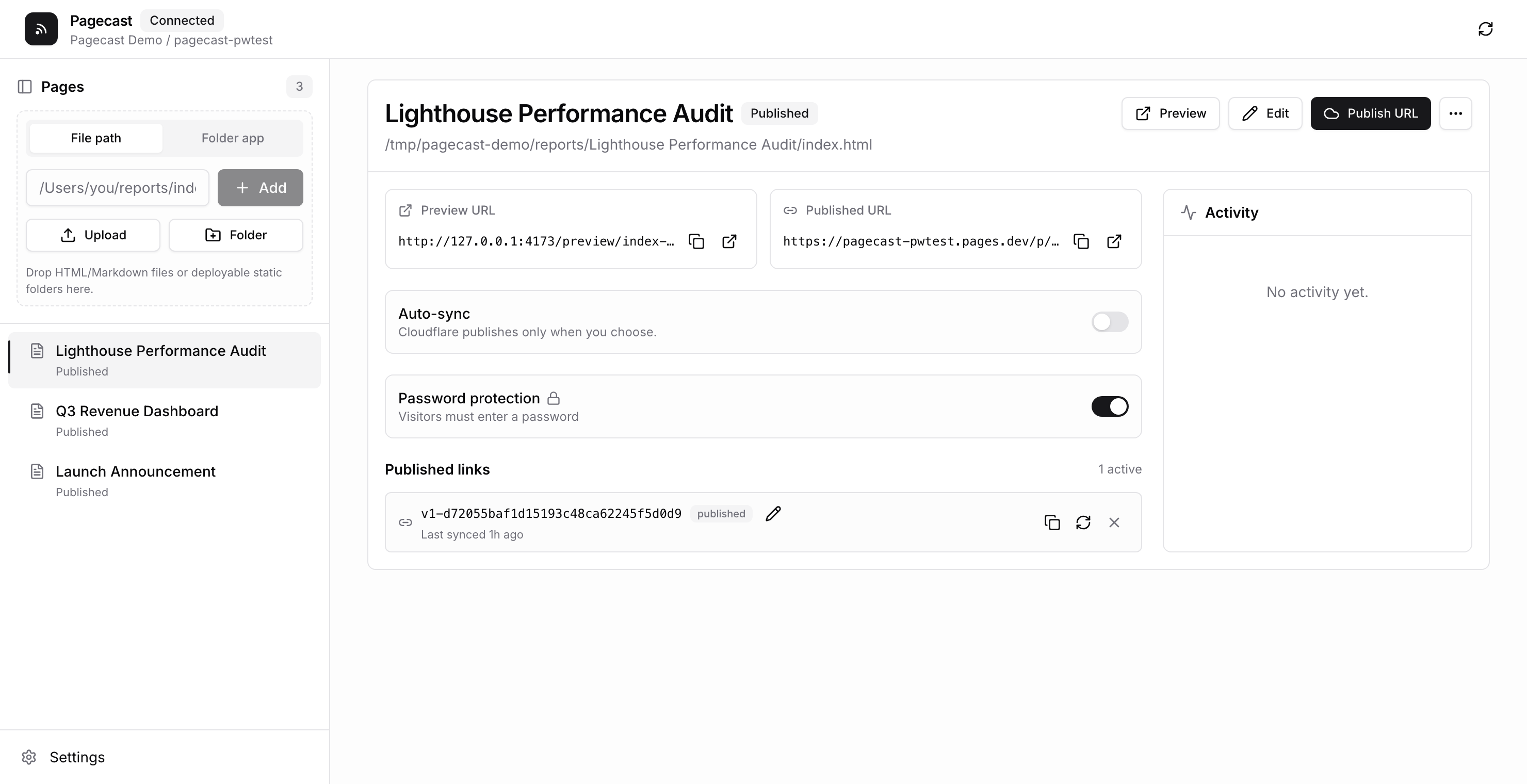
Admin UI Features
- Add
.html/.md files by path or file:///… URL, deployable static folders,
or source folders with a build command and output directory.
- Drag to reorder; publish, re-sync in place, rename links (old links redirect),
or revoke one/all versions.
- Auto-sync path-backed reports; password-protect pages; edit HTML in-app without
touching the original source file.
Security Model
- Admin UI binds to
127.0.0.1; draft previews are local-only.
- Public access only through active
/p/<token>/ links; revoked tokens 404 after
the redeploy finishes.
- Public routes reject directory traversal and hidden files. Sibling assets in a
report's folder can become public if referenced — keep secrets out of it.
- The Pages root publishes no report listing.
Development

 artwist-polyakov
 serenakeyitan
 trailofbits
 u-ichi
 jfernandez
 aviz85
'%20stop-opacity%3D'0.16'%2F%3E%3Cstop%20offset%3D'1'%20stop-color%3D'rgb(200%2C90%2C60)'%20stop-opacity%3D'0.03'%2F%3E%3C%2FlinearGradient%3E%3C%2Fdefs%3E%3Crect%20width%3D'320'%20height%3D'200'%20fill%3D'url(%23g)'%2F%3E%3Ccircle%20cx%3D'250'%20cy%3D'56'%20r%3D'92'%20fill%3D'rgb(200%2C90%2C60)'%20fill-opacity%3D'0.06'%2F%3E%3Ccircle%20cx%3D'64'%20cy%3D'172'%20r%3D'58'%20fill%3D'rgb(200%2C90%2C60)'%20fill-opacity%3D'0.05'%2F%3E%3C%2Fsvg%3E)