A neuroscience-inspired memory framework for AI agents
Encode. Consolidate. Activate. Forget.
Documentation · English | 中文




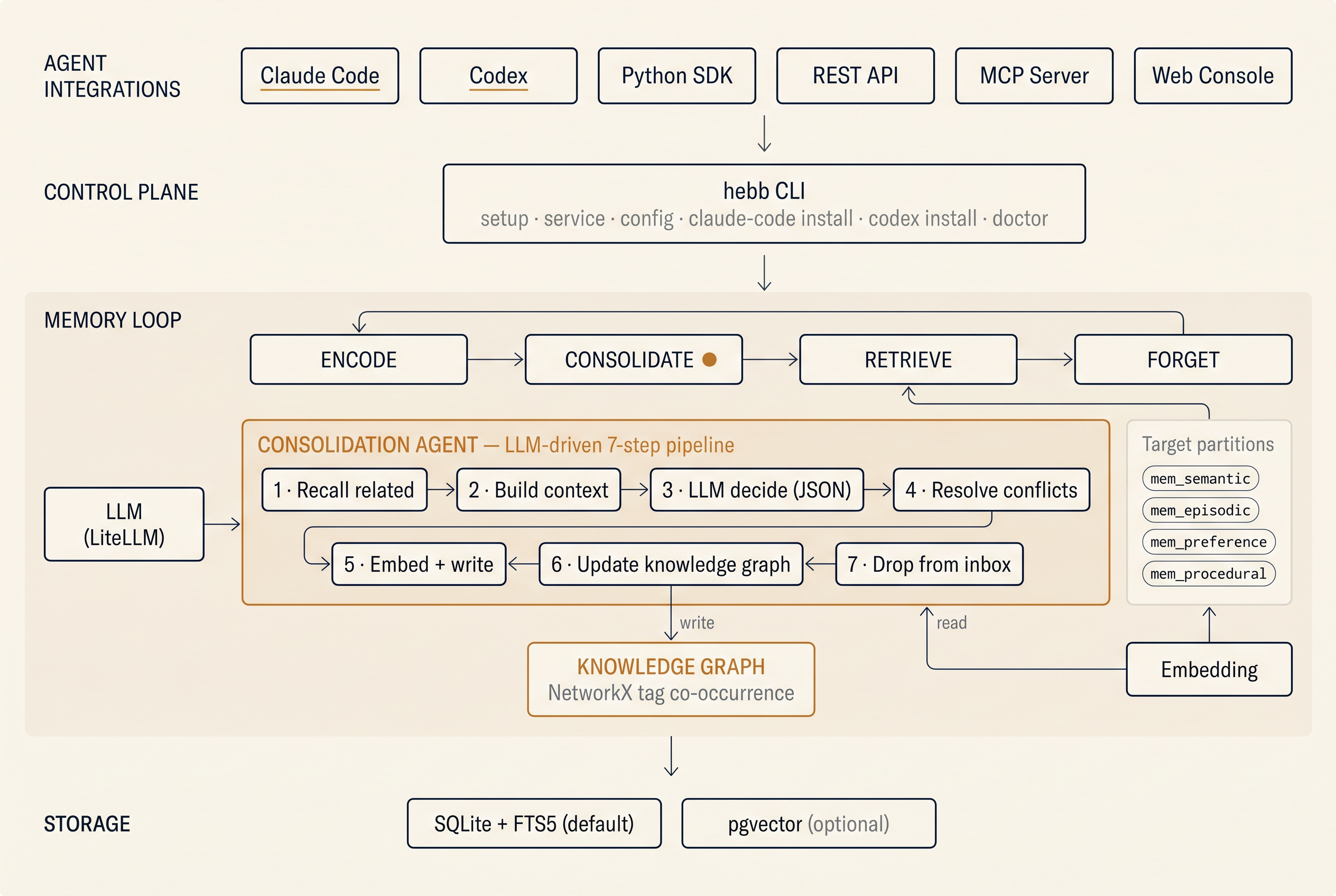
Hebb Mind gives AI agents a neuroscience-inspired memory loop — encode → replay → consolidate → forget. A pipx install and one command stand up a local REST + MCP endpoint: SQLite for storage, sentence-transformers for embedding, NetworkX for the tag graph. Zero external services — bring an LLM key only when you want consolidation to do its work.
Quick Start
Try in ~60 seconds — no API key needed
Ingest and hybrid search work fully offline with a local embedding model.
pipx install hebb-mind
hebb setup              # downloads a small embedding model based on your OS locale
hebb service install    # registers a background service (launchd / systemd / Task Scheduler)
hebb setup downloads a small embedding model only if it isn't already cached —
~90MB for English (all-MiniLM-L6-v2), ~470MB for multilingual
(intfloat/multilingual-e5-small). The ~60-second figure is for the English /
--profile fast small-model path; the multilingual model is a larger download.
Want the high-quality models? hebb setup --profile best pulls the BAAI bge
family instead (1–2GB+) — opt-in, never downloaded by default.
Don't have pipx? It's the recommended installer for Python CLI tools — isolated venv, automatic PATH, plays nice with PEP 668. Install it once:
# macOS (Homebrew)
brew install pipx && pipx ensurepath

# Linux — Debian / Ubuntu 23.04+
sudo apt install pipx && pipx ensurepath

# Linux — Fedora
sudo dnf install pipx && pipx ensurepath

# Windows / any platform with Python 3.10+
python -m pip install --user pipx && python -m pipx ensurepath
Then open a new terminal so the updated PATH takes effect, and re-run pipx install hebb-mind.
Prefer plain pip instead? python -m venv .venv && source .venv/bin/activate && pip install -U hebb-mind works fine — hebb lives on the venv's PATH automatically.
Hebb Mind runs as an OS-managed background service — no foreground process to keep alive, no start/stop shells to remember. The service is per-user by default and needs no admin/sudo. Use --scope system for a system-wide install. See hebb service --help.
In another shell:
curl -X POST http://localhost:8321/api/v1/memories \
  -H 'Content-Type: application/json' \
  -d '{"content": "User prefers dark mode and compact layout", "tags": ["preference", "ui"]}'

curl -X POST http://localhost:8321/api/v1/search \
  -H 'Content-Type: application/json' \
  -d '{"query": "UI preferences", "top_k": 5}'
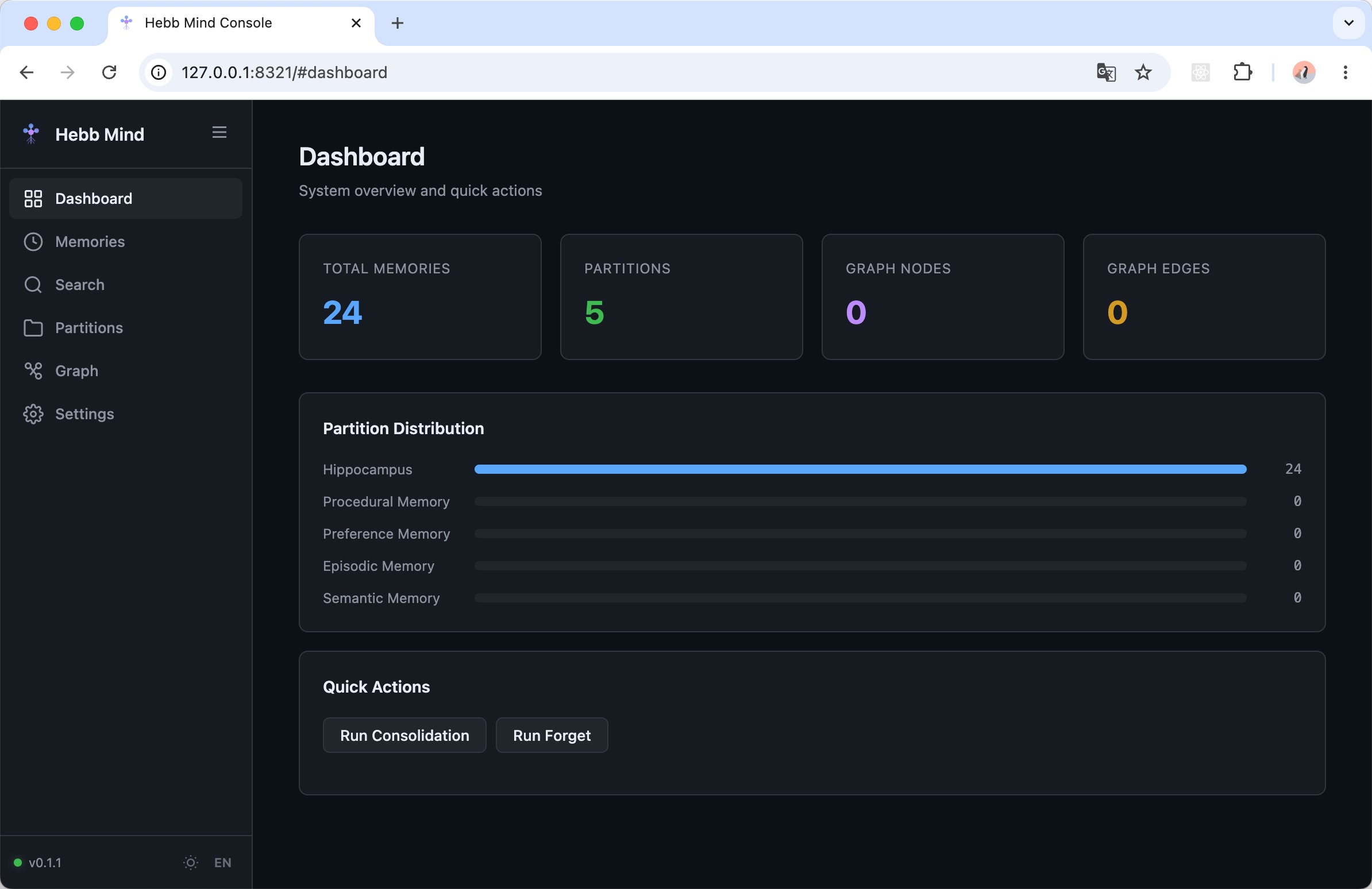
Open http://localhost:8321/ for the Web Console.
Full experience (5 min) — enable LLM consolidation
Consolidation, conflict resolution, and tag extraction need an LLM backend. The gate is llm_model — until it's set, those endpoints are a no-op (see #consolidation-no-op). A hosted provider also needs llm_api_key; a local model (e.g. Ollama via llm_base_url) does not.
hebb config set llm_model openai/gpt-4o-mini   # required — enables consolidation
hebb config set llm_api_key sk-...             # for hosted providers
# For Qwen / GLM / Kimi via LiteLLM:
hebb config set llm_base_url https://dashscope.aliyuncs.com/compatible-mode/v1
Trigger consolidation manually, or wait for the daily 18:00 job:
curl -X POST http://localhost:8321/api/v1/admin/consolidate
Installation Paths

 major7apps
 nhadaututtheky
 openmemind
 kevin-hs-sohn
 ourmem
 JSingletonAI
 Hebb Mind
'%20stop-opacity%3D'0.16'%2F%3E%3Cstop%20offset%3D'1'%20stop-color%3D'rgb(200%2C90%2C60)'%20stop-opacity%3D'0.03'%2F%3E%3C%2FlinearGradient%3E%3C%2Fdefs%3E%3Crect%20width%3D'320'%20height%3D'200'%20fill%3D'url(%23g)'%2F%3E%3Ccircle%20cx%3D'250'%20cy%3D'56'%20r%3D'92'%20fill%3D'rgb(200%2C90%2C60)'%20fill-opacity%3D'0.06'%2F%3E%3Ccircle%20cx%3D'64'%20cy%3D'172'%20r%3D'58'%20fill%3D'rgb(200%2C90%2C60)'%20fill-opacity%3D'0.05'%2F%3E%3C%2Fsvg%3E)