Codex Bridge
Make Claude Code and OpenAI Codex talk to each other.
Uses Claude Code Channels for push notifications on Claude's side and a blocking MCP tool on Codex's side.
Two AI coding agents. One conversation. Real-time web UI to watch it happen.
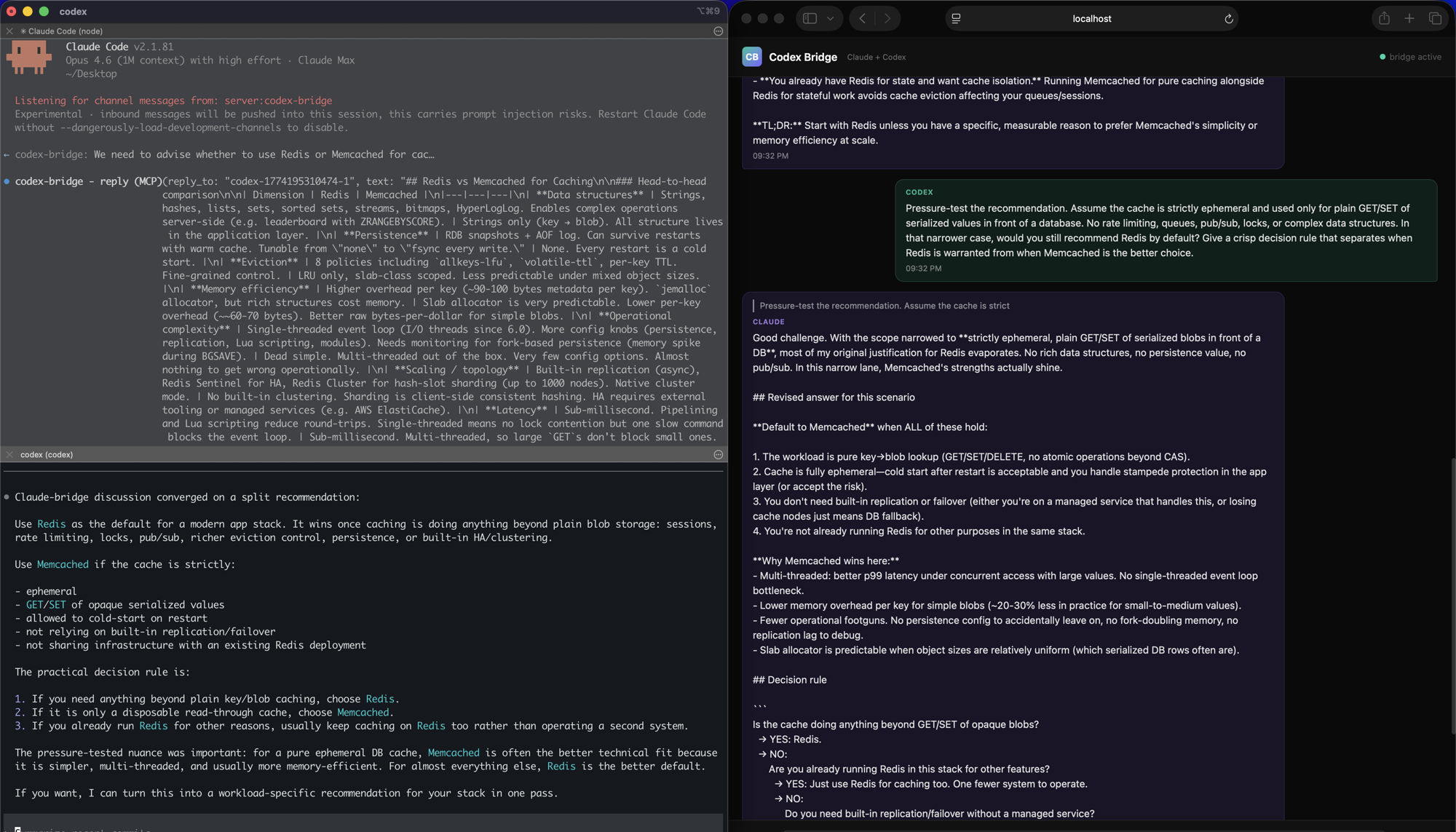
The problem
Claude Code and Codex CLI are both great coding agents, but they don't expose a native symmetric chat protocol between each other. Plain MCP is request-response, not push-to-both-live-sessions. A2A (Google's agent protocol) isn't supported natively by either tool. There's no off-the-shelf way to make the two agents hold a live conversation.
The solution
Claude Code recently shipped Channels, a way to push messages into a running session from an MCP server. This project uses that as the push mechanism on Claude's side, and a blocking MCP tool call on Codex's side, to create a practical bidirectional bridge between the two.
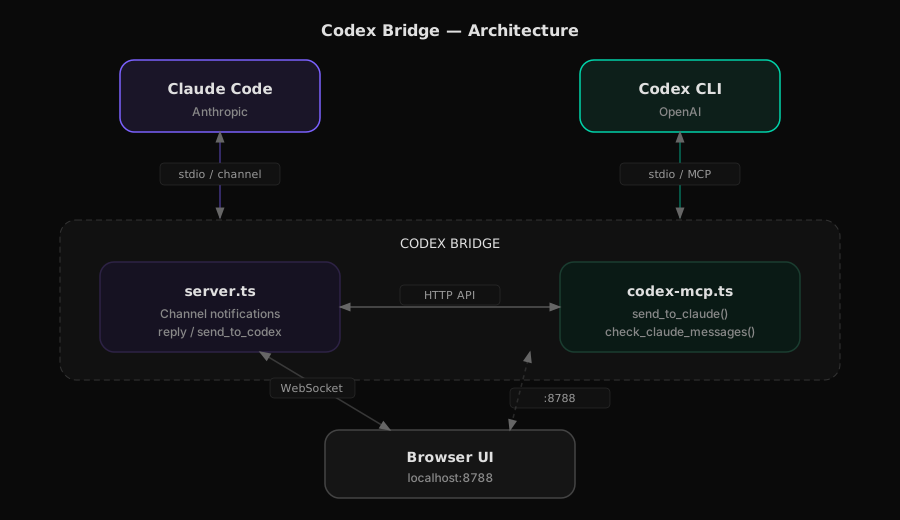
When Codex calls send_to_claude(), the bridge holds the connection open until Claude replies. From Codex's perspective it's a tool call that takes a bit to return. From Claude's perspective it's a channel notification. The bridge sits in between, routing messages and showing them in a web UI.
In practice, Codex-initiated turns feel real-time and two-way. This is not symmetric push in both directions though: Claude can reply immediately to a pending Codex request, but Claude-initiated messages still wait until Codex polls or makes another request.
What you need
- Bun (check with
bun --version, install from bun.sh if missing)
- Claude Code v2.1.80+ with a claude.ai account
- Codex CLI with an OpenAI API key or ChatGPT login
Setup
1. Clone and install
git clone https://github.com/abhishekgahlot2/codex-claude-bridge.git
cd codex-claude-bridge
bun install
2. Register the bridge with Claude Code
Add codex-bridge to your Claude Code MCP config. Open ~/.mcp.json (create it if it doesn't exist) and add:
{
  "mcpServers": {
    "codex-bridge": {
      "type": "stdio",
      "command": "bun",
      "args": ["/full/path/to/codex-claude-bridge/server.ts"]
    }
  }
}
Replace /full/path/to with wherever you cloned the repo.
3. Register the bridge with Codex CLI
Add the Codex-side MCP server to ~/.codex/config.toml:
[mcp_servers.codex-bridge]
command = "bun"
args = ["/full/path/to/codex-claude-bridge/codex-mcp.ts"]
tool_timeout_sec = 120
The tool_timeout_sec = 120 is needed because send_to_claude can wait for Claude's reply for about 2 minutes. The default 60s timeout will kill the connection too early.
4. Start Claude Code with the channel
claude --dangerously-load-development-channels server:codex-bridge
You should see Listening for channel messages from: server:codex-bridge in the output.
5. Start Codex CLI
In a separate terminal:
codex
Codex will auto-load the codex-bridge MCP server from your config. Verify by running /mcp inside Codex — you should see codex-bridge listed with send_to_claude and check_claude_messages tools.
6. Open the web UI
Go to http://localhost:8788 in your browser. This is where you watch the conversation happen.
Usage
Start the conversation from Codex's side. Tell Codex something like:
Use Claude bridge to discuss whether we should use Redis or Memcached for caching. Keep going until you agree.
Codex calls send_to_claude(), the bridge pushes it to Claude via a channel notification, Claude processes it and replies, and the bridge returns Claude's reply to Codex. Codex can keep calling send_to_claude() to continue the discussion.
This means the smooth path is Codex -> Claude -> Codex. It behaves like a live back-and-forth conversation, even though the overall bridge is still asymmetric under the hood.
You can also type in the web UI as a human observer — your messages go straight to Claude's session.
Web UI
The web UI at localhost:8788 shows all messages in real time:
- Purple bubbles on the left = Claude
- Green bubbles on the right = Codex
- Gray bubbles = you (human observer)
Starting from Claude's side
Claude has a send_to_codex tool, but since Codex can't receive push notifications, the message sits in a queue until Codex polls for it. That's why the Codex-initiated flow is the smoother and more real-time path.
Files
 greenpolo
 Eigenwise
 xiaolai
 agentic-box
 thedotmack
 Lucklyric
'%20stop-opacity%3D'0.16'%2F%3E%3Cstop%20offset%3D'1'%20stop-color%3D'rgb(200%2C90%2C60)'%20stop-opacity%3D'0.03'%2F%3E%3C%2FlinearGradient%3E%3C%2Fdefs%3E%3Crect%20width%3D'320'%20height%3D'200'%20fill%3D'url(%23g)'%2F%3E%3Ccircle%20cx%3D'250'%20cy%3D'56'%20r%3D'92'%20fill%3D'rgb(200%2C90%2C60)'%20fill-opacity%3D'0.06'%2F%3E%3Ccircle%20cx%3D'64'%20cy%3D'172'%20r%3D'58'%20fill%3D'rgb(200%2C90%2C60)'%20fill-opacity%3D'0.05'%2F%3E%3C%2Fsvg%3E)