Stats
Actions
Available In
Tags

Automate ABC development workflow: query Apifox OpenAPI docs for 5000+ medical APIs, execute custom git flows on Codeup repos, manage TAPD agile tickets/stories/bugs with SLS log tracing to localize Java issues, import Modao prototypes as Markdown docs, trigger and monitor Jenkins builds, and get Spring Boot backend guidance.
ABC 医疗云 API 文档查询工具。读取和查询 ABC API 的 OpenAPI 规范文档(5000+ 接口),支持按模块、路径、方法搜索,自动解析 $ref 引用。采用按模块拆分的缓存结构,查询速度快。使用场景:(1) 查询 API 接口定义 (2) 搜索特定功能接口 (3) 查询 Schema 定义 (4) 查看接口统计信息
ABC 后端开发指南。涵盖 Java/Spring Boot 基础、新建 API 接口、新建 RPC 服务、数据库变更、后端调试排查、项目启动、Git 分支管理。当用户提到"后端开发"、"Java"、"Spring Boot"、"新建接口"、"新建API"、"RPC"、"Feign"、"数据库变更"、"加字段"、"建表"、"后端调试"、"排查问题"、"日志查询"、"启动项目"、"端口"、"分支管理"等关键词时使用此技能。
ABC 后台 Git 分支管理工作流辅助。用于执行 git abc 命令进行分支操作、提供开发流程指导。当用户提到"开新分支"、"feature"、"hotfix"、"发布"、"提测"、"合并"、"灰度"、"全量"、"rc"、"tag"、"MR"、"merge request" 等关键词时使用此技能。
阿里云云效 Codeup 代码仓库管理工具集。使用场景包括:(1) 代码仓库操作 - 分支管理、文件操作、代码对比、合并请求/MR管理 (2) 组织管理 - 部门管理、成员查询、角色管理 (3) 操作 codeup 仓库、分支、MR、合并请求 (4) 查询云效组织成员、部门列表
ABC Jenkins 项目发布技能。支持智能参数推断和交互式触发 Jenkins 构建,自动获取 Git 分支和标签信息。当用户请求"发布 Jenkins"、"触发构建"、"部署项目"、"Jenkins 发布"或类似操作时触发此技能。需要环境变量 JENKINS_USER 和 JENKINS_TOKEN。
Own this plugin?
Verify ownership to unlock analytics, metadata editing, and a verified badge. GitHub access is read-only (username + org membership).
Sign in to claimOwn this plugin?
Verify ownership to unlock analytics, metadata editing, and a verified badge. GitHub access is read-only (username + org membership).
Sign in to claimBased on adoption, maintenance, documentation, and repository signals. Not a security audit or endorsement.
≥# ABC Claude Code Plugin Marketplace
中文 | English
本仓库托管了 ABC 团队的 Claude Code 插件市场。
# 安装单个 skill
npx skills add https://github.com/ABCFed/claude-marketplace/tree/main/skills/tapd
npx skills add https://github.com/ABCFed/claude-marketplace/tree/main/skills/abc-apifox
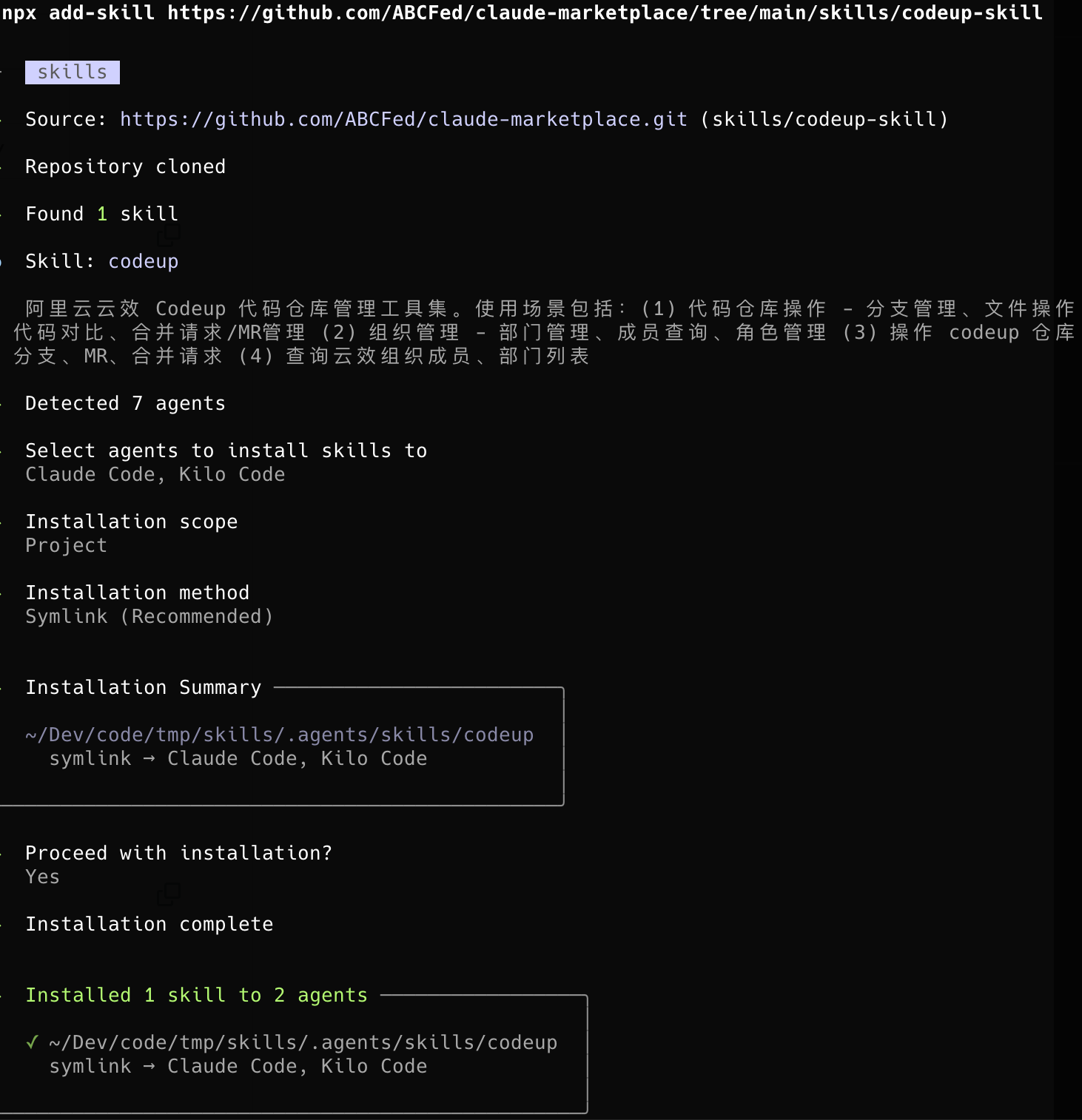
npx skills add https://github.com/ABCFed/claude-marketplace/tree/main/skills/codeup
npx skills add https://github.com/ABCFed/claude-marketplace/tree/main/skills/jenkins-deploy
npx skills add https://github.com/ABCFed/claude-marketplace/tree/main/skills/git-flow
npx skills add https://github.com/ABCFed/claude-marketplace/tree/main/skills/modao-capture
npx skills add https://github.com/ABCFed/claude-marketplace/tree/main/skills/sls-trace-analyzer
npx skills add https://github.com/ABCFed/claude-marketplace/tree/main/skills/tapd-bug-analyzer
常用选项:
| 选项 | 说明 |
|---|---|
-g, --global | 安装到用户目录而非项目目录 |
-a, --agent <agents...> | 指定目标 agent(如 claude-code, codex) |
-s, --skill <skills...> | 按名称安装指定 skills(多选用空格分隔) |
-l, --list | 列出可用 skills但不安装 |
-y, --yes | 跳过所有确认提示 |
示例:
# 安装到用户目录
npx skills add https://github.com/ABCFed/claude-marketplace/tree/main/skills/tapd --global

# 指定 agent 安装
npx skills add https://github.com/ABCFed/claude-marketplace/tree/main/skills/tapd --agent codex

# 跳过确认提示
npx skills add https://github.com/ABCFed/claude-marketplace/tree/main/skills/tapd --yes

# 列出仓库中所有可用 skills
npx skills add ABCFed/claude-marketplace --list
# 启动 Claude Code
claude

# 添加本地插件市场
/plugin marketplace add https://github.com/ABCFed/claude-marketplace

# 安装 abc-development-plugin
/plugin install abc-development-plugin@abc-claude-plugin-marketplace
TAPD 敏捷研发管理平台集成,通过 TAPD API 实现研发全流程管理。
安装:
npx skills add https://github.com/ABCFed/claude-marketplace/tree/main/skills/tapd
准备:
# 编辑 ~/.zshrc 或 ~/.bashrc
export TAPD_ACCESS_TOKEN="your_token_here"
source ~/.zshrc
触发关键词:TAPD、需求、缺陷、任务、迭代、测试用例、Wiki、工时
功能特性:
ABC 医疗云 API 文档查询工具 V2,读取和查询 ABC API 的 OpenAPI 规范文档(5000+ 接口)。采用按模块拆分的缓存结构,搜索性能提升 100+ 倍。
安装:
npx skills add https://github.com/ABCFed/claude-marketplace/tree/main/skills/abc-apifox
准备:
# 编辑 ~/.zshrc 或 ~/.bashrc
export APIFOX_ACCESS_TOKEN="your_apifox_token_here"
export APIFOX_PROJECT_ID="4105462"  # 可选,默认为 4105462
source ~/.zshrc

# 安装依赖
pip3 install requests
触发关键词:API、接口、Apifox、OpenAPI、接口文档、ABC API
功能特性:
init 命令自动安装依赖、检查配置、下载缓存)使用方式:
| 场景 | 使用方式 |
|---|---|
| 首次初始化 | /abc-apifox → 说"初始化" |
| 刷新缓存 | /abc-apifox → 说"刷新缓存" |
| 查询接口 | /abc-apifox → 说"查询xxx接口" |
阿里云云效 Codeup 代码仓库管理工具集,通过 Codeup API 管理代码仓库、分支、文件和合并请求。
安装:
npx skills add https://github.com/ABCFed/claude-marketplace/tree/main/skills/codeup
准备:
# 编辑 ~/.zshrc 或 ~/.bashrc
export YUNXIAO_ACCESS_TOKEN="your_codeup_token_here"
source ~/.zshrc
触发关键词:Codeup、代码仓库、分支、MR、合并请求、阿里云、云效
功能特性:
ABC Jenkins 项目发布技能,支持智能参数推断和交互式触发 Jenkins 构建。
安装:
npx skills add https://github.com/ABCFed/claude-marketplace/tree/main/skills/jenkins-deploy
准备:
# 编辑 ~/.zshrc 或 ~/.bashrc
export JENKINS_USER="your_jenkins_username"
export JENKINS_TOKEN="your_jenkins_api_token"
source ~/.zshrc
触发关键词:Jenkins、发布、部署、构建、Deploy、Build、CI/CD
功能特性:
ABC Git Flow 工作流助手,帮助使用 abc-git-flow 工具管理 git 分支。
安装:
npx skills add https://github.com/ABCFed/claude-marketplace/tree/main/skills/git-flow
准备:
# 安装 abc-git-flow
sudo curl https://cis-static-common.oss-cn-shanghai.aliyuncs.com/assets/abc-git-flow/git-abc-flow-install.sh

# 安装 Python 依赖
pip install requests
触发关键词:拉分支、创建分支、git flow、分支管理、feature、hotfix、tag
功能特性:
墨刀原型稿抓取工具。自动从墨刀原型稿链接抓取所有页面、截图和批注,生成 Markdown 文档。
安装:
npx skills add https://github.com/ABCFed/claude-marketplace/tree/main/skills/modao-capture
npx claudepluginhub abcfed/claude-marketplace --plugin abc-development-pluginA comprehensive toolkit for creating, validating, and distributing Claude Code plugins
 ABCFed
A comprehensive toolkit for creating, validating, and distributing Claude Code plugins
ABCFedagent-flow — Claude Code plugin for automated bug-fix, feature, and scaffold workflows. Issue tracker to merged PR via a pipeline of specialized AI agents.
 asysta-act
Official Atlassian MCP server for Jira and Confluence integration with OAuth authentication. Provides ticket management, JQL search, and ensures work completeness. Zero configuration - OAuth handles authentication automatically.
 TheBushidoCollective
Long-running agent harness with 5-layer memory architecture, GitHub integration via gh CLI, autonomous batch processing with a dedicated implementer subagent, Agent Teams with ATDD, quality-gate hooks, and 6 Agent Skills
 panayiotism
PROJECT.md-first autonomous development with hybrid auto-fix documentation. 8-agent pipeline, auto-orchestration, docs auto-update on commit (true vibe coding). Knowledge base system with 90% faster repeat research. Strict mode enforces SDLC best practices automatically. Works for ANY Python/JavaScript/TypeScript/Go project.
 akaszubski
Comprehensive skill pack with 66 specialized skills for full-stack developers: 12 language experts (Python, TypeScript, Go, Rust, C++, Swift, Kotlin, C#, PHP, Java, SQL, JavaScript), 10 backend frameworks, 6 frontend/mobile, plus infrastructure, DevOps, security, and testing. Features progressive disclosure architecture for 50% faster loading.
 Jeffallan
'%20stop-opacity%3D'0.16'%2F%3E%3Cstop%20offset%3D'1'%20stop-color%3D'rgb(200%2C90%2C60)'%20stop-opacity%3D'0.03'%2F%3E%3C%2FlinearGradient%3E%3C%2Fdefs%3E%3Crect%20width%3D'320'%20height%3D'200'%20fill%3D'url(%23g)'%2F%3E%3Ccircle%20cx%3D'250'%20cy%3D'56'%20r%3D'92'%20fill%3D'rgb(200%2C90%2C60)'%20fill-opacity%3D'0.06'%2F%3E%3Ccircle%20cx%3D'64'%20cy%3D'172'%20r%3D'58'%20fill%3D'rgb(200%2C90%2C60)'%20fill-opacity%3D'0.05'%2F%3E%3C%2Fsvg%3E)