Stats
Links
Categories
Plugins for Redpanda Connect
npx claudepluginhub redpanda-data/connectInteractive YAML config and Bloblang authoring for Redpanda Connect
 redpanda-data
[![Build Status][actions-badge]][actions-url]
API for Apache V2 builds: [![godoc for redpanda-data/connect ASL][godoc-badge]][godoc-url-apache]
API for Enterprise builds: [![godoc for redpanda-data/connect RCL][godoc-badge]][godoc-url-enterprise]
Redpanda Connect is a high performance and resilient stream processor, able to connect various [sources][inputs] and [sinks][outputs] in a range of brokering patterns and perform [hydration, enrichments, transformations and filters][processors] on payloads.
It comes with a [powerful mapping language][bloblang-about], is easy to deploy and monitor, and ready to drop into your pipeline either as a static binary or docker image, making it cloud native as heck.
Redpanda Connect is declarative, with stream pipelines defined in as few as a single config file, allowing you to specify connectors and a list of processing stages:
input:
  gcp_pubsub:
    project: foo
    subscription: bar

pipeline:
  processors:
    - mapping: |
        root.message = this
        root.meta.link_count = this.links.length()
        root.user.age = this.user.age.number()

output:
  redis_streams:
    url: tcp://TODO:6379
    stream: baz
    max_in_flight: 20
Claude Plugin for Redpanda Connect Configs
MCP Demo:
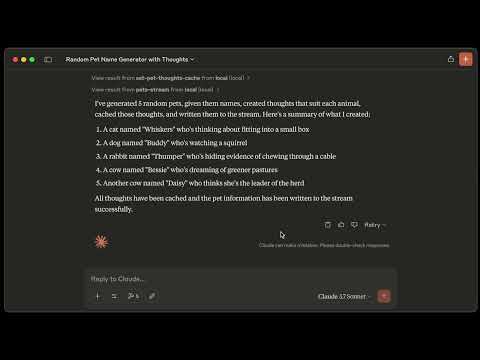
Agentic AI Demo:

Delivery guarantees can be a dodgy subject. Redpanda Connect processes and acknowledges messages using an in-process transaction model with no need for any disk persisted state, so when connecting to at-least-once sources and sinks it's able to guarantee at-least-once delivery even in the event of crashes, disk corruption, or other unexpected server faults.
This behaviour is the default and free of caveats, which also makes deploying and scaling Redpanda Connect much simpler.
AWS (DynamoDB, Kinesis, S3, SQS, SNS), Azure (Blob storage, Queue storage, Table storage), GCP (Pub/Sub, Cloud storage, Big query), Kafka, NATS (JetStream, Streaming), NSQ, MQTT, AMQP 0.91 (RabbitMQ), AMQP 1, Redis (streams, list, pubsub, hashes), Cassandra, Elasticsearch, HDFS, HTTP (server and client, including websockets), MongoDB, SQL (MySQL, PostgreSQL, Clickhouse, MSSQL), and [you know what just click here to see them all, they don't fit in a README][about-categories].
If you want to dive fully into Redpanda Connect then don't waste your time in this dump, check out the [documentation site][general-docs].
For guidance on building your own custom plugins in Go check out the public APIs.
Install on Linux:
curl -LO https://github.com/redpanda-data/redpanda/releases/latest/download/rpk-linux-amd64.zip
unzip rpk-linux-amd64.zip -d ~/.local/bin/
Or use Homebrew:
brew install redpanda-data/tap/redpanda
Or pull the docker image:
docker pull docker.redpanda.com/redpandadata/connect
For more information check out the [getting started guide][getting-started].
rpk connect run ./config.yaml
Or, with docker:
# Using a config file
docker run --rm -v /path/to/your/config.yaml:/connect.yaml docker.redpanda.com/redpandadata/connect run

# Using a series of -s flags
docker run --rm -p 4195:4195 docker.redpanda.com/redpandadata/connect run \
  -s "input.type=http_server" \
  -s "output.type=kafka" \
  -s "output.kafka.addresses=kafka-server:9092" \
  -s "output.kafka.topic=redpanda_topic"
Redpanda Connect serves two HTTP endpoints for health checks:
/ping can be used as a liveness probe as it always returns a 200./ready can be used as a readiness probe as it serves a 200 only when both the input and output are connected, otherwise a 503 is returned.Redpanda Connect [exposes lots of metrics][metrics] either to Statsd, Prometheus, a JSON HTTP endpoint, [and more][metrics].
Redpanda Connect also [emits open telemetry tracing events][tracers], which can be used to visualise the processors within a pipeline.
Redpanda Connect provides lots of tools for making configuration discovery, debugging and organisation easy. You can [read about them here][config-doc].
Build with Go (any currently supported version):
git clone [email protected]:redpanda-data/connect
cd connect
task build:all
Redpanda Connect uses [golangci-lint][golangci-lint] for formatting and linting.
task fmt to format the codebase,task lint to lint the codebase.Harness-native ECC skills, hooks, rules, MCP conventions, and operator workflows
Claude Code marketplace entries for the plugin-safe Antigravity Awesome Skills library and its compatible editorial bundles.
Production-ready workflow orchestration with 84 marketplace plugins, 192 local specialized agents, and 156 local skills - optimized for granular installation and minimal token usage
'%20stop-opacity%3D'0.16'%2F%3E%3Cstop%20offset%3D'1'%20stop-color%3D'rgb(200%2C90%2C60)'%20stop-opacity%3D'0.03'%2F%3E%3C%2FlinearGradient%3E%3C%2Fdefs%3E%3Crect%20width%3D'320'%20height%3D'200'%20fill%3D'url(%23g)'%2F%3E%3Ccircle%20cx%3D'250'%20cy%3D'56'%20r%3D'92'%20fill%3D'rgb(200%2C90%2C60)'%20fill-opacity%3D'0.06'%2F%3E%3Ccircle%20cx%3D'64'%20cy%3D'172'%20r%3D'58'%20fill%3D'rgb(200%2C90%2C60)'%20fill-opacity%3D'0.05'%2F%3E%3C%2Fsvg%3E)