
Human-in-the-loop review interface for AI coding workflows

 日本語
日本語
reviw
A lightweight browser-based tool for reviewing and annotating tabular data, text, Markdown, and diff files. Built entirely in MoonBit (zero hand-written JavaScript). Supports CSV, TSV, plain text, Markdown, and unified diff formats. Comments are output as YAML to stdout.
Features
File Format Support
- CSV/TSV: View tabular data with sticky headers, column freezing, filtering, and column resizing
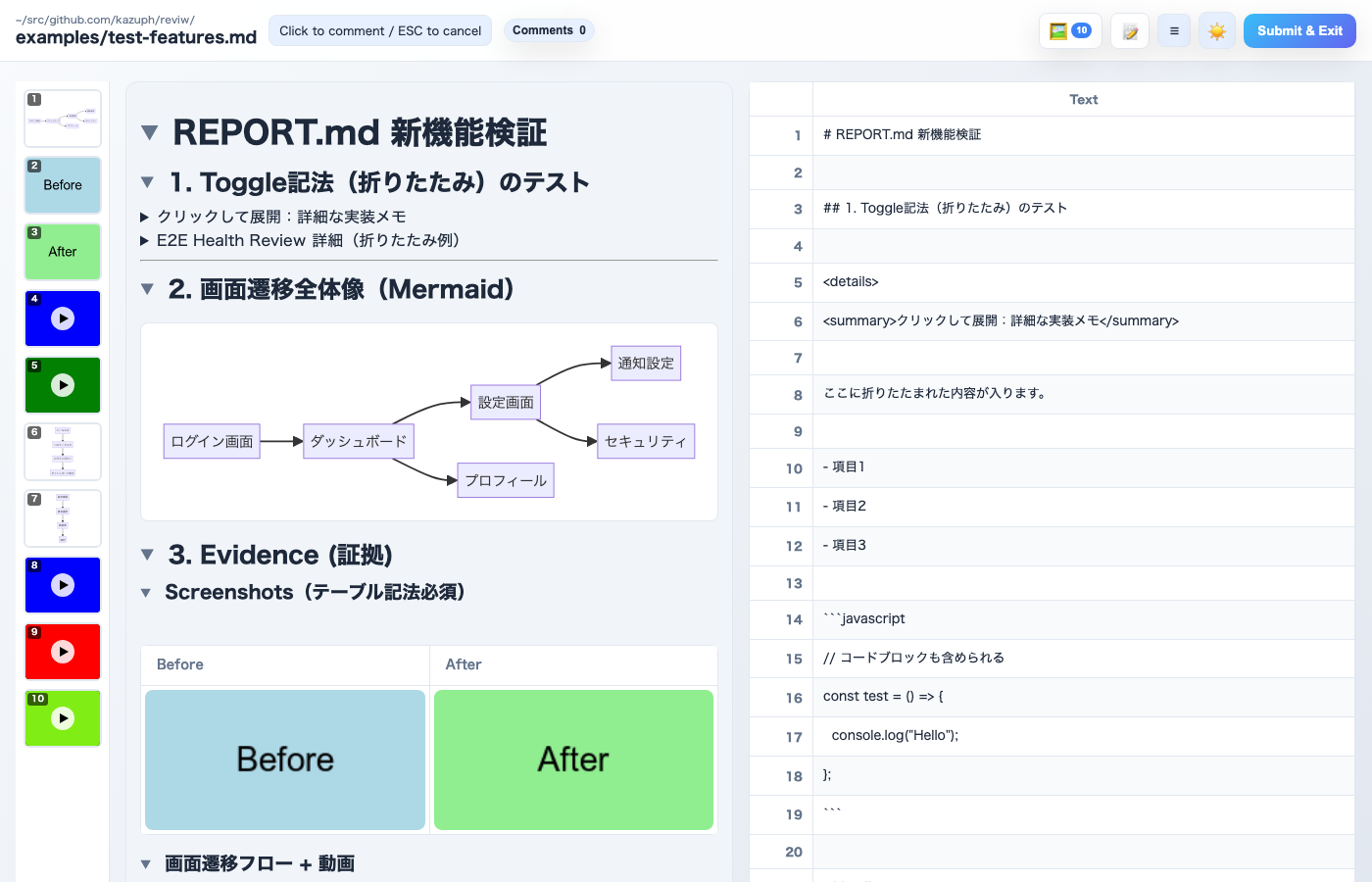
- Markdown: Side-by-side preview with synchronized scrolling, click-to-comment from preview
- Diff/Patch: GitHub-style diff view with syntax highlighting, collapsible large files (500+ lines), and binary files sorted to end
- Text: Line-by-line commenting for plain text files
Mermaid.js Diagrams
- Auto-detect and render Mermaid diagrams in Markdown files
- Click any diagram to open fullscreen viewer with minimap
- Zoom with mouse wheel (centered on cursor position, up to 10x)
- Pan with mouse drag
- Trackpad pinch-to-zoom and touch gesture support
- Shift+scroll zoom for Windows users
- Dark mode support for thumbnails
- Highlights corresponding source line after closing fullscreen
- Syntax error display in toast notifications
Media Sidebar
- Thumbnail gallery of all images and videos in the left sidebar
- Click any thumbnail to scroll to the corresponding media and highlight the source line
- Numbered badges for quick identification
Media Fullscreen
- Click images in Markdown preview to open fullscreen viewer
- Click videos to open fullscreen playback with YouTube-like keyboard shortcuts (Space/K, J/L, arrow keys, 0-9)
- Click anywhere (including the image/video itself) to close the fullscreen overlay
- Clicking media automatically highlights the corresponding source line in the Markdown panel
- Video timeline settings with adjustable scene detection sensitivity
UI Features
- Theme toggle: Switch between light and dark modes
- Preview-only mode: Hide source panel for wide preview reading
- Heading toggle: Collapse/expand sections by clicking heading arrows
- Multi-file support: Open multiple files simultaneously on separate ports
- Drag selection: Select rectangular regions or multiple rows for batch comments
- Real-time updates: Hot reload on file changes via SSE
- Comment persistence: Auto-save comments to localStorage with recovery modal
- Image attachment: Attach images to comments and submit dialog (paste with Cmd/Ctrl+V)
- Selected-lines copy: Copy button in comment dialog to copy selected line text
- Keyboard shortcuts: Cmd/Ctrl+Enter to open submit modal
- Multi-tab sync: Submit from any tab closes all tabs for the same file
- Server detection: Reuse existing server instead of starting a new one (via lock files)
- Tab activation (macOS): Automatically activates existing browser tab via AppleScript
- Review history: File-based persistent review history
- details/summary support: HTML details/summary tags rendered as collapsible sections
Output
- YAML format with file, mode, row, col, value, and comment text
- Overall summary field for review notes
- Image attachments included as base64 data
Installation
npm install -g reviw
Or run directly with npx:
npx reviw <file>
Usage
# Single file
reviw <file> [--port 4989] [--encoding utf8|shift_jis|...]

# Multiple files (each opens on consecutive ports)
reviw file1.csv file2.md file3.tsv --port 4989

# Diff from stdin
git diff HEAD | reviw

# Diff file
reviw changes.diff
Options
--port <number>: Specify starting port (default: 4989)--encoding <encoding>: Force specific encoding (auto-detected by default)--no-open: Prevent automatic browser opening--help, -h: Show help message--version, -v: Show version number
Workflow
- Browser opens automatically (macOS:
open / Linux: xdg-open / Windows: start)
- Click cells/lines to add comments, or drag to select multiple
- Use Cmd/Ctrl+Enter or click "Submit & Exit" to output comments
- Comments are printed as YAML to stdout
Screenshots
Markdown View with Media Sidebar
 kazuph