Stats
Actions
Available In
Tags

Compress local context for Claude Code workflows by condensing structured data, debug-heavy output, and supported source files into compact representations
English | 繁體中文 | 日本語 | Español | Français | Deutsch | 한국어 | Русский | Português | Tiếng Việt | Bahasa Indonesia
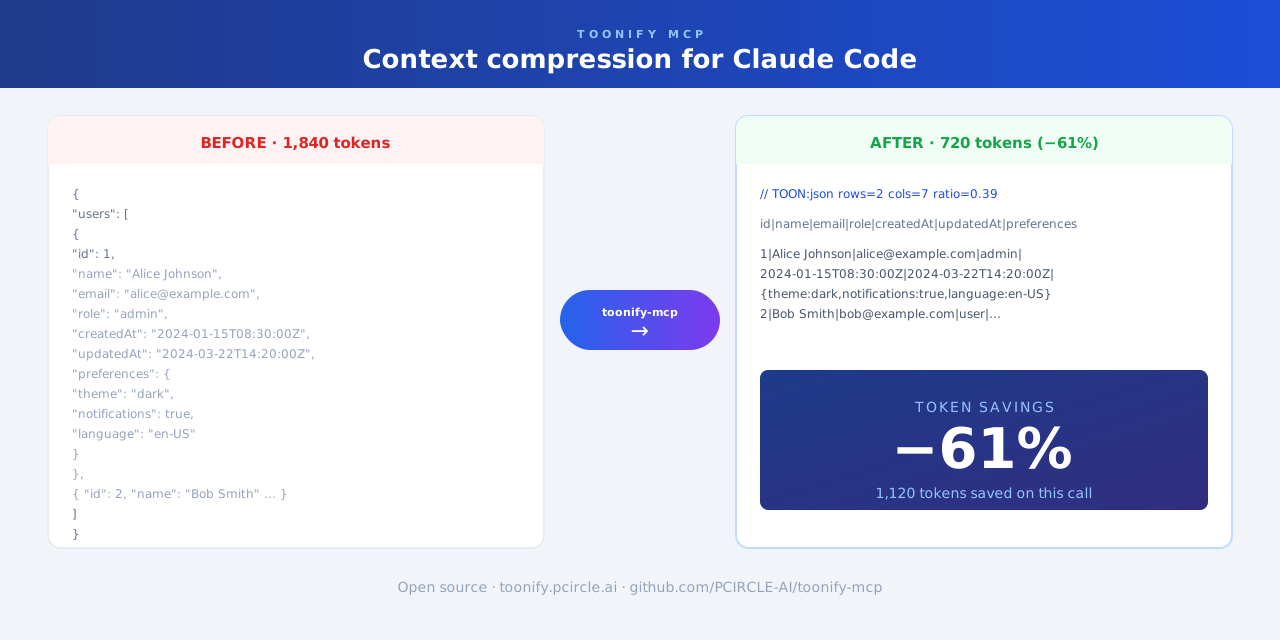
Context compression plugin for Claude Code. Automatically trims large tool output—JSON, CSV, YAML, stack traces, and logs—before it enters the context window.
Works as a Claude Code plugin (automatic, zero-config) or as an MCP server (on-demand).
Skipped for short text, very small files, and content where exact original formatting must be preserved.
git clone https://github.com/PCIRCLE-AI/toonify-mcp.git
cd toonify-mcp
npm install
npm run build
npm install -g .
toonify-mcp setup
toonify-mcp doctor
toonify-mcp setup adds the local marketplace and installs, updates, or re-enables the plugin automatically.
toonify-mcp status
toonify-mcp setup mcp
claude mcp list
claude mcp list should show toonify: toonify-mcp - ✓ Connected.
Based on adoption, maintenance, documentation, and repository signals. Not a security audit or endorsement.
Own this plugin?
Verify ownership to unlock analytics, metadata editing, and a verified badge. GitHub access is read-only (username + org membership).
Sign in to claimOwn this plugin?
Verify ownership to unlock analytics, metadata editing, and a verified badge. GitHub access is read-only (username + org membership).
Sign in to claimMeMesh — Local memory for Claude Code and MCP coding agents. One SQLite file, zero cloud required.
 PCIRCLE-AI
npx claudepluginhub pcircle-ai/toonify-mcp --plugin toonify-mcpjusTokenMax — token-reduction toolkit for Claude Code. Compresses attachments (PDF→Markdown, images), verbose logs, and provides a code symbol index plus chat-branching workflows so the agent reads and writes fewer tokens.
 Kalmantic
Token-lean sessions at the harness level, measured on real multi-turn coding sessions — a terse output style, output-shrinking hooks, and log compression cut output tokens and narration.
 V-Songbird
Token optimization for Claude Code. Automatic tool output compression (40-60% reduction), token meter in statusline, auto-compact at 70% context, structured output formats, self-building project wiki, URL ingestion, Karpathy compile pass, and semantic lint.
 abhisekjha
AST-powered code compression for LLMs. Send 89% fewer tokens, get the same understanding. Parses your code with tree-sitter, keeps the signal, drops the noise.
 mertcanaltin
Automatically compresses verbose CLI output (git, docker, npm, terraform, kubectl, etc.) to save tokens in Claude Code sessions. 32 specialized processors with content-aware compression.
 ppgranger
Governor: always-on compact professional output, telemetry, context slimming, tool-output filtering, prompt guidance, and drift guardrails for Claude Code Max users.
 0xhimanshu
'%20stop-opacity%3D'0.16'%2F%3E%3Cstop%20offset%3D'1'%20stop-color%3D'rgb(200%2C90%2C60)'%20stop-opacity%3D'0.03'%2F%3E%3C%2FlinearGradient%3E%3C%2Fdefs%3E%3Crect%20width%3D'320'%20height%3D'200'%20fill%3D'url(%23g)'%2F%3E%3Ccircle%20cx%3D'250'%20cy%3D'56'%20r%3D'92'%20fill%3D'rgb(200%2C90%2C60)'%20fill-opacity%3D'0.06'%2F%3E%3Ccircle%20cx%3D'64'%20cy%3D'172'%20r%3D'58'%20fill%3D'rgb(200%2C90%2C60)'%20fill-opacity%3D'0.05'%2F%3E%3C%2Fsvg%3E)