Stats
Actions
Available In
Tags

AI code review that catches production-breaking bugs, business logic issues, and security vulnerabilities — directly in Claude Code.



A Claude Code plugin that brings Optibot AI-powered code reviews directly into your coding workflow. Optibot catches production-breaking bugs, surfaces business logic issues, and strengthens security — all without leaving Claude Code.
What is a Claude Code plugin? Claude Code plugins extend Claude's capabilities with new skills, tools, and integrations. Once installed, this plugin lets Claude run Optibot reviews on your behalf — just ask in natural language. Learn more about Claude Code plugins.
A Claude Code plugin that brings Optibot AI-powered code reviews directly into your coding workflow. Optibot catches production-breaking bugs, surfaces business logic issues, and strengthens security — all without leaving Claude Code.
/plugin in the Claude Code chat to open the Plugin Manager UIOptimal-AI/optibot-skill/reload-plugins to activate it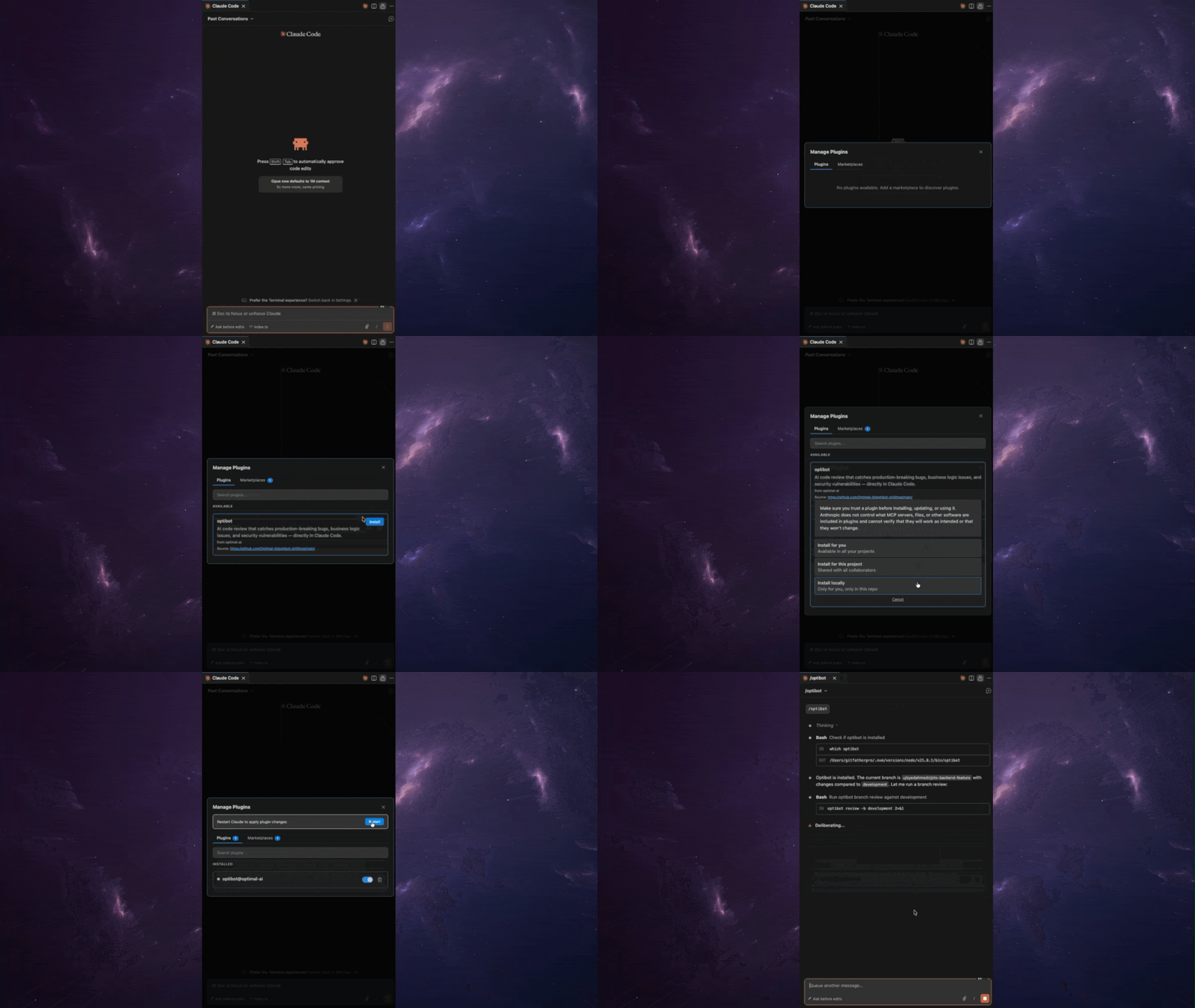
Note: These commands are run in your regular terminal, not inside a Claude Code session.
Add the marketplace:
claude plugin marketplace add Optimal-AI/optibot-skill
Install the plugin:
claude plugin install optibot@optimal-ai
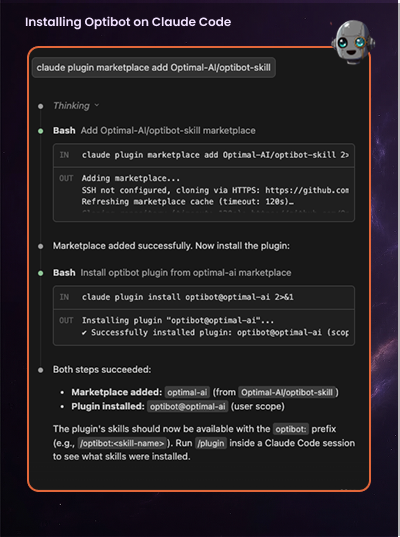
After installing, run /reload-plugins inside your Claude Code session to load the plugin. You can confirm it's active by typing /help and looking for Optibot commands.
Authenticate with your Optibot account:
optibot login
Then open Claude Code and say "review my changes" — you're good to go.
Don't have an account? Sign up free →
Once installed, Claude Code can:
.patch or .diff fileAfter installing the plugin, just ask Claude naturally:
| What you say | What happens |
|---|---|
| "review my changes" | Reviews uncommitted local changes |
| "review my branch" | Compares current branch against main |
| "review this diff" | Reviews an arbitrary patch file |
| "set up optibot" | Walks you through auth setup |
| "create an API key for CI" | Creates and displays a new API key |
On a dev machine — run optibot login to authenticate via browser (90-day token).
Setting up CI/CD — run optibot setup ci (CLI ≥ 0.4.0). It logs you in if needed, mints a long-lived API key, and prints copy-paste snippets for GitHub Actions and GitLab CI.
Inside a CI runner — set OPTIBOT_API_KEY=optk_... as an environment variable. Get the key with optibot setup ci from a dev machine first.
# GitHub Actions
- name: Optibot Review
  env:
    OPTIBOT_API_KEY: ${{ secrets.OPTIBOT_API_KEY }}
  run: npx @optimalai/optibot review -b main
claude plugin uninstall optibot
Contributions are welcome! See CONTRIBUTING.md for guidelines.
MIT — see LICENSE for details.
Copyright (c) 2026 Optimal AI, Inc.
Own this plugin?
Verify ownership to unlock analytics, metadata editing, and a verified badge. GitHub access is read-only (username + org membership).
Sign in to claimOwn this plugin?
Verify ownership to unlock analytics, metadata editing, and a verified badge. GitHub access is read-only (username + org membership).
Sign in to claimBased on adoption, maintenance, documentation, and repository signals. Not a security audit or endorsement.
npx claudepluginhub optimal-ai/optibot-skill --plugin optibotComprehensive code review with architecture, security, and PR enhancement
 EricGrill
Perform a comprehensive code review of recent changes
 ccplugins
Automated code review, security scanning, and quality enforcement
 rohitg00
Expert code review specialist. Proactively reviews code for quality, security, and maintainability. Use immediately after writing or modifying code.
ccpluginsMulti-lens code review pipeline: deep review (Claude or Codex), automated fix loop, interactive walkthrough, manual promote, external-finding injection.
 adamjgmiller
AI-powered code review in Claude Code, powered by CodeRabbit
 coderabbitai
'%20stop-opacity%3D'0.16'%2F%3E%3Cstop%20offset%3D'1'%20stop-color%3D'rgb(200%2C90%2C60)'%20stop-opacity%3D'0.03'%2F%3E%3C%2FlinearGradient%3E%3C%2Fdefs%3E%3Crect%20width%3D'320'%20height%3D'200'%20fill%3D'url(%23g)'%2F%3E%3Ccircle%20cx%3D'250'%20cy%3D'56'%20r%3D'92'%20fill%3D'rgb(200%2C90%2C60)'%20fill-opacity%3D'0.06'%2F%3E%3Ccircle%20cx%3D'64'%20cy%3D'172'%20r%3D'58'%20fill%3D'rgb(200%2C90%2C60)'%20fill-opacity%3D'0.05'%2F%3E%3C%2Fsvg%3E)