Stats
Actions
Available In
Tags

Simulate realistic user personas like Boomers, Millennials, and Gen Z interacting with web apps via Chrome automation to validate UX flows, uncover accessibility barriers, detect security issues, run A/B tests, smoke tests, WCAG audits, cookie compliance checks, and critical paths. Generate annotated reports, traces, and GitHub PR comments for pre-release quality assurance.
Compare two URL variants (A/B test) using persona-based user testing. Tests the same persona on both variants and generates a comparison report showing which performs better.
Add visual annotations (boxes, highlights, callouts) to the current page and take a screenshot. Use during user testing to highlight issues or confusion points.
Check for broken links on a webpage. Crawls the page to find all links and validates each one, reporting 404s, redirects, and other issues.
Run a GDPR/CCPA cookie consent compliance audit on a web page. Checks banner behavior, consent mechanisms, and generates an actionable compliance report.
Test critical user journeys defined in your project. Validates must-work paths like purchase flows, signups, and other essential functionality.
Compare two URL variants with the same persona to determine which provides a better user experience. This skill guides the comparison logic and report generation.
Audit web pages for GDPR and CCPA cookie consent compliance.
Test must-work user journeys defined in project configuration. Critical paths are essential flows that must always function correctly.
Test form inputs with edge case payloads to find security vulnerabilities and encoding issues.
Post user testing results as GitHub PR comments for CI/CD integration.
Uses power tools
Uses Bash, Write, or Edit tools
Own this plugin?
Verify ownership to unlock analytics, metadata editing, and a verified badge. GitHub access is read-only (username + org membership).
Sign in to claimOwn this plugin?
Verify ownership to unlock analytics, metadata editing, and a verified badge. GitHub access is read-only (username + org membership).
Sign in to claimBased on adoption, maintenance, documentation, and repository signals. Not a security audit or endorsement.
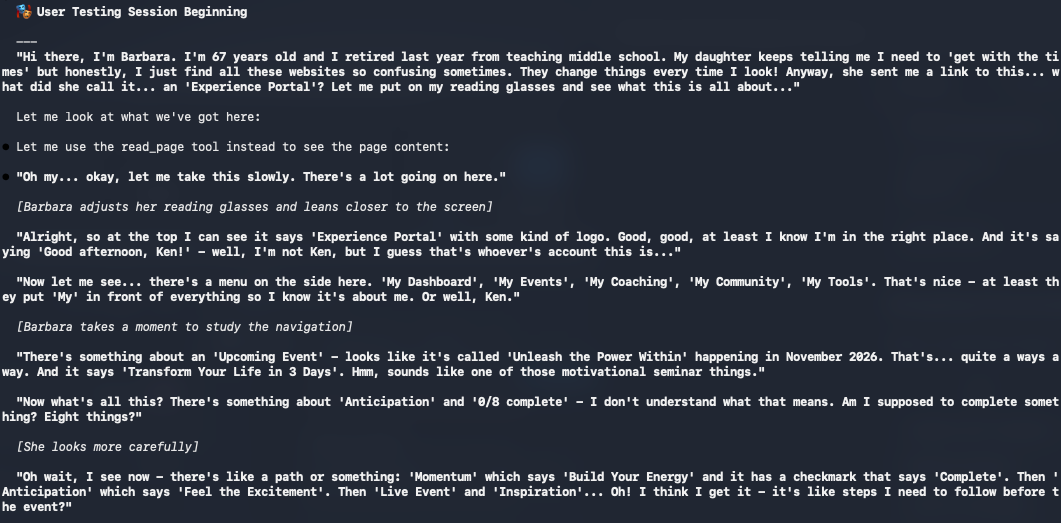
A Claude Code plugin that simulates realistic user personas for UX testing. The agent embodies different user archetypes with authentic behaviors, timing patterns, and frustration triggers to identify usability issues before real users encounter them.
# In Claude Code
/plugins
# Select "Add Marketplace" and enter:
ncklrs/claude-chrome-user-testing
# Start Claude with Chrome
claude --chrome

# Run a user test
/user-test --url https://example.com --persona genz-digital-native

# With tasks
/user-test --url https://shop.example.com --persona boomer-tech-averse --tasks "find product, checkout"
| Category | Personas |
|---|---|
| Generational | boomer-tech-averse, boomer-tech-friendly, millennial-tech-skeptic, genz-digital-native, genalpha-tablet-kid |
| Accessibility | screen-reader-user, low-vision-user, keyboard-only-user, cognitive-adhd-user |
| Professional | busy-executive, developer-critic, designer-critic, support-agent |
| Context | bad-connection-user, distracted-parent, non-native-english, power-user |
| Shopping | comparison-shopper, impulse-buyer, return-customer, gift-buyer |
| International | german-business-user, japanese-user, arabic-rtl-user, brazilian-user |
See docs/personas.md for detailed persona documentation.
| Command | Purpose |
|---|---|
/user-test | Main testing command with all options |
/stripe-test | Dedicated Stripe checkout testing |
/ab-test | Compare two URL variants |
/smoke-test | Quick validation with presets |
/critical-path | Test must-work journeys |
/check-links | Find broken links |
/wcag-audit | WCAG 2.1 accessibility audit |
/cookie-audit | GDPR/CCPA compliance audit |
/user-test-create-persona | Create custom personas |
See docs/commands.md for full command reference.
# Multi-persona comparison
/user-test --url https://example.com --personas "boomer-tech-averse,genz-digital-native" --quiet

# Mobile + slow network
/user-test --url https://example.com --persona impulse-buyer --viewport mobile --network slow-3g

# Stripe checkout testing
/stripe-test --url https://shop.example.com/checkout --card success

# A/B testing
/ab-test --url-a https://example.com --url-b https://staging.example.com --persona genz-digital-native

# Security fuzzing
/user-test --url https://example.com/signup --persona developer-critic --fuzz

# Cookie compliance
/cookie-audit --url https://example.com --regulation gdpr

# CI/CD with PR comment
/user-test --url https://staging.example.com --persona genz-digital-native --quiet --pr 123
- name: Run User Tests
  env:
    ANTHROPIC_API_KEY: ${{ secrets.ANTHROPIC_API_KEY }}
  run: |
    claude --chrome "/user-test \
      --url ${{ env.PREVIEW_URL }} \
      --persona genz-digital-native \
      --quiet \
      --output json \
      --pr ${{ github.event.pull_request.number }}"
user-testing-agent/
├── commands/           # Command definitions
├── agents/             # Testing agent
├── skills/             # Feature implementations
│   ├── user-testing/   # Personas and behaviors
│   ├── stripe-checkout/# Payment testing
│   ├── wcag-auditor/   # Accessibility audit
│   ├── cookie-auditor/ # Privacy compliance
│   ├── form-fuzzer/    # Security testing
│   └── ...
├── docs/               # Documentation
└── README.md
See CONTRIBUTING.md for guidelines on adding personas.
MIT - See LICENSE
npx claudepluginhub ncklrs/claude-chrome-user-testing --plugin user-testing-agentRun an autonomous QA review of a web UI by invoking the local qa-cli command via Bash: structured reviews (accessibility, usability, correctness) and quick visual checks on live pages.
 hcompai
Use this agent when conducting user research, analyzing user behavior, creating journey maps, or validating design decisions through testing. This agent specializes in understanding user needs, pain points, and behaviors to inform product decisions within rapid development cycles. Examples:\n\n<example>\nContext: Understanding user needs for a new feature
 ccplugins
QA skills for test planning, E2E testing, API testing, regression checks, bug reporting, load testing, accessibility audits, and test data generation.
 heaptracetechnology
Harness-native ECC plugin for engineering teams - 67 agents, 277 skills, 93 legacy command shims, reusable hooks, rules, MCP conventions, and operator workflows for Claude Code plus adjacent agent harnesses
 affaan-m
v9.44.1 — Patch release for Gemini environment/version detection and qwen auth gating. Run /octo:setup.
 nyldn
nyldnComprehensive skill pack with 66 specialized skills for full-stack developers: 12 language experts (Python, TypeScript, Go, Rust, C++, Swift, Kotlin, C#, PHP, Java, SQL, JavaScript), 10 backend frameworks, 6 frontend/mobile, plus infrastructure, DevOps, security, and testing. Features progressive disclosure architecture for 50% faster loading.
 Jeffallan
'%20stop-opacity%3D'0.16'%2F%3E%3Cstop%20offset%3D'1'%20stop-color%3D'rgb(200%2C90%2C60)'%20stop-opacity%3D'0.03'%2F%3E%3C%2FlinearGradient%3E%3C%2Fdefs%3E%3Crect%20width%3D'320'%20height%3D'200'%20fill%3D'url(%23g)'%2F%3E%3Ccircle%20cx%3D'250'%20cy%3D'56'%20r%3D'92'%20fill%3D'rgb(200%2C90%2C60)'%20fill-opacity%3D'0.06'%2F%3E%3Ccircle%20cx%3D'64'%20cy%3D'172'%20r%3D'58'%20fill%3D'rgb(200%2C90%2C60)'%20fill-opacity%3D'0.05'%2F%3E%3C%2Fsvg%3E)