By gregoryho
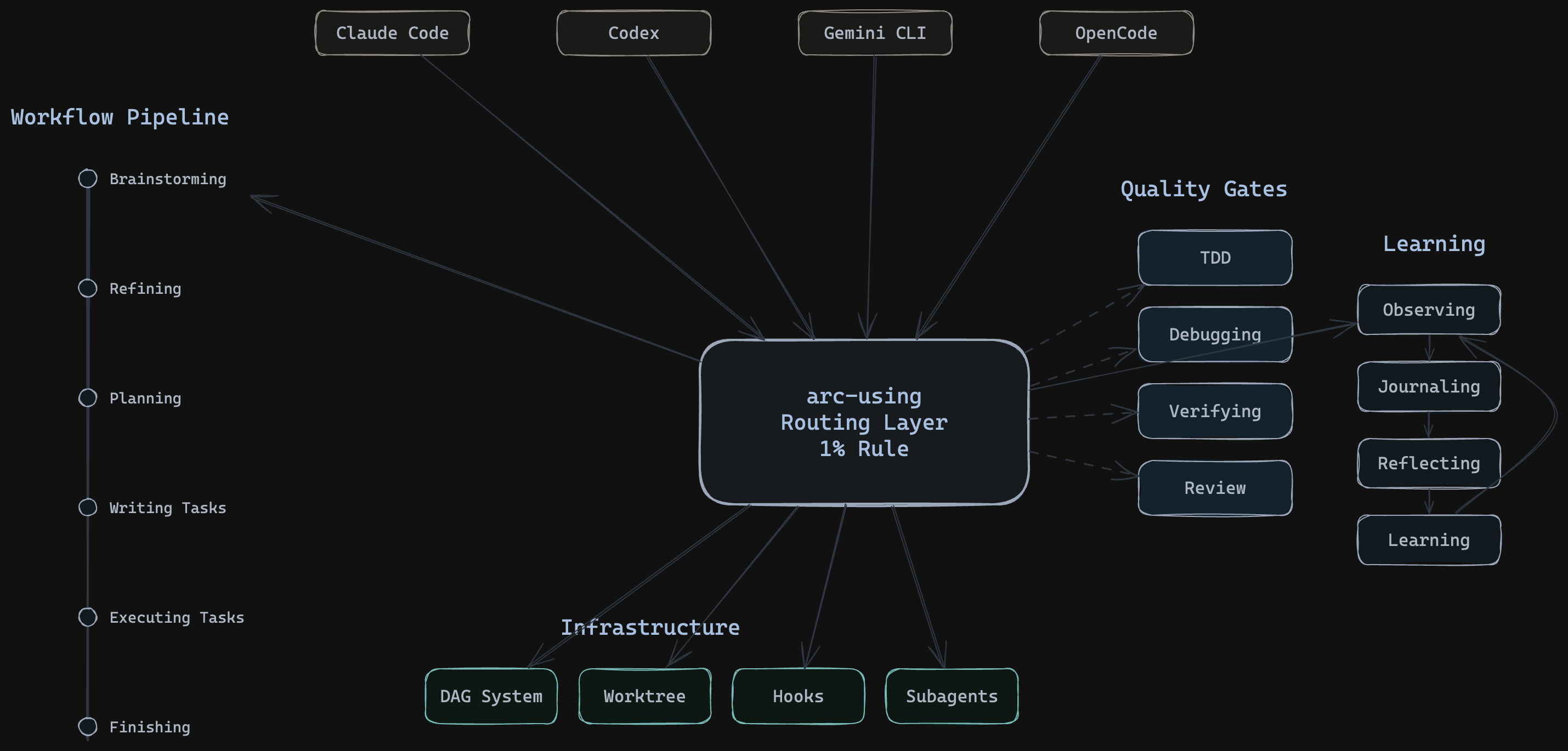
Orchestrate autonomous AI coding agents for large projects: expand SDD specs into DAG workflows, dispatch parallel agents to isolated git worktrees, enforce TDD cycles with root-cause debugging and code reviews, manage session continuity and opt-in behavioral learning for overnight execution loops.
npx claudepluginhub gregoryho/arcforge --plugin arcforgeRun a read-only advisory audit of an arcforge SDD spec family (design.md, spec.xml, dag.yaml) across three axes — cross-artifact alignment, internal consistency, state-transition integrity. Usage: /arc-auditing-spec <spec-id> [--save]
Use this before any creative work - exploring requirements and design before implementation.
Execute tasks in batches with review checkpoints
Show behavioral instincts dashboard — confidence scores, domains, and lifecycle status.
Capture session reflections - decisions, preferences, patterns observed during this session.
Analyze diary entries to identify recurring patterns and preferences.
Save/resume sessions, list sessions, manage aliases.
Create detailed execution tasks for a feature
Use this agent as the `cross-artifact-alignment` axis of the `/arc-auditing-spec` skill. Spawned in parallel with the other two audit axes during Phase 1 fan-out. Read-only by tool grant. Examines semantic alignment between `design.md`, `spec.xml` (+ `details/*.xml`), and `dag.yaml` of a single arcforge spec family; emits findings addressing misalignment across two or more artifacts, NOT issues internal to a single artifact.
Use this agent as the `internal-consistency` axis of the `/arc-auditing-spec` skill. Spawned in parallel with the other two audit axes during Phase 1 fan-out. Read-only by tool grant. Examines contradictions, dangling references, or self-referential prose **within a single artifact** of the arcforge spec family (e.g., a requirement contradicting its own `<consumes>` entry in the same spec.xml). Does NOT emit cross-artifact findings — those belong to the `cross-artifact-alignment` axis.
Use this agent as the `state-transition-integrity` axis of the `/arc-auditing-spec` skill. Spawned in parallel with the other two axes during Phase 1 fan-out. Read-only by tool grant. Examines whether `dag.yaml` recorded state (epic status, worktree pointer, feature status) matches on-disk evidence — `.arcforge-epic` marker files, worktree directory presence, feature-status files. Does NOT examine git history (out of scope; see below).
Use this agent when a major project step has been completed and needs to be reviewed against the original plan and coding standards. Examples: <example>Context: The user is creating a code-review agent that should be called after a logical chunk of code is written. user: "I've finished implementing the user authentication system as outlined in step 3 of our plan" assistant: "Great work! Now let me use the code-reviewer agent to review the implementation against our plan and coding standards" <commentary>Since a major project step has been completed, use the code-reviewer agent to validate the work against the plan and identify any issues.</commentary></example> <example>Context: User has completed a significant feature implementation. user: "The API endpoints for the task management system are now complete - that covers step 2 from our architecture document" assistant: "Excellent! Let me have the code-reviewer agent examine this implementation to ensure it aligns with our plan and follows best practices" <commentary>A numbered step from the planning document has been completed, so the code-reviewer agent should review the work.</commentary></example>
Use this agent to investigate and fix bugs using a structured 4-phase methodology that separates root cause analysis from fix attempts. Examples: <example>Context: A test is failing and the cause isn't obvious. user: "The sync command is returning stale data after worktree merge" assistant: "I'll use the debugger agent to investigate — it will isolate the root cause before attempting any fix." <commentary>The debugger's 4-phase methodology prevents the common pattern of jumping to fixes before understanding the problem.</commentary></example> <example>Context: A user reports unexpected behavior in production. user: "The compact-suggester fires twice at the 50-call threshold" assistant: "Let me dispatch the debugger agent to trace this through the counter logic and find the root cause." <commentary>Debugger agent systematically traces data flow rather than guessing at fixes.</commentary></example>
Use this agent to implement a specific task using TDD in an isolated subagent context. Each implementer gets a fresh context to avoid cross-task pollution. Examples: <example>Context: A task from a plan needs to be coded. user: "Implement the SyncResult dataclass as described in task 1" assistant: "I'll dispatch the implementer agent with the full task context to implement this using TDD." <commentary>The implementer agent handles the full TDD cycle — RED, GREEN, REFACTOR — then reports back with evidence.</commentary></example> <example>Context: arc-agent-driven is executing a task list and needs a subagent per task. user: "Execute task 3: add the loop CLI command" assistant: "Dispatching implementer agent with task spec and acceptance criteria." <commentary>Each task gets a fresh implementer to prevent context pollution between tasks.</commentary></example>
Use this agent to monitor an active autonomous loop. It reads loop state, detects stalls and retry storms, and recommends actions. NOT auto-invoked — user spawns it to monitor a running loop. Examples: <example>Context: An autonomous loop has been running for a while. user: "How's the loop doing? Any issues?" assistant: "I'll dispatch the loop-operator agent to check the loop state and look for stalls or errors." <commentary>The loop-operator reads .arcforge-loop.json and provides a health assessment of the running loop.</commentary></example> <example>Context: User suspects the loop is stuck. user: "The loop seems stuck — can you check what's happening?" assistant: "Let me use the loop-operator to diagnose the issue — it can detect stalls and retry storms." <commentary>The loop-operator has specific stall and retry storm detection logic.</commentary></example>
Use this agent for architectural analysis, approach exploration, and implementation planning when the work requires deep reasoning before any code is written. This agent is READ-ONLY — it cannot edit code, only analyze. Examples: <example>Context: User needs to plan a complex feature before implementation begins. user: "I need to figure out the best approach for adding real-time sync to the DAG system" assistant: "Let me use the planner agent to analyze the codebase and design the approach before we write any code." <commentary>The planner agent is ideal here because it needs deep reasoning about architecture without making premature changes.</commentary></example> <example>Context: User wants to explore multiple approaches before committing to one. user: "There are several ways we could restructure the coordinator — can you analyze the trade-offs?" assistant: "I'll use the planner agent to explore approaches and present trade-offs. It will analyze without modifying anything." <commentary>Planner's read-only constraint prevents accidental changes during exploratory analysis.</commentary></example>
Use this agent for code quality review AFTER spec compliance has been verified. It assesses architecture, testing, error handling, and production readiness. This is the second review gate in the two-stage review process. Examples: <example>Context: Spec compliance review passed, now need quality review. user: "Spec review passed for the loop command — now check code quality" assistant: "I'll dispatch the quality-reviewer agent to assess architecture, testing, and production readiness." <commentary>Quality review is the second gate — it only runs after spec compliance passes. It checks HOW the code was built, not WHAT was built.</commentary></example> <example>Context: arc-agent-driven workflow needs quality gate after spec review. user: "The eval harness passed spec review — run quality check" assistant: "Dispatching quality-reviewer to assess code quality, architecture patterns, and test coverage." <commentary>The quality-reviewer focuses on engineering quality rather than spec compliance, which was already verified.</commentary></example>
Use this agent to verify that an implementation matches its spec EXACTLY — nothing missing, nothing extra, nothing misunderstood. This is the first review gate in the two-stage review process. Examples: <example>Context: An implementer has completed a task and needs spec compliance review. user: "The implementer finished task 2 — run the spec review" assistant: "I'll dispatch the spec-reviewer agent to independently verify every acceptance criterion against the actual code." <commentary>Spec review must happen BEFORE code quality review — it gates whether the right thing was built.</commentary></example> <example>Context: arc-agent-driven workflow needs spec compliance check between implementation and quality review. user: "Check if the eval-grader agent matches the eval harness spec" assistant: "Dispatching spec-reviewer to compare implementation against spec. It will read the actual code, not trust any reports." <commentary>The spec-reviewer reads actual code and independently verifies — it never trusts implementer reports.</commentary></example>
Use this agent to independently verify that completed work actually meets its acceptance criteria. The verifier trusts nothing — it runs commands, reads output, and checks evidence. Examples: <example>Context: An implementer reports a task is complete. user: "The implementer says the loop command is done — can you verify?" assistant: "I'll dispatch the verifier agent to independently check every acceptance criterion with fresh evidence." <commentary>The verifier never trusts reports — it runs the actual commands and reads the actual output.</commentary></example> <example>Context: Before marking a feature as complete in the DAG. user: "Verify that all the eval harness components are working before I mark this done" assistant: "The verifier agent will check each component against its spec and run all tests independently." <commentary>Verifier provides the confidence gate before status transitions.</commentary></example>
Use when executing task lists where each task requires isolated execution
Use when the user explicitly runs the slash command `/arc-auditing-spec <spec-id>` to produce a read-only advisory audit of an arcforge SDD spec family (design.md, spec.xml, dag.yaml). Only triggered by direct user invocation; never auto-invoked from any pipeline skill (arc-brainstorming, arc-refining, arc-planning).
Use when exploring ideas before implementation or when user wants to design a new feature or iterate on an existing spec
Guide for strategic manual compaction timing at workflow phase boundaries
Use when managing worktrees for multi-epic projects, when specs/<spec-id>/dag.yaml exists, or when coordinating parallel development
Use when encountering any bug, test failure, or unexpected behavior, before proposing fixes
Use when the user wants to create an Excalidraw diagram, architecture visualization, flowchart, mind map, or any visual representation of concepts and relationships. Trigger on mentions of drawing, diagramming, visualizing, mapping, or illustrating ideas. Also trigger when arc-maintaining-obsidian delegates for Synthesis visuals that need more than embedded Mermaid. Even if the user just says "show me how this works visually" or "can you draw that?" — this skill applies.
Use when dispatching multiple independent features within a worktree session
Use when specs/<spec-id>/dag.yaml has 2+ epics in a ready state, the user is staying at their keyboard to monitor (not walking away), and the context is epic-level parallel work where arc-looping's unattended mode is a wrong fit. Use when the user mentions agent teams or teammates in the context of multi-epic work, asks what to do after arc-planning produces multiple ready epics, or is in an arcforge session where epic-level parallelism has arisen and the lead can stay present. For walk-away overnight execution, use arc-looping instead.
Use when measuring whether skills, agents, or workflows actually change AI agent behavior — before shipping a new skill, after modifying an existing one, or when comparing alternative approaches
Use when executing a prepared task list, when running batch implementation, or when tasks are already broken down
Use when epic implementation in a worktree is complete (.arcforge-epic file exists), all tests pass, and you need to decide how to integrate
Use when implementation is complete on a regular branch (no .arcforge-epic file), all tests pass, and you need to decide how to integrate
Use when orchestrating large project implementation in a worktree
Use when user explicitly requests /diary, when PreCompact hook triggers, or at end of significant work session
Use when optional learning is enabled and observations should become reviewable candidates, inactive drafts, and explicitly activated artifacts.
Use when running autonomous unattended loops — cross-session execution of DAG tasks without human intervention
Use when the user wants to create, query, audit, or initialize an Obsidian vault — wiki / knowledge base / second brain, project tracker, news pipeline, journal, or any typed-note vault. Trigger on saving notes / capturing ideas / sharing URLs to document; querying the vault ("what do I know about", "search my vault"); auditing health (missing links, orphans, drift); ingesting raw files; "init a new vault" or "register vault"; mentions of any registered vault. Also triggers on casual "save this" / "file this back". Do NOT trigger for Excalidraw diagram creation (use arc-diagramming-obsidian), general code, debugging, PR reviews, web searches.
Use when ending a session and handing off to a future session, summarizing recent context, continuing from where the last turn left off, archiving a session for durable reference, or resuming/listing/aliasing saved sessions
Use when user asks about behavioral patterns, requests instinct status, or wants to confirm/contradict a detected pattern
Use when breaking down a structured spec into an executable DAG, when a spec has been refined and epics need to be defined, or when planning feature and epic structure for implementation
Use when the user wants to manually save a pattern or insight as an instinct from the current session context. Use when the user says /recall followed by a description. Use when the user identifies a reusable technique worth preserving.
Use when receiving code review feedback, requires technical rigor not performative agreement
Use when converting design documents to structured specs, when spec quality is below threshold, or when requirements need formal acceptance criteria
Use when user requests /reflect, after 5+ diary entries accumulated, or when asked to summarize preferences from past sessions
Use when completing tasks or features to request code review
Use when optimizing any measurable metric through autonomous hypothesis-driven experimentation — build times, algorithm efficiency, prompt quality, model performance, or any target with a numeric signal
Use when implementing any feature or bugfix, before writing implementation code
Use when setting up an isolated workspace for a single epic, when starting work on a specific epic id from dag.yaml, or when any task mentions creating a branch or checkout for epic-level work. Use this skill even if the user doesn't say "worktree" — if they're scoping work to one epic, this applies. For batch (multi-epic) expansion, use arc-coordinating expand instead.
Use when an ArcForge task needs routing help or the user asks which ArcForge skill/workflow applies
Use when you need to verify work is complete before making completion claims
Use when maintaining ArcForge itself by creating, editing, or verifying ArcForge skills before deployment
Use when breaking down features into executable tasks, when preparing for implementation, or when tasks need exact code and commands
Production-grade engineering skills for AI coding agents — covering the full software development lifecycle from spec to ship.
Corca Workflow Framework — consolidated hooks and skill orchestration for structured development sessions
This skill should be used when the model's ROLE_TYPE is orchestrator and needs to delegate tasks to specialist sub-agents. Provides scientific delegation framework ensuring world-building context (WHERE, WHAT, WHY) while preserving agent autonomy in implementation decisions (HOW). Use when planning task delegation, structuring sub-agent prompts, or coordinating multi-agent workflows.
Battle-tested Claude Code plugin for engineering teams — 50 agents, 188 skills, 68 legacy command shims, production-ready hooks, and selective install workflows evolved through continuous real-world use
Modifies files
Hook triggers on file write and edit operations
Uses power tools
Uses Bash, Write, or Edit tools
Share bugs, ideas, or general feedback.
Complete developer toolkit for Claude Code
Manus-style persistent markdown files for planning, progress tracking, and knowledge storage. Works with Claude Code, Kiro, Clawd CLI, Gemini CLI, Cursor, Continue, Hermes, and 17+ AI coding assistants. Now with Arabic, German, Spanish, and Chinese (Simplified & Traditional) support.
No model invocation
Executes directly as bash, bypassing the AI model
No model invocation
Executes directly as bash, bypassing the AI model
Share bugs, ideas, or general feedback.
Own this plugin?
Verify ownership to unlock analytics, metadata editing, and a verified badge.
Sign in to claimOwn this plugin?
Verify ownership to unlock analytics, metadata editing, and a verified badge.
Sign in to claim