Stats
Actions
Available In
Tags

Review Claude Code edits as consolidated VS Code diffs instead of approving them one-by-one. Auto-approves edits, captures originals in shadow storage, then opens clean per-file diffs when Claude finishes.
Accept all of Claude's changes and clean up shadow copies
Open VS Code diffs for changed files (all files, or one specific path)
Pause diff tracking for the current session
Interactively change review mode and scope via Claude
Restore files to their pre-edit state (all files, or one specific path)
Modifies files
Hook triggers on file write and edit operations
Own this plugin?
Verify ownership to unlock analytics, metadata editing, and a verified badge. GitHub access is read-only (username + org membership).
Sign in to claimOwn this plugin?
Verify ownership to unlock analytics, metadata editing, and a verified badge. GitHub access is read-only (username + org membership).
Sign in to claimBased on adoption, maintenance, documentation, and repository signals. Not a security audit or endorsement.
Executables (bin/) — files in this plugin's bin/directory are added to the Bash tool's PATH while the plugin is enabled.




Review Claude Code edits with per-hunk accept/reject instead of approving them one-by-one.
v0.8.1 — first stable release. Core review flow (interactive VS Code diff, terminal fallback, multi-round re-engagement, shadow baseline modes) is considered stable. See Known Issues for current limitations.
Claude Code's default flow interrupts you for every file edit. claude-diff-review flips the model: auto-approve edits, capture originals in the background, then open a native VS Code diff per file when Claude finishes. Accept what you like, reject individual hunks, restore what you don't — and if you reject anything, Claude is automatically re-engaged with the details.
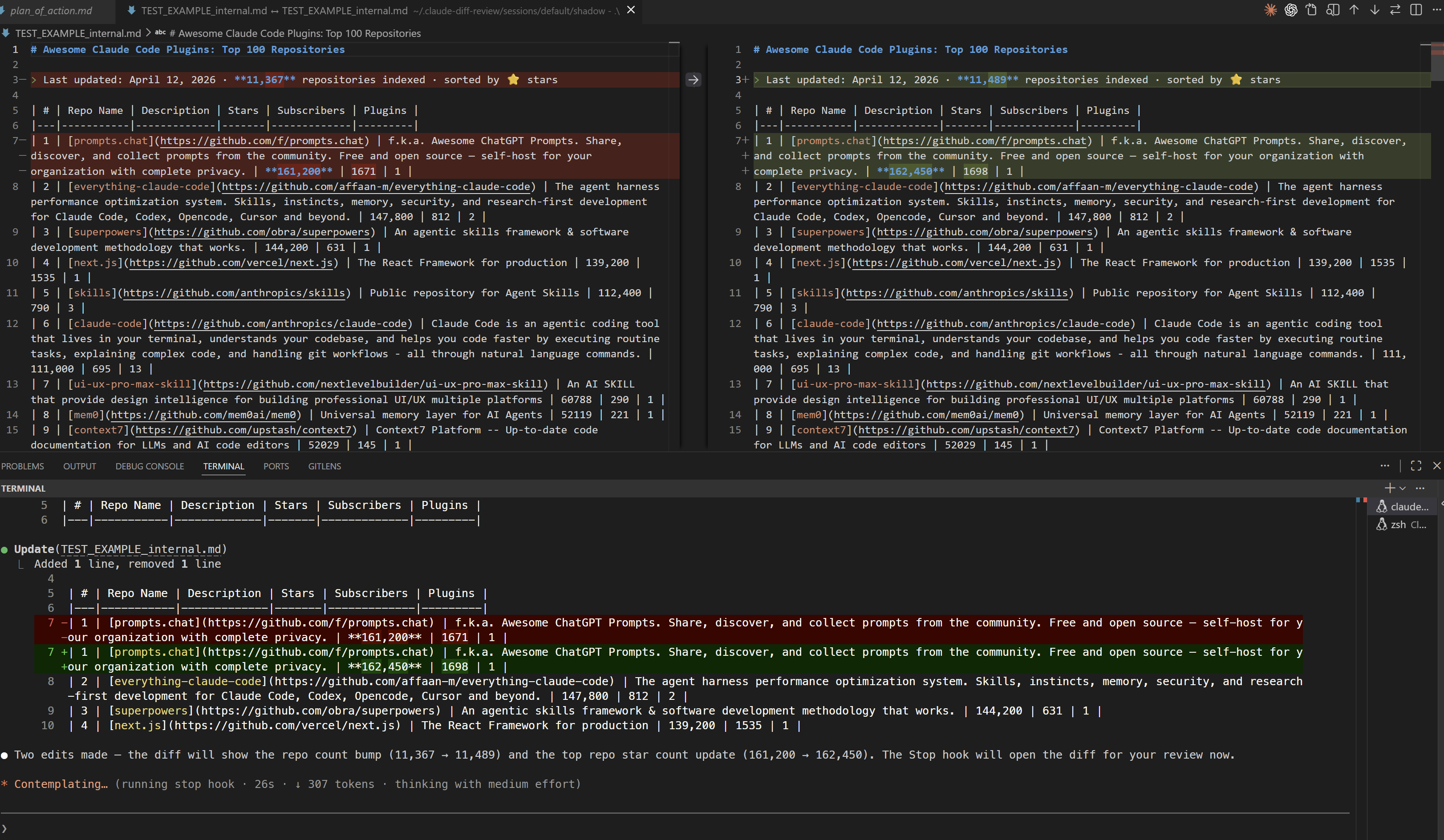
Before — Two edits tracked and ready for review:
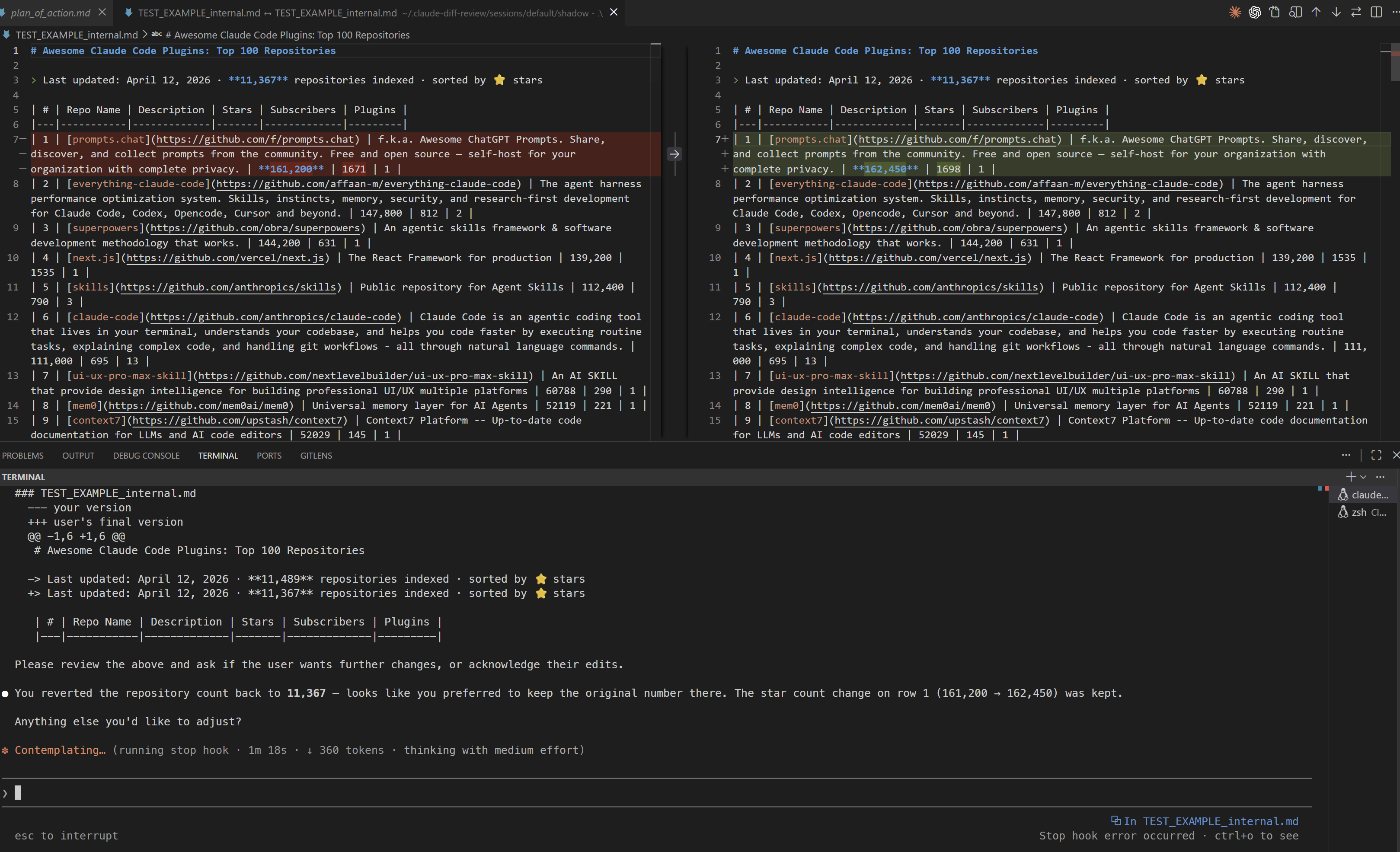
After — VS Code opens the diff; user reverts a hunk, Claude is re-engaged:
You ask Claude to refactor something
         │
         ▼
┌─ PreToolUse hook ──────────────────┐
│  Copies original to shadow/        │
│  Returns "allow" → edit proceeds   │
│  (file scope: opens prev diffs)    │
└────────────────────────────────────┘
         │
         ▼  (Claude edits 1–N files)
         │
┌─ PostToolUse hook ─────────────────┐
│  Tracks: which files, edit count   │
│  Clears stale decisions on re-edit │
└────────────────────────────────────┘
         │
         ▼  (Claude finishes responding)
         │
┌─ Stop hook → lib/review.py ────────┐
│  interactive (default):            │
│    VS Code native diff per file    │
│    Per-hunk accept / reject        │
│    Rejections re-engage Claude     │
│  vscode: code --diff --wait        │
│  terminal: colored per-hunk y/n    │
│  summary: +/- counts only          │
└────────────────────────────────────┘
         │
         ▼
  All accepted → session ends
  Any rejected → Claude gets context
                 and iterates
git add -p-style per-hunk y/n review when VS Code isn't connectedround (diff shows only new changes since last review) or session (diff shows all session changes)claude-diff log for real-time debuggingsession) or open progressively as Claude works (file)claude-diff pause / claude-diff resume to bypass all hooks temporarilyEvery hook and review decision is written to an append-only event log for the current session:
claude-diff log           # show last 50 events (color-coded by hook)
claude-diff log -n 100    # show more
claude-diff log -f        # follow in real time while Claude is running
If something looks wrong — a diff didn't open, a decision wasn't recorded, a fallback fired unexpectedly — start here. The log shows exactly what each hook saw and decided.
claude plugin marketplace add https://github.com/Gorluxor/Claude-Code-Diff-Review
Then open /plugins inside Claude Code and install claude-diff-review. Restart Claude Code when prompted.
git clone https://github.com/Gorluxor/Claude-Code-Diff-Review.git
claude --plugin-dir ./Claude-Code-Diff-Review
git clone https://github.com/Gorluxor/Claude-Code-Diff-Review.git
cd Claude-Code-Diff-Review
bash install.sh
Then restart Claude Code.
npx claudepluginhub gorluxor/claude-code-diff-review --plugin claude-diff-reviewNative diff review window (Monaco + Glimpse) for AI coding agents. Browse changes since the merge-base with your base branch (or last commit / uncommitted), leave inline + file-level + overall comments on the slop, and have the agent address each item.
 dbachelder
Record Claude Code Write/Edit/MultiEdit calls into deltoids traces, grouped by Claude session.
 juanibiapina
Git diff review integration for Claude Code with VSCode extension. Provides inline diff view, browser diff editor, and auto-open files.
 Dev-GOM
Automatic plan review with revdiff
 umputun
Enforces git diff thresholds to promote disciplined code review during AI agent sessions
 kylesnowschwartz
Terminal-based code review companion for Claude Code. Review diffs, leave structured feedback, and submit reviews — all from a TUI running alongside Claude.
 josephschmitt
'%20stop-opacity%3D'0.16'%2F%3E%3Cstop%20offset%3D'1'%20stop-color%3D'rgb(200%2C90%2C60)'%20stop-opacity%3D'0.03'%2F%3E%3C%2FlinearGradient%3E%3C%2Fdefs%3E%3Crect%20width%3D'320'%20height%3D'200'%20fill%3D'url(%23g)'%2F%3E%3Ccircle%20cx%3D'250'%20cy%3D'56'%20r%3D'92'%20fill%3D'rgb(200%2C90%2C60)'%20fill-opacity%3D'0.06'%2F%3E%3Ccircle%20cx%3D'64'%20cy%3D'172'%20r%3D'58'%20fill%3D'rgb(200%2C90%2C60)'%20fill-opacity%3D'0.05'%2F%3E%3C%2Fsvg%3E)