Stats
Actions
Available In
Tags

Orchestrate structured agentic development workflows with persistent memory and specialist AI personas: plan milestones, execute plans, test coverage, generate documentation, enforce security gates, and learn from sessions across multiple AI coding assistants.
Append a new phase to the current milestone roadmap when scope grows after initial planning
Generate and add test coverage for a specific plan or phase post-execution
Capture a todo/idea mid-session without interrupting flow
Verify milestone met its definition of done — requirement coverage, integration check, stub detection
Product + engineering challenge gate — is this worth building?
Stress-tests proposals through product and engineering lenses using forcing questions. Spawned by the challenge workflow on platforms with subagent support.
Reviews code changes through a specific persona lens (correctness, testing, security, performance, maintainability, adversarial) and returns structured findings with severity and confidence. Spawned by the review workflow on platforms with subagent support.
Investigates bugs using systematic hypothesis testing — traces from symptoms to root cause, writes investigation findings to the debug session file. Spawned by debug workflow on platforms with subagent support.
Verifies documentation matches the live codebase — catches stale docs, missing sections, incorrect references. Spawned by /docs-update and /validate-phase.
Writes and updates project documentation files — grounded in the live codebase, verifies factual claims. Spawned by docs-update workflow.
A learning partner skill grounded in neuroscience and philosophy. Use when you want to actually learn a concept (not just get an answer), quiz yourself on a codebase, reflect on what you built, brainstorm a design collaboratively, practice productive struggle on a hard problem, journal a decision with its alternatives and consequences, or schedule concepts to revisit later. Invoke with @agentic-learning followed by one of: learn, quiz, reflect, space, brainstorm, explain-first, struggle, either-or, explain, interleave, or cognitive-load.
A design quality system for frontend interfaces. 21 focused actions for auditing, refining, and elevating UI quality. Invoke with @impeccable followed by one of: adapt, animate, arrange, audit, bolder, clarify, colorize, critique, delight, distill, extract, frontend-design, harden, normalize, onboard, optimize, overdrive, polish, quieter, teach-impeccable, or typeset.
Uses power tools
Uses Bash, Write, or Edit tools
Own this plugin?
Verify ownership to unlock analytics, metadata editing, and a verified badge. GitHub access is read-only (username + org membership).
Sign in to claimOwn this plugin?
Verify ownership to unlock analytics, metadata editing, and a verified badge. GitHub access is read-only (username + org membership).
Sign in to claimBased on adoption, maintenance, documentation, and repository signals. Not a security audit or endorsement.
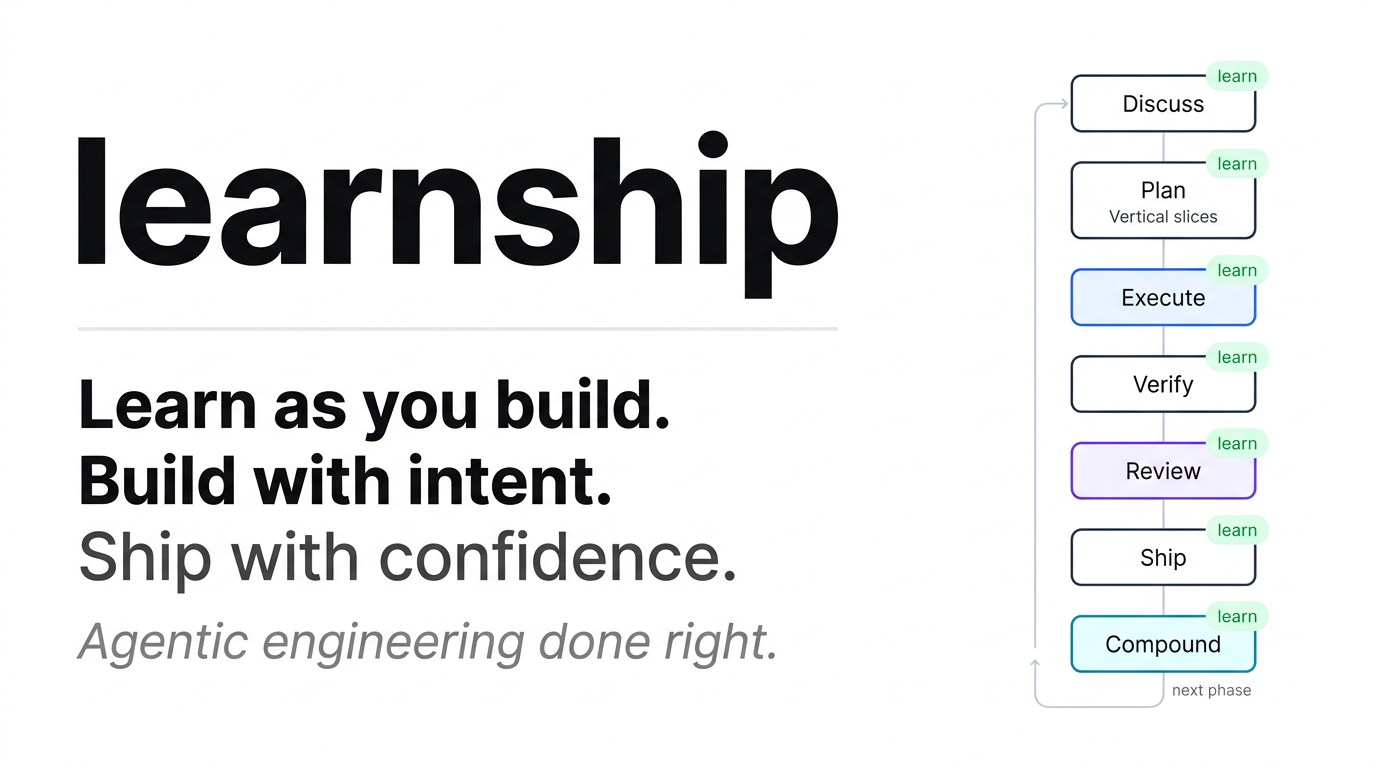





Agentic engineering done right. Learn as you build. Build with intent.
A context engineering and spec-driven development system for Claude Code, Windsurf, Cursor, OpenCode, Gemini CLI, and Codex CLI.
Install · 5 Commands · Phase Loop · How It Works · All Workflows · Full Docs · Changelog
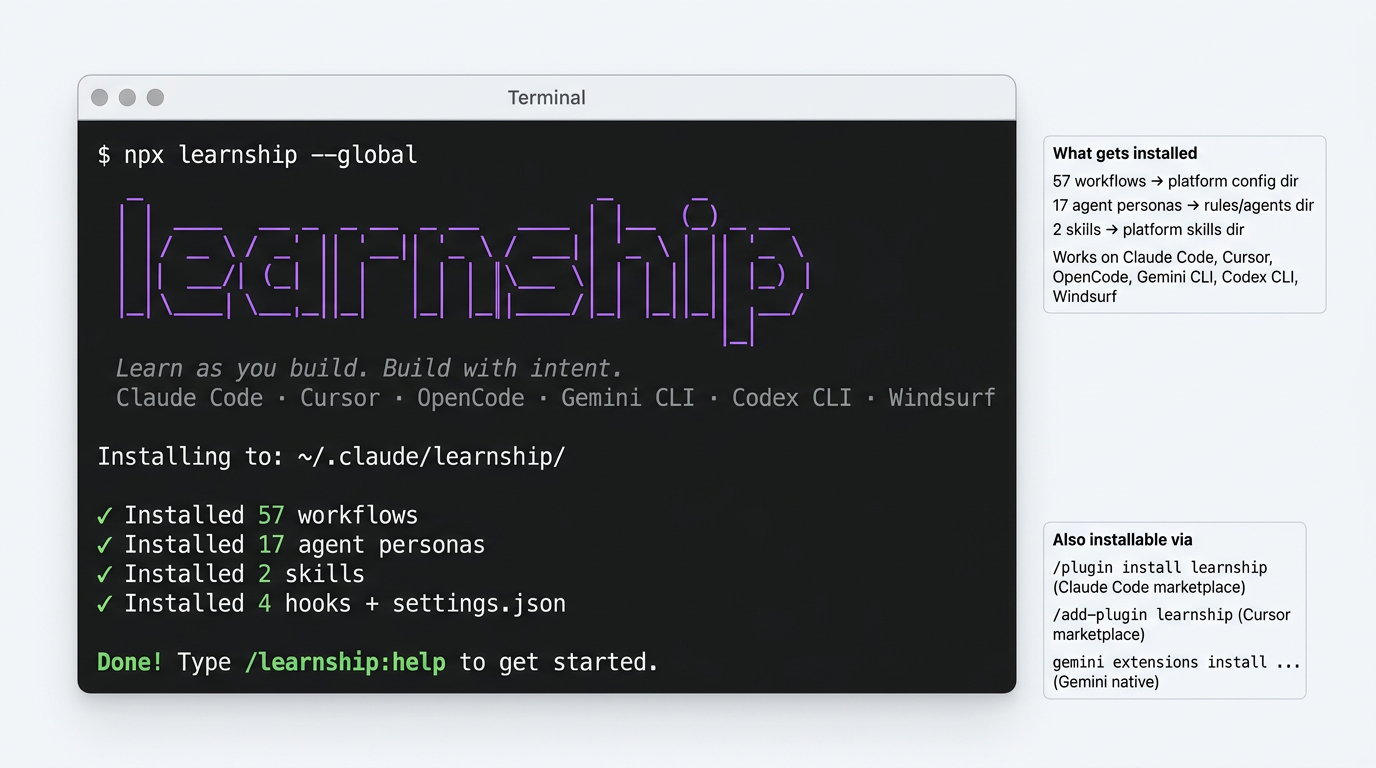
npx learnship
Works on Mac, Windows, and Linux. Requires Node.js ≥ 22 and Git. The installer auto-detects your platform.
npx learnship --global   # all projects
npx learnship --local    # this project only
npx learnship --all --global  # all 6 platforms at once
Then open your AI agent and type:
/ls
That's it. /ls tells you where you are, what to do next, and offers to run it.
| Platform | Install command | Invoke commands as |
|---|---|---|
| Windsurf | npx learnship --windsurf --global | /ls, /new-project |
| Claude Code | npx learnship --claude --global | /learnship:ls, /learnship:new-project |
| Cursor | /add-plugin learnship (marketplace) | @learnship rules load automatically |
| OpenCode | npx learnship --opencode --global | /learnship-ls, /learnship-new-project |
| Gemini CLI | npx learnship --gemini --global | /learnship:ls, /learnship:new-project |
| Codex CLI | npx learnship --codex --global | $learnship-ls, $learnship-new-project |
Via marketplace (no terminal required):
# Claude Code — community marketplace
/plugin marketplace add FavioVazquez/learnship-marketplace
/plugin install learnship@learnship-marketplace

# Cursor — after marketplace approval
/add-plugin learnship

# Gemini CLI — native extension
gemini extensions install https://github.com/FavioVazquez/learnship
Custom install directory:
npx learnship --claude --global --target /path/to/custom/dir
--target overrides the default platform directory. Works with install and uninstall on all 6 platforms.
learnship is published to npm — npx learnship pulls the latest release directly. No github: prefix, no clone needed. The same bin/install.js runs regardless of install method.
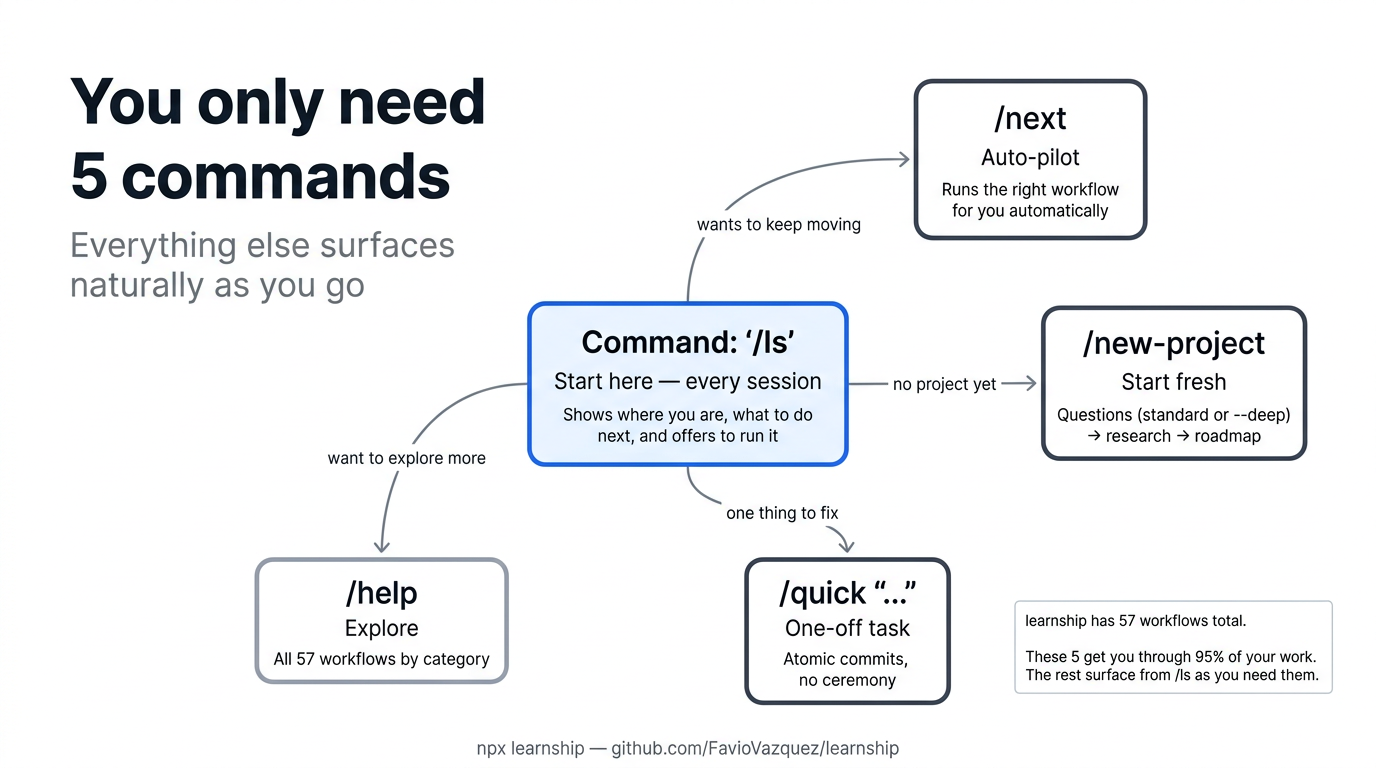
learnship has 57 workflows. You need five. Everything else surfaces naturally from /ls.
| Command | What it does | When to use |
|---|---|---|
/ls | Show status, recent work, and next step (and offer to run it) | Start every session here |
/next | Read state and immediately run the right next workflow | When you just want to keep moving |
/new-project | Full init: questions → research → requirements → roadmap | Starting a new project |
/quick "..." | One-off task with atomic commits, no planning ceremony | Small fixes, experiments |
/help | All 57 workflows organized by category | Discovering capabilities |
Tip:
/lsworks for both new and returning users. No project? It explains learnship and offers/new-project. Returning? It shows your progress and suggests exactly what to do next.
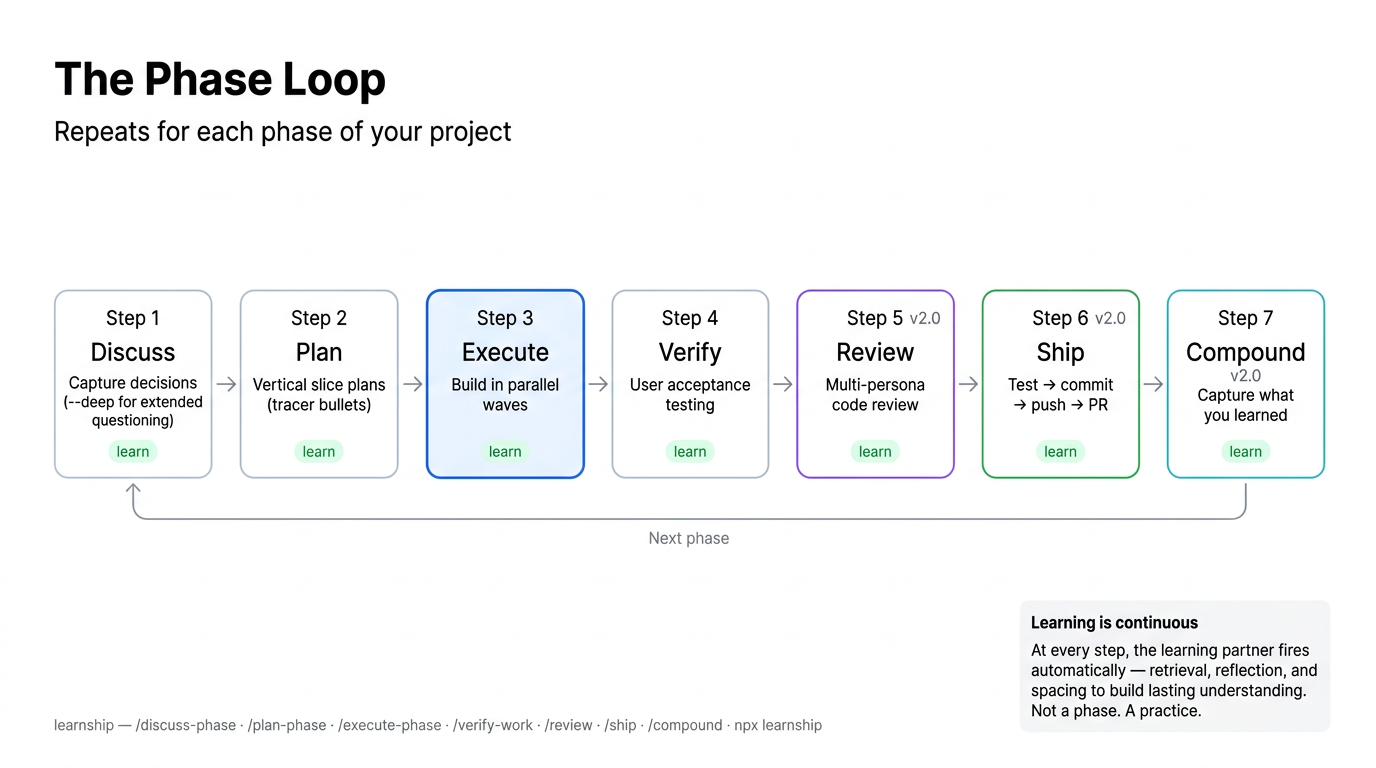
Every feature ships through a 7-step loop:
npx claudepluginhub faviovazquez/learnship-marketplace --plugin learnshipKnowledge graph platform for instant codebase comprehension — git history, structural health, risk scoring, and architectural tours for any project
 FavioVazquez
HelloAGENTS — The orchestration kernel that makes any AI CLI smarter. Adds intelligent routing, unified QA gates, safety guards, and notifications.
 hellowind777
Production-grade engineering skills for AI coding agents — covering the full software development lifecycle from spec to ship.
 az9713
Unified capability management center for Skills, Agents, and Commands.
 guanyang
This skill should be used when the model's ROLE_TYPE is orchestrator and needs to delegate tasks to specialist sub-agents. Provides scientific delegation framework ensuring world-building context (WHERE, WHAT, WHY) while preserving agent autonomy in implementation decisions (HOW). Use when planning task delegation, structuring sub-agent prompts, or coordinating multi-agent workflows.
 Jamie-BitFlight
Harness for Claude Code — skills, /harness:* slash commands, persona subagents, lifecycle hooks, and MCP tools without per-repo `harness setup`. Sibling plugins exist for Cursor, Gemini CLI, and Codex.
 Intense-Visions
Harness-native ECC plugin for engineering teams - 67 agents, 277 skills, 93 legacy command shims, reusable hooks, rules, MCP conventions, and operator workflows for Claude Code plus adjacent agent harnesses
 affaan-m
'%20stop-opacity%3D'0.16'%2F%3E%3Cstop%20offset%3D'1'%20stop-color%3D'rgb(200%2C90%2C60)'%20stop-opacity%3D'0.03'%2F%3E%3C%2FlinearGradient%3E%3C%2Fdefs%3E%3Crect%20width%3D'320'%20height%3D'200'%20fill%3D'url(%23g)'%2F%3E%3Ccircle%20cx%3D'250'%20cy%3D'56'%20r%3D'92'%20fill%3D'rgb(200%2C90%2C60)'%20fill-opacity%3D'0.06'%2F%3E%3Ccircle%20cx%3D'64'%20cy%3D'172'%20r%3D'58'%20fill%3D'rgb(200%2C90%2C60)'%20fill-opacity%3D'0.05'%2F%3E%3C%2Fsvg%3E)