Stats
Actions
Available In
Tags

Orchestrate multi-model AI prompt execution across Claude, Codex, Gemini, and local models using isolated git worktrees and tmux sessions, with automated dependency planning, validation, and agent monitoring for complex development workflows.
Check AI CLI usage/quota for Claude, Codex, Gemini, Z.AI
Verify daplug configuration status and detect legacy settings
Check if daplug plugin has updates available
Run task with OpenAI Codex CLI (gpt-5.3-codex) (user)
Create an agent-team orchestration bundle (orchestrator prompt + sub-prompts)
Resolve complex orchestration failures that require deep reasoning and broad tool access.
Merge and reconcile outputs from parallel orchestration branches, including conflict resolution.
Launch delegated /run-prompt execution, monitor logs/tmux, and emit triage-only execution reports.
Analyze prompt dependencies and produce execution group syntax for /run-at-prompt auto-deps mode.
Validate multi-phase orchestration outputs, detect conflicts, and return PASS/RETRY/ESCALATE decisions.
Check AI CLI usage/quota for Claude Code, OpenAI Codex, Google Gemini CLI, and Z.AI. Use when user asks about remaining quota, usage limits, rate limits, or wants to check how much capacity is left.
Create agent-team orchestrated prompt bundles (orchestrator + sub-prompts) and store them through prompt-manager.
Orchestrate multi-prompt execution with phase groups, optional auto-deps, and model-tiered agent roles.
Manage git worktrees for isolated development. Use when user asks to create isolated workspaces, work on multiple branches simultaneously, set up parallel development environments, or clean up old worktrees.
Manage tmux sessions for background tasks. Use when user asks about background processes, wants to monitor running tasks, attach to sessions, list active sessions, or kill stuck processes.
Executes bash commands
Hook triggers when Bash tool is used
Uses power tools
Uses Bash, Write, or Edit tools
Own this plugin?
Verify ownership to unlock analytics, metadata editing, and a verified badge. GitHub access is read-only (username + org membership).
Sign in to claimOwn this plugin?
Verify ownership to unlock analytics, metadata editing, and a verified badge. GitHub access is read-only (username + org membership).
Sign in to claimBased on adoption, maintenance, documentation, and repository signals. Not a security audit or endorsement.
Delegate prompts to Codex, Gemini, Z.AI, or local models from Claude Code — with worktree isolation and Ralph-Wiggum-inspired verification loops.
Run these commands in your terminal (not inside Claude Code):
# Add the marketplace (SSH)
claude plugin marketplace add cruzanstx/daplug

# Or via HTTPS
claude plugin marketplace add https://github.com/cruzanstx/daplug

# Install daplug
claude plugin install daplug@cruzanstx
Clone/copy this plugin to one of:
~/.claude/plugins/daplug/ (user scope).claude/plugins/daplug/ (project scope)OpenCode does not load Claude marketplace plugins, so daplug's namespaced commands (for example /daplug:run-prompt) are not available and will fail with Command or skill not found.
To use daplug commands in OpenCode, install bridge commands using the built-in command (from Claude Code):
/install-bridges opencode
Or run the generator script directly:
# Default output: ~/.config/opencode/commands/
python3 scripts/generate-opencode-bridges.py

# Custom output directory (example: project-local)
python3 scripts/generate-opencode-bridges.py .opencode/commands

# Remove stale daplug bridges before regenerating
python3 scripts/generate-opencode-bridges.py --clean
Bridges contain an absolute @ reference to daplug's real commands/*.md specs, so there's no command duplication.
Command name mapping:
/daplug:run-prompt/daplug-run-prompt| Command | Description |
|---|---|
/daplug:check-config | Verify daplug configuration status and detect legacy settings |
/daplug:cclimits | Check AI CLI usage/quota (Claude, Codex, Gemini, Z.AI) |
/daplug:check-updates | Check if plugin has updates available |
/daplug:codex-cli | Run task with OpenAI Codex CLI |
/daplug:create-at-prompt | Create an agent-team orchestration bundle (orchestrator prompt + sub-prompts) |
/daplug:create-llms-txt | Research and generate llms_txt documentation |
/daplug:create-prompt | Create optimized, XML-structured prompts |
/daplug:devstral-cli | Run task with local Devstral model via Codex CLI |
/daplug:detect-clis | Scan and manage available AI coding CLIs |
/daplug:gemini-cli | Run task with legacy Google Gemini CLI |
/daplug:install-bridges | Install daplug command bridges for other runtimes (e.g. OpenCode) |
/daplug:migrate-config | Migrate legacy CLAUDE.md settings to <daplug_config> |
/daplug:prompts | Analyze prompts folder and recommend next steps |
/daplug:qwen-cli | Run task with local Qwen model via Codex CLI |
/daplug:run-at-prompt | Run existing prompts with agent-team orchestration (phase groups + auto-deps) |
/daplug:run-prompt | Execute prompts with various AI models |
/daplug:sprint | Automated sprint planning from specs or existing prompts |
/daplug:uvc | Update docs and push to version control |
/daplug:zai-cli | Run task with Z.AI GLM-4.7 via Codex CLI |
| Agent | Description |
|---|---|
frontend-build-optimizer | Optimize frontend build times (SvelteKit, Next.js, Vite) |
go-build-optimizer | Optimize Go compilation and Docker builds |
infra-troubleshooter | Diagnose infrastructure issues |
k8s-cicd-troubleshooter | Troubleshoot Kubernetes and CI/CD pipelines |
readonly-log-watcher | Monitor prompt execution logs without touching files |
| Skill | Description |
|---|---|
ai-usage | Check AI CLI usage/quota (Claude, Codex, Gemini, Z.AI) |
config-reader | Read and manage daplug config from CLAUDE.md (<daplug_config>) |
prompt-executor | Execute prompts with AI models, worktrees, tmux |
prompt-finder | Find and resolve prompts in ./prompts/ directory |
prompt-manager | CRUD operations for prompts with subfolder support |
sprint | Automated sprint planning, dependency graphs, execution plans |
tmux-manager | Manage tmux sessions for background tasks |
worktree | Manage git worktrees for isolated development |
hooks/hooks.json - PostToolUse hook that nudges Claude to spawn pipeline-deploy-monitor after successful git pushhooks/scripts/post-push-detect.sh - Detects git push and respects auto_pipeline_monitor: disabled in <daplug_config>servers.json - Placeholder MCP config (disabled by default)Commands below are shown without the /daplug: prefix for readability. In Claude Code, use /daplug:<command> if you prefer namespaced commands.
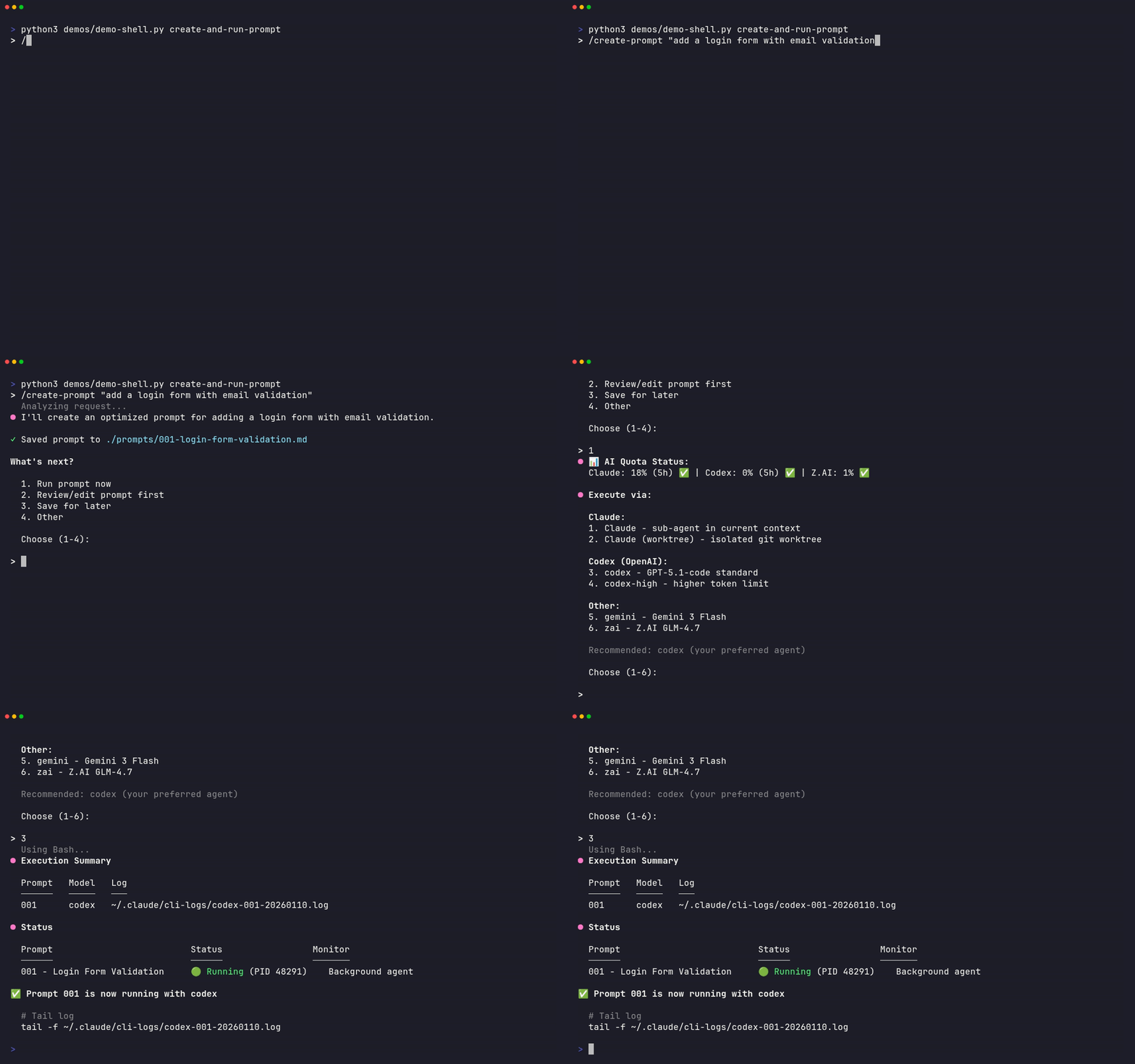
/create-promptgenerates XML-structured prompts optimized for each task type, then/run-promptexecutes them with your chosen model.
npx claudepluginhub cruzanstx/daplug --plugin daplugHarness-native ECC plugin for engineering teams - 67 agents, 271 skills, 92 legacy command shims, reusable hooks, rules, MCP conventions, and operator workflows for Claude Code plus adjacent agent harnesses
 affaan-m
Access thousands of AI prompts and skills directly in your AI coding assistant. Search prompts, discover skills, save your own, and improve prompts with AI.
 f
fComprehensive feature development workflow with specialized agents for codebase exploration, architecture design, and quality review
 anthropics
Complete developer toolkit for Claude Code
 rohitg00
Intelligent draw.io diagramming plugin with AI-powered diagram generation, multi-platform embedding (GitHub, Confluence, Azure DevOps, Notion, Teams, Harness), conditional formatting, live data binding, and MCP server integration for programmatic diagram creation and management.
 markus41
Reliable automation, in-depth debugging, and performance analysis in Chrome using Chrome DevTools and Puppeteer
 ChromeDevTools
'%20stop-opacity%3D'0.16'%2F%3E%3Cstop%20offset%3D'1'%20stop-color%3D'rgb(200%2C90%2C60)'%20stop-opacity%3D'0.03'%2F%3E%3C%2FlinearGradient%3E%3C%2Fdefs%3E%3Crect%20width%3D'320'%20height%3D'200'%20fill%3D'url(%23g)'%2F%3E%3Ccircle%20cx%3D'250'%20cy%3D'56'%20r%3D'92'%20fill%3D'rgb(200%2C90%2C60)'%20fill-opacity%3D'0.06'%2F%3E%3Ccircle%20cx%3D'64'%20cy%3D'172'%20r%3D'58'%20fill%3D'rgb(200%2C90%2C60)'%20fill-opacity%3D'0.05'%2F%3E%3C%2Fsvg%3E)