LINE Plugin for Claude Code
English | 繁體中文
English
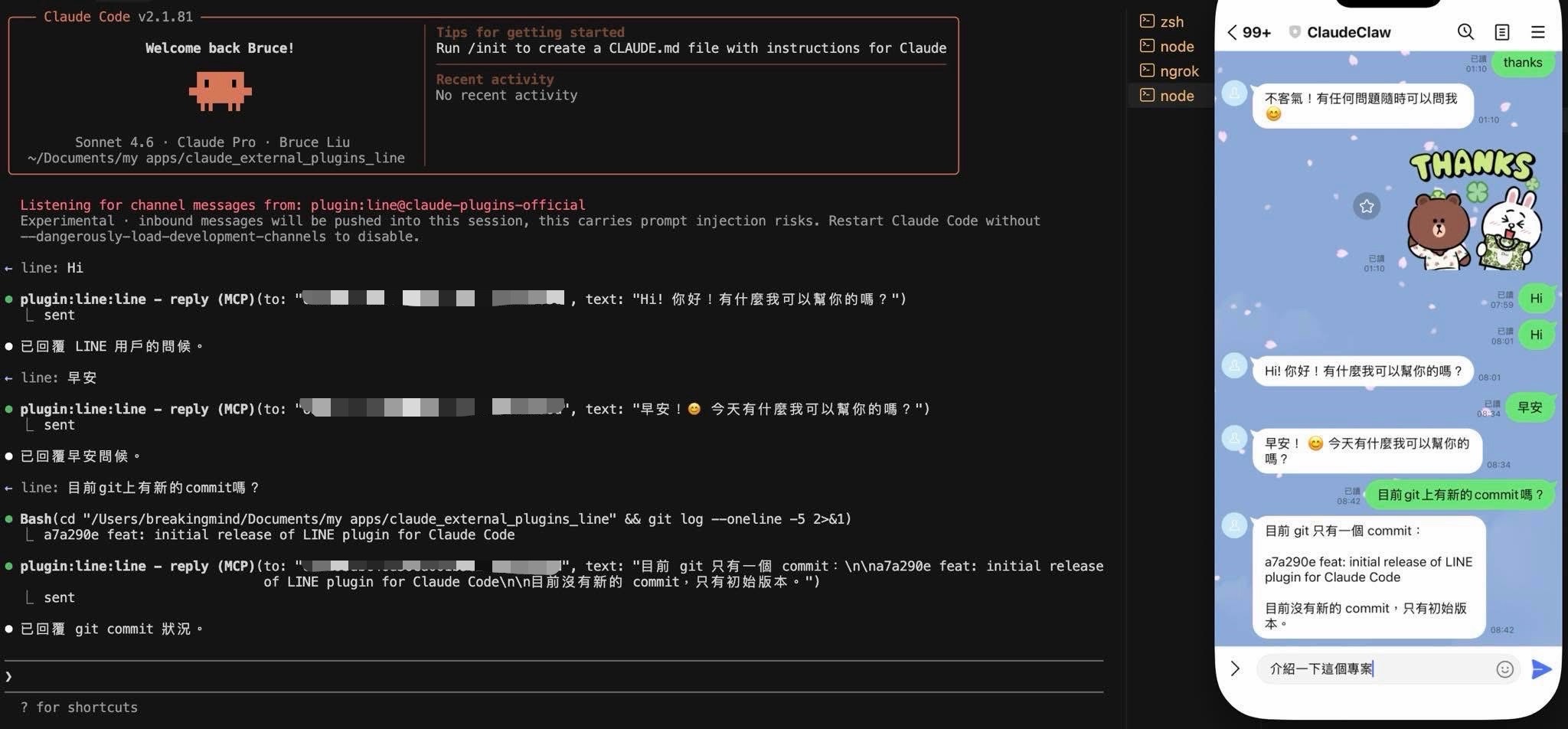
Connect a LINE bot to your Claude Code with an MCP server.
The MCP server receives LINE messages via webhook and provides tools to Claude to reply. When you message the bot, the server forwards the message to your Claude Code session.
Prerequisites
- Bun — the MCP server runs on Bun. Install with
curl -fsSL https://bun.sh/install | bash.
- A public HTTPS endpoint for the LINE webhook. Use a tunnel:
Quick Setup
1. Create a LINE Messaging API channel.
- Go to the LINE Developers Console
- Create a Provider (if you don't have one)
- Create a Messaging API channel
- Under Messaging API tab:
- Disable "Auto-reply messages"
- Disable "Greeting messages"
- Note your Channel access token (issue a long-lived token)
- Under Basic settings tab:
2. Install the plugin manually.
Since this plugin is not yet on the official marketplace, follow these steps:
# 1. Create plugin cache directory
mkdir -p ~/.claude/plugins/cache/claude-plugins-official/line/0.0.1/.claude-plugin

# 2. Copy plugin metadata (run from this repo's root)
cp .claude-plugin/plugin.json \
   ~/.claude/plugins/cache/claude-plugins-official/line/0.0.1/.claude-plugin/plugin.json

# 3. Create MCP config (update the path to match your machine)
cat > ~/.claude/plugins/cache/claude-plugins-official/line/0.0.1/.mcp.json << 'EOF'
{
  "mcpServers": {
    "line": {
      "command": "bun",
      "args": ["--silent", "/path/to/claude_external_plugins_line/server.ts"]
    }
  }
}
EOF

# 4. Remove orphan marker if it exists
rm -f ~/.claude/plugins/cache/claude-plugins-official/line/0.0.1/.orphaned_at
Then add the plugin to ~/.claude/plugins/installed_plugins.json:
{
  "line@claude-plugins-official": {
    "pluginId": "line",
    "marketplaceId": "claude-plugins-official",
    "installedAt": "2026-01-01T00:00:00.000Z",
    "sourceDir": "/path/to/claude_external_plugins_line"
  }
}
And enable it in ~/.claude/settings.json:
{
  "enabledPlugins": {
    "line@claude-plugins-official": true
  }
}
Make sure the project-level .mcp.json in this repo is renamed or disabled to avoid conflicts:
mv .mcp.json .mcp.json.disabled
3. Save credentials.
/line:configure token <your-channel-access-token>
/line:configure secret <your-channel-secret>
Both values are written to ~/.claude/channels/line/.env.
4. Start a tunnel.
In a separate terminal:
npx ngrok http 3000
Note the HTTPS URL (e.g. https://abc123.ngrok.io).
5. Set the webhook URL in LINE Developers Console.
Under your channel's Messaging API tab:
- Webhook URL:
https://abc123.ngrok.io/webhook
- Enable Use webhook
- Click Verify (Claude Code must be running with the channel flag for this to succeed)
6. Launch Claude Code with the LINE channel.
This plugin is in local development and is not on Claude's approved channels allowlist.
You must use the --dangerously-load-development-channels flag every time.
Before launching, kill any leftover server processes to avoid port 3000 conflicts:
pkill -f "bun.*server" 2>/dev/null
sleep 2
claude --dangerously-load-development-channels plugin:line@claude-plugins-official
A successful startup shows:
Listening for channel messages from: plugin:line@claude-plugins-official
Keep ngrok running between Claude restarts. As long as ngrok stays up, the webhook URL does not change and you do not need to update the LINE Console.
7. Pair.
Message your LINE bot from the LINE app — it replies with a 6-character pairing code. In your Claude Code session:
/line:access pair <code>
Your next message reaches the assistant.
8. Lock it down.
Pairing is for capturing LINE user IDs. Once you're in, switch to allowlist:
/line:access policy allowlist
Configuration
Changing the webhook port
Default port is 3000. To change it:
/line:configure port 8080
Then update your tunnel and webhook URL accordingly.
Environment variables
All config lives in ~/.claude/channels/line/.env:
LINE_CHANNEL_ACCESS_TOKEN=<token>
LINE_CHANNEL_SECRET=<secret>
LINE_WEBHOOK_PORT=3000
LINE_ACCESS_MODE=static   # optional: pin config at boot, no runtime writes
Shell environment variables take precedence over the .env file.
Access control
See ACCESS.md for DM policies, group support, delivery config, and skill commands.

 thedotmack
 Lucklyric
 JuliusBrussee
 anthropics
 coreyhaines31
 wshobson
'%20stop-opacity%3D'0.16'%2F%3E%3Cstop%20offset%3D'1'%20stop-color%3D'rgb(200%2C90%2C60)'%20stop-opacity%3D'0.03'%2F%3E%3C%2FlinearGradient%3E%3C%2Fdefs%3E%3Crect%20width%3D'320'%20height%3D'200'%20fill%3D'url(%23g)'%2F%3E%3Ccircle%20cx%3D'250'%20cy%3D'56'%20r%3D'92'%20fill%3D'rgb(200%2C90%2C60)'%20fill-opacity%3D'0.06'%2F%3E%3Ccircle%20cx%3D'64'%20cy%3D'172'%20r%3D'58'%20fill%3D'rgb(200%2C90%2C60)'%20fill-opacity%3D'0.05'%2F%3E%3C%2Fsvg%3E)