Guidance for Claude Code with Amazon Bedrock
This guidance provides enterprise deployment patterns for Claude Code with Amazon Bedrock using existing identity providers. Integrates with your IdP (Okta, Azure AD, Auth0, Cognito User Pools) for centralized access control, audit trails, and usage monitoring across your organization.
Key Features
For Organizations
- Enterprise IdP Integration: Leverage existing OIDC identity providers (Okta, Azure AD, Auth0, etc.)
- Centralized Access Control: Manage Claude Code access through your identity provider
- No API Key Management: Eliminate the need to distribute or rotate long-lived credentials
- Usage Monitoring: Optional CloudWatch dashboards for tracking usage and costs
- Multi-Region Support: Configure which AWS regions users can access Bedrock in
- Multi-Partition Support: Deploy to AWS Commercial or AWS GovCloud (US) regions
- Multi-Platform Support: Windows, macOS (ARM & Intel), and Linux distributions
For End Users
- Seamless Authentication: Log in with corporate credentials
- Automatic Credential Refresh: No manual token management required
- AWS CLI/SDK Integration: Works with any AWS tool or SDK
- Multi-Profile Support: Manage multiple authentication profiles
- Cross-Platform: Works on Windows, macOS, and Linux
Table of Contents
- Quick Start
- Architecture Overview
- Prerequisites
- AWS Partition Support
- What Gets Deployed
- Monitoring and Operations
- Additional Resources
Quick Start
This guidance integrates Claude Code with your existing OIDC identity provider (Okta, Azure AD, Auth0, or Cognito User Pools) to provide federated access to Amazon Bedrock.
What You Need
Existing Identity Provider:
You must have an active OIDC provider with the ability to create application registrations. The guidance federates this IdP with AWS IAM to issue temporary credentials for Bedrock access.
AWS Environment:
- AWS account with IAM and CloudFormation permissions
- Amazon Bedrock activated in target regions
- Python 3.10+ development environment for deployment
What Gets Deployed
The deployment creates:
- IAM OIDC Provider or Cognito Identity Pool for federation
- IAM roles with scoped Bedrock access policies
- Platform-specific installation packages (Windows, macOS, Linux)
- Optional: OpenTelemetry monitoring infrastructure
Deployment time: 2-3 hours for initial setup including IdP configuration.
See QUICK_START.md for complete step-by-step deployment instructions.
Architecture Overview
This guidance uses Direct IAM OIDC federation as the recommended authentication pattern. This provides temporary AWS credentials with complete user attribution for audit trails and usage monitoring.
Alternative: Cognito Identity Pool is also supported for legacy IdP integrations. See Deployment Guide for comparison.
Authentication Flow (Direct IAM Federation)
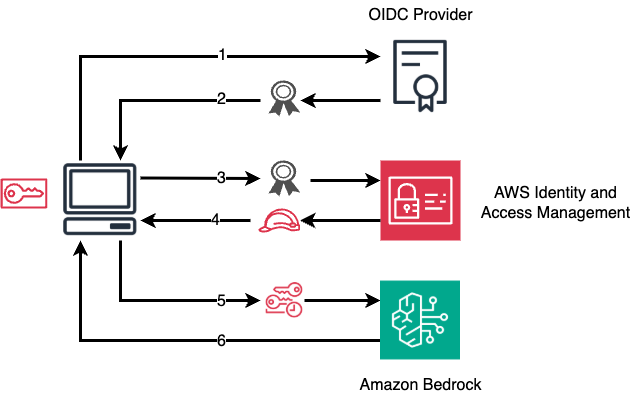
- User initiates authentication: User requests access to Amazon Bedrock through Claude Code
- OIDC authentication: User authenticates with their OIDC provider and receives an ID token
- Token submission to IAM: Application sends the OIDC ID token to Amazon Cognito
- IAM returns credentials: AWS IAM validates and returns temporary AWS credentials
- Access Amazon Bedrock: Application uses the temporary credentials to call Amazon Bedrock
- Bedrock response: Amazon Bedrock processes the request and returns the response
Prerequisites
For Deployment (IT Administrators)
Software Requirements:
- Python 3.10-3.13
- Poetry (dependency management)
- AWS CLI v2
- Git
AWS Requirements:
- AWS account with appropriate IAM permissions to create:
- CloudFormation stacks
- IAM OIDC Providers or Cognito Identity Pools
- IAM roles and policies
- (Optional) Amazon Elastic Container Service (Amazon ECS) tasks and Amazon CloudWatch dashboards
- (Optional) Amazon Athena, AWS Glue, AWS Lambda, and Amazon Data Firehose resources
- (Optional) AWS CodeBuild
- Amazon Bedrock activated in target regions
OIDC Provider Requirements:
- Existing OIDC identity provider (Okta, Azure AD, Auth0, etc.)
- Ability to create OIDC applications
- Redirect URI support for
http://localhost:8400/callback
For End Users
Software Requirements:
- AWS CLI v2 (for credential process integration)
- Claude Code installed
- Web browser for SSO authentication
No AWS account required - users authenticate through your organization's identity provider and receive temporary credentials automatically.

 JuliusBrussee
 anthropics
 thedotmack
 coreyhaines31
 wshobson
 Lucklyric
'%20stop-opacity%3D'0.16'%2F%3E%3Cstop%20offset%3D'1'%20stop-color%3D'rgb(200%2C90%2C60)'%20stop-opacity%3D'0.03'%2F%3E%3C%2FlinearGradient%3E%3C%2Fdefs%3E%3Crect%20width%3D'320'%20height%3D'200'%20fill%3D'url(%23g)'%2F%3E%3Ccircle%20cx%3D'250'%20cy%3D'56'%20r%3D'92'%20fill%3D'rgb(200%2C90%2C60)'%20fill-opacity%3D'0.06'%2F%3E%3Ccircle%20cx%3D'64'%20cy%3D'172'%20r%3D'58'%20fill%3D'rgb(200%2C90%2C60)'%20fill-opacity%3D'0.05'%2F%3E%3C%2Fsvg%3E)