Stats
Actions
Available In
Tags

Connect Claude Code to running Flutter apps via Dart VM Service for real-time inspection of semantic UI snapshots, widget details, screenshots, and errors; drive interactions like taps, scrolls, form fills; apply hot-reloads; diagnose issues; validate toolkit setup—all enabling AI-assisted mobile debugging and automation without manual device control.
Use this skill when the agent exposes app-specific surfaces by registering custom MCP tools and resources inside the Flutter app (mcp_toolkit dynamic registry — MCPCallEntry, bootstrapFlutter additionalEntries / addEntries). Covers tool vs resource vs evaluate-expression, Map-based handlers, schema strictness, discovery via fmt_list_client_tools_and_resources, fmt_client_tool, fmt_client_resource, and lifecycle pitfalls.
Diagnose problems in a running Flutter app — read logs, evaluate Dart expressions, interpret error envelopes. Use when something broke.
Entry point for inspecting or driving a running Flutter app from your AI assistant — routes to the right task skill (inspect / control / debug / custom app surfaces) and runs preflight.
Read state from a running Flutter app — semantic snapshot, view details, errors, screenshots, VM info. Use when you need to understand what the app is showing.
Verify the flutter-mcp-toolkit install, run doctor preflight, troubleshoot connection issues. Use when the toolkit isn't responding or first-time setup.
Uses power tools
Uses Bash, Write, or Edit tools
Own this plugin?
Verify ownership to unlock analytics, metadata editing, and a verified badge. GitHub access is read-only (username + org membership).
Sign in to claimOwn this plugin?
Verify ownership to unlock analytics, metadata editing, and a verified badge. GitHub access is read-only (username + org membership).
Sign in to claimBased on adoption, maintenance, documentation, and repository signals. Not a security audit or endorsement.
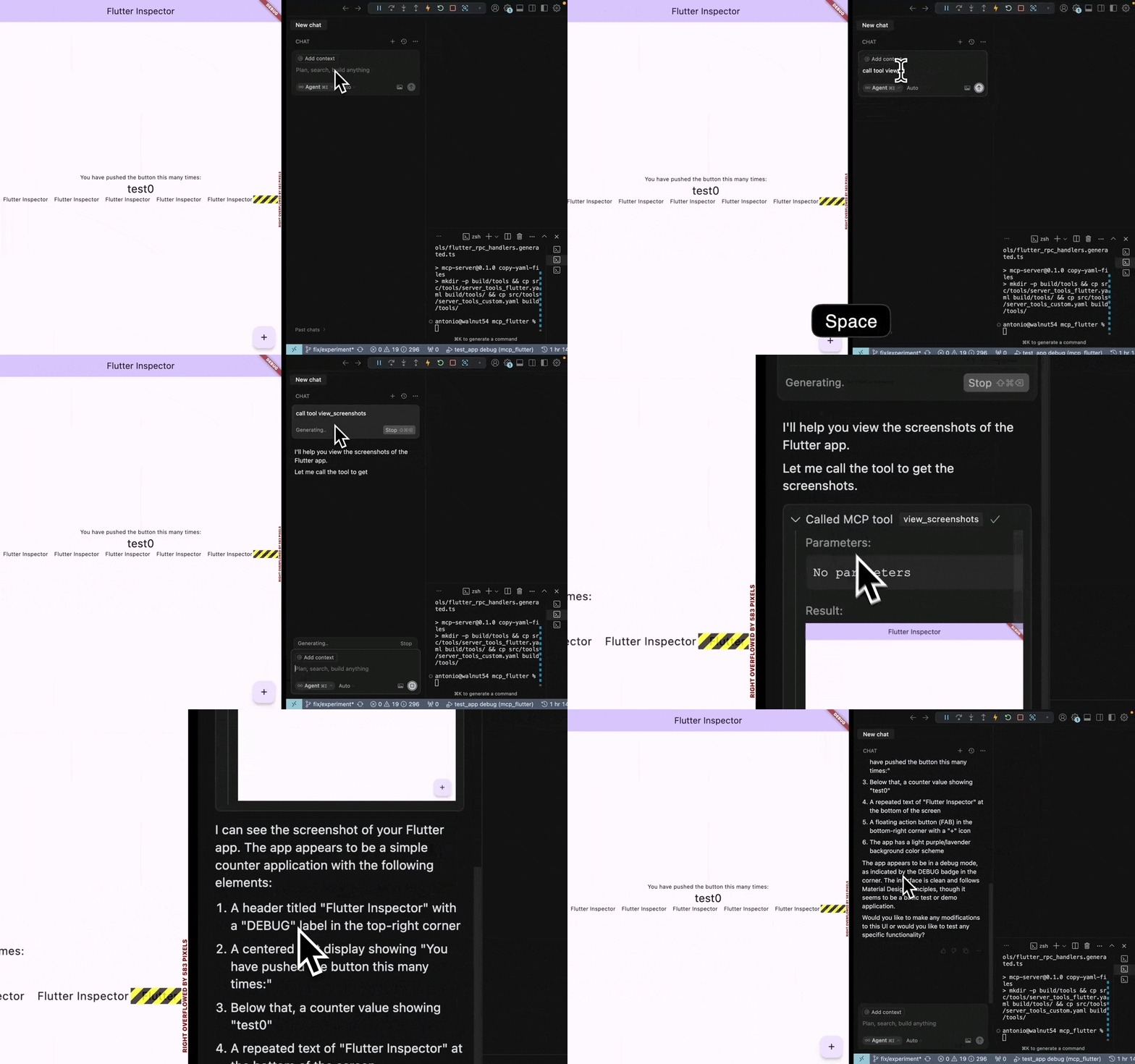
Inspect and drive a running Flutter app from your AI assistant.


flutter-mcp-toolkit is a Dart MCP server + Flutter package that lets AI
assistants (Claude Code, Cursor, Codex, Cline) take (semantic snapshots, tap
widgets, type into forms, hot-reload, and read logs from a Flutter app) or create its own tools and resources at runtime using MCP Toolkit —
without leaving the conversation.
# 1. Install the binary
curl -fsSL https://raw.githubusercontent.com/Arenukvern/mcp_flutter/main/install.sh | bash

# 2. Add the toolkit to your Flutter app
cd my-flutter-app
flutter-mcp-toolkit codegen-init   # adds flutter_mcp_toolkit + emits main.dart snippet

# 3. Install skills for your AI agent
flutter-mcp-toolkit init claude-code   # or: cursor | codex | cline | all

# 4. Run
flutter run --debug
That's it. Your AI agent can now inspect and drive the running app.
fmt_* MCP tools, binaries, client config keys, validate-runtime.The toolkit exposes 27 MCP tools (under the fmt_* capability prefix) across four categories:
See the flutter-mcp-toolkit-{guide,inspect,control,debug} skills for the full
reference (installed by flutter-mcp-toolkit init).
Flutter apps can register custom tools and resources at runtime. See how it
works in this short YouTube video.
The same arguments.connection targeting is supported by the CLI's exec,
batch, daemon command/execute, daemon watch/start, and snapshot step args.
Dump RPC methods (like dump_render_tree) can produce huge token output and
are disabled by default. Enable with --dumps. See
mcp_server_dart README for the full flag surface.
Generally, since you use MCP server to connect to Flutter app in Debug Mode, it should be safe to use. However, I still recommend to review how it works in ARCHITECTURE.md, how it can be modified to improve security if needed.
This MCP server is verified by MseeP.ai.
Connection Issues
arguments.connection.uri and paste exact Flutter machine app.debugPort.wsUriconnection_selection_required, retry with arguments.connection.targetId using one URI from availableTargets (or set arguments.connection.uri directly)AI Tool Not Detecting Inspector
Dynamic Tools Not Appearing
flutter_mcp_toolkit package is properly initialized in your Flutter appMCPToolkitBinding.instance.addEntries()fmt_list_client_tools_and_resources to verify registrationnpx claudepluginhub arenukvern/mcp_flutter --plugin flutter-mcp-toolkitEngineering stewardship skills for agent-operated repositories.
 Arenukvern
Use this agent when you need expert assistance with Flutter mobile development tasks, including code analysis, widget creation, debugging, performance optimization, or architectural decisions. Examples: <example>Context: User is working on a Flutter app and faces issues with navigation. user: 'My Navigator.push isn't updating the UI correctly when moving to a new screen' assistant: 'Let me use the flutter-dev agent to analyze your navigation setup and provide a solution' <commentary>Since this is a Flutter-specific navigation issue, use the flutter-dev agent to provide expert guidance on Navigator problems.</commentary></example> <example>Context: User wants to create a custom widget that aligns with their app's design system. user: 'I need to create a custom button widget that matches our app's design system' assistant: 'I'll use the flutter-dev agent to create a button widget that aligns with your existing codebase structure and design patterns' <commentary>The user needs a Flutter widget that follows existing patterns, so use the flutter-dev agent.</commentary></example>
 ananddtyagi
Use this agent when you need expert assistance with Flutter mobile development tasks, including code analysis, widget creation, debugging, performance optimization, or architectural decisions. Examples: <example>Context: User is working on a Flutter app and faces issues with navigation. user: 'My Navigator.push isn't updating the UI correctly when moving to a new screen' assistant: 'Let me use the flutter-dev agent to analyze your navigation setup and provide a solution' <commentary>Since this is a Flutter-specific navigation issue, use the flutter-dev agent to provide expert guidance on Navigator problems.</commentary></example> <example>Context: User wants to create a custom widget that aligns with their app's design system. user: 'I need to create a custom button widget that matches our app's design system' assistant: 'I'll use the flutter-dev agent to create a button widget that aligns with your existing codebase structure and design patterns' <commentary>The user needs a Flutter widget that follows existing patterns, so use the flutter-dev agent.</commentary></example>
 devsforge
Flutter app development with widget creation and platform channels
 rohitg00
Flutter UI design and implementation agents. Includes UI Designer (design analysis), UI Implementer (code generation), UI Comparison (pixel-perfect validation), and Design Iteration Coordinator (complete design-to-implementation workflow).
 cleydson
Best-practice skills for Flutter and Dart covering accessibility, animations, BLoC, testing, theming, navigation, security, internationalization, layered architecture, license compliance, UI packages, project creation, and SDK/lint upgrades — plus automated dart analyze and format hooks.
 VeryGoodOpenSource
Ultra-compressed communication mode. Cuts ~75% of tokens while keeping full technical accuracy by speaking like a caveman.
 JuliusBrussee
'%20stop-opacity%3D'0.16'%2F%3E%3Cstop%20offset%3D'1'%20stop-color%3D'rgb(200%2C90%2C60)'%20stop-opacity%3D'0.03'%2F%3E%3C%2FlinearGradient%3E%3C%2Fdefs%3E%3Crect%20width%3D'320'%20height%3D'200'%20fill%3D'url(%23g)'%2F%3E%3Ccircle%20cx%3D'250'%20cy%3D'56'%20r%3D'92'%20fill%3D'rgb(200%2C90%2C60)'%20fill-opacity%3D'0.06'%2F%3E%3Ccircle%20cx%3D'64'%20cy%3D'172'%20r%3D'58'%20fill%3D'rgb(200%2C90%2C60)'%20fill-opacity%3D'0.05'%2F%3E%3C%2Fsvg%3E)
