Stats
Actions
Available In
Tags

Build, debug, and optimize data transformation DAGs using the Hamilton framework. Supports decorator-based pipelines, testing, scaling with Spark/Ray/async, LLM/AI workflows, and observability via the Hamilton UI.
Core Hamilton patterns for creating DAGs, applying decorators, testing, and debugging dataflows. Use for basic Hamilton development tasks.
Systematic 5-step workflow for building Hamilton DAGs - DOT graphs, signatures, validation, TDD implementation. Use this workflow when creating new Hamilton modules from scratch.
Hamilton integration patterns for Airflow, Dagster, FastAPI, Streamlit, Jupyter notebooks, and other frameworks. Use when integrating Hamilton with other tools.
LLM and AI workflow patterns for Hamilton including RAG pipelines, embeddings, vector databases, and prompt engineering. Use for building AI applications with Hamilton.
Interactive Hamilton DAG development via MCP tools. Validate, visualize, scaffold, and execute Hamilton pipelines without leaving the conversation. Use when building or debugging Hamilton dataflows interactively.
Based on adoption, maintenance, documentation, and repository signals. Not a security audit or endorsement.





Disclaimer
Apache Hamilton is an effort undergoing incubation at the Apache Software Foundation (ASF), sponsored by the Apache Incubator PMC.
Incubation is required of all newly accepted projects until a further review indicates that the infrastructure, communications, and decision making process have stabilized in a manner consistent with other successful ASF projects.
While incubation status is not necessarily a reflection of the completeness or stability of the code, it does indicate that the project has yet to be fully endorsed by the ASF.
Apache Hamilton (incubating) is a lightweight Python library for directed acyclic graphs (DAGs) of data transformations. Your DAG is portable; it runs anywhere Python runs, whether it's a script, notebook, Airflow pipeline, FastAPI server, etc. Your DAG is expressive; Apache Hamilton has extensive features to define and modify the execution of a DAG (e.g., data validation, experiment tracking, remote execution).
To create a DAG, write regular Python functions that specify their dependencies with their parameters. As shown below, it results in readable code that can always be visualized. Apache Hamilton loads that definition and automatically builds the DAG for you!
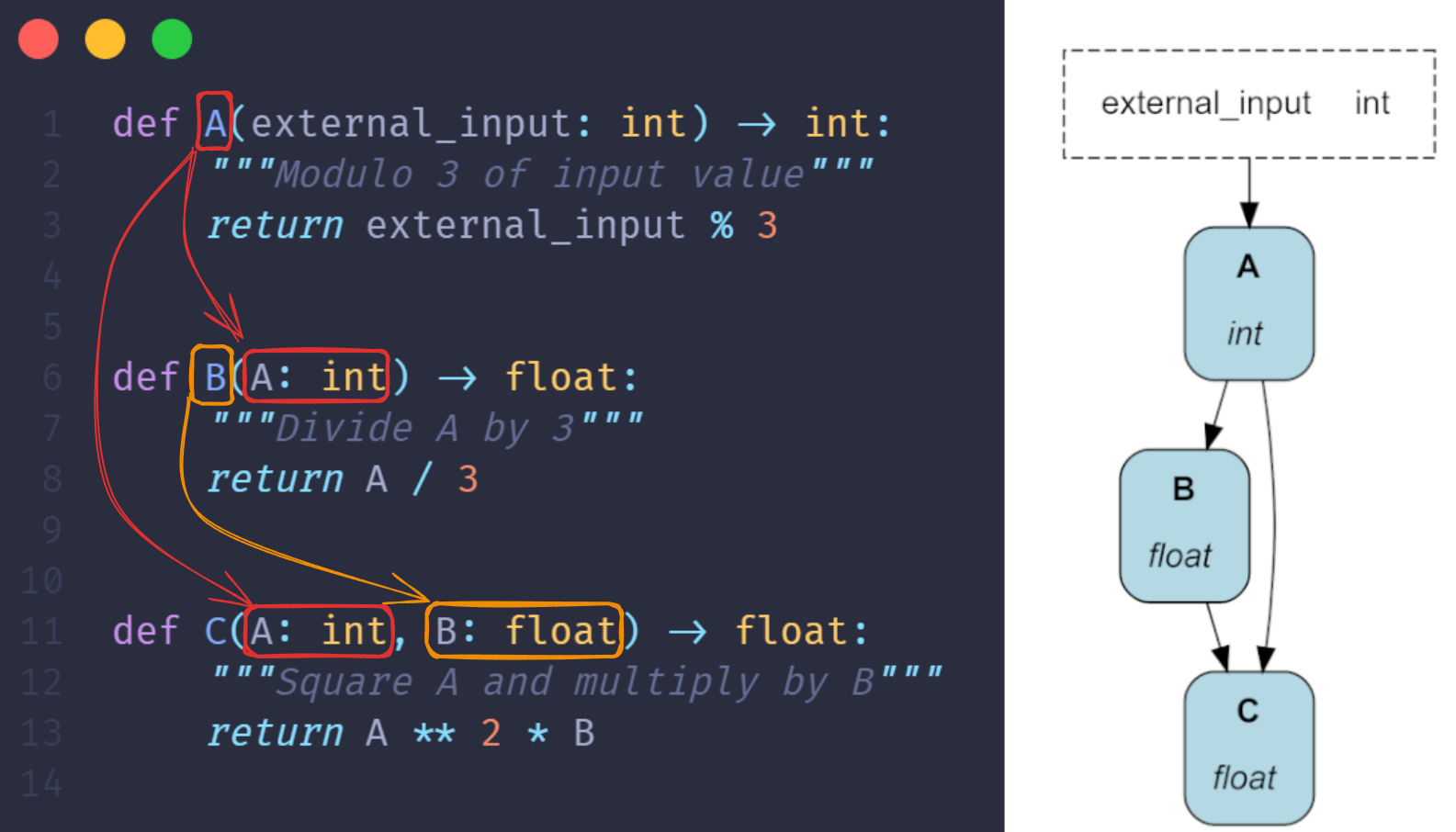
B() and C() refer to function A via their parameters
Apache Hamilton brings modularity and structure to any Python application moving data: ETL pipelines, ML workflows, LLM applications, RAG systems, BI dashboards, and the Apache Hamilton UI allows you to automatically visualize, catalog, and monitor execution.
Apache Hamilton is great for DAGs, but if you need loops or conditional logic to create an LLM agent or a simulation, take a look at our sister library Burr 🤖 .
Apache Hamilton supports Python 3.8+. We include the optional visualization dependency to display our Apache Hamilton DAG. For visualizations, Graphviz needs to be installed on your system separately.
pip install "apache-hamilton[visualization]"
To use the Apache Hamilton UI, install the ui and sdk dependencies.
pip install "apache-hamilton[ui,sdk]"
To try Apache Hamilton in the browser, visit www.tryhamilton.dev
npx claudepluginhub apache/hamilton --plugin hamiltonGenerate, validate, and execute read-only BanyanDB BydbQL for SkyWalking data.
 apache
Apache Cayenne ORM — design DataMaps, reverse-engineer schemas, generate classes, and write runtime code. Drives the cayenne MCP server when present.
apacheBuild production Apache Airflow DAGs with best practices for operators, sensors, testing, and deployment. Use when creating data pipelines, orchestrating workflows, or scheduling batch jobs.
 wshobson
Data engineering plugin - warehouse exploration, pipeline authoring, Airflow integration
 astronomer
Pi Flow — author, enhance, and run structured filesystem-coordinated workflows (a DAG of producer/verify nodes) as a fleet of efficient pi agents driven by non-Claude coding-plan models, with Claude Code as the single console. Three skills: piflow-init (create a workflow), piflow-enhance (improve it), piflow-start (run + monitor it).
 blueif16
Quick insights from dlt pipeline data. Connect to a pipeline, profile tables, plan charts, and assemble marimo dashboards.
 dlt-hub
Dagster skills for CLI operations, best practices, integrations, and Python standards
 dagster-io
Spec-Driven Development framework for Data Engineering — 58 agents, 24 KB domains, 5-phase SDD workflow, 31 commands
 luanmorenommaciel
'%20stop-opacity%3D'0.16'%2F%3E%3Cstop%20offset%3D'1'%20stop-color%3D'rgb(200%2C90%2C60)'%20stop-opacity%3D'0.03'%2F%3E%3C%2FlinearGradient%3E%3C%2Fdefs%3E%3Crect%20width%3D'320'%20height%3D'200'%20fill%3D'url(%23g)'%2F%3E%3Ccircle%20cx%3D'250'%20cy%3D'56'%20r%3D'92'%20fill%3D'rgb(200%2C90%2C60)'%20fill-opacity%3D'0.06'%2F%3E%3Ccircle%20cx%3D'64'%20cy%3D'172'%20r%3D'58'%20fill%3D'rgb(200%2C90%2C60)'%20fill-opacity%3D'0.05'%2F%3E%3C%2Fsvg%3E)