Stats
Actions
Available In
Tags
Automate academic research in finance, economics, and real estate: search literature via Corbis, generate and rank novel ideas with heuristics, screen for novelty and journal fit, visualize trends and gaps with Python-generated figures, draft structured reviews and positioning memos, read/summarize papers with a subagent, and audit citations in LaTeX files.
External network access
Connects to servers outside your machine
Uses power tools
Uses Bash, Write, or Edit tools
Own this plugin?
Verify ownership to unlock analytics, metadata editing, and a verified badge. GitHub access is read-only (username + org membership).
Sign in to claimOwn this plugin?
Verify ownership to unlock analytics, metadata editing, and a verified badge. GitHub access is read-only (username + org membership).
Sign in to claimBased on adoption, maintenance, documentation, and repository signals. Not a security audit or endorsement.
Generate 10 ranked research ideas from a topic area using structured heuristic lenses
Screen a research idea with scoring and novelty check
Generate figures visualizing literature trends, citation patterns, and research gaps
Write a structured literature review on a topic with Corbis-backed searches and BibTeX citations
Search the literature and build a positioning memo
Write a comprehensive, structured literature review on a topic. Searches the literature via Corbis, organizes into thematic strands, writes synthesized prose (not paper-by-paper enumeration), and outputs as Markdown, LaTeX section, or standalone LaTeX document with proper BibTeX citations.
Map the closest literature and sharpen contribution claims for finance or real-estate papers. Use for related-literature sections, novelty maps, and closest-paper comparisons.
Generate figures that visualize patterns in an academic literature: publication trends, citation landmarks, journal distributions, thematic evolution, method timelines, and coverage gap maps. Uses Corbis search data and Python/matplotlib.
Generate novel research ideas in finance and real estate using structured heuristic lenses with internal rejection filtering. Produces a curated Idea Menu of survivors, not a brainstorming list.
Screen and refine research ideas in corporate finance, investments, asset pricing, and real estate. Use for brainstorming, novelty checks, contribution framing, and journal-fit triage.
Turn your AI assistant into a literature-review machine. Search 400,000+ papers,
map a field, test ideas, and come back with citations instead of 37 half-read browser tabs.




corbis.ai | Quick Setup | Workflows | Documentation | Get a Corbis Key | Corbis Research Database | Open Datasets
Corbis is research-first AI for finance, real estate, and economics. You ask in plain language; it searches a large, domain-specific index (hundreds of thousands of peer-reviewed papers, plus industry reports and market data in the product) and returns answers with citations you can open and check. The goal is evidence you can stand behind, not unattributed claims. For a journal-level snapshot of publications and what the corpus includes, see Research Insights.
The full platform adds chat, guided workflows, and exports (for example PDF, Word, LaTeX, and citation formats). MCP (Model Context Protocol) exposes the same underlying tools to external clients (Cursor, Claude Code, Codex, and other compatible agents). This repository is a literature starter kit for that path: it focuses on surveying literature, mapping a field, screening ideas, and keeping citations and search trails explicit in your repo.
Most AI assistants are good at sounding confident and bad at doing literature work carefully. Corbis fixes the first part by giving them live research, data, and citation tools through MCP. This repo fixes the second part by packaging those tools into reusable research workflows.
Use it to:
It works with Codex, Claude Code, Cursor, and other MCP-compatible agents.
Claude Code gets the smoothest out-of-the-box slash-command experience. Codex, Cursor, and other MCP clients can use the same Corbis tools and the same workflow prompts from this repo.
These are the six workflows bundled with the kit:
| Workflow | What it is good for |
|---|---|
/lit-review | Write a structured literature review on any topic |
/lit-search | Find the closest papers and sharpen your contribution |
/brainstorm | Generate ranked research ideas with rejection filtering |
/idea | Stress-test one specific research idea |
/verify-citations | Audit a .bib file against the literature |
/lit-landscape | Visualize trends, gaps, methods, and landmark papers |
Plus a paper-reader agent prompt for assistants that support repo-defined agents.
If your client does not support slash commands directly, use the same workflow names as prompt starters or follow the examples in SKILLS_USE_GUIDE.md.
You need two things: an AI assistant with MCP support and a Corbis MCP API key.
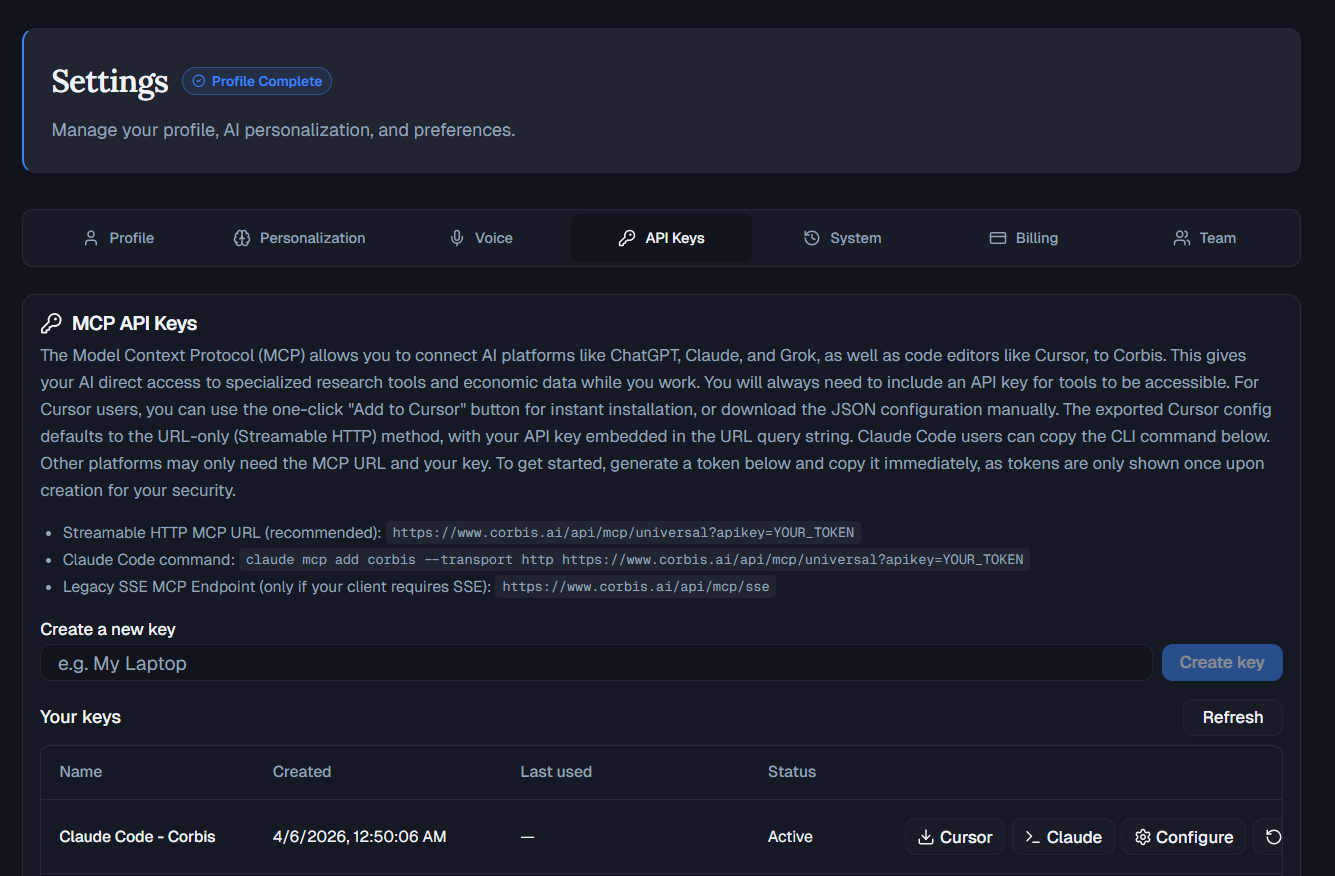
Open the Corbis app, go to Settings > API Keys, and create a key.
Corbis MCP keys start with corbis_mcp_. Copy the key when it is created. It is shown once.
Add Corbis to ~/.codex/config.toml for global use, or .codex/config.toml for a project-local setup:
[mcp_servers.corbis]
url = "https://www.corbis.ai/api/mcp/universal"
bearer_token_env_var = "CORBIS_MCP_API_KEY"
startup_timeout_sec = 20
tool_timeout_sec = 120
Then export your key before starting Codex:
export CORBIS_MCP_API_KEY="corbis_mcp_..."
codex
Full guide: CORBIS_MCP_CODEX_GUIDE.md
npx claudepluginhub agentic-assets/corbis-literature-starter-kitPersonal skill collection with 23 specialized skills for PhD research, finance, real estate, AI/ML, and Python development. Features progressive disclosure architecture for optimized token usage.
 Agentic-Assets
PhD-level research capabilities: literature review, multi-source investigation, critical analysis, hypothesis-driven exploration, quantitative/qualitative methods, and lateral thinking
 poemswe
AI-powered deep research with multi-agent source verification and structured outputs
 fivetaku
深度研究 — 13 agent 协作:研究问题定义、系统性检索、偏差评估、综合分析、引用编译
 Imbad0202
Specialized research analysis agents for critical thinking, evidence verification, synthesis, and parallel paper analysis
 rpatrik96
Semi-automated research assistant for academic research and software development, with skills for literature review, experiments, analysis, writing, and project knowledge management
 Galaxy-Dawn
Strategic research thinking agents — idea evaluation, project triage, and structured brainstorming inspired by Carlini's research methodology
 andrehuang
'%20stop-opacity%3D'0.16'%2F%3E%3Cstop%20offset%3D'1'%20stop-color%3D'rgb(200%2C90%2C60)'%20stop-opacity%3D'0.03'%2F%3E%3C%2FlinearGradient%3E%3C%2Fdefs%3E%3Crect%20width%3D'320'%20height%3D'200'%20fill%3D'url(%23g)'%2F%3E%3Ccircle%20cx%3D'250'%20cy%3D'56'%20r%3D'92'%20fill%3D'rgb(200%2C90%2C60)'%20fill-opacity%3D'0.06'%2F%3E%3Ccircle%20cx%3D'64'%20cy%3D'172'%20r%3D'58'%20fill%3D'rgb(200%2C90%2C60)'%20fill-opacity%3D'0.05'%2F%3E%3C%2Fsvg%3E)